
Providing controlled access to prospecting tools allows individual accounts to independently discover leads, generate reports, and manage outreach activities. This feature ensures each account operates within its own dedicated workspace while maintaining centralized control over access and availability.
What This Feature Does
Account-level prospecting enables individual accounts to search for prospects, generate audit reports, and manage their own prospecting workflows without access to broader system settings or other accounts.
This approach ensures clean data separation while allowing flexible control over which accounts can use prospecting and how the feature is distributed.
Key Benefits of Account-Level Prospecting
Enabling prospecting at the account level provides both operational flexibility and better control over how lead generation tools are used.
Controlled Access: Enable prospecting only for selected accounts
Independent Workspaces: Each account manages its own data and activity
Flexible Monetization: Offer prospecting as a premium or bundled feature
Centralized Management: Control access from a single location
Scalable Growth: Easily expand availability across multiple accounts
How to Enable Prospecting for Accounts
Enabling prospecting access involves configuring settings from a central location and applying them to the desired accounts.
Access Reselling Settings
Begin by navigating to the section where feature access and availability are managed.
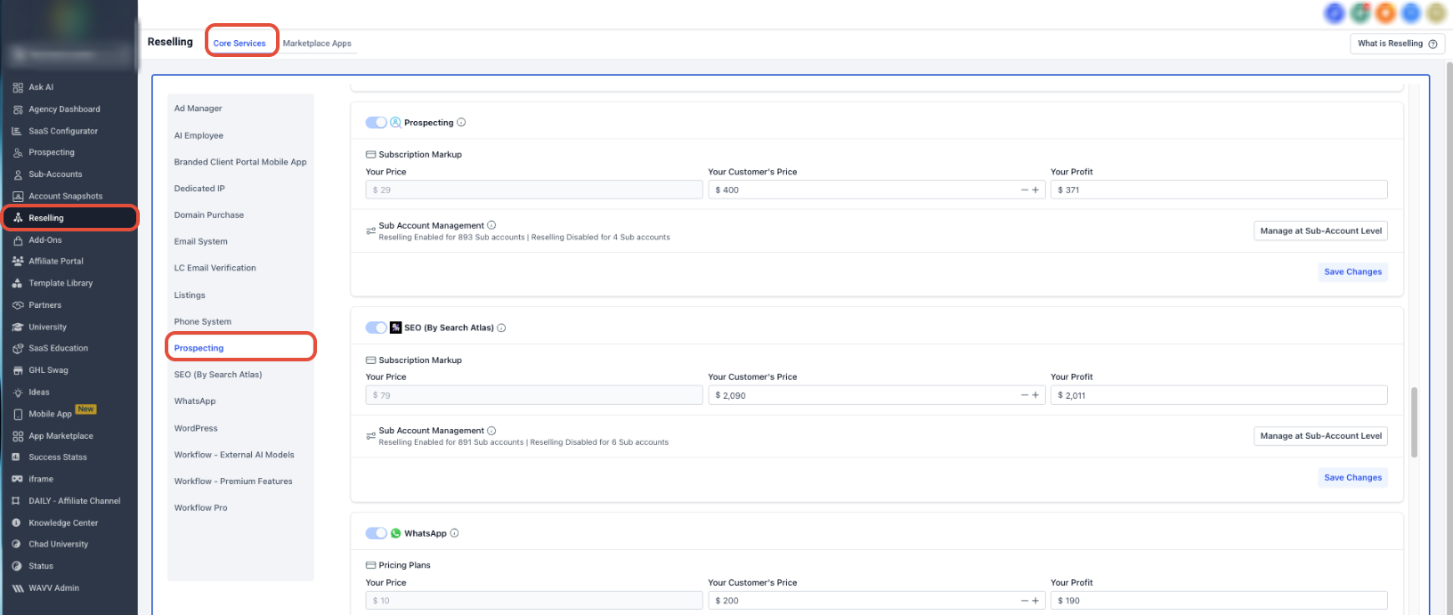
This screen displays where prospecting access can be enabled and configured for accounts.
Within the main navigation, open the Reselling section and locate Prospecting under the available services.
Enable Prospecting Access
Once inside the prospecting settings, access can be activated for accounts.
Turn on the Prospecting toggle to allow accounts to use prospecting tools.
Configure Availability and Pricing (Optional)
Depending on your setup, you may choose to define how prospecting is offered.
Adjust pricing, availability, or access conditions as needed before finalizing the setup.
Save and Apply Changes
After configuring the settings, save your changes to activate the feature.
Once saved, prospecting access is immediately available within the selected accounts.
Access Within Accounts
After activation, prospecting tools become visible inside each enabled account.
Users can begin searching for prospects, generating reports, and managing their activities independently.
Key Capabilities
Understanding how this feature works helps you maximize its value across accounts.
Account-Level Access
Each account gains direct access to prospecting tools without visibility into other accounts or system-level configurations.
Independent Prospect Management
Accounts can manage their own leads, reports, and outreach activities within a dedicated environment.
Centralized Control
Access can be enabled or disabled at any time from a single control point.
Flexible Feature Distribution
Prospecting can be selectively offered based on account needs or service structure.
Why This Matters
Enabling account-level prospecting improves both efficiency and scalability.
Keeps data secure and isolated between accounts
Allows teams to operate independently without overlap
Simplifies onboarding and reduces setup time
Supports scalable growth without increasing complexity
Frequently Asked Questions
Q: Who can enable prospecting access?
Users with permission to manage account-level settings can enable or modify access.
Q: Can accounts view each other’s prospects or reports?
No. Each account operates in a completely isolated environment.
Q: Can prospecting be enabled for only certain accounts?
Yes. Access is controlled individually and can be customized per account.
Q: Is additional setup required inside the account?
No. Once enabled, prospecting tools appear automatically.
Q: Can access be removed later?
Yes. Prospecting can be disabled at any time from the same settings.
Need More Help
If you need assistance enabling prospecting or managing access, open the Help Center from your dashboard or contact support for further guidance.