
A2P 10DLC registration verifies who is sending business text messages, what those messages are used for, and how recipients consent to receive them. This guide explains Brand and Campaign registration, current setup options, common rejection reasons, required-fix details, supporting evidence, resubmission, and the documented Campaign appeal path. It also explains what to provide Support when a registration continues to fail.
Do not submit the same information again without reviewing the rejection. Jump to If Your Brand or Campaign Is Rejected to find the exact failure reason, required correction, evidence checklist, and Support/appeal steps.
What is A2P 10DLC?
A2P 10DLC establishes a verified relationship between the business sending a message, the messaging purpose, and the recipients who consented to receive those messages. Understanding each component matters because registration review evaluates the complete messaging program rather than simply checking whether every required field contains information.
A2P 10DLC stands for Application-to-Person 10-Digit Long Code. It is the carrier registration framework used for business SMS and MMS messages delivered to U.S. recipients from standard 10-digit local phone numbers.
Registration is completed through Settings > Phone System > Trust Center. The platform provides the registration workflow, while carriers and their registration partners make the final approval or rejection decision.
A2P: Application to Person. A software application sends a business message to an individual recipient.
10DLC: 10-Digit Long Code, the standard local phone-number format used for this business messaging registration framework.
The Campaign Registry (TCR): An industry registry used within the A2P ecosystem to identify Brands and Campaigns and provide mobile carriers with information about messaging senders and use cases.
Key Benefits of A2P 10DLC Registration
Accurate registration gives carriers a clear picture of the sender, messaging purpose, and consent process. This helps establish legitimate business messaging while giving users a structured process for correcting registration issues when review identifies a problem.
- Business verification: Associates messaging activity with a verified business or qualified Sole Proprietor identity.
- Messaging transparency: Documents why messages are sent and what recipients should expect.
- Consent verification: Shows how recipients opt in and what disclosures are presented before consent.
- Actionable rejection details: Rejected Campaigns can display the error code, rejection category, explanation, and correction required.
- Defined recovery path: Eligible Campaigns can be corrected and resubmitted, while documented appeals are available when a rejection is believed to be incorrect.
Who Needs A2P 10DLC Registration?
Registration requirements depend on the sending number and where messages are delivered. Identifying the messaging route first helps ensure the correct verification process is completed.
A2P 10DLC registration is required for business SMS or MMS messages sent to U.S. recipients from standard 10-digit local phone numbers. Common examples include appointment reminders, customer-care messages, account notifications, lead follow-up, and promotional messaging.
Canadian 10-digit local numbers that send messages to U.S. recipients must follow A2P requirements. Canada-only messaging can follow different verification requirements depending on when the number was obtained and the messaging configuration.
Toll-Free numbers do not use A2P 10DLC Brand and Campaign registration. Toll-Free messaging uses a separate verification process.
How A2P 10DLC Works
A2P registration separates business identity from messaging behavior. The Brand establishes who is responsible for the messages, while the Campaign explains what is being sent, why recipients receive it, and how they provided consent.
Standard Brand
Standard Brand registration is used by registered businesses with an accepted business registration number, such as an EIN for a U.S. entity. Legal business information should match official records exactly.
Sole Proprietor Brand
Sole Proprietor registration is intended for qualifying individuals or very small businesses that do not have an EIN or other registered business entity. A business that has an EIN should use the Standard Brand path instead.
Before You Start
The strongest submissions tell one consistent story across business records, the website, Campaign purpose, sample messages, and recipient-consent flow. Preparing these items before registration helps prevent mismatches that can lead to rejection.
| Area | Prepare |
|---|---|
| Business identity | Exact legal business name, accepted registration number or Tax ID, registered address, business type, and industry. |
| Authorized contact | Current name, business email, reachable phone number, title, and position. |
| Website | A live, publicly accessible website that clearly represents the registered business and includes business contact information. |
| Messaging purpose | The correct Campaign use case, a detailed Campaign description, and realistic sample messages. |
| Consent | The actual opt-in method, consent disclosures, message frequency, HELP/STOP information, Privacy Policy, and Terms & Conditions. |
| Opt-in evidence | A public URL or hosted screenshots showing exactly what a recipient sees before consenting, especially when the form is offline or behind a login. |
Newly issued business-registration information may not immediately appear in verification datasets. If identity verification fails even though the information is correct, keep the complete official registration document available in case Support requests it for review.
How To Setup A2P 10DLC Registration
Completing the Brand first and then matching the Campaign to the real customer-consent journey gives reviewers a consistent registration to evaluate. Campaign registration supports a guided Quick Setup using the Chat Widget or Manual Setup for businesses that collect SMS consent through another method.
- Open Trust Center.
Go to Settings > Phone System > Trust Center. - Open Brand & Campaigns.
From the A2P Messaging (SMS) card, open Brand & Campaigns. - Complete Brand Registration.
Select the registration path that matches the business structure and Tax ID status. Enter the legal or qualifying business information exactly as it appears in official records. - Enter Campaign registration.
Continue into Campaign Details after Brand registration. If the Brand is already approved and another Campaign is needed, open the Campaigns tab and select Create Campaign. - Select the messaging-volume option.
Choose the available option that matches the Brand type and expected messaging needs. Review the current limits and pricing displayed during registration before submitting. - Choose Quick Setup or Manual Setup.
Campaign registration opens in Chat Widget Setup by default. Continue with the guided Quick Setup if the platform-provided Chat Widget will collect consent. Select Switch to manual setup if consent is collected through another approved method. - Complete the opt-in and Campaign details.
Confirm that the website, selected use case, Campaign description, sample messages, consent method, Privacy Policy, and Terms & Conditions all represent the same business and messaging program. - Provide verifiable consent evidence.
If reviewers cannot access the original opt-in flow publicly, provide hosted screenshots or another accessible representation showing what the recipient sees before consent. - Run the compliance review and submit.
Select Review Application. Correct any failed compliance checks and select Review Again. Submit the Campaign after all required checks pass.
Existing website forms, paper forms, lead forms, QR-code flows, kiosks, verbal consent, and other qualifying consent methods can use Manual Setup when the Chat Widget is not the actual customer opt-in experience.
What Happens After Submission
Campaign status determines the correct next step. Waiting while review is active, correcting every rejection reason when required, and confirming number association after approval prevents unnecessary duplicate submissions and troubleshooting.
| Status | What It Means | What To Do |
|---|---|---|
| Pending | The Campaign is still under review. | Wait for review to finish. Do not create a duplicate Campaign or resubmit while it remains Pending. |
| Rejected | One or more issues were identified during vetting. | Open every rejection reason and review View required fixes → before making changes. |
| Approved | The Campaign passed review. | Confirm each applicable local number is associated with the Campaign and displays A2P Verified. |
Go to Settings > Phone System > Phone Numbers and confirm the sending number displays the green A2P Verified label. If the label is missing, associate the number with the approved Campaign before using it for SMS or MMS.
Denial Reasons, Required Evidence, and How to Appeal
A registration can be rejected even when every required field has been completed. Reviewers evaluate whether the business identity, website, Campaign purpose, sample messages, consent flow, and policy pages are accurate, verifiable, and consistent with one another. The safest next step is to identify the exact rejection first, correct every listed issue, and only then resubmit or request assistance.
Completion and compliance are different. A submission can contain information in every field and still fail if the information does not match official records, the website represents a different Brand, sample messages conflict with the selected use case, the consent flow cannot be verified, or required messaging disclosures are missing.
Common Brand Registration Problems
Brand failures usually involve business-identity verification. Compare the registration directly against official records before attempting another submission.
| Problem | What to Check | Recommended Action |
|---|---|---|
| Legal name mismatch | The submitted name is a DBA, abbreviation, trade name, or other name that does not match the official entity. | Use the exact legal name shown in the applicable registration or tax record. |
| Invalid EIN or Tax ID | The number is invalid for the entity or country, or a different identifier was entered instead. | Verify the registration number against the official business record and correct the submission. |
| Wrong Brand type | A business with an EIN was registered as Sole Proprietor, or the business structure does not meet the selected path. | Use the Brand path that matches the actual business structure. |
| New registration record | A recently issued EIN or registration may not yet be available to verification systems. | Keep the complete official documentation available and contact Support if correct information cannot be verified. |
How to Find the Exact Campaign Rejection Reason
Rejected Campaigns include structured required-fix information. Use these details instead of guessing why the Campaign failed.
- Go to Settings > Phone System > Trust Center.
- Open Brand & Campaigns.
- Locate the rejected Campaign.
- Review every displayed failure reason.
- Select View required fixes → next to each rejection.
- Review the Error code, Rejection category, What it means, and Correction needed.
- Correct every applicable issue before resubmitting.
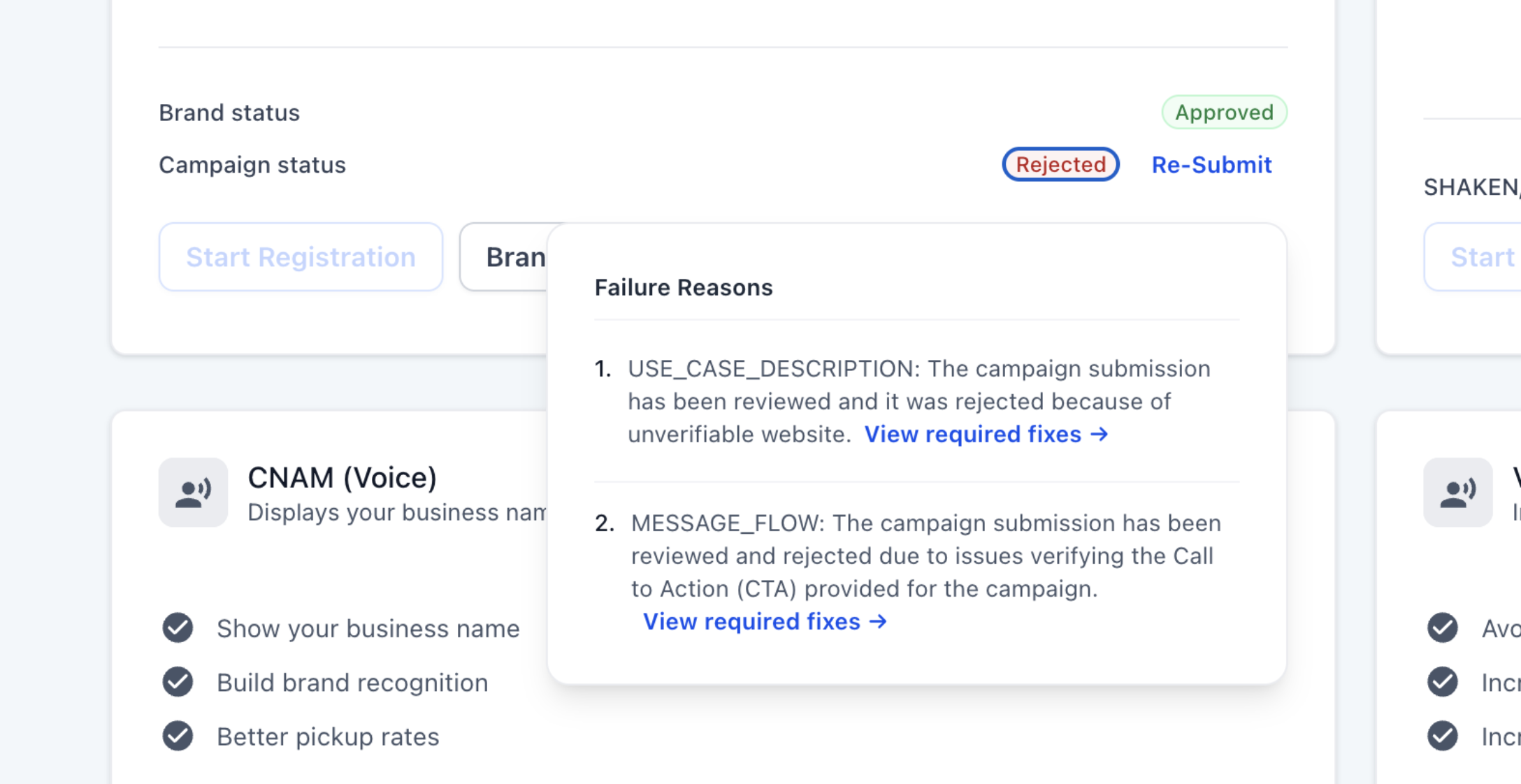
Screenshot: A rejected Campaign can display multiple failure reasons. Open “View required fixes →” for every listed reason.
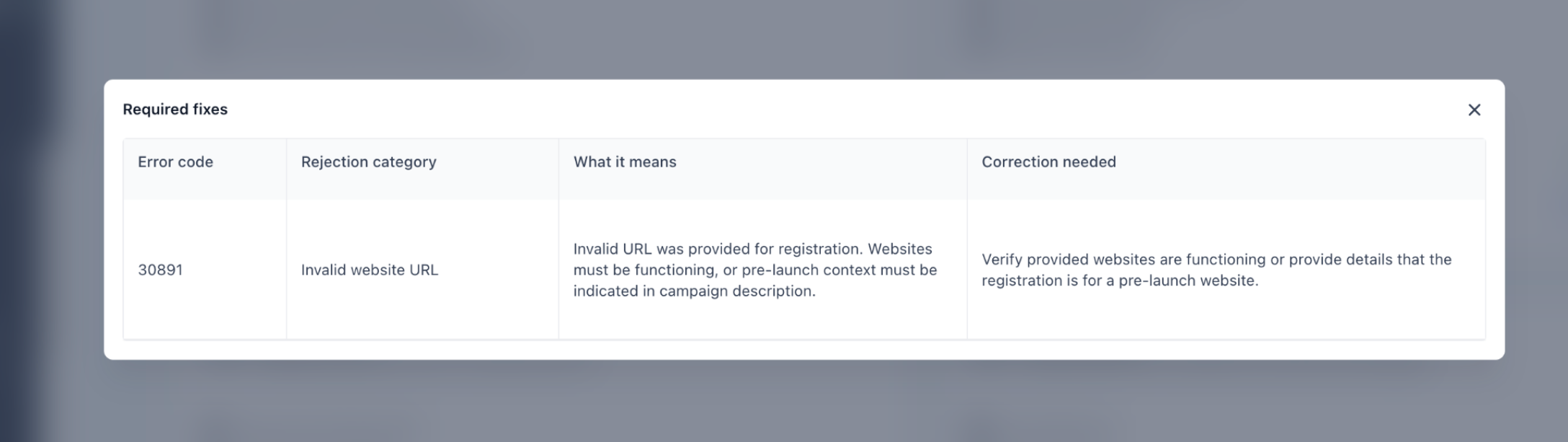
Screenshot: Required fixes identify the error code, rejection category, explanation, and correction needed.
A Campaign can contain more than one rejection. Correcting only the first visible problem can result in another rejection. Review the entire Campaign—including use case, description, sample messages, website, consent flow, Privacy Policy, and Terms & Conditions—before resubmitting.
Common Campaign Rejection Codes and Fixes
The rejection details displayed in Trust Center are the source of truth for your individual submission. The examples below cover several frequently encountered issues and show the type of correction reviewers expect.
| Code | Reason | What to Correct |
|---|---|---|
| 30909 | Consent / Call-to-Action cannot be verified. | Describe every consent method and provide accessible evidence. If the flow is behind a login, provide hosted screenshots. |
| 30913 | Marketing and informational consent are not separated. | Collect promotional-message consent separately or clearly explain that the Campaign sends only transactional messages. |
| 30924 | Required consent disclosures are missing. | Add message type, message frequency, message/data-rate disclosure, and STOP instructions near the opt-in. |
| 30919 | Website does not contain enough business or messaging information. | Add the company name, services, contact information, Privacy Policy, and information about the SMS messaging program. |
| 30907 | Website does not match the Brand or Campaign. | Make the website, registered Brand, and Campaign details represent the same business and messaging purpose. |
| 30908 | Privacy Policy cannot be located or does not meet requirements. | Publish an accessible Privacy Policy and provide the direct link within the message/consent flow. |
| 30915 | Registered as Sole Proprietor while using a corporate business name. | Register as a Standard Brand using the applicable business registration information. |
| 30918 | DBA does not match the legal business information. | Update the Brand registration so the DBA relationship is accurately represented. |
| 30926 | One Campaign references multiple companies or Brands. | Use separate Campaigns for separate Brands. |
| 30927 | Opt-in evidence displays a different business. | Make the business name in screenshots and URLs match the registered Brand. |
| 30886 | Campaign description is unclear or does not match the use case. | Explain who sends the messages, who receives them, what is sent, why it is sent, and how recipients opt in. |
| 30893 | Sample messages are missing, unclear, or do not match the use case. | Provide realistic, distinct samples that match the actual Campaign and include appropriate sender identification and opt-out language. |
Certain forbidden, disallowed, fraud, phishing, deceptive-marketing, and other high-risk content rejections may not be eligible for normal correction and resubmission. Follow the instructions displayed with the rejection. If you believe the decision was incorrect, use the documented Campaign appeal path through Support.
When a New Campaign May Be Required
Some Campaign fields cannot be edited during a resubmission. If the required correction affects a locked field—such as the Campaign use case or certain opt-in information—the required-fix instructions may require you to create a new Campaign instead of editing the rejected Campaign.
Evidence Checklist Before Contacting Support
Providing the registration details and evidence together helps Support understand the issue without requiring repeated requests for basic information.
- Screenshot showing the current Brand and Campaign status
- Screenshot of every rejection reason and required-fix modal
- Exact error code and rejection category
- Legal business name and DBA, if applicable
- Campaign name and selected use case
- Campaign description and exact sample messages
- Business website URL
- Opt-in URL or hosted screenshots of the consent experience
- Privacy Policy and Terms & Conditions URLs
- Affected phone number
- Submission or registration identifiers shown in Trust Center, if available
- Approximate submission dates and number of attempts
- For a business-identity issue, the applicable official business-registration or EIN confirmation document if Support requests verification
Protect sensitive information: Do not place full Tax IDs or identity documents in public messages or screenshots. Provide sensitive verification documents only through the approved Support channel when they are required.
What Support Can and Cannot Do
- Review the visible Brand or Campaign status and rejection information.
- Help explain required-fix details and registration errors.
- Help determine whether the Campaign should be corrected, resubmitted, or recreated.
- Assist when an unknown or unclear rejection requires additional investigation.
- Assist with a documented Campaign appeal when you believe an eligible or ineligible rejection was made in error.
- Guarantee that a registration or appeal will be approved.
- Override carrier or registration-partner policies.
- Make prohibited messaging categories eligible for approval.
- Fabricate, modify, or substitute official business or consent documentation.
Suggested Support Request
Copy the template below into your Support request and attach the evidence collected above.
How to Appeal a Campaign Rejection
If you believe a Campaign rejection was made in error, contact Support and provide the full details of the appeal. This can also apply to an ineligible rejection when you have evidence that the classification is incorrect.
Use the subject line: 10DLC Campaign Appeal for [your business name or number]
Review times can vary based on the rejection type, the evidence required, and the external review involved. Support cannot guarantee a fixed carrier response time or a successful reversal.
A2P 10DLC Fees
A2P registration can include registration, Campaign vetting, recurring Campaign, and carrier messaging charges. Pricing can change as industry and carrier requirements change, so review the current amounts shown in Trust Center before submitting.
Frequently Asked Questions
Need Help?
Before Contacting Support
- Confirm whether the issue is with the Brand, Campaign, or phone-number association.
- Open every Campaign rejection and review View required fixes →.
- Correct every listed issue rather than only the first rejection.
- Confirm the legal business name and registration information match official records.
- Verify the website, Campaign description, sample messages, and consent method all represent the same business and use case.
- Confirm Privacy Policy and Terms & Conditions pages are publicly accessible.
- Gather screenshots of the status, rejection reasons, and required fixes.
- Gather the opt-in URL or hosted consent screenshots.
- After approval, confirm the sending number displays A2P Verified.
Still Need Help?
Contact Support if the rejection reason remains unclear, correct information continues to fail verification, a Campaign is repeatedly rejected after all required fixes are completed, a locked field prevents the required correction, or you believe a Campaign rejection should be appealed. Include the evidence checklist and Support request template above so the case can be reviewed with the necessary context.