
If emails sent through your SMTP provider are failing to deliver, the most common cause is that the sender email address does not match the verified email configured inside your SMTP settings. This article explains how to verify your SMTP sender setup, understand delivery errors, and troubleshoot failed outbound emails.
TABLE OF CONTENTS
- Overview
- Why SMTP Delivery Errors Happen
- Verify Your SMTP Sender Email
- Review SMTP Errors in Conversations
- Common Causes of Delivery Failures
- Best Practices for SMTP Deliverability
- Frequently Asked Questions
- Need Help?
Overview
SMTP providers require outbound emails to be sent from a verified sender identity. If the sender email being used inside conversations, workflows, or campaigns does not match the configured SMTP account, the provider may reject the email.
This article helps you:
- Verify your SMTP sender configuration
- Identify sender mismatch issues
- Understand SMTP error messages
- Troubleshoot failed email delivery attempts
Why SMTP Delivery Errors Happen
Most SMTP delivery failures occur because the sender email is not authorized by the SMTP provider.
Common reasons include:
- Sending from an unverified email address
- Using a sender address different from the configured SMTP account
- Missing sender authentication
- Domain verification issues
- SMTP provider security restrictions
In many cases, simply correcting the sender email resolves the issue immediately.
Verify Your SMTP Sender Email
The sender email used when sending messages should match the email configured inside your SMTP provider settings.
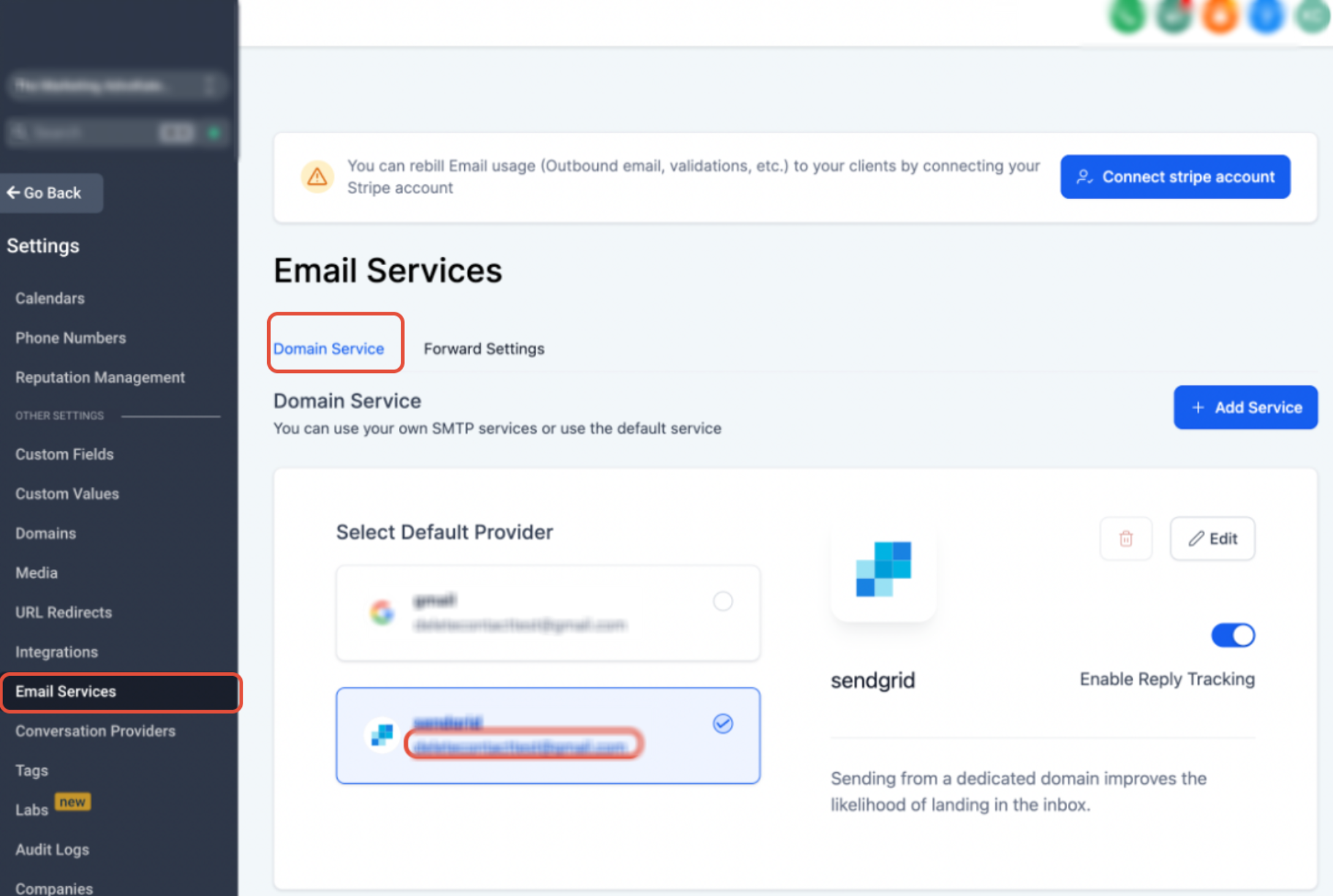
This image shows where to verify the configured SMTP provider and sender email inside Email Services settings.
Review the highlighted sender email and confirm it matches the email address being used for outbound communication.
Review SMTP Errors in Conversations
When an email fails to send, the exact error returned by the SMTP provider is displayed directly inside the conversation activity.
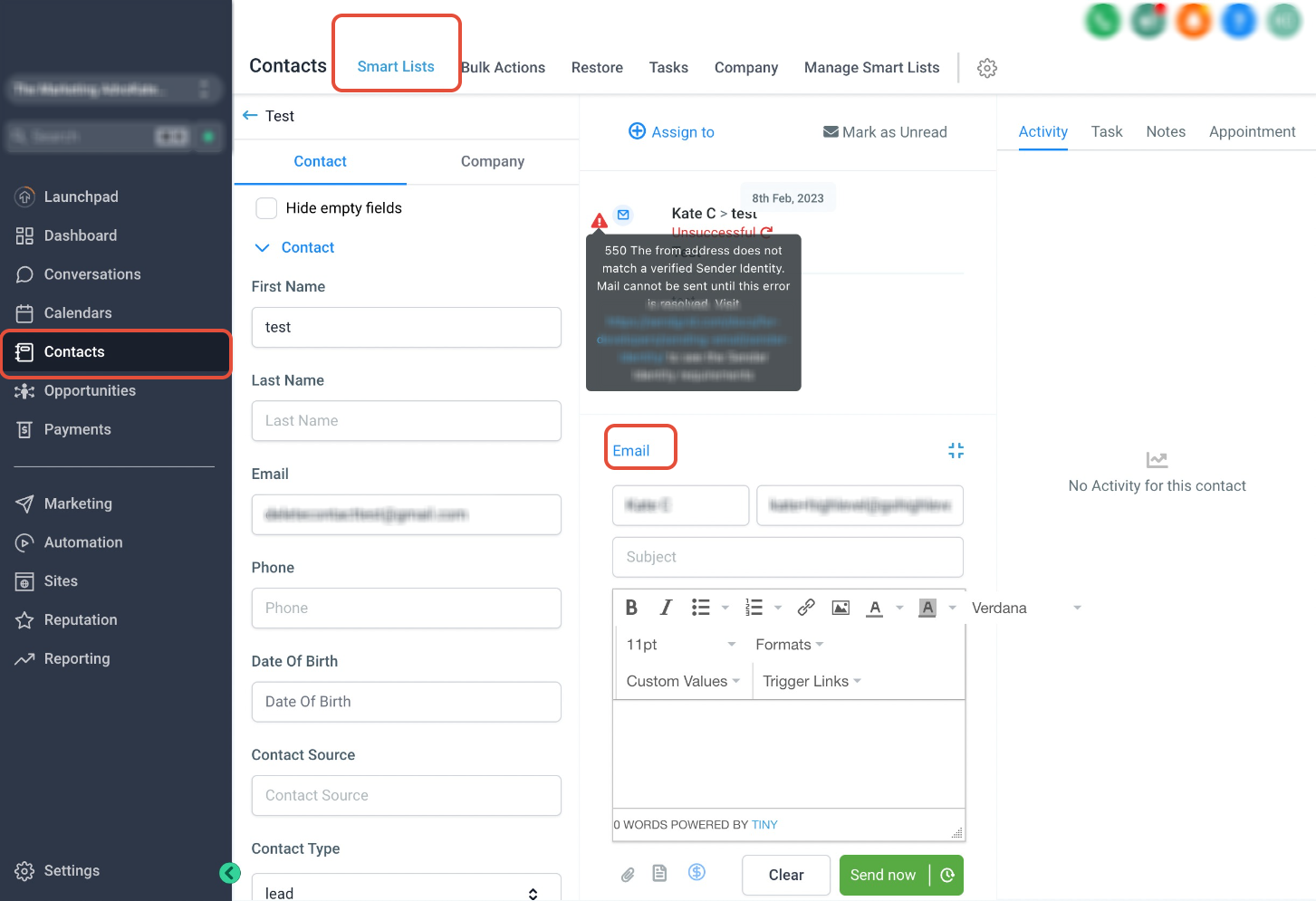
This image shows how SMTP delivery failures appear inside the conversation panel.
Click the warning icon beside the failed email message to view detailed error information returned by the SMTP provider. These errors commonly explain whether the sender identity is invalid, unauthorized, or not verified.
Common Causes of Delivery Failures
SMTP delivery issues are usually caused by one of the following:
- The sender email does not match the configured SMTP account
- The sender domain has not been verified
- SMTP credentials are invalid or expired
- The provider rejected the email due to security policies
- Sender authentication is incomplete
If the sender email already matches the configured SMTP account and emails are still failing, contact your SMTP provider directly to review delivery logs and provider-side restrictions.
Best Practices for SMTP Deliverability
Following proper SMTP configuration practices helps improve deliverability and reduce failed sends.
Recommended practices include:
- Always send from a verified email address or domain
- Keep SMTP credentials updated
- Use authenticated domains whenever possible
- Avoid frequently changing sender emails
- Monitor SMTP provider warnings and logs regularly
Proper authentication improves inbox placement and reduces rejection rates.
Frequently Asked Questions
Q: Why are my emails failing to send?
This usually happens because the sender email does not match the verified email configured in your SMTP provider settings.
Q: Where can I view SMTP delivery errors?
SMTP delivery errors can be viewed directly inside the conversation activity by clicking the warning icon beside the failed message.
Q: What does “sender identity not verified” mean?
It means the SMTP provider does not recognize or allow the email address being used to send outbound emails.
Q: Can I send emails from a different address than my SMTP account?
Most SMTP providers require the sender email or sender domain to be verified before messages can be delivered successfully.
Q: What should I do if the sender email already matches?
Contact your SMTP provider and request delivery logs or additional troubleshooting support.
Need Help?
If you continue experiencing SMTP delivery issues after verifying your sender email configuration, contact your SMTP provider for additional troubleshooting and delivery status information.