
Opportunity pipelines help organize your sales or service process by dividing it into structured stages. Each stage represents a step in the customer journey, making it easier to track progress, manage leads, and understand where opportunities stand within your workflow.
By organizing opportunities into pipelines and stages, teams can visualize their sales process, identify bottlenecks, and ensure every lead moves through a consistent process from initial contact to final conversion.
TABLE OF CONTENTS
- Understanding Opportunity Pipelines
- Accessing Pipelines
- Creating and Editing Pipeline Stages
- Managing Pipeline Visibility
- Frequently Asked Questions
- Need Help
Understanding Opportunity Pipelines
A pipeline represents a structured sequence of stages that track the progress of opportunities through a business process. Each stage defines a specific point in the journey, allowing teams to clearly understand what actions should happen next.
For example, a typical pipeline may include stages such as:
Lead Received
Initial Contact
Meeting Scheduled
Proposal Sent
Closed or Completed
Using pipelines ensures every opportunity follows a consistent path, which improves organization and helps teams manage customer relationships more effectively.
Accessing Pipelines
To manage pipelines, navigate to the area where opportunities are managed and open the Pipelines section. From there, you can create new pipelines or edit existing ones.
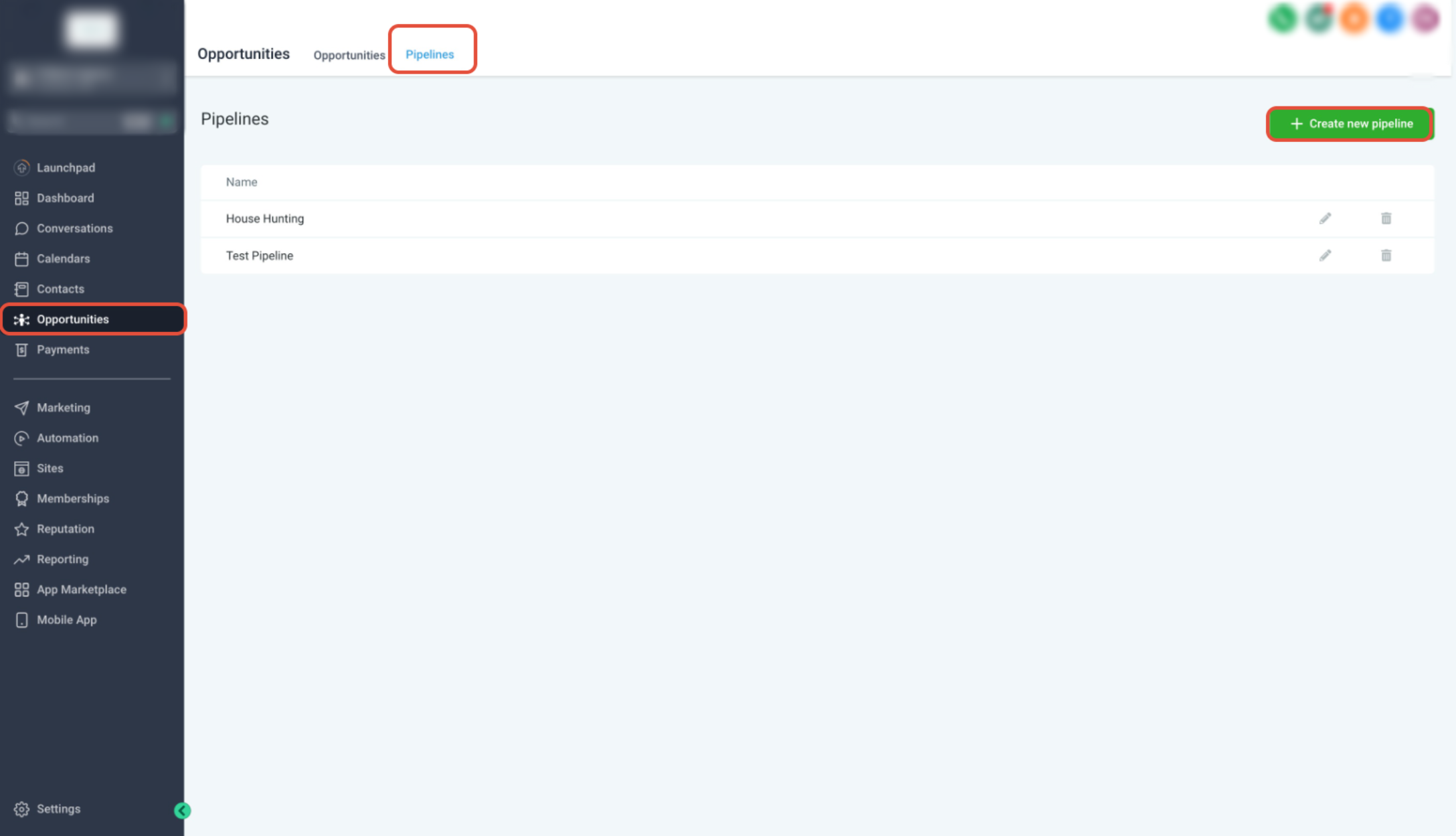
This screen shows the pipeline management page where existing pipelines are listed.
From this page you can:
View existing pipelines
Create new pipelines
Edit or delete pipelines
Manage the structure of each pipeline
Selecting a pipeline allows you to configure its stages and settings.
Creating and Editing Pipeline Stages
Each pipeline is made up of stages that represent key steps in your sales or service process.
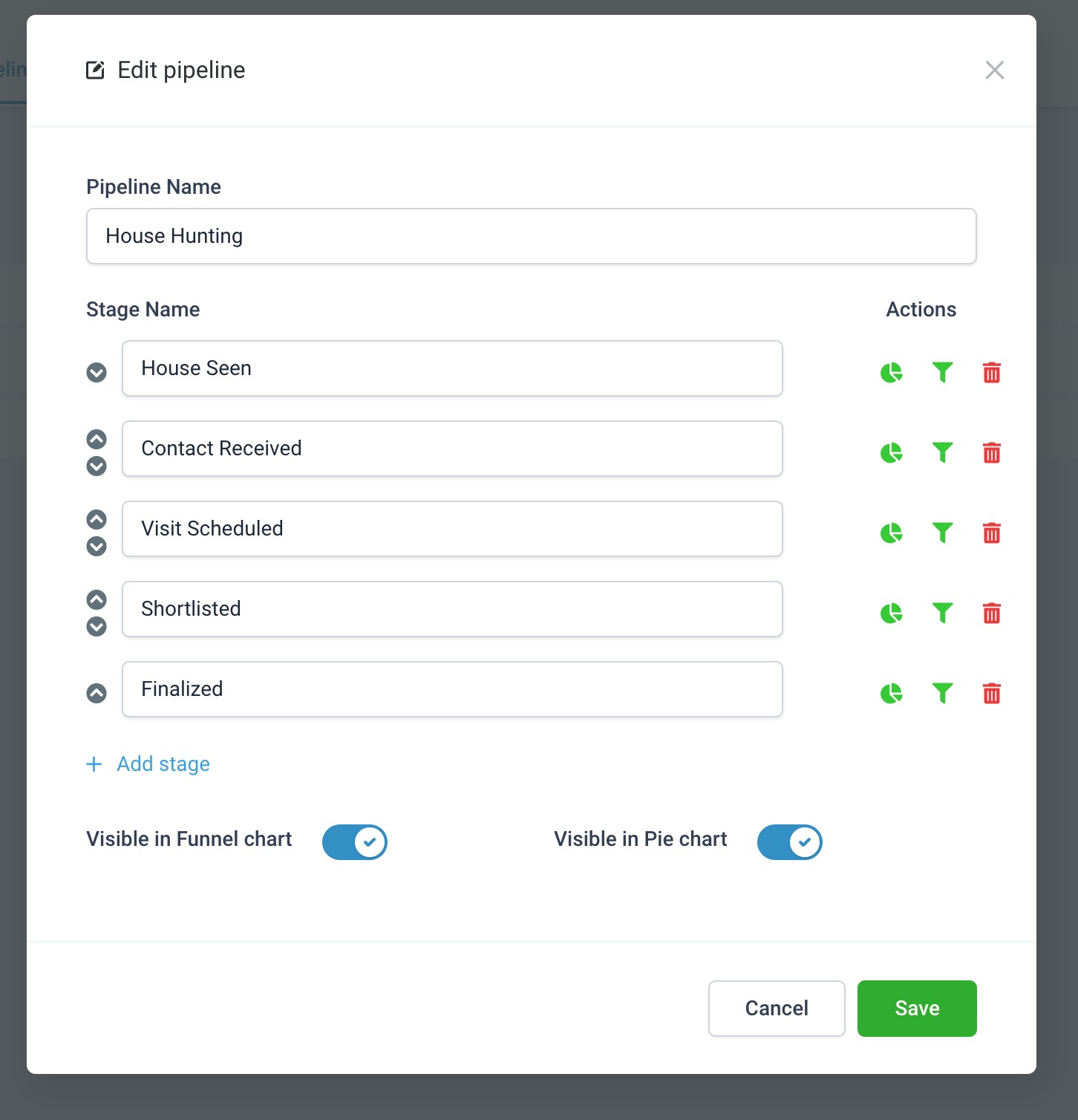
This screen displays the pipeline editor where stages can be configured.
From this panel you can:
Rename the pipeline
Add new stages
Reorder existing stages
Delete stages that are no longer needed
To reorganize stages:
Locate the stage you want to move
Drag the stage up or down to change its order
Save the changes once the stages are arranged correctly
Reordering stages allows you to reflect the real flow of your business process.
Managing Pipeline Visibility
Some pipelines allow stages to be displayed in visual charts for better reporting and analysis.
These visualization options help teams understand performance across stages and identify where opportunities tend to slow down.
Common visualization options include:
Funnel charts for stage progression
Pie charts for distribution of opportunities across stages
Using visual reports can help identify areas where improvements may increase conversions.
Best Practices for Pipeline Management
Well-structured pipelines make opportunity tracking much easier. Consider the following best practices when designing your pipelines.
Keep Pipelines Simple
Avoid adding unnecessary stages. A shorter pipeline is easier to manage and helps teams focus on key actions.
Use Clear Stage Names
Stage names should clearly describe the action or milestone. This prevents confusion when multiple team members work within the same pipeline.
Review Pipelines Regularly
Business processes evolve over time. Periodically review pipelines to ensure they still match your current workflow.
Use Data to Improve Processes
Review performance data from your pipeline stages to identify bottlenecks and opportunities for improvement.
Frequently Asked Questions
Q: What is a pipeline used for?
Pipelines organize opportunities into structured stages so teams can track progress and manage leads throughout a sales or service process.
Q: Can I create multiple pipelines?
Yes. Multiple pipelines can be created to represent different workflows, products, services, or departments.
Q: Can stages be reordered after creating a pipeline?
Yes. Stages can be rearranged at any time by dragging them into the desired order within the pipeline editor.
Q: Can I delete a pipeline stage?
Yes. Stages can be removed if they are no longer needed. However, it is recommended to review existing opportunities before removing a stage.
Q: Do pipelines affect reporting and analytics?
Yes. Pipeline stages are often used in reports and visual charts to track opportunity movement and performance.
Need Help
If you experience issues while creating or managing pipelines:
Confirm that you have permission to edit opportunity settings.
Verify that the pipeline contains the stages required for your workflow.
Refresh the page after saving changes to ensure the pipeline updates appear correctly.
If problems continue, contact your support team and provide details about the pipeline configuration you attempted to update.