
Accurate attribution is critical for understanding which campaigns, ad sets, and ads are driving results. By combining UTM parameters, tracking tools, and consistent naming conventions, you can ensure that every lead is correctly linked back to its source.
This enables clearer reporting, better optimization decisions, and improved return on investment across all campaigns.
TABLE OF CONTENTS
- Understanding Attribution
- Setup Requirements
- Viewing UTM Parameters
- Best Practices for Campaign Naming
- Adding UTM Parameters
- Reviewing Attribution Reports
- Frequently Asked Questions
- Need More Help?
Understanding Attribution
Attribution connects each lead to the exact campaign, ad set, and ad responsible for generating it. When configured correctly, it provides a clear path from initial click to final conversion.
For attribution to work reliably, it is essential to implement consistent tracking across all campaigns. This includes using structured UTM parameters, enabling tracking tools, and maintaining clean naming conventions.
Setup Requirements
Before implementing attribution tracking, ensure that your setup follows a few key principles.
Tracking parameters should always be applied consistently, and campaign naming should remain structured and predictable. Avoid using special characters or emojis, as they can interfere with tracking accuracy.
It is also important to understand that attribution is only recorded when users complete specific tracked actions, such as submitting a form, booking an appointment, or interacting with a chat widget.
Viewing UTM Parameters
Once tracking is active, attribution data becomes visible within each contact record. This allows you to see exactly where each lead originated.
You will typically see details such as campaign name, ad set, ad name, campaign ID, and referral data. These values help you understand performance at every level of your campaigns.
Best Practices for Campaign Naming
Consistent naming plays a major role in accurate attribution. Every campaign, ad set, and ad should have a unique and descriptive name.
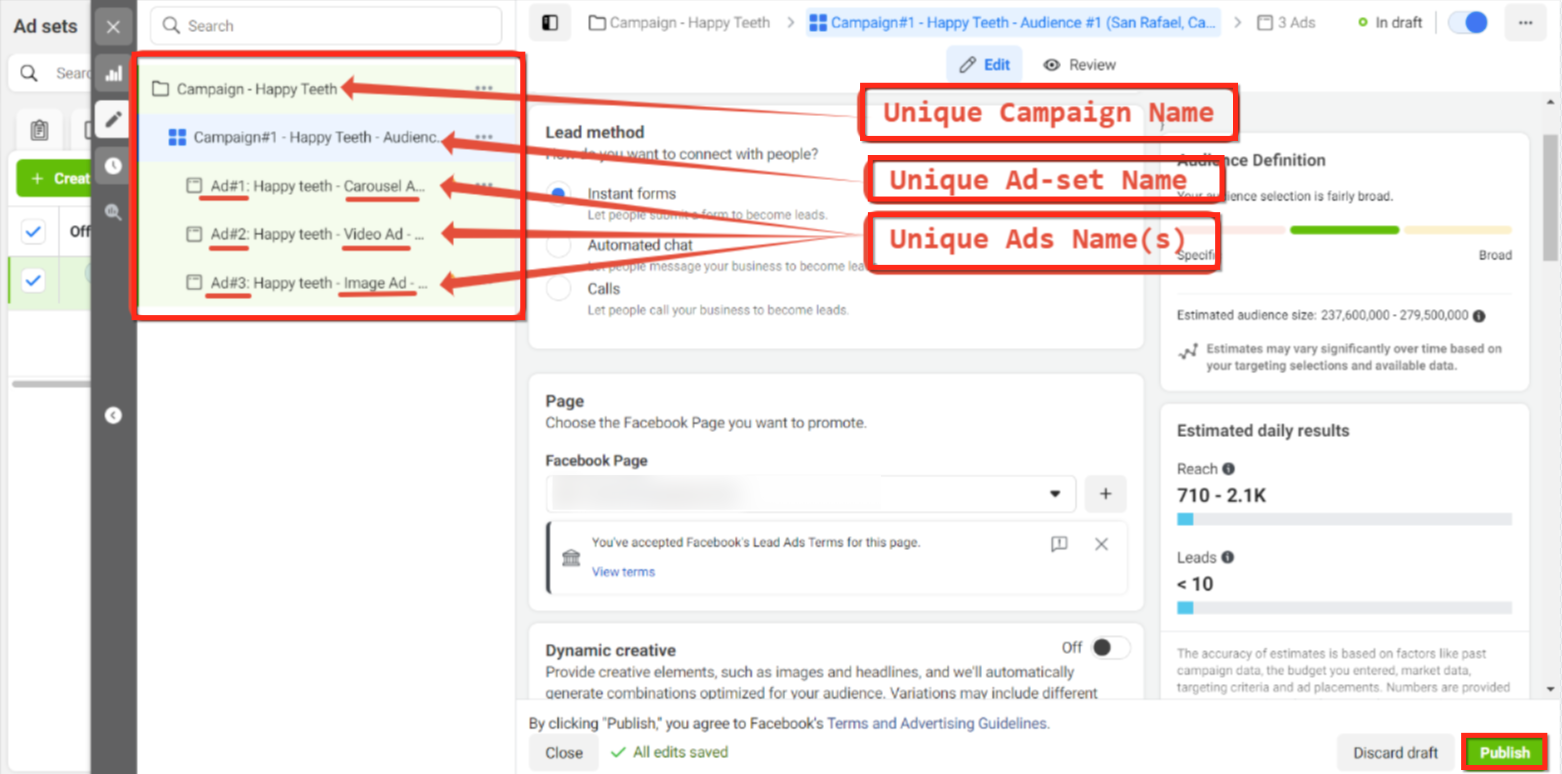
This image shows how campaigns, ad sets, and ads should each have clearly defined and unique names to prevent duplication and tracking confusion.
Using structured naming ensures that reporting remains clean and that each data point can be traced back correctly. If a campaign needs to be changed, it is best to create a new one instead of renaming an existing one, as renaming can break attribution continuity.
Adding UTM Parameters
UTM parameters are essential for tracking where traffic originates. They should be added directly within the tracking section of your ad setup.
Start by editing your ad and navigating to the tracking section.
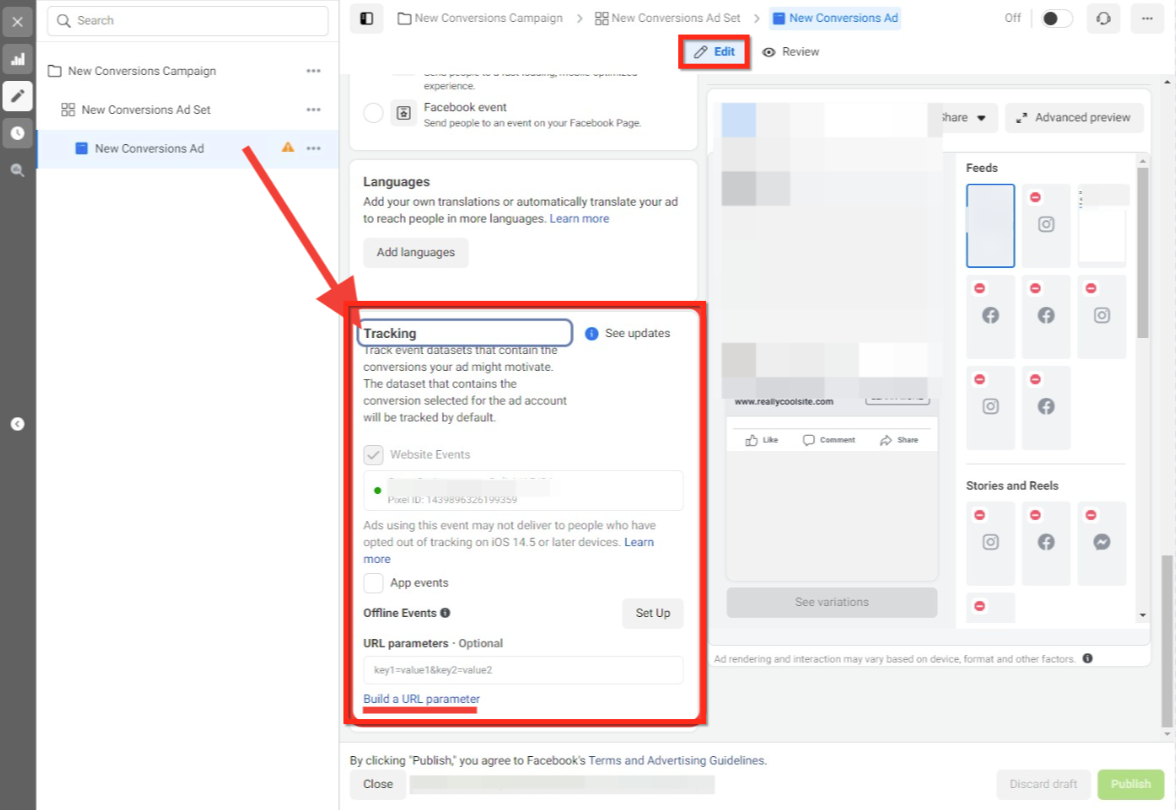
This image highlights where the tracking section appears when editing an ad.
Next, use the URL parameter builder to create your tracking structure.
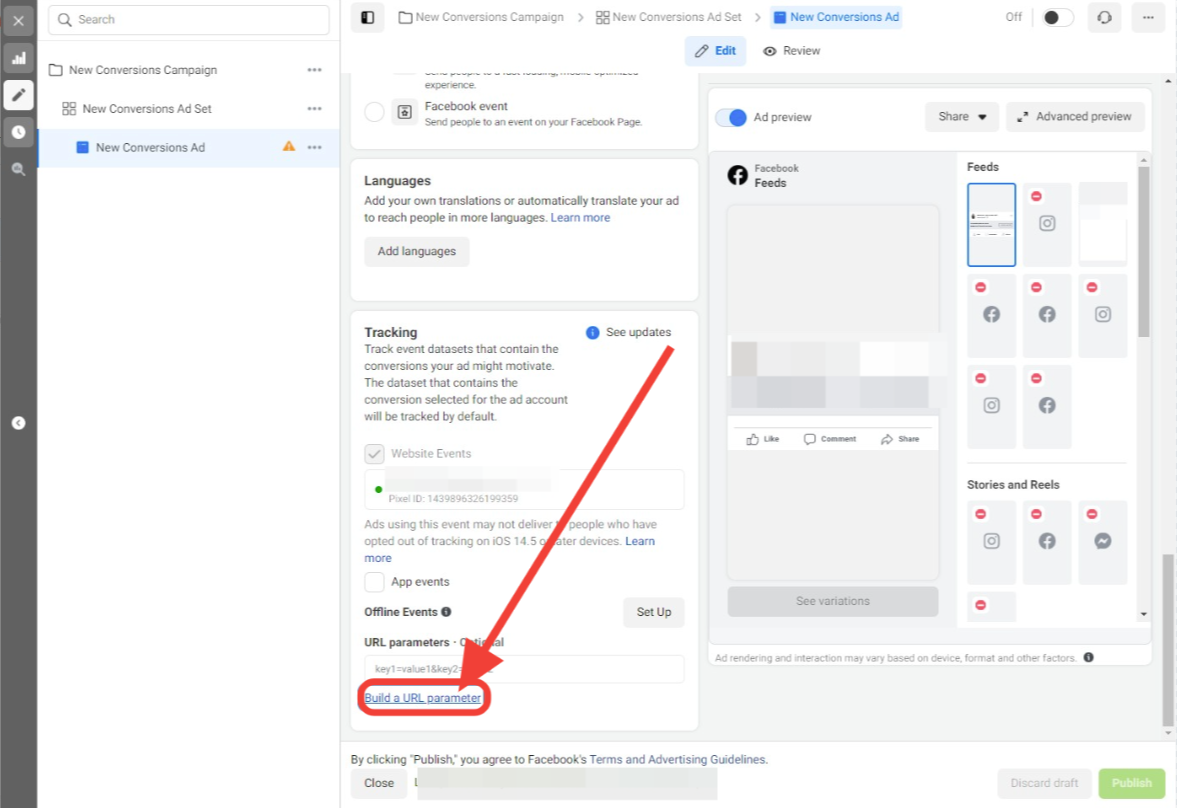
Click the option to build a URL parameter to begin configuring tracking values.
Inside the builder, enter the required UTM fields exactly as defined.
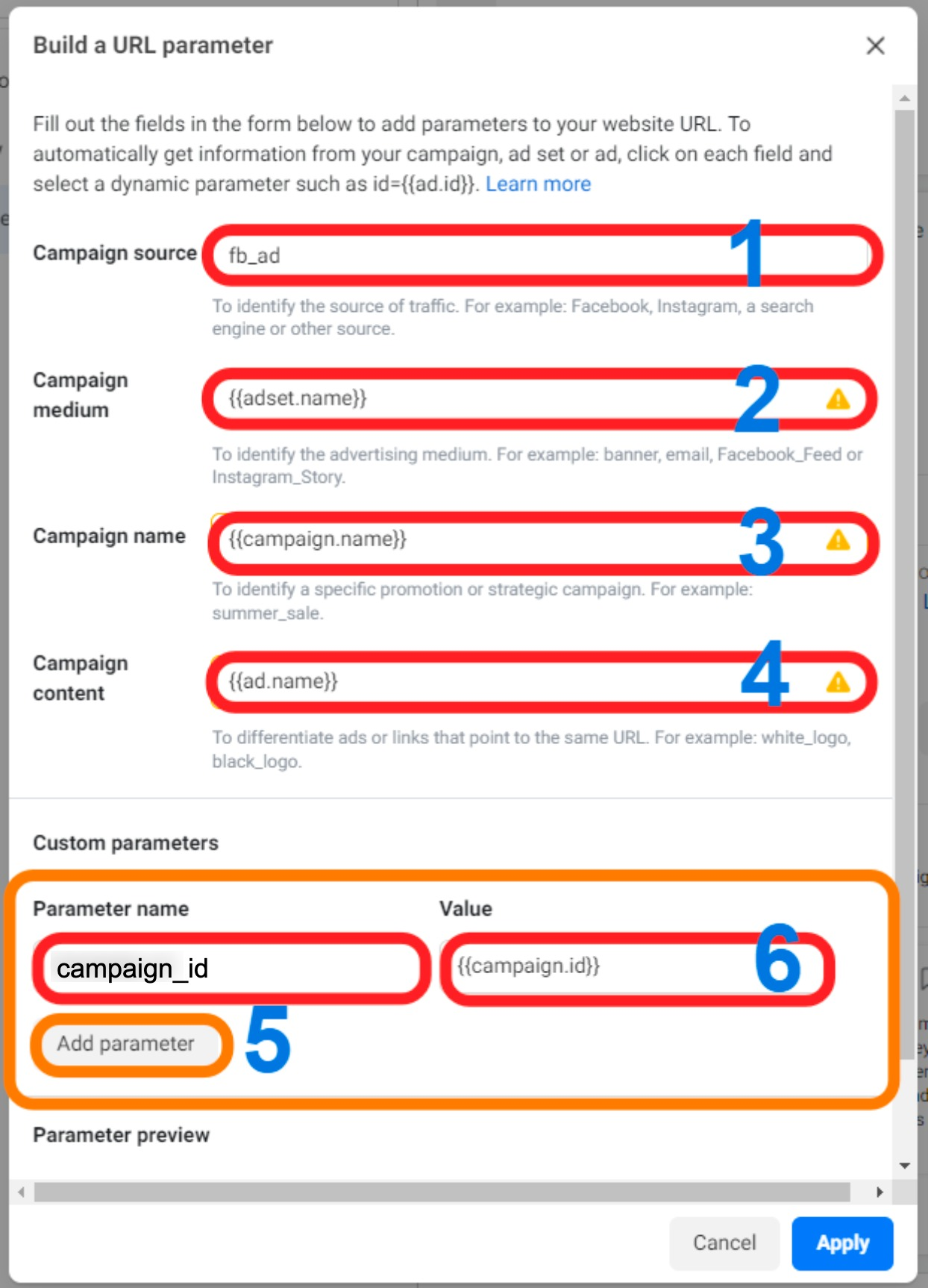
This image shows the correct setup for UTM parameters, including campaign source, medium, name, content, and campaign ID.
Using dynamic values ensures that each campaign automatically passes accurate data into your reporting system.
Reviewing Attribution Reports
Once campaigns are active and tracking is configured, attribution data will begin appearing in your reporting dashboard. This allows you to evaluate which campaigns are generating leads, conversions, and revenue.
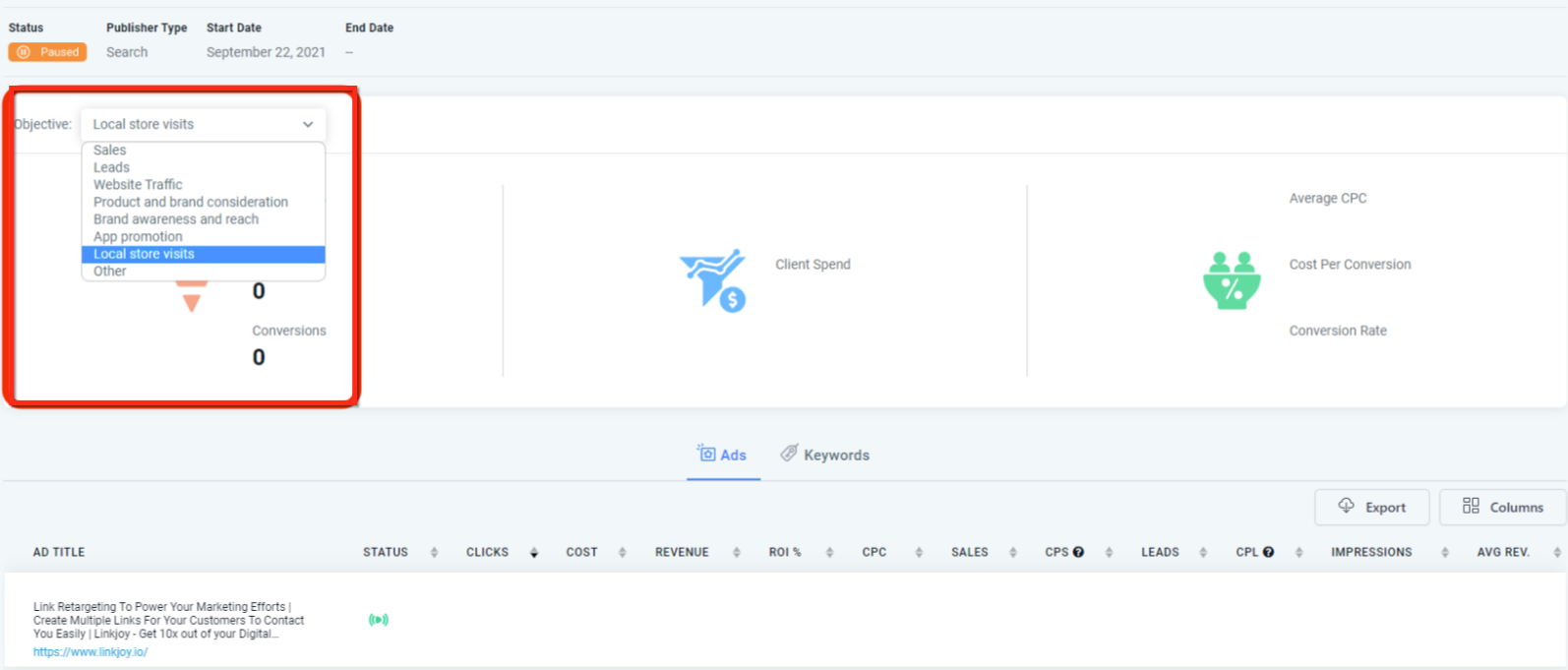
This image shows how campaign objectives and reporting data appear together, helping you analyze performance across different campaign types.
Regularly reviewing this data helps identify top-performing campaigns, optimize underperforming ones, and allocate budget more effectively.
Frequently Asked Questions
Q: Why don’t I see UTM parameters in my ad preview?
UTM parameters are not visible in previews. They only appear after the ad is published and live.
Q: Why is attribution data missing for some leads?
Attribution is only recorded when users complete supported actions such as form submissions or bookings.
Q: Why did my reporting change after renaming a campaign?
Renaming campaigns can disrupt attribution tracking. It is recommended to create a new campaign instead.
Q: Are UTM parameters required for tracking?
Yes, they are essential for accurately identifying the source of each lead.
Q: Where should UTM parameters be added?
They should always be added in the tracking section of the ad setup, not directly in the destination URL.
Need More Help?
If you need assistance setting up attribution tracking or reviewing campaign performance, open the Help Center or contact support for further guidance.