
Accepting payments should be simple, fast, and frictionless. Payment links allow you to send a direct checkout experience to customers so they can complete purchases quickly without needing a full website or manual invoicing.
This improves conversion rates, reduces delays, and creates a smoother buying experience.
TABLE OF CONTENTS
- What Are Payment Links
- Key Benefits of Payment Links
- How to Create a Payment Link
- Best Practices
- Frequently Asked Questions
- Need More Help?
What Are Payment Links
Payment links are shareable URLs that allow customers to complete a payment instantly. Instead of guiding customers through multiple steps, a single link takes them directly to a secure checkout page.
This makes it easier to collect payments for services, products, or one-time offers while keeping the process simple and efficient.
Key Benefits of Payment Links
Faster Payments: Customers can pay instantly from a single link
Simplified Experience: No complex checkout required
Flexible Sharing: Send via email, SMS, or messaging apps
Improved Conversions: Reduce drop-off during payment
Secure Transactions: Payments are processed safely
How to Create a Payment Link
Creating a payment link is quick and requires only a few steps.
Step 1: Open the Payment Links Section
Navigate to the Payments section from the left-hand menu, then click on Payment Links in the top navigation.
Next, click Create New Payment Link to begin.
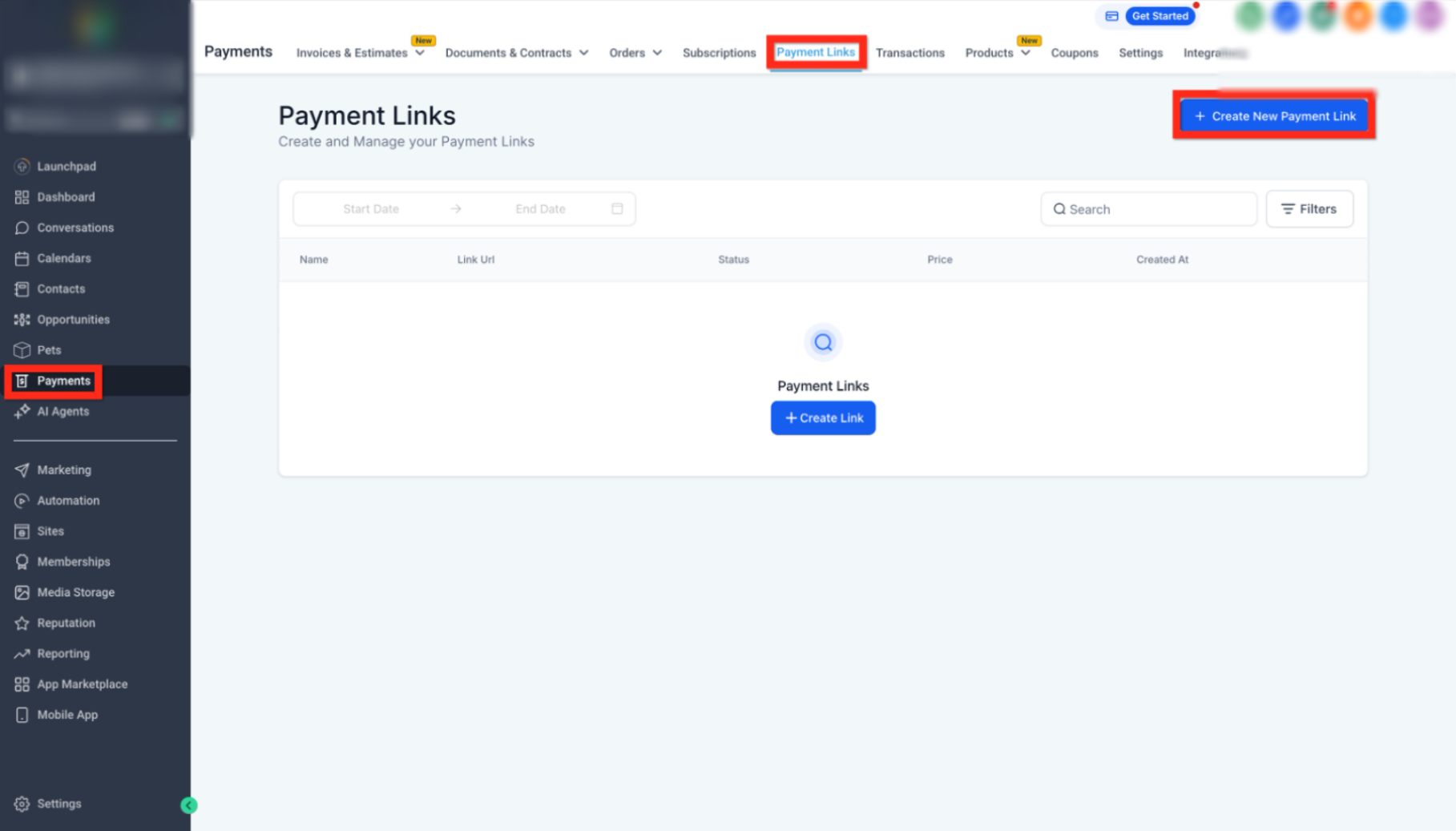
This image shows exactly where to open the Payment Links section and where to click to create a new payment link. Follow the highlighted areas to access the correct page and start the setup process.
Step 2: Enter Payment Details
Add the required information for your payment link, including:
Product or service name
Price or amount
Payment type (one-time or recurring)
Optional description
Make sure all details are accurate before saving.
Step 3: Save and Generate the Link
After entering the details, save the payment link. A unique URL will be generated automatically.
Step 4: Share the Payment Link
Copy the generated link and send it to your customer via:
Email
SMS
Chat or messaging apps
Customers can click the link and complete their payment instantly.
Best Practices
Using clear naming and accurate pricing helps customers trust and complete payments faster. Always double-check your payment details before sharing the link.
Keep the process simple and test the link yourself before sending it to ensure everything works smoothly.
Frequently Asked Questions
Q: Can I reuse a payment link?
Yes, payment links can be reused unless set for one-time use.
Q: Can I send payment links via text or email?
Yes, they can be shared through any communication channel.
Q: Are payment links secure?
Yes, they use secure checkout processes to protect customer data.
Q: Can I edit a payment link after creating it?
Yes, depending on your setup, you can update the details.
Q: What types of payments can I collect?
You can collect one-time or recurring payments.
Need More Help?
If you need assistance creating or managing payment links, open the Help section from your dashboard or contact support for guidance.