
Legitimate business calls can sometimes appear as Spam Likely, Potential Spam, or similar warnings on a recipient's device. These labels are influenced by carriers and caller analytics providers that evaluate factors such as phone-number reputation, calling patterns, recipient feedback, and caller authentication.
LeadConnector provides several tools including SHAKEN/STIR, CNAM, and Voice Integrity—to help establish caller trust and address reputation issues, but each tool serves a different purpose.
TABLE OF CONTENTS
- What Does It Mean When Calls Are Marked as Spam?
- Key Benefits of Improving Caller Reputation
- Authentication vs. Caller ID vs. Reputation
- Voice Integrity
- Free Caller Registry
- SHAKEN/STIR
- CNAM
- Best Practices for Maintaining a Positive Caller Reputation
- When to Consider Replacing a Phone Number
- How To Fix Calls Marked as Spam
- Frequently Asked Questions
What Does It Mean When Calls Are Marked as Spam?
Spam labels are reputation signals applied by carriers, devices, and caller analytics providers when they determine that a phone number may be associated with unwanted or suspicious calling activity. A legitimate business number can still receive one of these labels, which is why maintaining accurate caller information and healthy calling behavior is important.
A phone number may be more likely to experience reputation issues when calling patterns resemble unwanted traffic. LeadConnector recommends maintaining consistent number usage, avoiding sudden outbound-volume spikes, gradually increasing new campaign volume, respecting customer consent and opt-out requests, and avoiding suspicious calling patterns such as excessive neighbor calling.
Caller reputation can also continue changing over time. Completing authentication or reputation registrations does not guarantee that a number will permanently remain free of spam labels because carriers and analytics providers can continue evaluating calling activity, recipient feedback, and other reputation signals.
Key Benefits of Improving Caller Reputation
A healthy caller reputation helps recipients and telecommunications providers recognize legitimate business calls more easily. Combining the appropriate LeadConnector trust registrations with responsible calling behavior creates stronger trust signals and can reduce the risk of legitimate calls being incorrectly treated as suspicious.
Increase caller trust: Give carriers and recipients more information to identify legitimate business calls.
Improve caller recognition: Use accurate caller-name information where supported to help contacts understand who is calling.
Address incorrect spam labels: Submit eligible U.S. numbers for reputation review through Voice Integrity or other applicable remediation options.
Strengthen caller authentication: Use SHAKEN/STIR to help verify that your business is authorized to use the phone number.
Protect long-term reputation: Follow consistent, consent-based calling practices to reduce future reputation issues.
Improve call reach: Strong authentication, identification, and reputation signals can help legitimate calls reach customers more reliably.
Authentication vs. Caller ID vs. Reputation
SHAKEN/STIR, CNAM, and Voice Integrity work together but solve different problems. Understanding the distinction prevents common troubleshooting mistakes, such as expecting CNAM or SHAKEN/STIR alone to remove a Spam Likely label.
| Trust Layer | LeadConnector Tool | What It Does | Important Limitation |
|---|---|---|---|
| Authentication | SHAKEN/STIR | Helps authenticate caller ID information and verify that the caller is authorized to use the number | Does not remove nuisance or spam labels |
| Identification | CNAM | Associates a U.S. phone number with a registered business or personal name | Name display is not guaranteed and does not remove spam labels |
| Reputation | Voice Integrity | Submits eligible U.S. numbers to caller analytics providers for reputation review | Review and label changes may take time |
LeadConnector recommends completing SHAKEN/STIR before Voice Integrity. CNAM is optional for Voice Integrity but is recommended because it adds a caller-identification layer alongside authentication and reputation management.
Voice Integrity
Voice Integrity is LeadConnector's reputation-management option for eligible U.S. phone numbers. It submits number information to major caller analytics providers so they can evaluate legitimate business traffic and review reputation or Spam Likely concerns.
LeadConnector submits eligible Voice Integrity registrations to caller analytics providers including First Orion, Hiya, and TNS. Voice Integrity is specifically intended to help address phone-number reputation and incorrect spam labeling.
Before submitting Voice Integrity:
Complete SHAKEN/STIR registration.
Configure CNAM when applicable and recommended.
Confirm the phone number is an eligible U.S. number.
Make sure your business information is accurate and consistent.
To access Voice Integrity, navigate to:
Settings → Phone Numbers → Trust Center → Voice Integrity
Follow the on-screen registration process for the eligible phone numbers you want to submit.
For the complete registration workflow, see Improve Your Phone Number's Reputation with Voice Integrity.
Free Caller Registry
Free Caller Registry provides another U.S. remediation route for businesses that need to submit legitimate phone numbers for reputation consideration. LeadConnector specifically recommends this path when a business does not have an EIN and therefore cannot use the documented SHAKEN/STIR and CNAM registration processes.
If your business has an EIN and is eligible for Voice Integrity, LeadConnector recommends using Voice Integrity. If your business does not have an EIN, the Free Caller Registry can be used as an alternative for eligible U.S. numbers.
Free Caller Registry is a separate process from Voice Integrity, so its review timeline should not be treated as the Voice Integrity processing timeline.
For complete instructions, see Remediate “Spam Likely” on Your Caller ID Using Free Caller Registry.
SHAKEN/STIR
SHAKEN/STIR provides caller authentication rather than reputation remediation. It uses authentication protocols and digital certificates to help carriers verify that your business is authorized to use the phone number displayed on an outbound call.
SHAKEN/STIR can improve trust and help prevent caller-ID spoofing, but it does not directly remove Spam Likely or other nuisance labels.
For LeadConnector users:
If a qualifying A2P SMS registration has already been completed, eligible numbers may be enrolled in SHAKEN/STIR automatically.
If you have not registered through that route, SHAKEN/STIR can be configured through the LeadConnector Trust Center.
An EIN is required for the documented SHAKEN/STIR registration process.
To review or configure SHAKEN/STIR, go to:
Settings → Phone Numbers → Trust Center
For complete requirements and setup guidance, see What is SHAKEN/STIR?.
CNAM
CNAM helps identify who is calling by associating a U.S. phone number with a registered business or personal name. Accurate caller identification can improve recognition and trust, but CNAM should not be treated as a spam-label removal tool.
CNAM does not directly remove nuisance or Spam Likely labels. The receiving carrier also determines whether the registered name is displayed, so completing CNAM registration does not guarantee that every recipient will see your business name.
To register or update CNAM in LeadConnector :
Settings → Phone Numbers → Trust Center → CNAM (Voice)
An EIN is required for CNAM registration through LeadConnector's documented Trust Center process.
For complete setup guidance, see What is CNAM?.
Best Practices for Maintaining a Positive Caller Reputation
Registrations can improve caller trust, but your ongoing calling behavior also affects reputation. Consistent, expected, and permission-based traffic helps distinguish legitimate business communication from patterns commonly associated with unwanted calls.
LeadConnector recommends the following practices:
Use the same caller ID consistently when repeatedly contacting the same recipient.
Avoid using the same phone number for unrelated purposes such as marketing, surveys, and support callbacks.
Keep outbound call volume reasonably consistent.
Gradually ramp up call volume for new campaigns rather than moving immediately from little or no traffic to high volume.
Keep calling lists accurate and remove numbers that no longer connect.
Respect customer consent, opt-outs, and applicable Do Not Call requirements.
Avoid excessive or repeated calling that could lead to complaints.
Avoid suspicious neighbor-calling patterns.
Use accurate caller identification and announce the business clearly during the call.
Avoid calling outside appropriate or legally permitted hours.
These practices do not guarantee that a number will never receive a spam label, but they reduce behaviors that carriers and analytics providers may associate with unwanted calling activity.
For the full guidance, see Recommendations and Best Practices for Maintaining a Positive Caller Reputation.
When to Consider Replacing a Phone Number
Replacing a phone number can be an option when reputation remediation is unlikely to be worthwhile. Because established numbers may already be used by customers, campaigns, and business processes, replacement should be considered carefully rather than treated as the first remediation step.
LeadConnector's Free Caller Registry guidance notes that replacement may be more practical when a flagged number is relatively new, is not important to the business, or has an FTC complaint associated with it.
For an established business number, consider completing applicable reputation remediation and reviewing your calling practices before deciding to replace it.
If you replace the number, make sure any LeadConnector workflows, forwarding configurations, campaigns, published contact information, and other processes that use the old number are reviewed and updated as needed.
How To Fix Calls Marked as Spam
A structured troubleshooting process helps determine whether your issue involves caller authentication, identification, reputation, or calling behavior. Completing every registration without understanding the problem can create extra work and may not address the actual cause.
Step 1: Confirm Which Phone Number Is Being Flagged
Identify the exact outbound phone number displaying the spam warning.
Test carefully and document:
The affected phone number.
The label being displayed.
Which carriers, devices, or recipients are showing the label.
Whether the issue occurs consistently or only with certain destinations.
Caller ID and spam-label presentation can vary by carrier, device, service plan, and analytics provider.
Step 2: Review SHAKEN/STIR
Authentication should be in place before proceeding with Voice Integrity.
Go to Settings → Phone Numbers → Trust Center.
Review the number's SHAKEN/STIR status.
Complete the applicable registration if it is not already active.
Remember that SHAKEN/STIR authenticates your caller ID but does not directly remove Spam Likely labels.
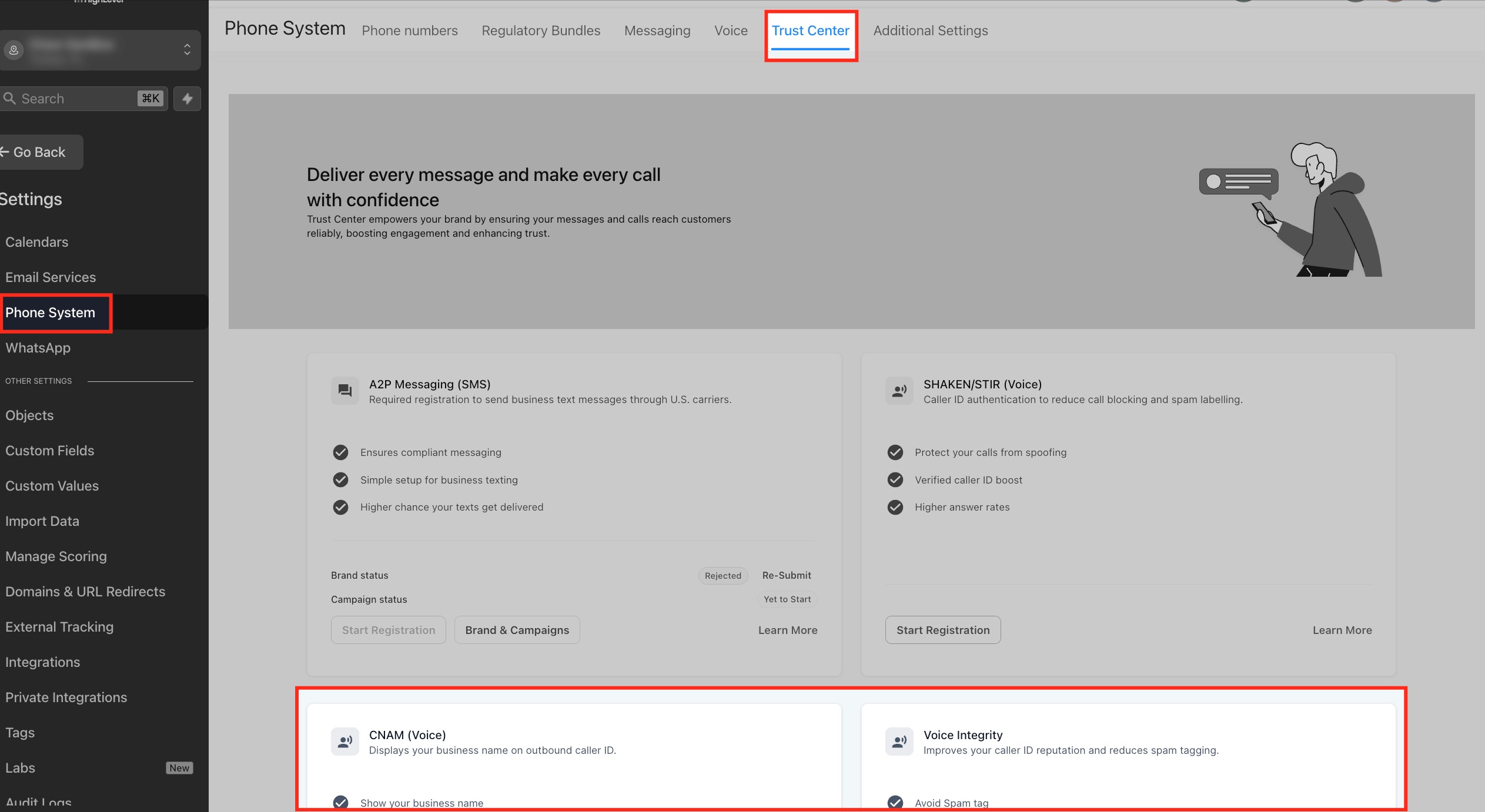
Step 3: Review CNAM
Accurate caller-name information can help recipients identify your business even though CNAM does not directly control spam classification.
From Trust Center, open CNAM (Voice).
Confirm that the registered name is accurate.
Complete or update the registration when appropriate.
Keep in mind that the receiving carrier ultimately controls whether the name appears.
Step 4: Submit the Number for Reputation Review
If the number is eligible and your business meets the requirements:
Go to Settings → Phone Numbers → Trust Center → Voice Integrity.
Select the affected eligible U.S. number.
Complete the required business and registration information.
Submit the application.
Monitor the application status.
Voice Integrity submits eligible numbers to major caller analytics providers for reputation review.
If you do not have an EIN and cannot use the documented SHAKEN/STIR/CNAM route, review the Free Caller Registry option instead.
Step 5: Review Your Calling Behavior
Registration alone may not resolve a reputation problem if the calling patterns that contributed to the issue continue.
Review:
Call volume and unexpected spikes.
Frequency of repeated calls to the same contacts.
Consent and opt-out handling.
Accuracy of your calling lists.
Whether one number is being used for unrelated types of campaigns.
Whether your calls resemble suspicious neighbor-calling patterns.
Adjust your calling practices where necessary and continue monitoring the number's reputation.
Step 6: Monitor the Result
Reputation changes are not always immediate, and display behavior can vary among carriers and analytics providers.
Continue monitoring:
Whether the Spam Likely label remains.
Which carriers continue showing the label.
Whether caller-name or trusted-call information appears correctly.
Whether the number develops new complaints or reputation issues.
If one provider continues to classify the number incorrectly after applicable remediation, carrier- or analytics-provider-specific review may still be necessary.
Step 7: Consider Number Replacement if Appropriate
If the number is new or non-critical, has a serious existing reputation issue, or remediation is not practical, replacing it may be appropriate.
For established business numbers, evaluate the operational impact and complete reasonable remediation efforts before replacing the number.
Frequently Asked Questions
Q: Does SHAKEN/STIR remove a Spam Likely label?
No. SHAKEN/STIR authenticates caller ID information and helps verify that the caller is authorized to use the phone number. LeadConnector specifically notes that it does not remove nuisance labels.
Q: Does CNAM remove Spam Likely?
No. CNAM associates a caller name with a U.S. phone number. It can improve caller recognition, but it does not remove nuisance labels.
Q: Why might my number still show as Spam Likely after Voice Integrity registration?
Carriers and analytics providers continue evaluating number reputation and calling behavior. Registration does not guarantee a permanent label change or identical caller ID presentation across every carrier and device.
Q: Can my number be marked as spam again after it has been remediated?
Yes. Calling volume, recipient feedback, complaint activity, and other reputation signals can continue affecting how carriers and analytics providers classify a number.
Q: Why doesn't my business name appear after CNAM registration?
The receiving carrier determines whether CNAM is supported and how caller-name information is displayed. Registering CNAM does not guarantee that every recipient will see the business name.
Q: What should I do if only some carriers show my number as Spam Likely?
Spam-label behavior can vary by carrier and caller analytics provider. Complete the applicable LeadConnector trust and reputation registrations, review your calling behavior, and monitor which providers continue displaying the label.
Q: Should I use Voice Integrity or Free Caller Registry?
LeadConnector recommends Voice Integrity for eligible businesses with an EIN. Businesses without an EIN can review Free Caller Registry as an alternative for eligible U.S. numbers.
Q: When should I replace a phone number instead of trying to remediate it?
LeadConnector notes that replacement may be more practical when a flagged number is relatively new, non-critical to the business, or has an FTC complaint associated with it. Established business numbers should be evaluated carefully before replacement.