
Effective Date: 12th Feb 2026. This new ESP Block Policy will be implemented on 12th Feb 2026. Current users will receive advance notification and have time to review their email practices before enforcement begins.
What you should do now: review your current bounce classification data, implement recommended email authentication and best practices, clean your email lists and improve content quality, and monitor your ESP block rates closely.
What Are ESP Blocks?
ESP blocks occur when major email providers (Gmail, Yahoo, Outlook, etc.) reject your emails due to:
- Authentication failures (DMARC, SPF, DKIM issues)
- Poor sender reputation
- Content that appears spam-like
- Policy violations
- Technical configuration problems
Unlike regular bounces, ESP blocks are calculated separately and trigger immediate restrictions to protect your long-term email deliverability.
ESP Block System
The block system escalates through three temporary blocks, with warning emails sent before each one. Here is the full progression:
| ESP Block Rate | Action | Duration | Block Level |
|---|---|---|---|
| 3% | Warning Email Sent | Immediate notification | Pre-Block Warning |
| 5% | Email sending suspended | 12 hours | 1st Block |
| 3% (after 1st block) | Critical Warning Email Sent | Immediate notification | Pre-2nd Block Warning |
| 5% (after 1st block) | Email sending suspended | 24 hours | 2nd Block |
| 3% (after 2nd block) | Final Warning Email Sent | Immediate notification | Pre-3rd Block Final Warning |
| 5% (after 2nd block) | PERMANENT SUSPENSION | Permanent | 3rd Block — FINAL |
All blocks are reset after 7 consecutive days of maintaining ESP block rates below 1%.
In this release, email sending will not be permanently disabled. Each block will be temporary and limited to a 24-hour duration only.
What You'll See When Blocked
If your email service is blocked due to ESP Block Detected, you will see the following error message displayed as a top banner inside the affected subaccount:
Email sending is blocked due to a high number of spam blocks from email providers.
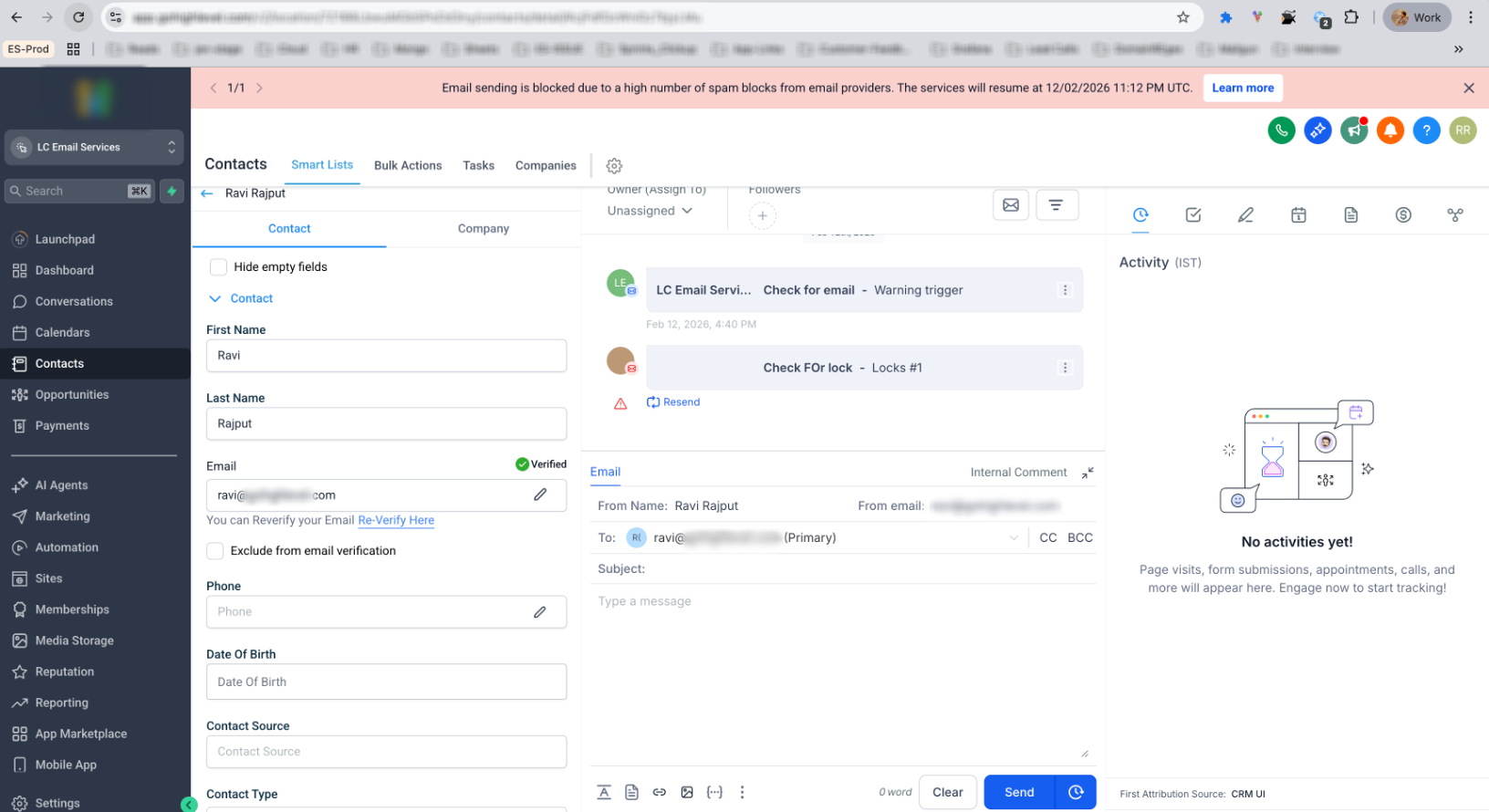
This block is enforced to protect email deliverability and prevent further reputation damage with Email Service Providers (ESPs).
How to Request Permanent Unblock
Permanent unblocking cannot be done automatically. Reach out to your agency owner in order to unblock the same.
Agency owners review each request manually before lifting a permanent suspension to ensure the underlying deliverability issues have been addressed.
Why This Matters
- ESP blocks damage your sender reputation permanently
- Poor reputation leads to emails landing in spam folders
- Reduced deliverability impacts your business revenue
- Recovery can take weeks or months without proper action
- Major ESPs are increasingly strict about email quality
- Authentication requirements are now mandatory
- Content filtering has become more sophisticated
- Sender reputation affects all future campaigns
Next Steps
Use the Bounce Classification to understand your specific ESP blocks.
Address the identified issues using our detailed support guides.
Track your improvements through the analytics dashboard.
Ensure fixes are working before resuming normal sending.
Support Resources
- Access detailed ESP block analysis
- View error categories and volumes
- Get specific recommendations for your account
- Monitor improvement progress
Category-Specific Support Guides. Each ESP block category in your analytics dashboard links to detailed fix guides:
Time-Sensitive Actions
- Complete email authentication setup
- Clean all email lists thoroughly
- Optimize email content and templates
- Test email delivery across major providers
- Monitor analytics dashboard daily
- Review analytics data immediately
- Identify top 3 ESP block categories
- Begin implementing critical fixes (authentication, major content issues)
- Complete all technical fixes
- Clean email lists and remove problematic content
- Test email delivery to major providers
- Monitor analytics dashboard daily
- Maintain email best practices
- Regular list hygiene and engagement monitoring
Important Reminders
- ESP blocks are separate from regular bounces — they require immediate attention.
- Each provider has different requirements — use analytics to see provider-specific issues.
- Prevention is better than cure — implement proper email practices from the start.
- Time is critical — delays in fixing issues can lead to permanent restrictions.
- You have 30 days to prepare — use this time wisely to optimize your email practices.
Your email deliverability and business success depend on taking action now. Start with the Email Analytics dashboard and begin preparing for the new policy implementation.
ESP Block Lock — AUP Update
Separate from the ESP Block Policy above, the underlying ESP Block Lock mechanism — the automated system that temporarily locks a sender out for damaging shared IP reputation — is also being updated. These changes tighten the confidence bar required before a lock can fire, so occasional volume spikes stop being mistaken for bad sending behavior.
13th Aug 2026. This update applies to the ESP Block Lock evaluation logic only and is independent of the 12th Feb 2026 ESP Block Policy timeline described above.
Before: The system would evaluate ESP block rate after just 15 sends — extremely low confidence.
After: The minimum send count before a lock can fire is now tiered based on the ESP block rate, matching the same logic already applied to bounce.
Before: Just 15 ESP block events could contribute to a lock.
After: At least 25 ESP blocks must occur before the system considers locking — eliminating locks triggered by a single small send spike.
| Parameter | Before | After |
|---|---|---|
| Minimum send floor | Flat 50 sends | Tiered up to 500 sends, based on ESP block rate |
| Minimum ESP block count | 15 blocks | 25 blocks |
3 in 10 ESP block locks were triggered by bulk campaign send spikes — not bad senders. A legitimate sender blasting a large list at once could hit the threshold purely from volume, get locked, and re-trigger within the hour after unlocking.
The system now requires a larger confirmed sample before locking. Repeat offenders who genuinely damage the shared IP remain blocked. Campaign senders who spiked once are no longer caught.
Frequently Asked Questions
This policy is designed to protect your sender reputation and ensure long-term email deliverability success. We're here to help you prepare and succeed with these new requirements.