
Overview
To comply with A2P 10DLC regulations and ensure successful campaign approval, all SMS communications must be backed by valid, explicit, and documented consent. Carriers require proof showing how contacts opted in and where the consent was collected. Generally, an opt-in message must clearly state that customers consent to receive text messages from your business, include an unchecked checkbox for that consent, and provide an opt-out option (e.g., instructing users to text “STOP” to unsubscribe).
This article explains each supported opt-in method and the compliance requirements associated with it.
You can meet the Opt-in requirements for your 10DLC registration through any of the approved consent methods listed below. Select the method your company will use to collect customer permission for your use case to view the specific requirements-
A) Website Form:
A web/online opt-in must be presented as a standalone consent form on your website or app. Example:
“Please check this box to opt in to receive promotional messages from [Company Name].”
This form must include an unmarked checkbox, clear consent language, and opt-out instructions (e.g., “Text STOP to opt out.”)
Note: One of the most important elements of this process is domain consistency between your website and the opt-in form URL.
B) QR Code:
A QR opt-in should direct customers to a web form where they can enter their phone number and provide consent, or open a pre-filled templated message in their SMS app that allows them to send a keyword confirming opt-in.
C) Paper Form:
Paper opt-in requires a signed document clearly stating the customer’s agreement to receive messages. Example:
“By signing below, I agree to receive promotional text messages from [Company Name].”
D) Verbal:
Verbal opt-ins must follow a documented script that explains how consent was obtained. You must keep a record of when and how the customer verbally agreed to receive messages.
E) Kiosk:
Kiosk opt-in must include a clear on-screen consent statement and a required checkbox that customers must select before submitting their information.
F) Facebook Lead Form:
Facebook Lead Ads must include a custom consent disclaimer within the lead form itself, ensuring users knowingly agree to receive text messages from your business.
Detailed Explanation
1. Website Form Opt-In
The user provides their phone number and agrees to receive SMS messages through a form on your website. This is the most common and preferred method because it provides clear, written consent.
Important Requirements for Web Form Opt-In:
Opt-in checkbox MUST be selectable by end-user
Opt-in checkbox MUST include a disclaimer (consent message) such as:
"I consent to receive sms notifications, alert from COMPANY NAME HERE. Message frequency varies. Message & data rates may apply. Text HELP to (XXX) XXX-XXX for assistance. You can reply STOP to unsubscribe at any time."Opt-in consent message and checkbox MUST be separated from Privacy Policy | Terms of Service and Promotional consent checkboxes. Promotional consent may be something like:
"By checking this box I agree to receive occasional marketing messages from INSERT COMPANY NAME HERE."Opt-in disclaimer MUST have ALL CTA disclosures present to be considered compliant:
- Program name and/or a description of the messages that will be sent (appointment reminders, marketing messages, occasional offers, etc.)
- Organization or individual being represented in the initial message.
Fee disclosure (“Message and data rates may apply”)
Service delivery frequency or recurring messages disclosure (“4 messages per month”, “Message frequency varies”, “1 message per login”, etc
Customer care information (typically “Text HELP for help” or Help at XXX-XXX-XXXX) - not required for single message programs (i.e 2FA)
Opt out instructions (“Text STOP to unsubscribe”) – not required for single message programs (i.e 2FA)
Link to Privacy Policy describing how end user opt-in information will be used. Be sure there is no mention of sharing of personal information with Third Parties (Must not be part of the checkbox statement. Instead, provide the link at the bottom of the form)
Link to Terms and Conditions describing terms of service (Must not be part of the checkbox statement. Instead, provide the link at the bottom of the form)
Incorporate a checkbox option that end-users must select in order to receive SMS messaging. The checkbox can not be pre-selected. The checkbox provides the end-user the ability to agree, or not agree, to receive SMS messaging.
- Program name and/or a description of the messages that will be sent (appointment reminders, marketing messages, occasional offers, etc.)
Examples of Web Form Opt-In Flow
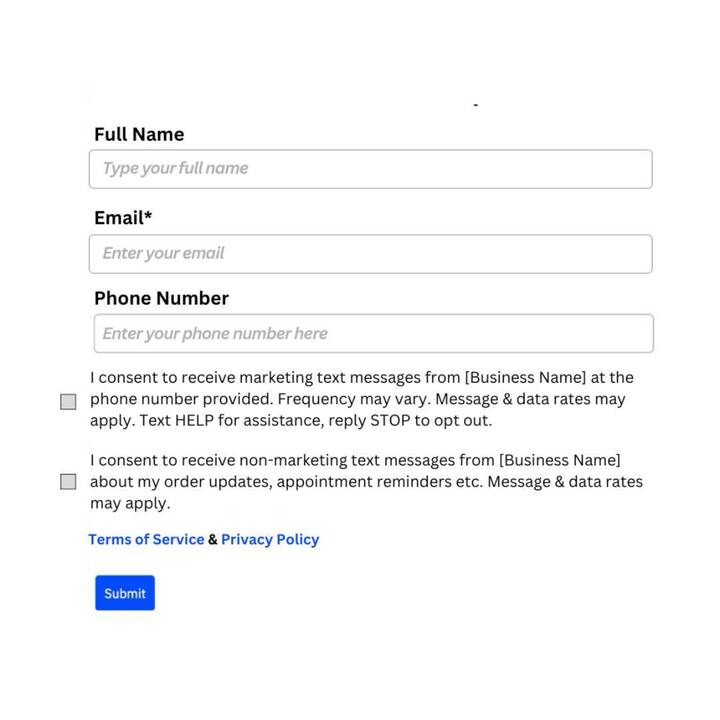
When Phone Number field is mandatory:
Consent checkboxes should be separated for both Marketing and Non-Marketing messages.
Consent checkboxes cannot be pre-selected and should be optional when the phone number is required.
SMS notifications cannot be forced — you cannot require BOTH consent and the phone number to proceed.
Privacy Policy and T&C at footer.
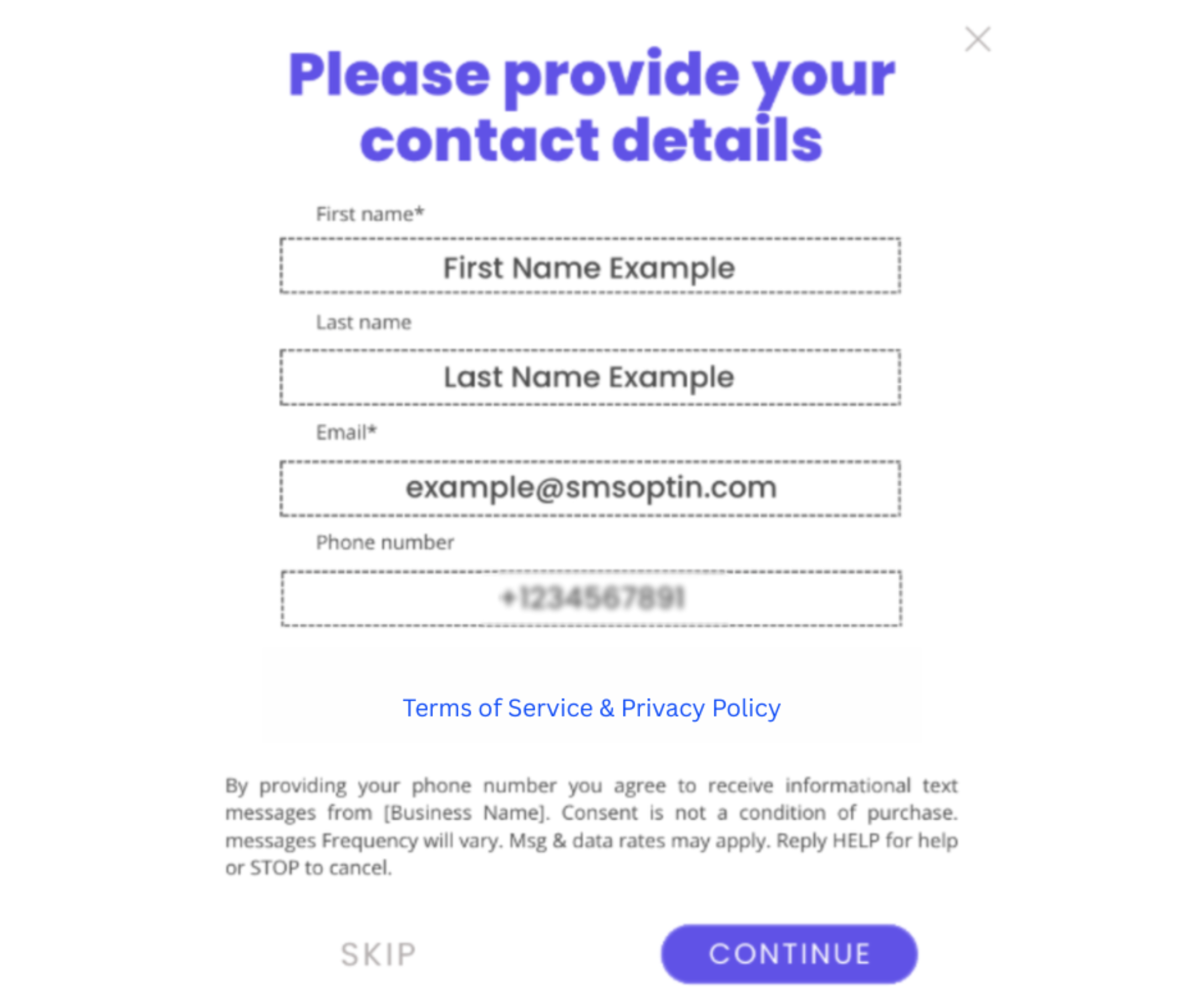
When Phone Number field is not mandatory:
Consent checkboxes not required when the phone number field is not mandatory.
Privacy Policy and T&C at footer.
PLEASE NOTE:
If the web opt-in is behind a login or not yet published, host a screen shot on a publicly accessible website (like OneDrive or Google Drive) and provide the image URL and the website URL in your registration form where it asks: "How do end-users consent to receive messages?"
To get a useable image link, you can upload the screenshot to your Media Storage Library in your account as shown in the screenshot below: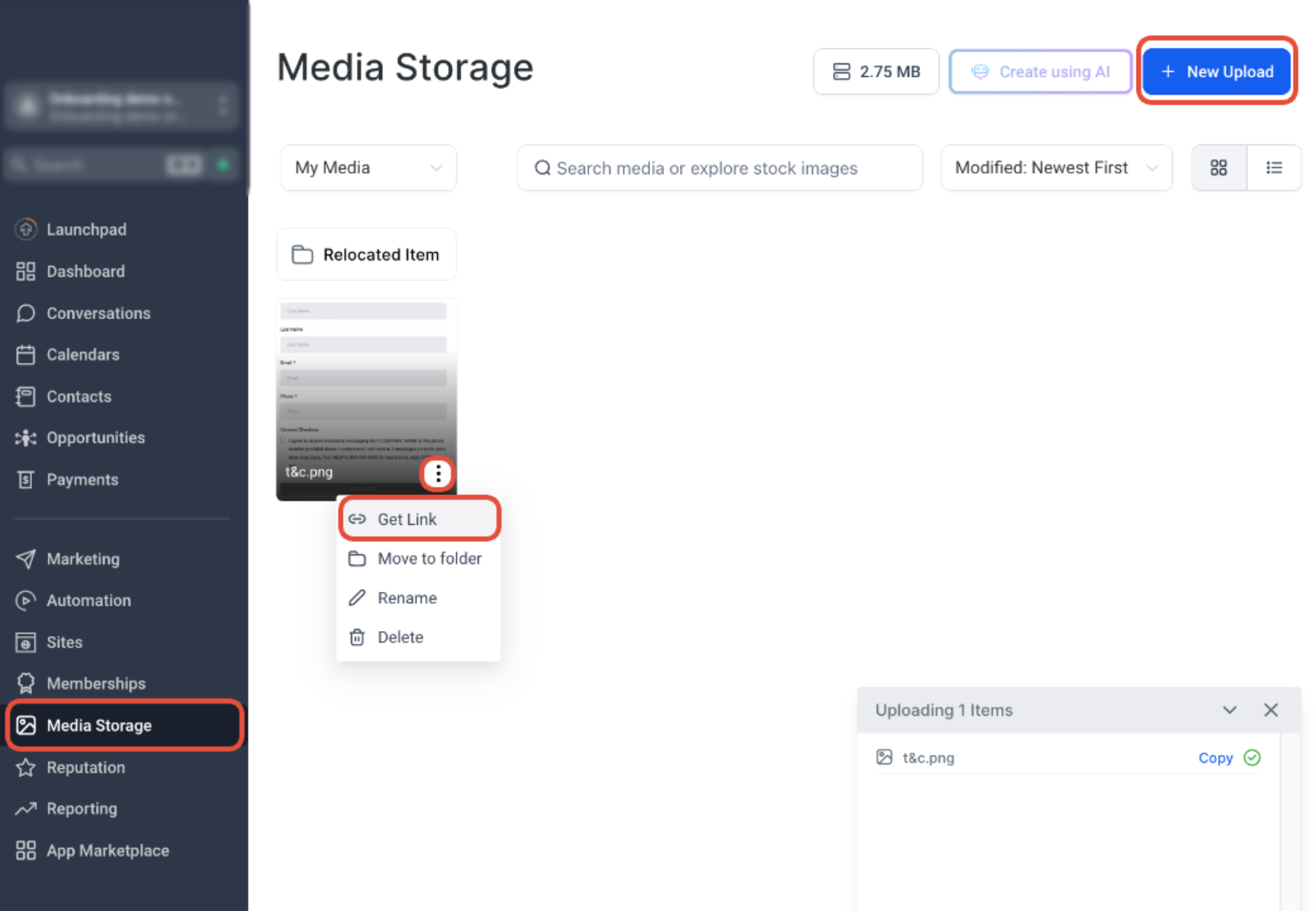
Proof Needed:
Provide a live URL and/or screenshots showing the exact opt-in form.
2. QR Code Opt-In
You can also use a QR code that links to an online form prompting end-users to enter their mobile phone number and opt into the texting campaign.
QR codes can direct the consumer to the messaging application used on their mobile device (for example iMessage) with a templated opt-in message, or can even take the consumer directly to a web-form opt-in on your website.
PLEASE NOTE: If the QR code leads to a Web-Form Opt-In, please follow all requirements listed in this article above where we discuss the Web-Form Opt-In method.3. Paper Form Opt-In
An in-store visitor completes a physical form that collects their phone number and their consent to subscribe to your texting campaign.
Host a screenshot of the paper form on a publicly accessible website (like OneDrive or Google Drive or Subaccount's media library) and provide the URL in the answer for "How do end-users consent to receive messages?".
4. Verbal Opt-In
A user verbally agrees to receive SMS during a phone call or in-person interaction.
This method is accepted but highly regulated.
Compliance Requirements
Conversation must include a clear consent statement
You must record that the customer explicitly agreed to receive SMS
Documentation must include:
Date & time
Agent or representative
Summary of the exact consent statement used
Below is an example of a verbal opt-in, which would happen during a phone call with the consumer. You can also get a verbal opt-in by using a phone IVR flow, which would consist of an automated system getting opt-in confirmation from the consumer.
Phone IVR: "As part of our service we can send you automated monthly text alerts regarding account payment activity. We will send two messages per month. Message and data rates may apply, depending on your mobile phone service plan. At any time you can get more help by replying HELP to these texts, or you can opt-out completely by replying STOP. Mobile Terms of Service are available at http://yourcompany.com/terms and our Privacy Statement can be found at https://yourcompany.com/privacy. Please reply with 'yes' or 'no' to indicate if you would like this service".
Customer: "Yes please"
Phone IVR: "Great! We will send you a text message to confirm your enrollment here shortly."
Note: 1. If verbal opt-in is selected, please provide a publicly accessible Google Doc or PDF link that includes the exact verbal opt-in script used in opt-in form/Image url field, along with a brief explanation of when and how the script is presented to users to obtain consent.
example
2. Verbal consent is strictly forbidden for marketing campaigns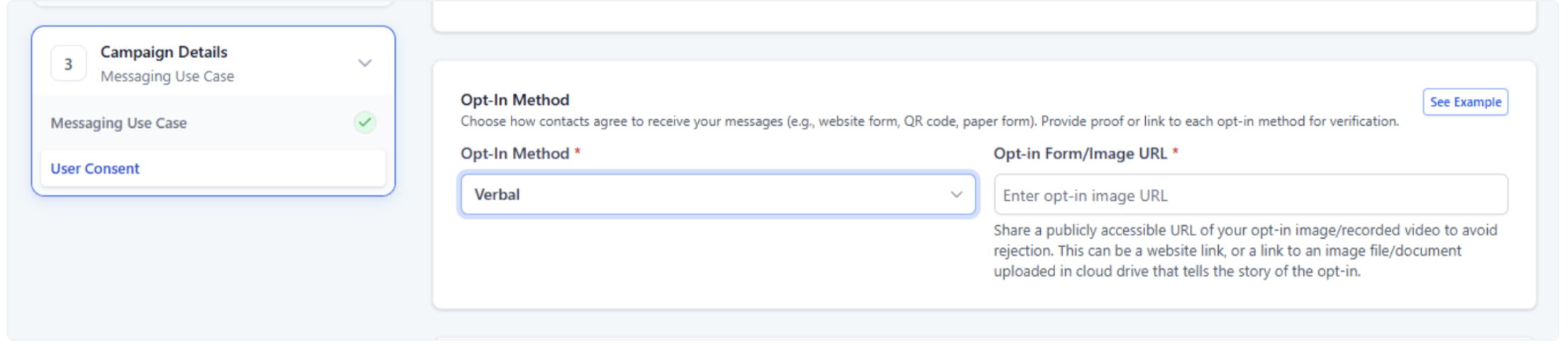
5. Kiosk Opt-In
A customer enters their phone number through a kiosk, tablet, or in-store digital signup device.
Compliance Requirements
Screen must display full SMS consent wording
User must manually enter the phone number (cannot be pre-filled)
All disclosures must be visible at the time of consent, including:
Brand name
Purpose
STOP/HELP
Terms & Privacy Policy
6. Facebook Lead Form Opt-In
Customers consent to SMS messaging while filling out a Facebook Lead Ad form.
Compliance Requirements
Lead form must include clear SMS consent language
Consent checkbox must not be pre-checked
Form must identify your business/brand name
Opt-in must specify message purpose and opt-out instructions when possible
Facebook’s shortened text area must still clearly show SMS consent
Compliance Essentials for All Opt-In Methods
✔ Business/brand identity
✔ Clear SMS consent language
✔ Purpose of messaging
✔ STOP & HELP instructions
✔ Message frequency or “frequency varies”
✔ “Message and data rates may apply” disclaimer
✔ Visible Terms of Service & Privacy Policy
✔ Ability to provide proof of opt-in
Lack of proper consent proof is a top reason A2P 10DLC campaigns are rejected.
Summary
Each opt-in method—Website, QR Code, Paper Form, Verbal, Kiosk, Facebook Lead Form—must clearly demonstrate how the user provided explicit permission to receive SMS.
Following these requirements helps ensure:
Higher chances of A2P approval
Reduced filtering
Lower suspension risk
Better customer trust
Need Help?
If your A2P campaign is being rejected because of opt-in or consent issues, first review the consent method, disclosure language, and proof submitted with the registration.
Verify that:
- The opt-in method selected in your registration matches how contacts actually provide consent.
- The business name is clearly identified at the time of opt-in.
- The message purpose is explained clearly.
- The consent language specifically states that the contact agrees to receive SMS messages.
- Any required consent checkbox is optional and not pre-selected.
- Marketing and non-marketing consent are separated when required.
- Required disclosures include message frequency and “Message and data rates may apply.”
- STOP instructions are included where applicable.
- HELP or customer care information is included where applicable.
- Links to the Privacy Policy and Terms of Service are visible and publicly accessible.
- The Privacy Policy does not state that SMS opt-in data is shared with third parties for unrelated marketing purposes.
- Website and opt-in form domains are consistent where required.
- Screenshots or supporting proof are publicly accessible if the opt-in flow is not publicly available.
- QR codes lead to a compliant web form or clearly documented SMS opt-in flow.
- Paper forms clearly show consent language and can be provided as proof.
- Verbal consent includes a documented script and records when and how consent was obtained.
- Verbal consent is not being used for marketing campaigns.
- Kiosk opt-ins display all required consent disclosures before submission.
- Facebook lead forms clearly identify SMS consent and do not use a pre-checked consent option.
- The exact opt-in flow submitted for A2P review matches the messaging use case in the campaign.
If the campaign was rejected, review the rejection reason carefully and update the consent language or proof before resubmitting.
If the issue continues, collect the campaign use case, opt-in method, live form URL or proof URL, consent language, Privacy Policy and Terms links, screenshots of the opt-in flow, and the rejection reason before contacting support.