
Automatically generating Marketing Audit Reports through workflows allows you to instantly analyze every new lead’s online presence. This helps you understand opportunities faster, personalize outreach, and improve conversion rates without manual effort.
TABLE OF CONTENTS
- What is the Marketing Audit Workflow Action?
- Action Name
- What Data is Used to Generate Reports?
- What is a Marketing Audit Report?
- How to Set Up the Workflow Action
- How the Workflow Action Works
- Duplicate Prevention (Important)
- Where to Find Generated Reports
- Example Use Case: Automating Lead Audits
- Frequently Asked Questions
- Need More Help
What is the Marketing Audit Workflow Action?
The Marketing Audit workflow action enables automatic report generation for any contact entering your system. Instead of manually running audits, this feature uses available contact data to create a detailed report instantly.
This allows teams to:
Identify gaps in a business’s online presence
Understand SEO, listings, and reputation performance
Personalize communication based on real insights
Save time by automating repetitive analysis tasks
Unlike previous limitations, this action works for contacts from any source, including forms, ads, imports, integrations, and more.
Action Name
Generate Marketing Audit Report
What Data is Used to Generate Reports?
The workflow action pulls information directly from the contact record to generate the audit.
This may include:
Business name
Website URL
Address (city, state, zip code)
Email
Phone number
More complete and accurate contact data leads to more reliable audit results.
What is a Marketing Audit Report?
A Marketing Audit Report provides a structured overview of a business’s online presence. It evaluates key performance areas and highlights opportunities for improvement.
The report typically analyzes:
Business listing accuracy
Website performance
Search visibility (SEO)
Online reputation and reviews
Business profile completeness
These insights help guide decision-making, improve onboarding, and support better marketing strategies.
How to Set Up the Workflow Action
Proper workflow setup ensures that every new contact is automatically analyzed without manual intervention, allowing your team to act quickly with data-backed insights.
Create a Workflow to Generate Reports Automatically
Open your automation/workflow builder
Create a new workflow
Add a trigger (recommended: Contact Created)
Click Add Action
Select Generate Marketing Audit Report
Map the required contact fields (business name, address, etc.)
Save the action
Publish the workflow
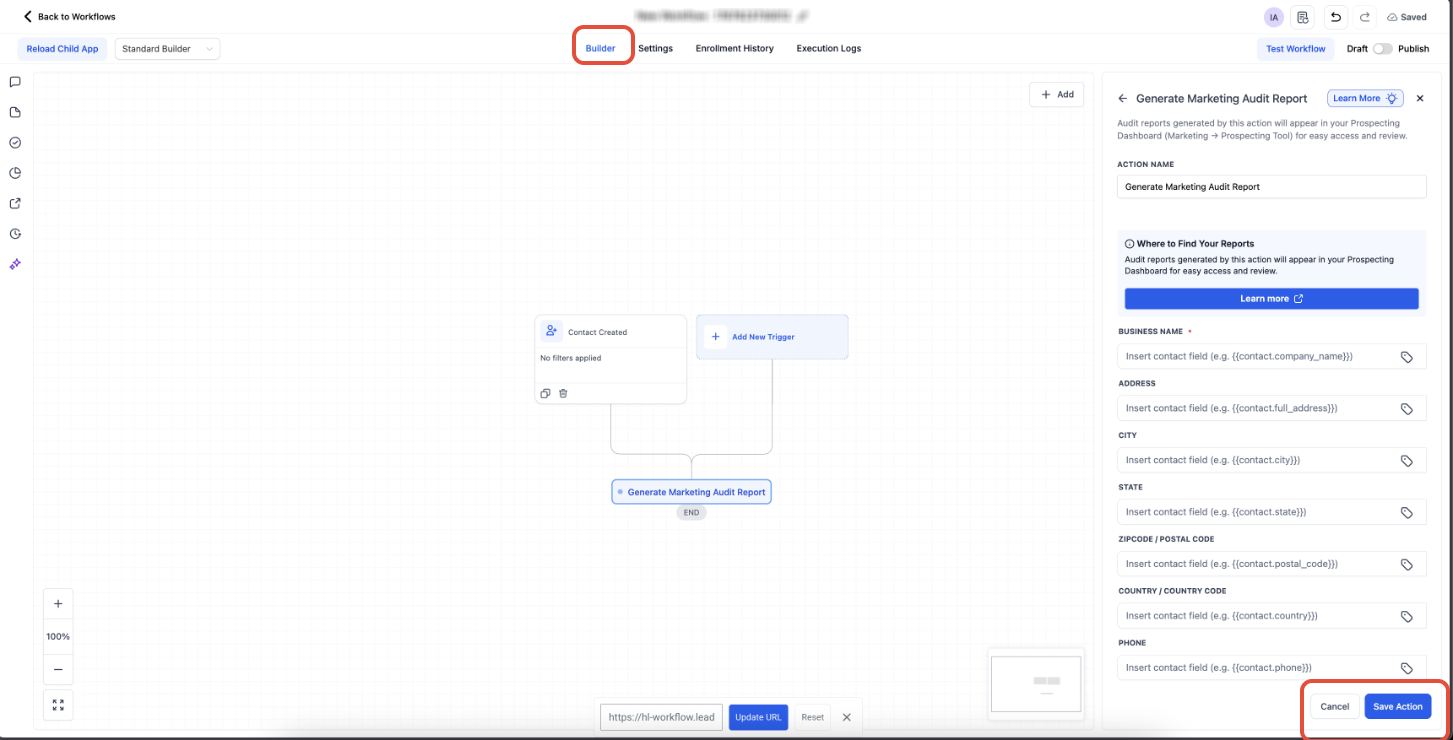
This screen shows the workflow builder with the audit action configured and fields mapped.
What to do: Add the “Generate Marketing Audit Report” action, map the required fields, then click Save Action and publish the workflow.
How the Workflow Action Works
Understanding how the automation runs helps ensure your data is structured correctly and your reports are accurate.
When a contact enters the workflow:
The system reads available business information
It identifies the correct business entity
A detailed audit is generated automatically
The report is attached to the contact record
This entire process runs automatically once configured.
Duplicate Prevention (Important)
To maintain clean and reliable data:
Duplicate audit reports are automatically prevented
Existing audit workflows will not re-trigger for the same contact
Previously analyzed records are intelligently managed
This ensures reports are not unnecessarily duplicated.
Where to Find Generated Reports
Once the workflow runs, reports are stored and easily accessible for review and follow-up.
To locate a generated report:
Navigate to your Prospecting area
Search for the contact or business
Open the record
View the associated Marketing Audit Report
If the Prospecting section is not visible, ensure the feature is enabled for your account.
Example Use Case: Automating Lead Audits
Automating audits for every new lead ensures no opportunity is missed and allows your team to respond with relevant, data-driven insights.
Scenario:
A new contact is created from a form, ad, or import
The workflow triggers instantly
A Marketing Audit Report is generated
Your team gains immediate visibility into performance gaps
This enables you to:
Personalize outreach based on real data
Identify opportunities before initial contact
Improve engagement and conversion rates
Frequently Asked Questions
Q: Can I generate reports for contacts from any source?
Yes. Reports can be generated for contacts from forms, ads, imports, integrations, and more.
Q: What happens if contact data is incomplete?
The report will still generate, but accuracy may be limited. More complete data improves results.
Q: Will this create duplicate reports?
No. Duplicate reports are automatically prevented.
Q: Do I need to manually run the report?
No. Once added to a workflow, the process is fully automated.
Q: Where are the reports stored?
Reports are available inside the Prospecting section under the associated contact.
Need More Help
If you need assistance setting up workflows or generating reports, open the Help Center from your dashboard or contact support for further guidance.