
When an SEO subscription is canceled, the system automatically starts an offboarding flow designed to preserve your existing optimizations while pausing active automation.
TABLE OF CONTENTS
- Overview of the SEO Subscription Unsubscribe Flow
- Key Benefits of the SEO Subscription Unsubscribe Flow
- How to Cancel the SEO Subscription
- The “Frozen” State
- Managing Your Live Optimizations
- Re-subscribing and Reactivation
- Project Status Comparison
Overview of the SEO Subscription Unsubscribe Flow
The SEO unsubscribe flow explains what happens to your SEO projects after the SEO subscription is canceled. The system preserves existing project data and applied SEO Pixel fixes while pausing active automation such as crawling and new recommendations.
After unsubscription, projects that use the SEO Pixel move into a Frozen state. In this state, previously applied fixes remain live on the website as long as the SEO Pixel script stays installed, but active automation stops. Existing project settings and applied fixes are retained in your account, which makes later reactivation easier.
Key Benefits of the SEO Subscription Unsubscribe Flow
- Fix Preservation: SEO recommendations and fixes already applied through the SEO Pixel can remain live on your website after unsubscription, so previous implementation progress is not lost.
- Automatic Offboarding: Projects move into a Frozen state automatically, with no manual offboarding required.
- Project Retention: Existing project settings and applied fixes stay associated with your account, which supports easier future reactivation.
How to Cancel the SEO Subscription
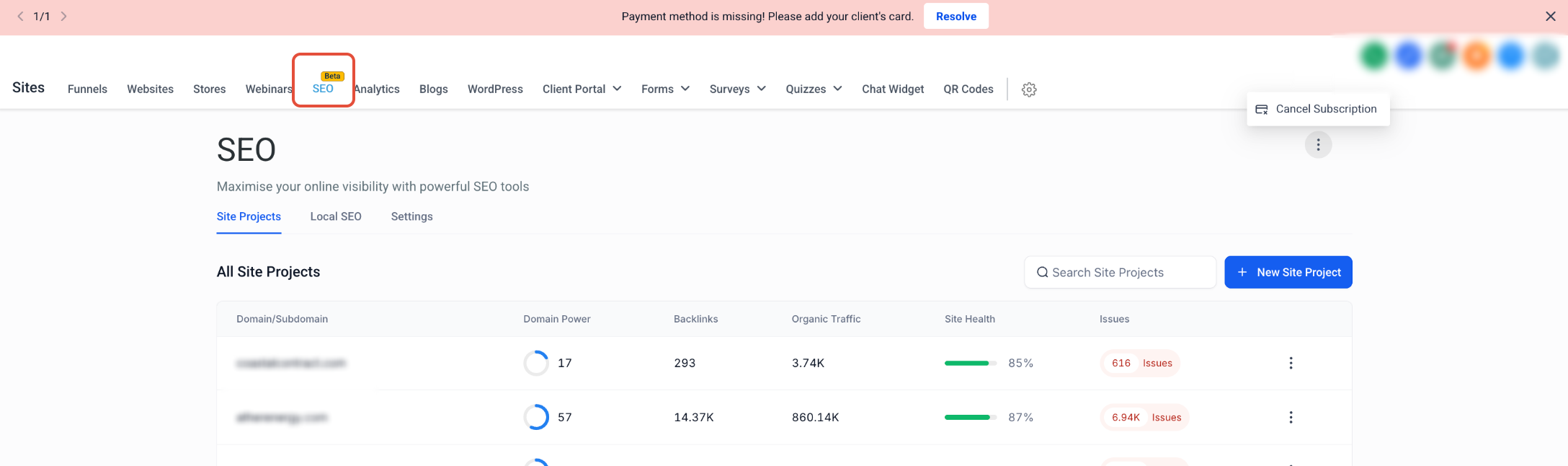
- In your account, go to Sites > SEO.
- On the Site Projects tab, click the three-dot menu in the upper-right area of the SEO page and select Cancel Subscription.
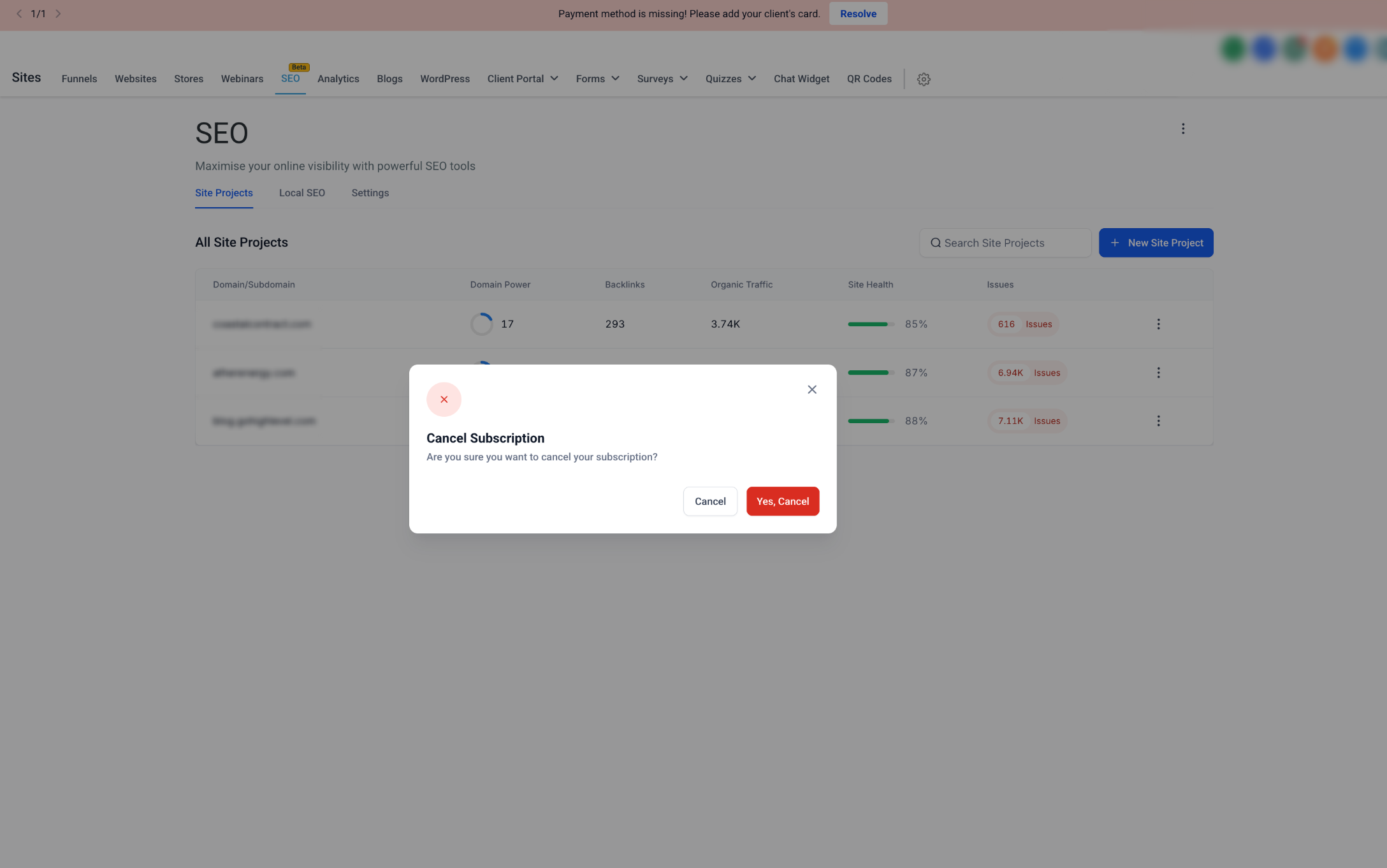
- In the confirmation modal, click Yes, Cancel to confirm the cancellation.
The “Frozen” State
If you have active projects using the SEO Pixel, those projects automatically transition into a Frozen state upon unsubscription. This process happens in the background—no manual action is required.
Key characteristics of a Frozen project
- Fix Preservation: All SEO recommendations and fixes previously applied via the pixel script remain live on your website. Your implementation progress is not lost when your subscription ends.
- Automation Paused: The system stops crawling your site and stops generating new SEO audit recommendations.
- Data Retention: Your existing project settings and applied fixes are retained within your account.
Managing Your Live Optimizations
You maintain control over how SEO changes are reflected on your site after unsubscribing:
- To retain changes: Keep the SEO Pixel script on your website. As long as the script remains installed, your applied optimizations continue to be served to visitors.
- To remove changes: Remove the SEO Pixel script from your website’s code. This immediately reverts the site to its original state.
Re-subscribing and Reactivation
If you choose to re-subscribe, returning to an active state is straightforward:
- Re-subscribe to an active subscription.
- Re-link your projects within the dashboard.
- The project moves to an Unfrozen state, restoring your ability to re-crawl, generate new recommendations, and apply new SEO fixes.
Project Status Comparison
Active subscription
- Existing Pixel Fixes: Live & Editable
- Site Crawling: Enabled
- New Recommendations: Enabled
- System Action: Full Automation
Frozen (Unsubscribed)
- Existing Pixel Fixes: Live (Read-Only)
- Site Crawling: Paused
- New Recommendations: Paused
- System Action: Automatic Suspension
Need Help?
If your SEO project does not move to the expected status after cancellation or reactivation, first review the subscription status, project state, and SEO Pixel installation.
Verify that:
- The SEO subscription cancellation was completed successfully.
- The affected project shows the expected Frozen status after cancellation.
- The SEO Pixel remains installed if you want previously applied fixes to stay live.
- The SEO Pixel has not been removed or altered on the website.
- You are not expecting new crawls or recommendations while the project is Frozen.
- Existing fixes are being treated as read-only while the subscription is inactive.
- You have re-subscribed before attempting to reactivate the project.
- The project was re-linked after re-subscribing.
- The project moved out of the Frozen state after reactivation.
- Crawling and new recommendations resumed only after the project was successfully reactivated.
If existing SEO changes disappear after cancellation, confirm that the SEO Pixel is still installed and loading correctly on the website. If the project remains Frozen after re-subscribing, review whether it was re-linked successfully.
If the issue continues, collect the project name, subscription status, current project status, whether the SEO Pixel is installed, date and time of the cancellation or reactivation, and screenshots of the SEO project settings before contacting support.