
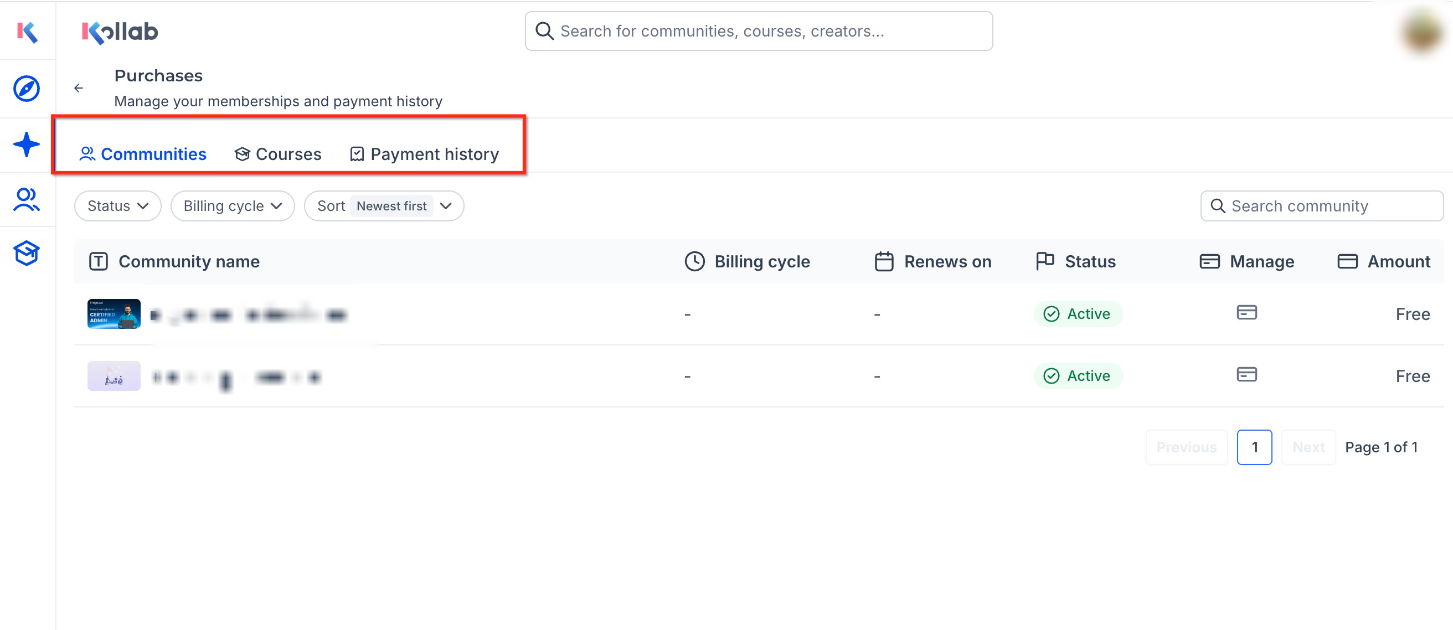
Manage Purchases gives GoKollab users one centralized place to view their communities, courses, and payment history. Instead of switching between different areas to check memberships, learning access, or past payments, users can review their purchase-related information from their profile menu. This helps users stay organized, understand their access, and manage account details more confidently.
TABLE OF CONTENTS
- What is Manage Purchases?
- Key Benefits of Manage Purchases
- How To Access Manage Purchases
- Frequently Asked Questions
What is Manage Purchases?
Manage Purchases is a centralized area in GoKollab where users can view and manage their memberships, courses, and payment history. It helps learners and community members quickly understand what they have joined, what they have purchased or enrolled in, and which payments have been made through GoKollab.
Manage Purchases is designed for users who want visibility into their own account activity. It is different from GoKollab Studio, which is used by creators to manage communities and courses they own.
Key Benefits of Manage Purchases
A centralized purchase view makes it easier for users to keep track of their memberships, courses, and billing history without searching across multiple pages. This improves account transparency and gives users more confidence when reviewing their learning access or past transactions.
- Centralized Purchase Visibility: View communities, courses, and payment history from one organized location.
- Easier Membership Tracking: See free and paid communities connected to your GoKollab account.
- Clearer Course Access: Review purchased and enrolled courses so you can quickly find your learning content.
- Improved Payment Transparency: Check past payments, invoices, and the payment methods used for previous transactions.
- More Organized Learner Experience: Keep memberships, courses, and billing details easier to understand and manage.
How To Access Manage Purchases
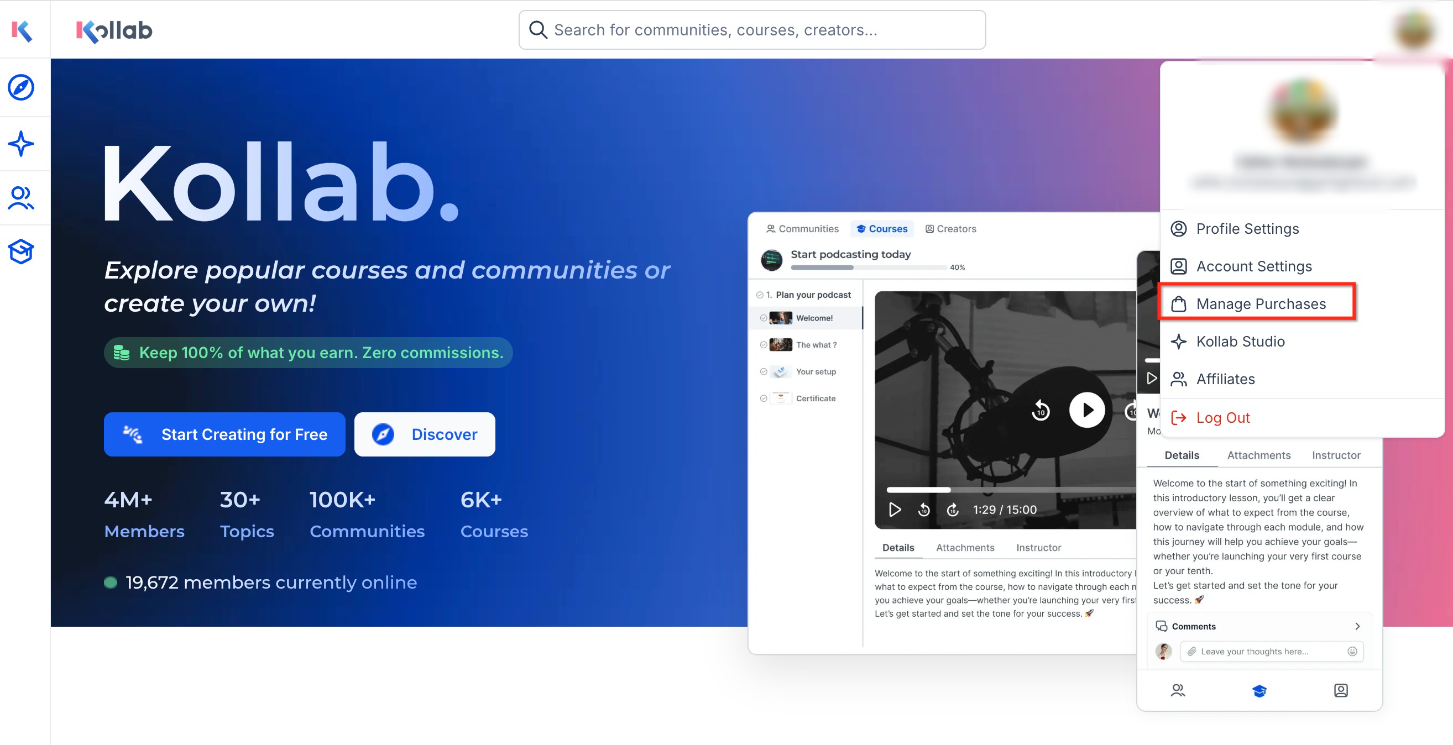
Manage Purchases is available from the GoKollab homepage profile menu. Accessing it from your profile ensures you are viewing purchase, membership, course, and payment details connected to your own GoKollab account.
To access Manage Purchases:
- Go to the GoKollab homepage.
- Click your Profile menu.
- Select Manage purchases.
- Use the available tabs to review your Communities, Courses, and Payment History.
Frequently Asked Questions
Q: Is Manage Purchases the same as GoKollab Studio?
A: No. Manage Purchases is for users who want to view their memberships, courses, and payment history. GoKollab Studio is for creators who manage communities and courses they own.
Q: Can I see both free and paid communities in Manage Purchases?
A: Yes. Manage Purchases allows users to view free and paid communities connected to their GoKollab account.
Q: Can I view my purchased courses from Manage Purchases?
A: Yes. The Courses tab shows purchased and enrolled courses associated with your GoKollab account.
Q: Can I download invoices from Manage Purchases?
A: Yes. Available invoices can be downloaded from the Payment History tab.
Q: Why do I see a payment method in my payment history?
A: Payment History shows the payment method used for past transactions so you can better understand and track previous purchases.
Q: What should I do if a course or community is missing?
A: Confirm that you are logged in with the same account used to purchase or enroll in the course or community. If the item still does not appear, contact the business or community owner for assistance.
Q: Can I update my payment method from Manage Purchases?
A: The release information confirms that users can view payment methods used for previous payments. It does not confirm that payment methods can be updated directly from Manage Purchases.
Q: Can I cancel a membership from Manage Purchases?
A: Manage Purchases helps users review membership and billing details. The release information does not confirm that cancellations can be completed directly from this page.