
Voice AI outbound calling helps businesses reach contacts using AI-powered phone calls. This article explains the updated outbound calling requirements, including consent responsibility, KYC, call limits, calling hours, same-country calling, and platform safeguards.
TABLE OF CONTENTS
- What is Voice AI Outbound Calling Compliance?
- Key Benefits of Voice AI Outbound Calling Compliance
- Flexible Outbound Calling Framework
- Location Compliance
- Consent Responsibilities
- Voice AI Outbound Calling Requirements
- AI Disclaimer Configuration
- Call Rate, Daily, and Phone-Number Limits
- Call Hours Rules
- Same-Country Domestic Calling
- How To Enable Voice AI Outbound Calling
- Frequently Asked Questions
What is Voice AI Outbound Calling Compliance?
Voice AI Outbound Calling Compliance refers to the rules and safeguards that apply when using Voice AI to place outbound calls. These requirements help businesses use outbound AI calling responsibly while protecting contacts from excessive or improper call activity.
The system enforces platform-level safeguards such as KYC, location eligibility, call limits, call-hour rules, same-country calling restrictions, and Acceptable Use Policy safeguards. Businesses are responsible for confirming they have the proper consent before placing outbound AI calls.
Key Benefits of Voice AI Outbound Calling Compliance
These safeguards help businesses scale outbound AI calling while keeping usage controlled, predictable, and responsible.
- Flexible Consent Management: Manage consent using your own systems, legal workflows, forms, surveys, calendars, or other approved business processes.
- Location Eligibility Controls: Outbound AI calling can only be enabled when the location meets required setup and KYC requirements.
- Higher Calling Capacity: Each eligible location can place up to 1,000 outbound Voice AI calls per day.
- Faster Call Throughput: Calls can be placed at up to 10 calls per minute per location.
- Phone-Number Protection Limits: Each phone number can only be called once per day and up to 14 times within a 14-day period.
- Time-Zone-Based Calling Windows: Calls are scheduled between 8:00 AM and 8:00 PM based on the contact’s phone-number timezone.
- Same-Country Domestic Calling: Outbound calls are supported for domestic numbers in the same country as the location.
- AUP Safeguards: Outbound calling may pause automatically if a location exceeds LC’s Acceptable Use Policy thresholds.
Flexible Outbound Calling Framework
The Flexible Outbound Calling Framework gives businesses more control over how consent is collected, stored, and verified. This reduces setup friction while keeping businesses responsible for lawful and compliant use of outbound AI calling.
Voice AI no longer performs platform-level contact consent validation before placing outbound calls. Businesses can manage consent using their own legal, operational, or compliance workflows.
Important details:
- The platform provides the outbound Voice AI calling tool.
- Your business is responsible for securing the correct level of consent before placing calls.
- Compliance obligations still apply even when consent is managed outside the platform.
- Platform safeguards still apply, including KYC, call limits, calling hours, domestic calling restrictions, and AUP thresholds.
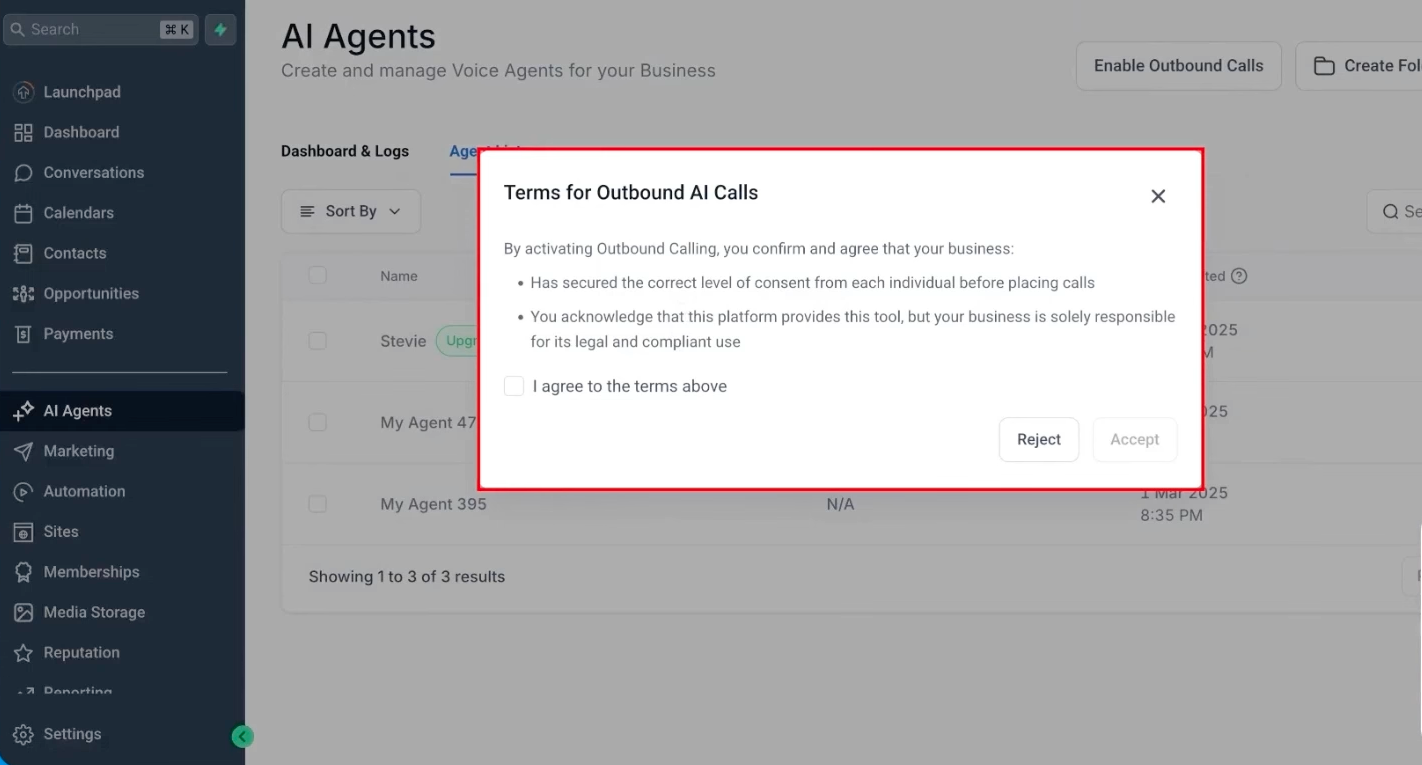
This screenshot shows the business acknowledging that it has secured the correct level of consent and is responsible for legal and compliant use.
Location Compliance
Location compliance determines whether location is eligible to use outbound Voice AI calling. These checks help ensure outbound calls originate only from locations that meet the required platform standards.
To use Voice AI outbound calling, the location must:
- Have Outbound Calling enabled.
- Complete KYC verification.
- Remain within platform usage and AUP thresholds.
Outbound AI calling is blocked for locations that do not meet eligibility requirements. If a location exceeds LC’s Acceptable Use Policy thresholds, outbound calls may be automatically paused.
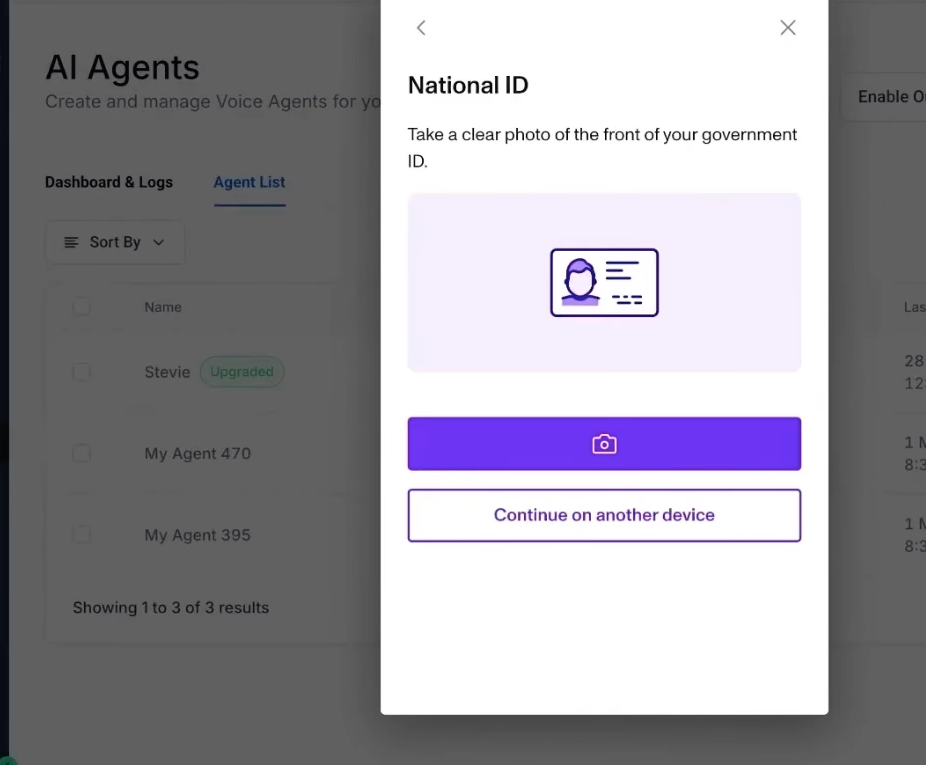
This screenshot shows the identity verification step required during KYC completion.
Consent Responsibilities
Businesses are responsible for confirming that each contact can legally receive outbound AI calls. Consent should be reviewed before contacts are enrolled into outbound calling workflows or campaigns.
Your consent process should confirm:
- The contact agreed to receive phone calls.
- The contact agreed to receive automated, prerecorded, or AI voice calls when required.
- The contact has not opted out or requested not to be called.
- The contact is eligible to be called under applicable laws and your business policies.
Businesses should continue honoring opt-outs, DND preferences, and any applicable legal restrictions before placing outbound AI calls.
Voice AI Outbound Calling Requirements
Clear consent language helps contacts understand what they are agreeing to before receiving outbound AI calls. The platform may display guidance to help businesses review whether their data collection channels include appropriate consent language.
Recommended consent language should include:
- A clear statement that the user agrees to receive phone calls and, where applicable, text messages.
- A disclosure that calls may be automated, prerecorded, or use an AI voice.
- A statement that the user agrees to receive communications from your business.
- Instructions for how the user can opt out of future calls or messages.
Consent language may need to be reviewed across forms, surveys, appointment forms, calendars, and other lead capture experiences.
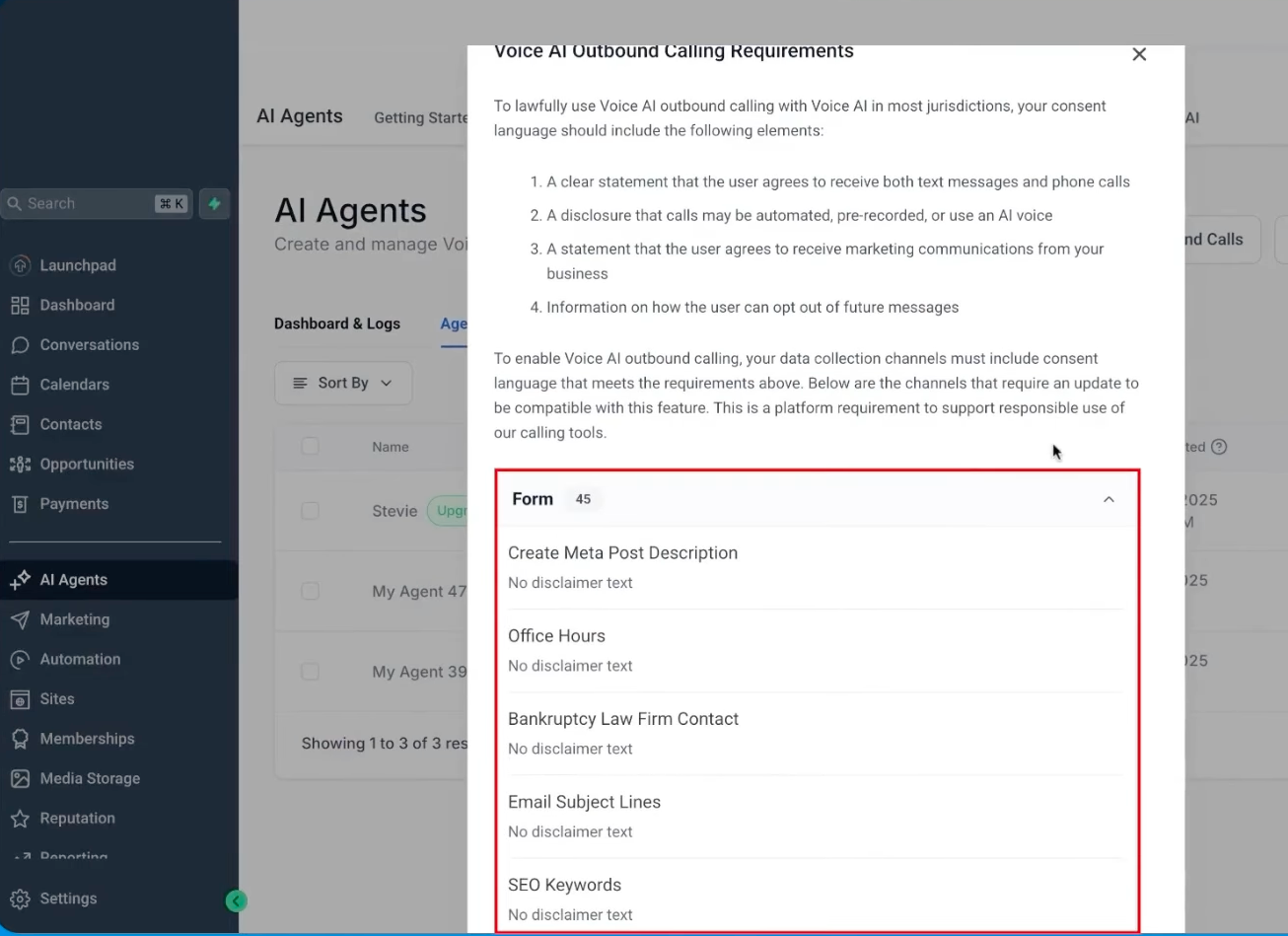
This screenshot shows consent-language guidance and the list of forms or assets that may need disclaimer text.
AI Disclaimer Configuration
AI disclaimer configuration controls how the Voice AI agent introduces itself and communicates opt-out language at the beginning of outbound calls. A clear greeting helps contacts understand who is calling, why they are being contacted, and how they can opt out.
When configuring an outbound Voice AI agent, you can:
- Choose a disclaimer style, such as Concise, Standard, or Conversational.
- Preview the disclaimer message.
- Add the agent’s intent message.
- Review the complete greeting before publishing.
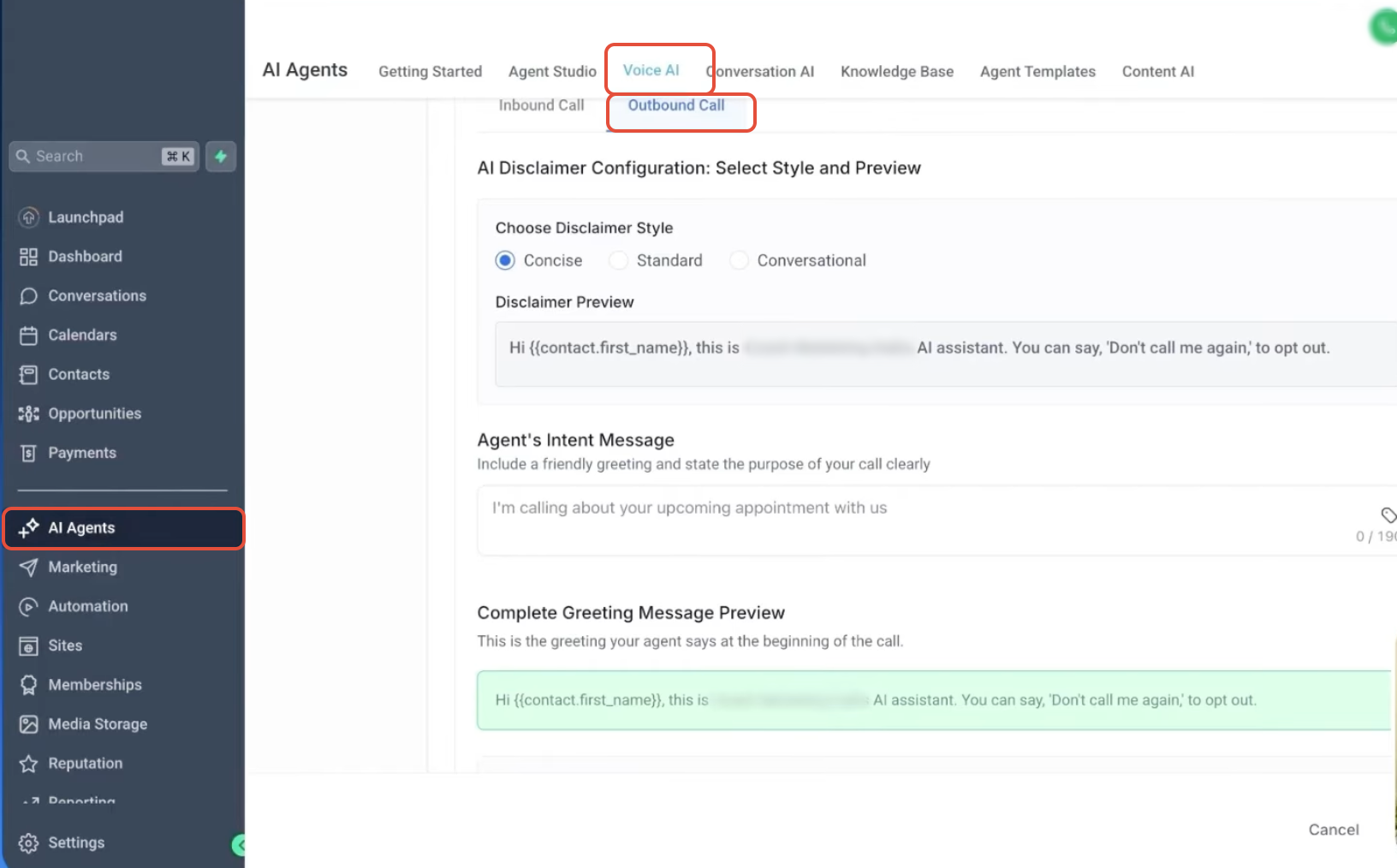
This screenshot shows disclaimer style options, disclaimer preview, agent intent message, and the complete greeting preview.
Call Rate, Daily, and Phone-Number Limits
Outbound calling limits help control call volume across locations and contacts. These safeguards reduce excessive call attempts and keep campaigns within the platform supported usage thresholds.
The platform enforces the following limits:
- Call rate: Up to 10 calls per minute per location.
- Daily limit: Up to 1,000 outbound Voice AI calls per location per day.
- Daily overflow: Calls over the daily limit are automatically scheduled for the next eligible day.
- Per-phone-number daily limit: Each phone number can be called once per day.
- Per-phone-number 14-day limit: Each phone number can be called up to 14 times within 14 days.
Call Hours Rules
Call-hour rules ensure outbound AI calls are placed only during the supported calling window for the contact. The platform uses the contact’s phone-number timezone to determine when the call can be made.
Voice AI outbound calls are scheduled only between:
8:00 AM and 8:00 PM based on the contact’s phone-number timezone
Calls outside this window are scheduled for the next eligible time.
Same-Country Domestic Calling
Same-country domestic calling ensures outbound Voice AI calls are placed only to eligible domestic numbers. This helps prevent calls from being placed across unsupported country boundaries.
Outbound Voice AI calls can only be placed to phone numbers in the same country as the calling location. Calls to unsupported international numbers are not eligible for outbound Voice AI calling.
How To Enable Voice AI Outbound Calling
Proper setup ensures your location is eligible for outbound Voice AI calling and that your business understands its compliance responsibilities before calls begin.
- Go to AI Agents in the platform.
- Open the Voice AI section.
- Select Outbound Call.
- Click Enable Outbound Calls.
- Review the Terms for Outbound AI Calls.
- Confirm your business has secured the correct level of consent.
- Check the agreement box and click Accept.
- Complete KYC verification if prompted.
- Configure your outbound Voice AI agent.
- Choose an AI disclaimer style and review the greeting preview.
- Add the Voice AI outbound call action to your workflow.
- Confirm the workflow follows outbound calling limits and contact eligibility requirements.
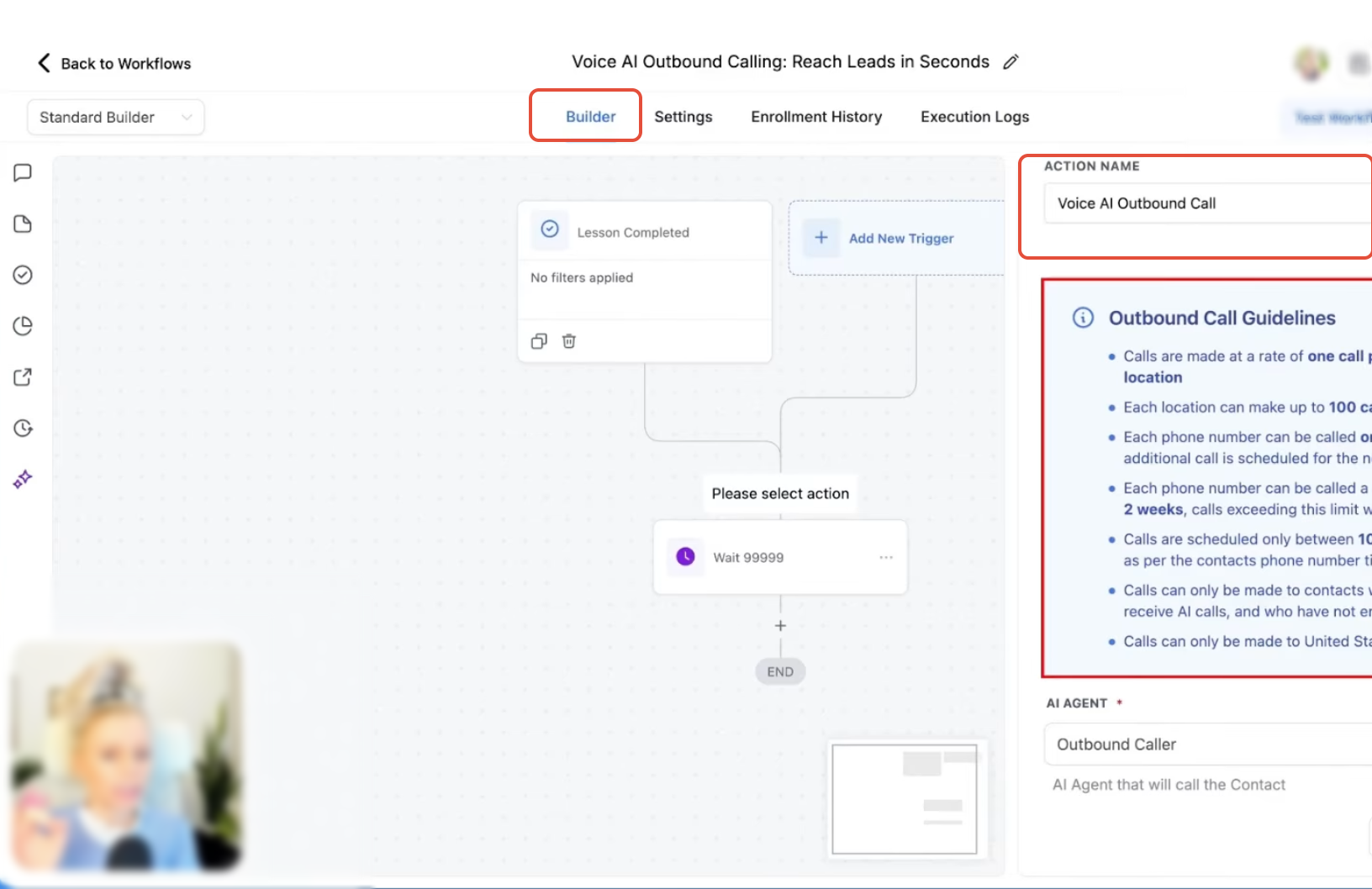
This screenshot shows the workflow action and outbound call guidelines panel.
Frequently Asked Questions
Q: Does the platform verify contact consent before placing outbound Voice AI calls?
No. Voice AI no longer performs platform-level contact consent validation before placing outbound calls. Businesses are responsible for managing and confirming consent.
Q: Who is responsible for legal compliance when using Voice AI outbound calling?
The business using Voice AI outbound calling is responsible for legal and compliant use.
Q: What happens if I exceed 1,000 calls in one day?
Calls over the daily limit are automatically scheduled for the next eligible day.
Q: How many outbound Voice AI calls can a location place per minute?
Each location can place up to 10 outbound Voice AI calls per minute.
Q: Can the same phone number be called more than once in a day?
No. Each phone number can only be called once per day.
Need Help?
If you need assistance enabling outbound Voice AI calling, understanding compliance requirements, completing verification, or troubleshooting calling restrictions, contact support or your system administrator for assistance.