
The Domain Purchase feature allows you to search for, register, and manage domains directly within the platform. This article explains how to purchase a domain, choose a registration period, add additional domain extensions, and configure your domain after purchase.
TABLE OF CONTENTS
- Overview of Purchasing a Domain
- Key Benefits of Purchasing a Domain
- Multi-Year Domain Registration
- How to Purchase a Domain
- Start a Domain Purchase from Funnels, Websites, Stores, or Webinars
- Frequently Asked Questions
Overview of Purchasing a Domain
Domain Purchase allows you to search for and register a new domain directly within the platform.
Instead of purchasing a domain from a third-party registrar and connecting it separately, you can complete the registration process from your account and manage the domain alongside the products and sites that use it.
This makes it easier to move from purchasing a domain to using it with supported products, including websites, funnels, stores, and other digital assets that require a connected domain.
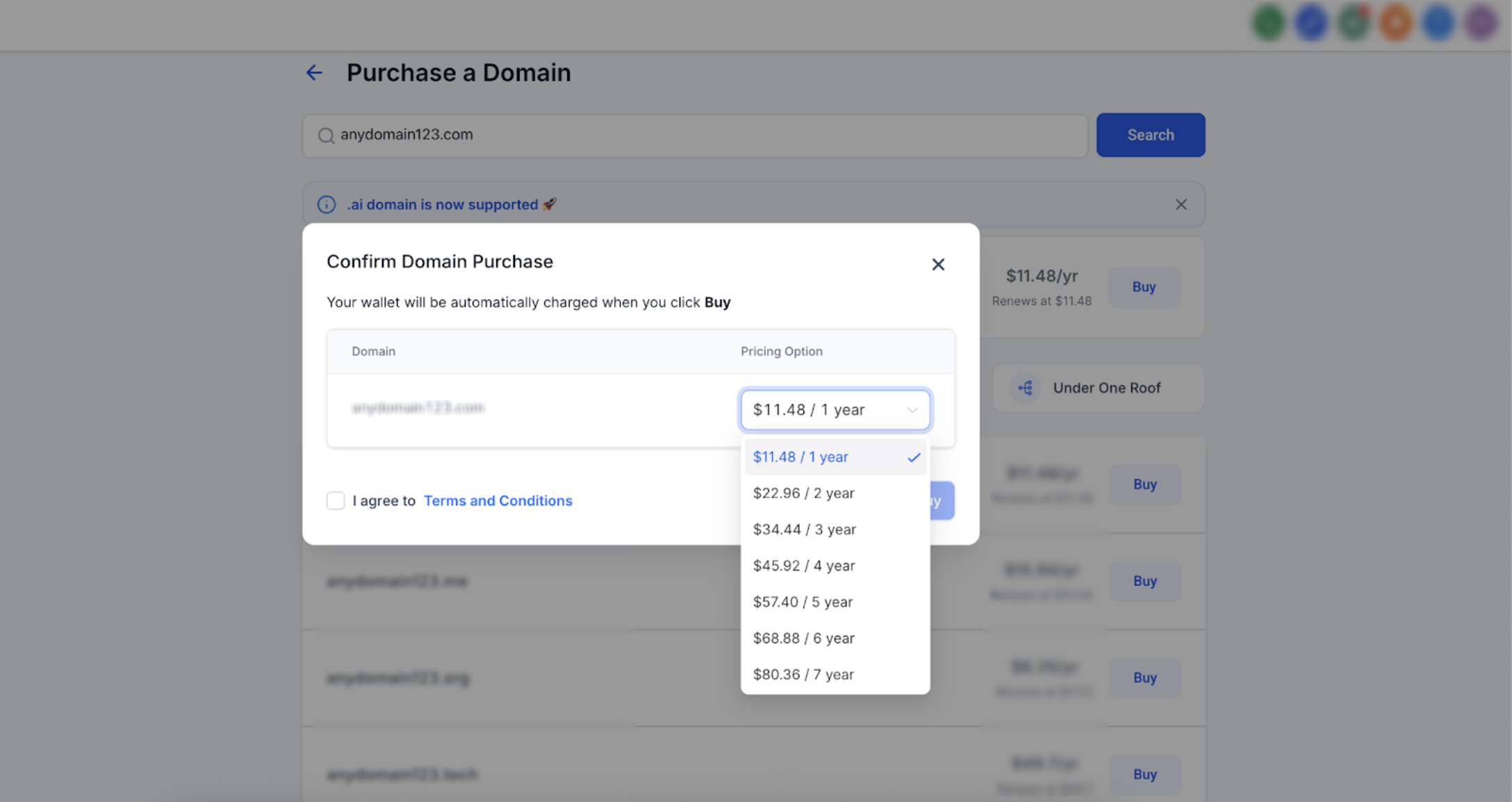
Multi-year registration is also available for eligible top-level domains (TLDs). You can select a longer registration period during checkout when supported.
Note: Your domain automatically includes WHOIS privacy protection, so your personal registration details are not visible in public WHOIS lookups.
Key Benefits of Purchasing a Domain
Centralized domain management: Purchase and manage registered domains from the same account.
Multi-year registration: Register eligible domains for multiple years during checkout instead of renewing every year.
Simplified setup: After purchase, configure the domain or connect it to supported products from the Purchased Domains area.
Multi-Year Domain Registration
Multi-year domain registration allows you to register a new domain for more than one year, up to 10 years depending on the TLD. Instead of renewing your domain annually, you can select a longer registration period during the initial purchase process when the TLD supports it.
Keep the following registration limits in mind:
Most TLDs can be registered for up to 10 years.
The
.cofamily of TLDs, including.co,.com.co,.net.co, and.nom.co, supports up to 5 years of registration.Some TLDs are limited to a 1-year registration period at the time of purchase.
How to Purchase a Domain
Purchasing a domain involves searching for an available name, selecting the registration period, and completing the purchase.
Carefully review the domain name and registration period before completing the transaction because domain registrations are finalized after purchase.
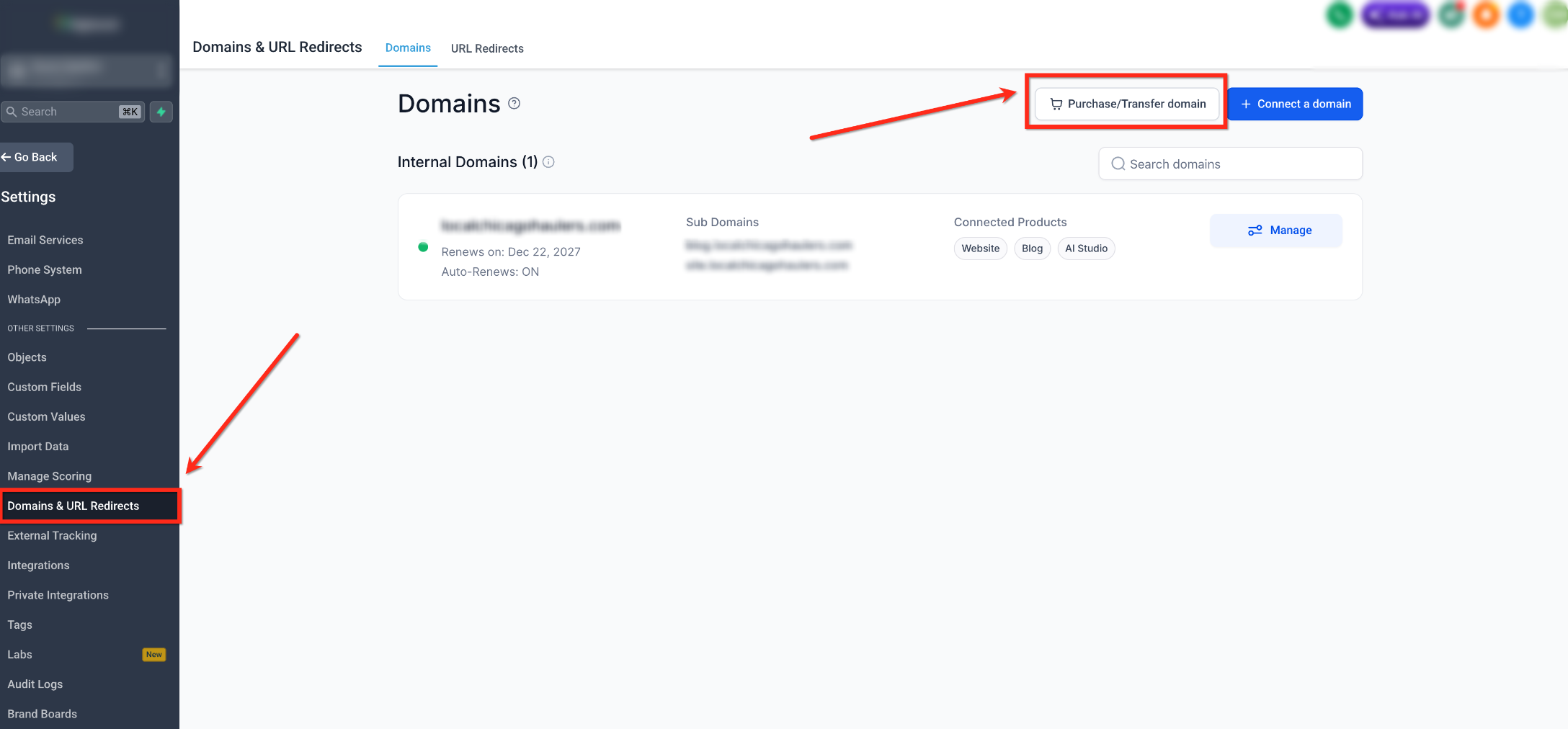
Step 1: Open Domains
Go to Settings > Domains & URL Redirects.
Click Purchase/Transfer Domain.
Step 2: Search for a Domain
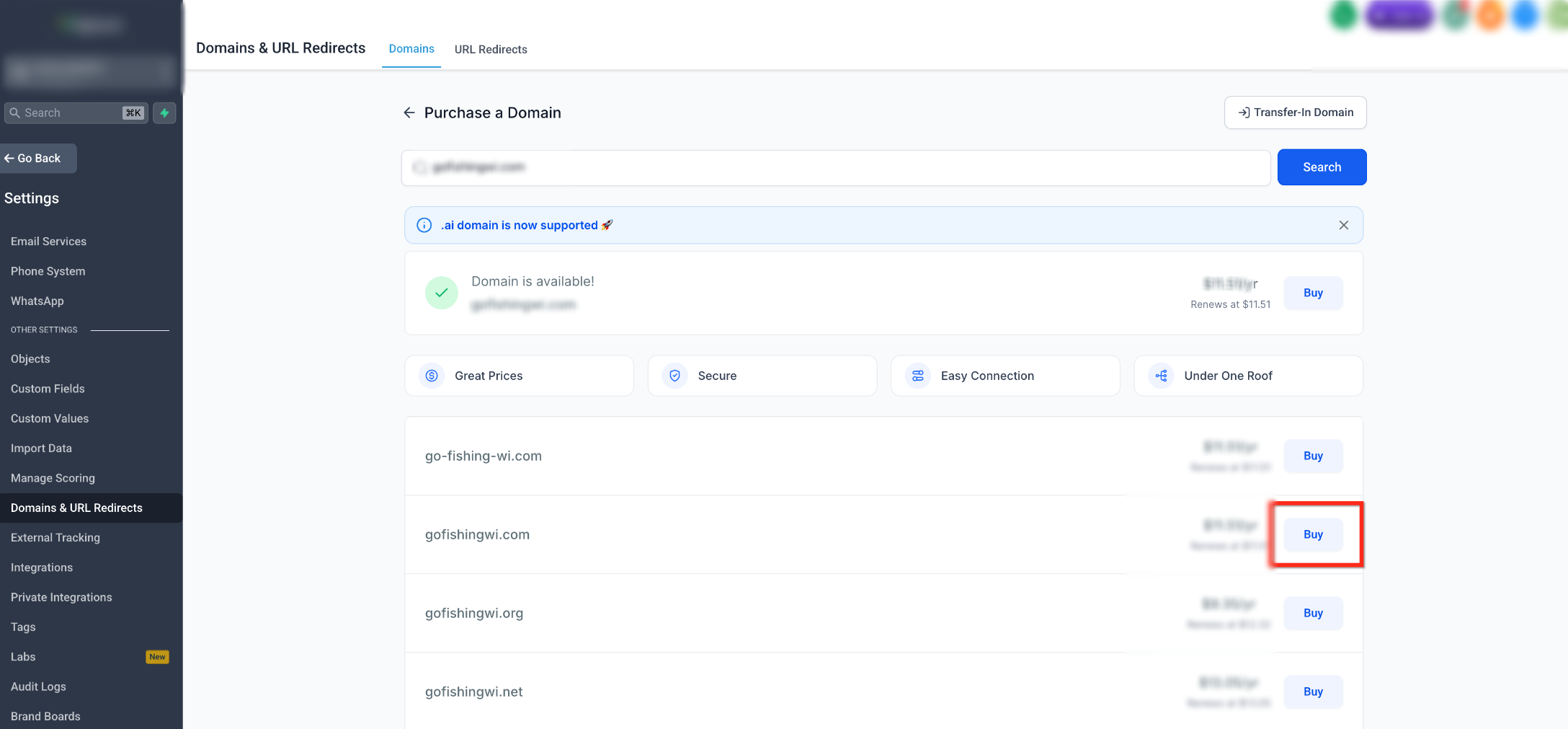
Enter the domain name you want to purchase.
The page displays whether the requested domain is available and may provide alternative domain suggestions.
Locate the domain you want and click Buy.
Step 3: Select a Registration Period
Open the Pricing Option dropdown for the primary domain.
Select the number of years you want to register the domain.
Registration periods can be up to 10 years but vary depending on the TLD.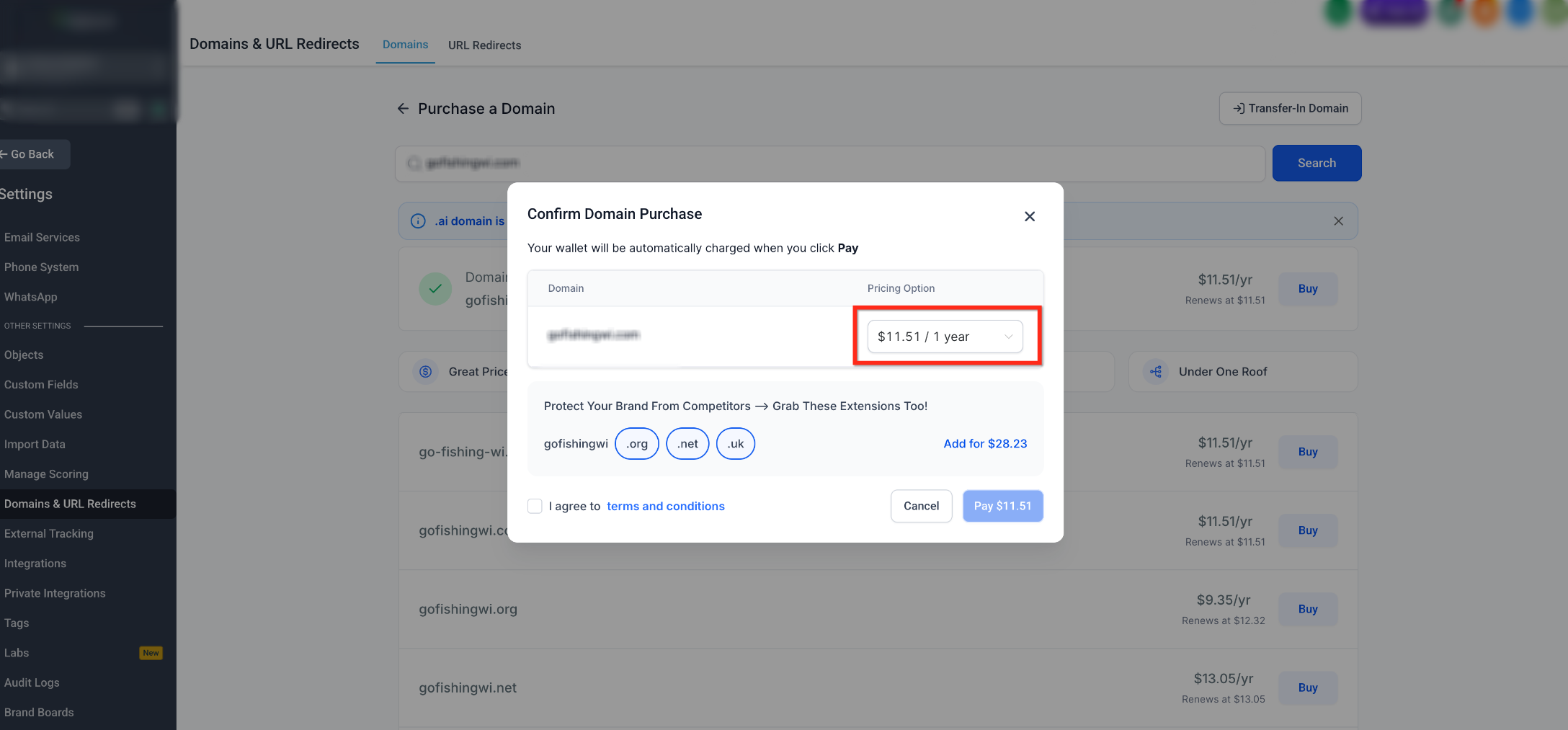
Step 4: Add Additional Domain Extensions
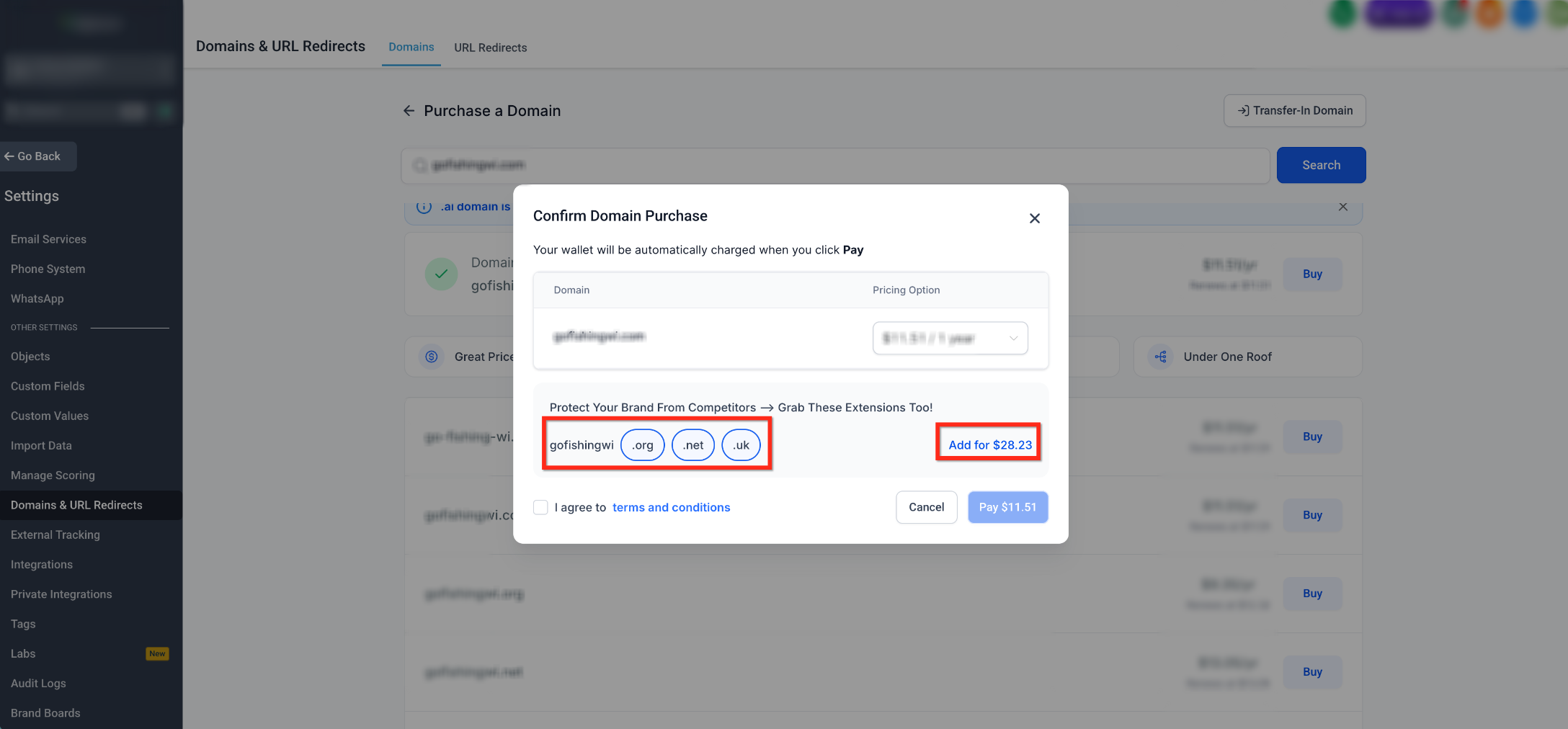
After selecting the registration period for your primary domain, you may see Protect Your Brand From Competitors — Grab These Extensions Too! This section can display additional domain extensions such as .org, .net, and .uk.
Select any additional extensions you want to register.
Each additional domain uses a 1-year registration period by default. You can select a different available registration period for each domain. You can also remove an added domain using the delete icon.
Step 5: Complete the Purchase
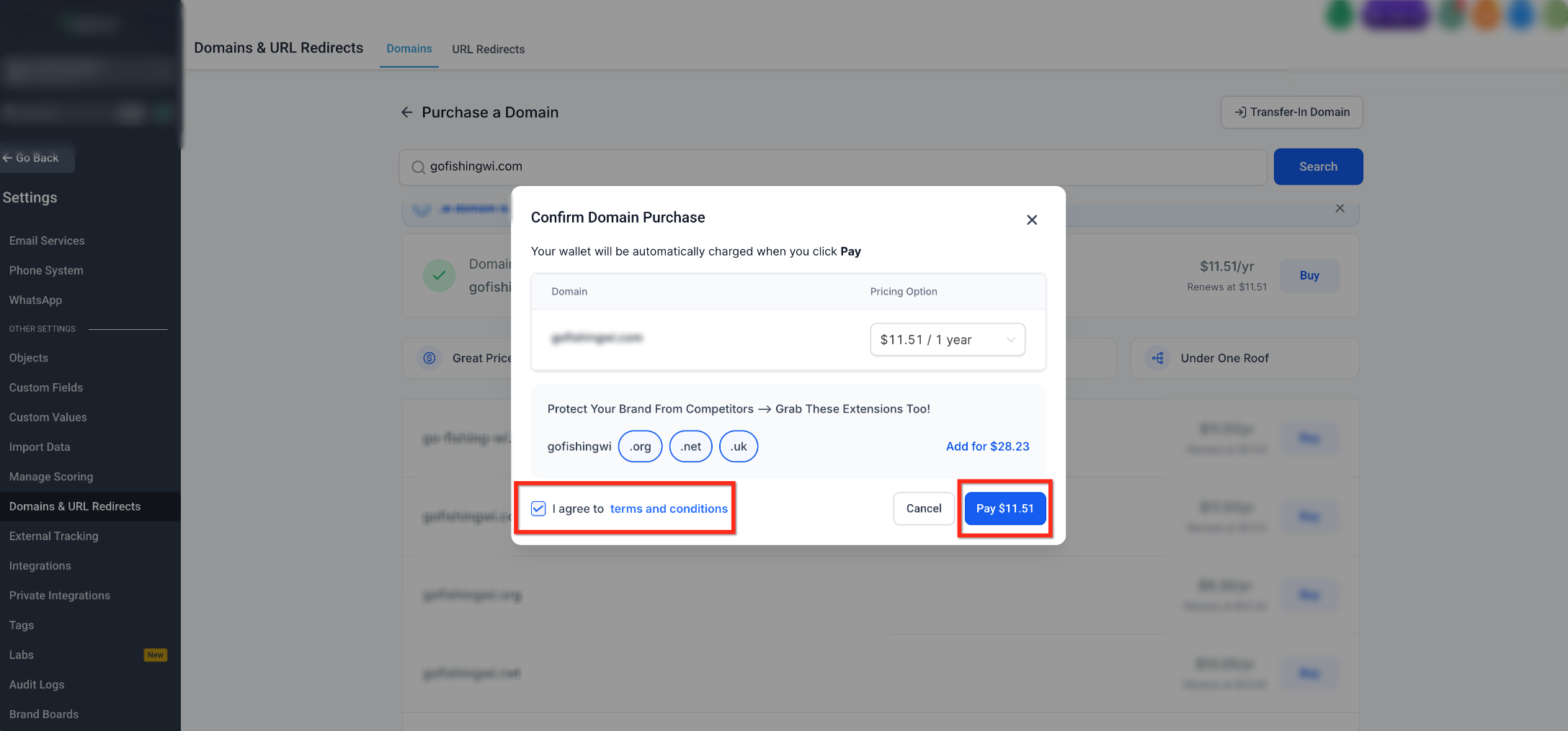
Review your selected domains and registration periods the agree to the Terms and Conditions, then click Pay.
Domain registration typically takes about one minute to complete.
Start a Domain Purchase from Funnels, Websites, Stores, or Webinars
You can also start a domain purchase directly from the asset you are working on.
From the Settings screen for a Funnel, Website, Store, or Webinar, click Purchase Domain to open the domain purchase page and begin searching for a domain.
You can also start the process from the builder:
In the Funnel, Website, Store, or Webinar builder, click Connect Domain.
Select Purchase Domain when prompted.
The domain purchase page opens in a new tab, where you can search for and purchase a new domain.
After purchasing the domain, configure and connect it to the Funnel, Website, Store, Webinar, or other supported product where you want to use it.
Frequently Asked Questions
Q: Why can I only register some domains for one year?
Registration periods vary by TLD. Some TLDs do not support longer initial registration periods and can only be registered for one year at the time of purchase.
Q: Can I extend my domain registration later?
Yes. You can renew or extend the domain later based on the options available for that TLD at the time of renewal.
Q: Will I receive reminders before my multi-year registration ends?
Yes. You will receive renewal reminders before the domain registration period ends so you can renew the domain in advance.
Q: Is WHOIS privacy included with purchased domains?
Yes. WHOIS privacy protection is automatically included so your personal registration details are not visible in public WHOIS lookups.
Q: What domain extensions are supported for domain purchase?
Many common top-level domains (TLDs) are supported for domain purchase, including .com, .net, .org, .co, .uk, .church, and more. Available extensions depend on the domain you search for.
Need Help?
If you have questions about purchasing a domain, selecting a registration period, or connecting a purchased domain to a supported product, Support can help.
Before reaching out, it can help to confirm:
- The domain name you want is available for purchase
- Your selected registration period is supported by the TLD
- Your payment method is valid
- The domain purchase has finished processing before you try to connect it
To contact support, select the Help icon in your account and reach out to the support team for assistance with your domain purchase or setup.