
Keeping your wallet funded helps prevent interruptions to SMS, email, phone, and other usage-based services. Auto Recharge automatically adds funds when the wallet balance falls below a configured threshold, while Smart Adjustment can increase the recharge amount when recharges occur frequently. This guide explains how both features work, how to configure them, and which settings can be changed or disabled.
TABLE OF CONTENTS
- What Are Auto Recharge and Smart Adjustment?
- Key Benefits of Auto Recharge and Smart Adjustment
- Auto Recharge
- Smart Adjustment
- How to Configure Auto Recharge
- How to Disable Smart Adjustment
- Frequently Asked Questions
- Need Help?
What Are Auto Recharge and Smart Adjustment?
Auto Recharge and Smart Adjustment work together to help maintain sufficient wallet funds. Auto Recharge controls when funds are added, while Smart Adjustment helps reduce frequent recharge transactions by increasing the recharge amount when needed.
Auto Recharge adds funds to the wallet when the balance falls below the configured threshold.
Smart Adjustment, shown as Auto-update in the settings menu, monitors how frequently the same recharge amount is triggered. If the same amount is triggered more than three times within seven days, the recharge amount automatically increases to the next available level for future top-ups.
IMPORTANT: Wallet Auto Recharge cannot be disabled. Smart Adjustment can be disabled if you do not want the recharge amount to increase automatically. Disabling Smart Adjustment does not disable Auto Recharge.
Key Benefits of Auto Recharge and Smart Adjustment
Maintaining sufficient wallet funds helps reduce interruptions to services that depend on the available wallet balance.
- Reduced Service Interruptions: Helps maintain sufficient funds for SMS, email, phone, and other wallet-funded services.
- Automatic Wallet Funding: Reduces the need to manually monitor and replenish the wallet.
- Fewer Recharge Transactions: Smart Adjustment can increase the recharge amount when Auto Recharge occurs frequently.
- Configurable Recharge Settings: Choose an available recharge amount and balance threshold that match your usage.
- Smart Adjustment Control: Disable Auto-update if you do not want the recharge amount to increase automatically.
Auto Recharge
Auto Recharge uses two settings to determine how much is added to the wallet and when the recharge occurs.
- Recharge Amount: The amount charged to the saved payment method and added to the wallet each time Auto Recharge triggers.
- Threshold Balance: The wallet balance below which Auto Recharge is triggered.
Set the Recharge Amount and Balance Threshold
Use the Auto Recharge controls to choose how much should be added to the wallet and how low the balance can fall before a recharge is triggered.
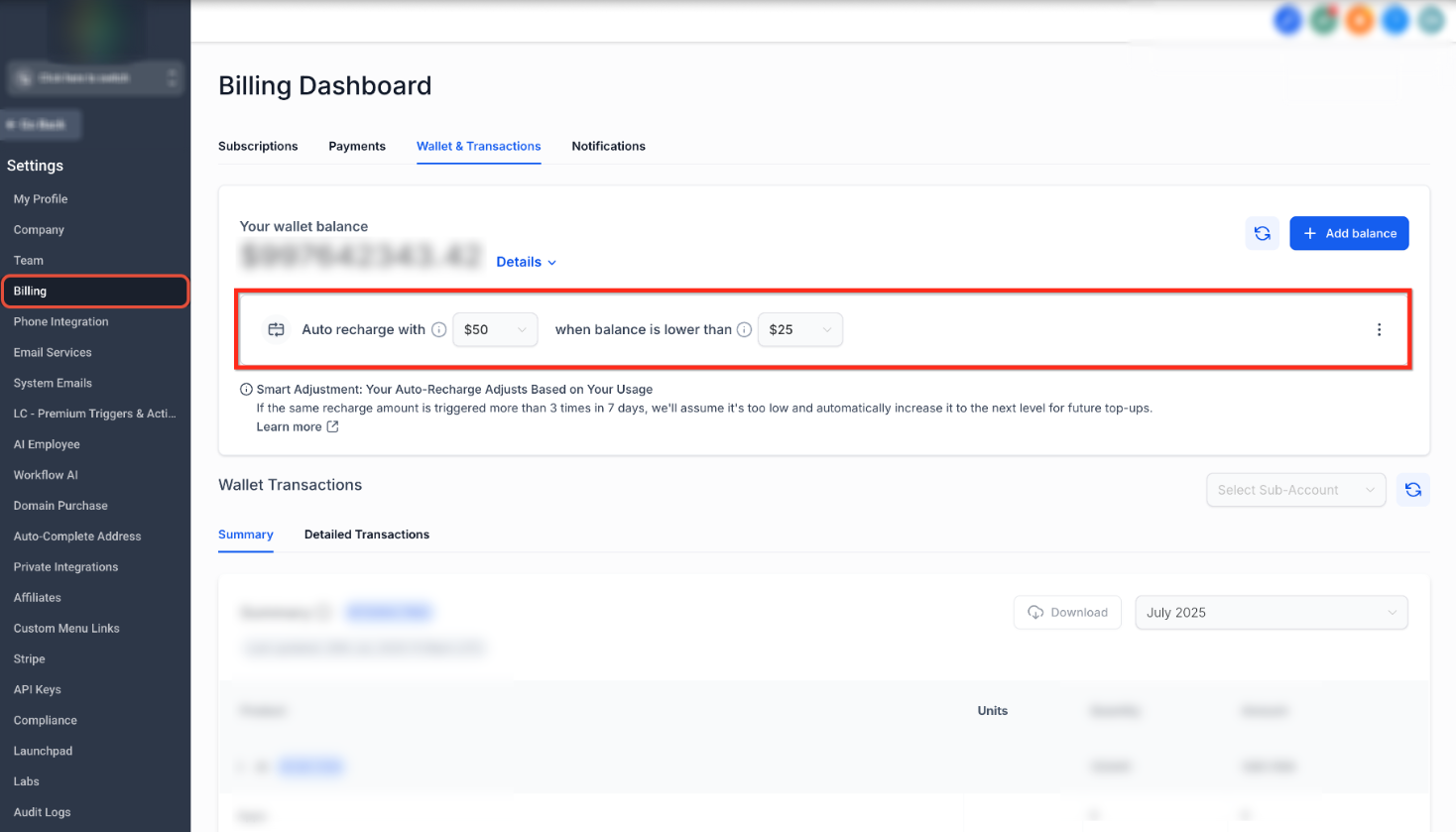
Use the Auto recharge with dropdown to select the amount that should be added during each recharge. Use the when balance is lower than dropdown to select the wallet balance that should trigger the recharge.
Example: If the Recharge Amount is $50 and the Threshold Balance is $25, Auto Recharge triggers when the wallet balance falls below $25. The saved payment method is then charged $50, and those funds are added to the wallet.
A higher threshold causes Auto Recharge to trigger earlier, which may be helpful when wallet usage is consistently high.
Smart Adjustment
Smart Adjustment helps reduce frequent wallet top-ups by automatically increasing the recharge amount when the current amount is being triggered too often.
If the same recharge amount is triggered more than three times within seven days, Smart Adjustment automatically increases the amount to the next available recharge level for future top-ups.
Review When Smart Adjustment Can Increase the Amount
The Smart Adjustment notice explains when an automatic recharge increase can occur and how the updated amount applies to future wallet top-ups.
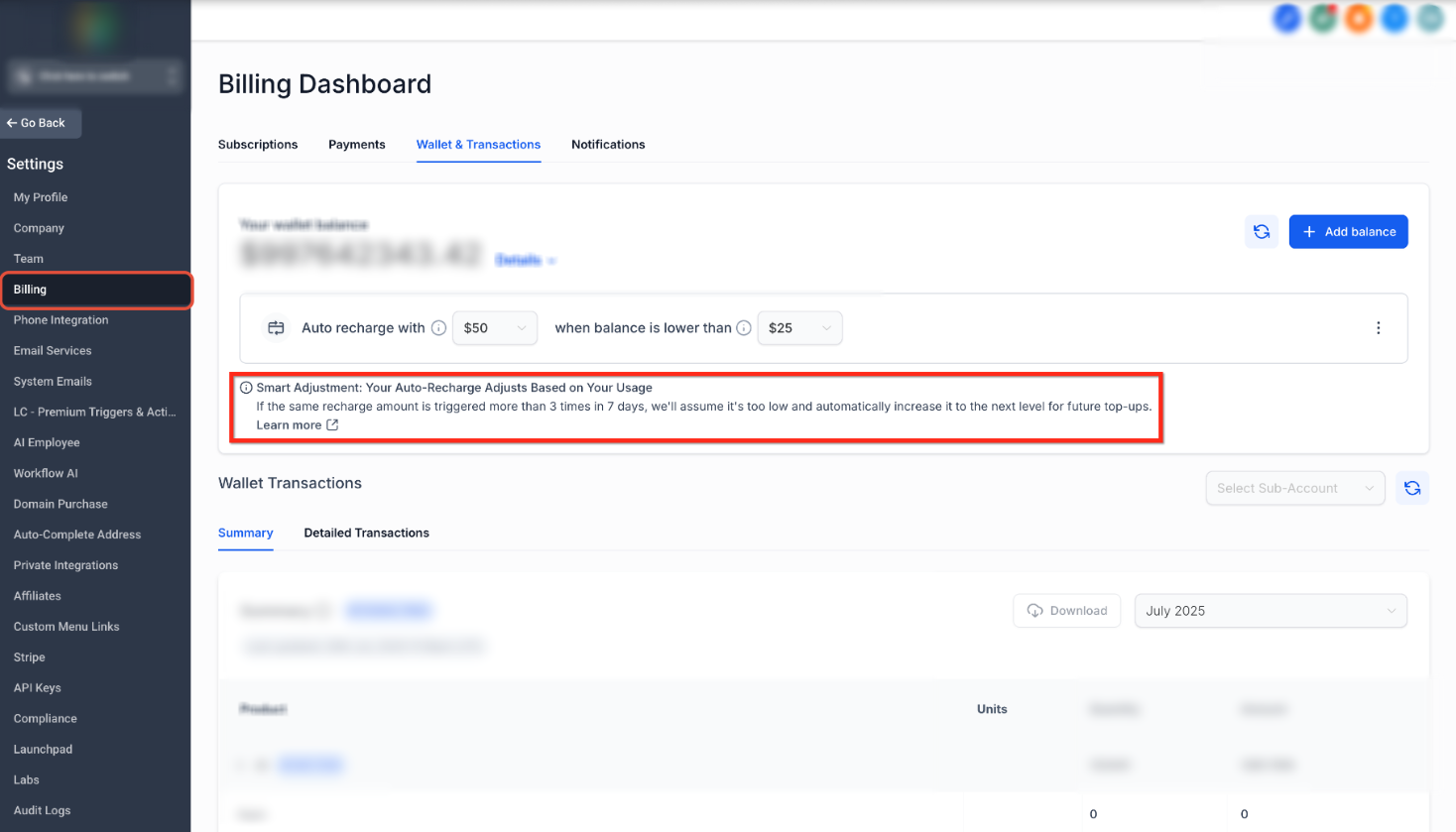
Review the Smart Adjustment message below the Auto Recharge controls. It confirms that the recharge amount can increase when the same amount is triggered more than three times within seven days.
Example: If the current recharge amount is $200 and it is triggered more than three times within seven days, Smart Adjustment can increase the recharge amount to the next available level for future recharges.
Disabling Smart Adjustment prevents automatic increases, but Auto Recharge remains active.
How to Configure Auto Recharge
Configuring the recharge amount and balance threshold lets you control how much is added to the wallet and when the recharge is triggered.
Open Settings
Start from the main navigation and open the settings area.
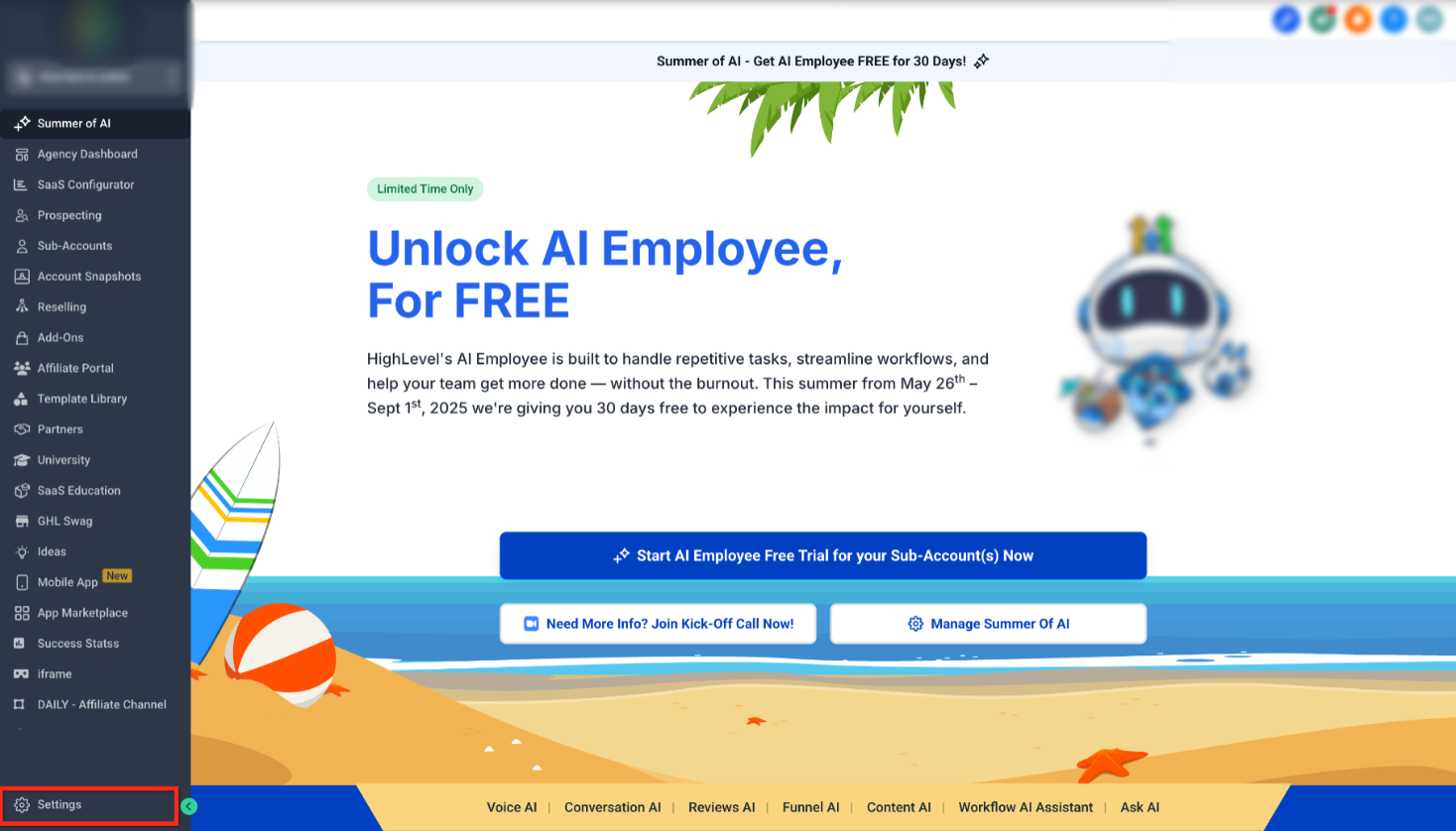
Click Settings in the lower-left corner of the navigation menu.
Open Billing and Wallet Transactions
Wallet controls are available from the billing area.
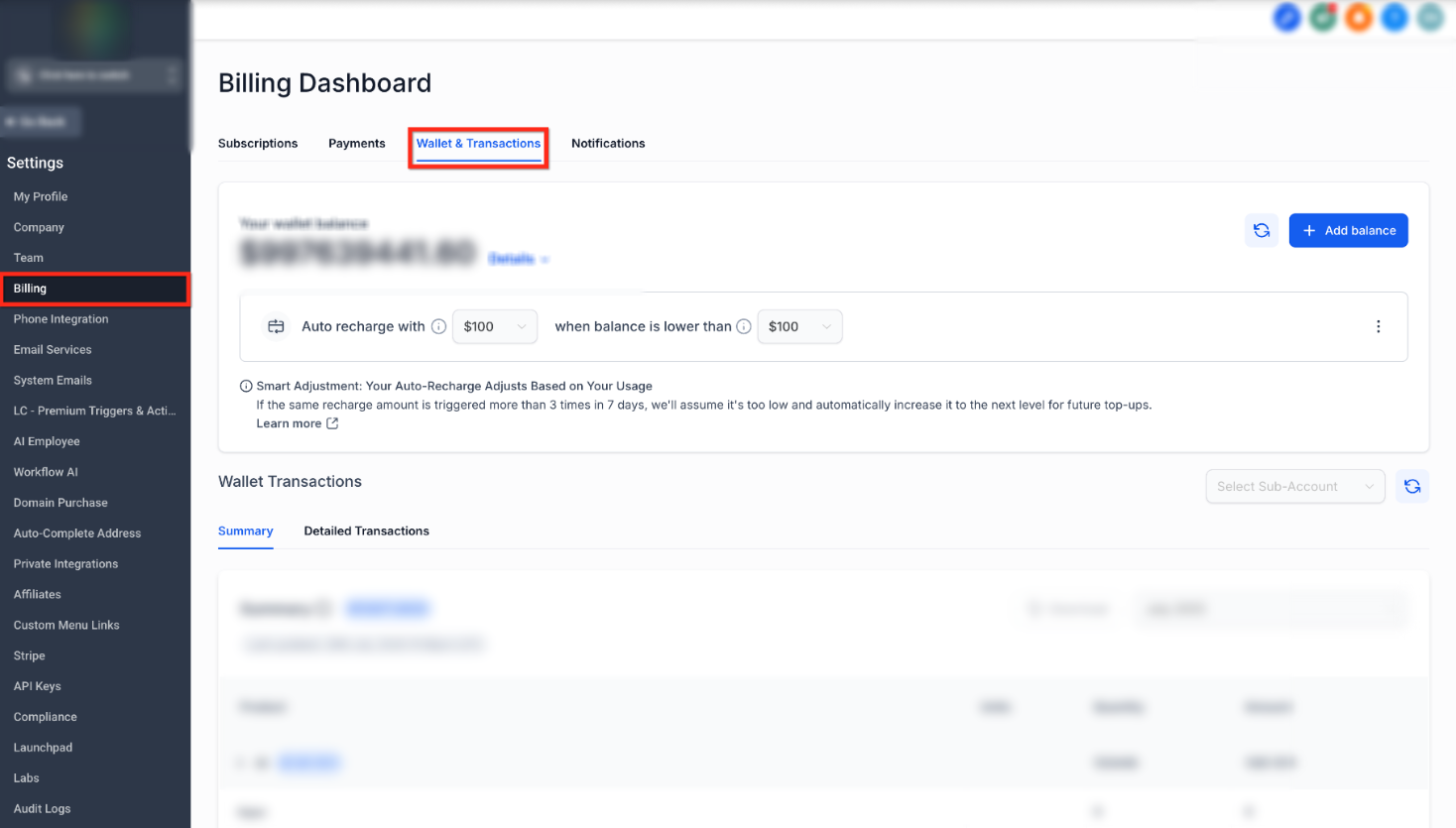
Click Billing, then select the Wallet & Transactions tab at the top of the Billing Dashboard.
Configure Auto Recharge
The Auto Recharge controls appear near the current wallet balance.
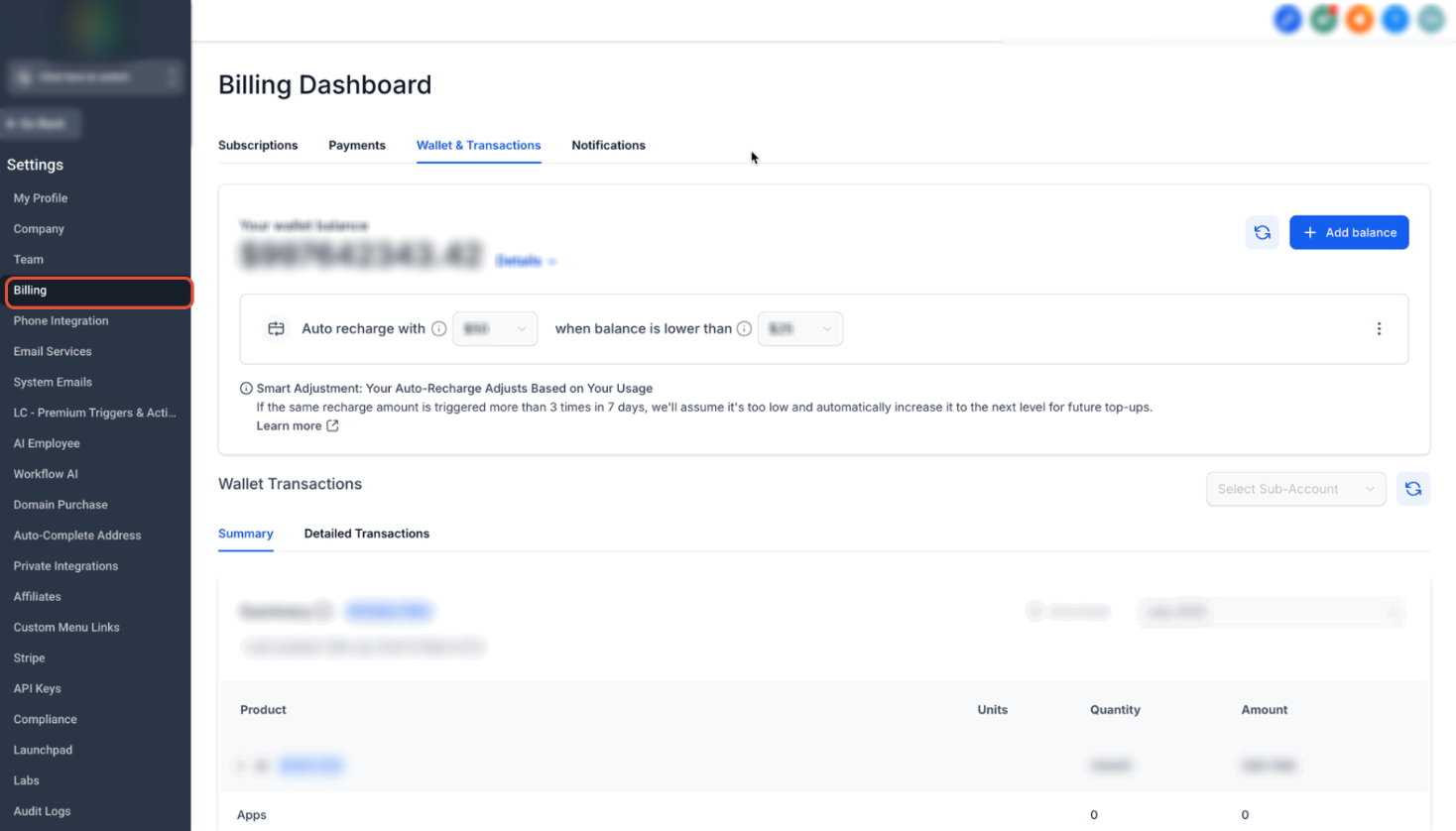
Select the desired amount from Auto recharge with, then select the desired trigger balance from when balance is lower than.
These settings determine how much is added during future Auto Recharges and when those recharges are triggered.
How to Disable Smart Adjustment
Smart Adjustment can be disabled if you want the configured recharge amount to remain unchanged instead of increasing automatically based on recharge frequency.
IMPORTANT: Disabling Smart Adjustment does not disable Wallet Auto Recharge. Auto Recharge will continue when the wallet balance falls below the configured threshold.
Open the Auto Recharge Menu
The Smart Adjustment control is available from the menu on the right side of the Auto Recharge settings.
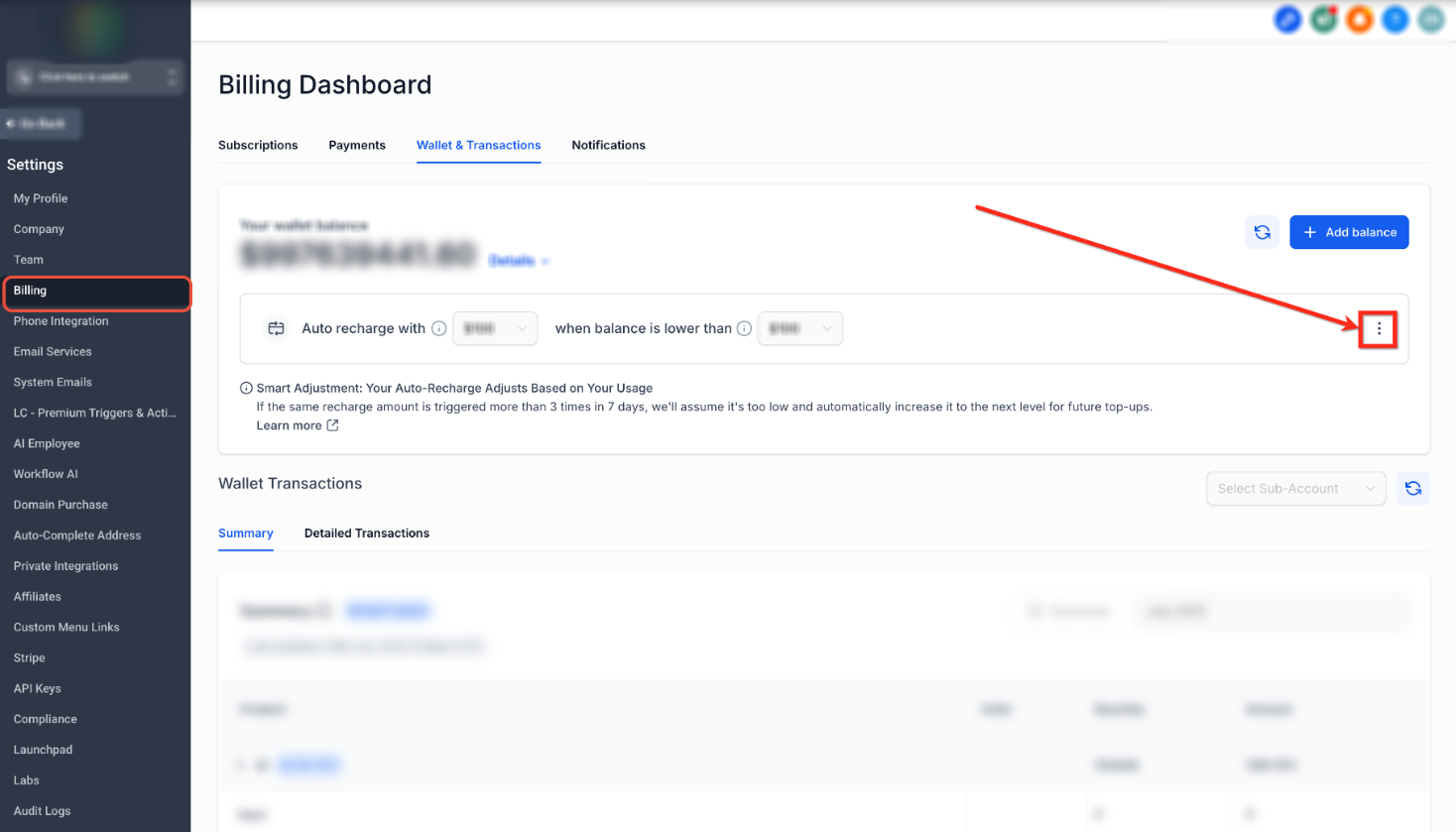
Click the three-dot menu on the right side of the Auto Recharge controls.
Disable Automatic Updates
Use the menu option to prevent automatic recharge amount increases.
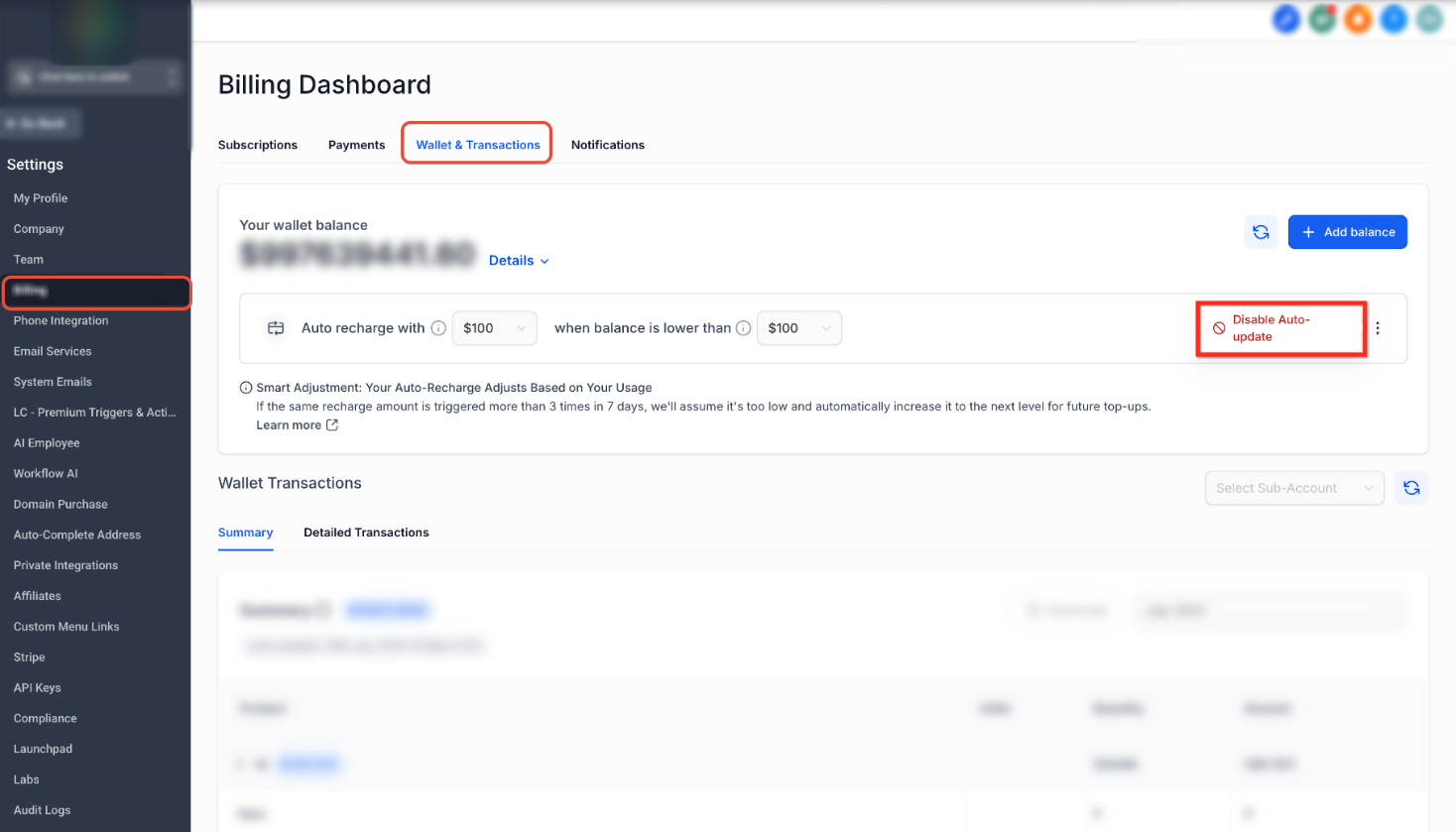
Click Disable Auto-update.
Confirm the Change
A confirmation message appears before Smart Adjustment is disabled.
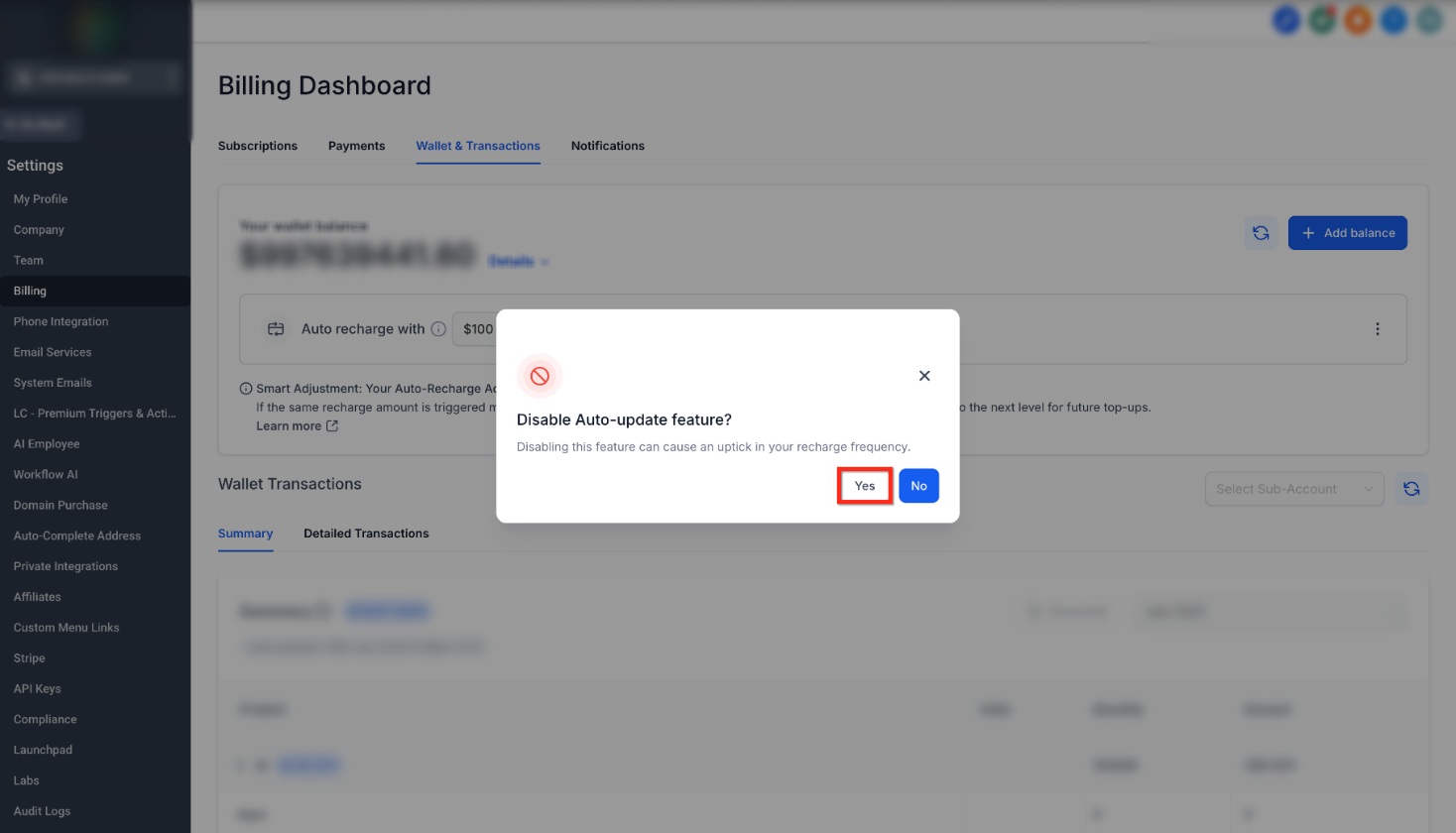
Click Yes to confirm.
Smart Adjustment will no longer automatically increase the recharge amount. Auto Recharge will remain active using the configured recharge settings.
Frequently Asked Questions
Q: Can Wallet Auto Recharge be turned off completely?
No. Wallet Auto Recharge remains active so the wallet can continue funding eligible usage-based services.
Q: Is an Auto Recharge the same as a usage charge?
No. An Auto Recharge adds prepaid funds to the wallet. Eligible usage-based services then deduct charges from the available wallet balance as they are used.
Q: What causes Smart Adjustment to increase the recharge amount?
Smart Adjustment can increase the recharge amount when the same Auto Recharge amount is triggered more than three times within seven days.
Q: Does disabling Smart Adjustment disable Auto Recharge?
No. Disabling Smart Adjustment only prevents the recharge amount from increasing automatically. Auto Recharge will continue when the wallet balance falls below the configured threshold.
Q: Why is the wallet recharging frequently?
Frequent recharges generally mean wallet-funded services are consuming the available balance quickly compared with the current recharge amount and threshold. Increasing the recharge amount or using a higher balance threshold may reduce how often recharges occur.
Q: What does a higher balance threshold do?
A higher threshold causes Auto Recharge to trigger sooner, before the wallet balance falls as low as it would with a smaller threshold.
Need Help?
If you need help understanding a wallet charge, changing Auto Recharge settings, or managing Smart Adjustment, contact your support team for assistance.
When contacting support, include the following information when possible:
- A brief description of what happened
- The date and approximate time of the recharge
- The recharge amount
- The balance threshold currently selected
- A screenshot of the wallet settings or transaction in question
Do not include full payment card details, passwords, or other sensitive information in your support request.