
Number Hosting, also called Hosted SMS or Hosted Messaging, lets eligible businesses use SMS/MMS with a phone number they already own through another carrier. The original carrier continues handling voice calls while supported messaging traffic is routed through the platform-managed phone service.
Because ownership and voice service remain with the existing carrier, Number Hosting is different from porting or migrating a phone number. A verification and authorization process is required before hosted messaging can be activated.
This guide explains eligibility, required information, setup, messaging compliance, expected timelines, post-activation checks, and common hosting issues.
Hosting approval does not replace messaging compliance. Applicable 10DLC numbers must meet A2P registration requirements, toll-free numbers used for SMS/MMS to US or Canadian recipients must complete Toll-Free Verification, and all messaging must follow consent, sender-identification, opt-out, and content requirements.
What is Number Hosting (Hosted SMS / Hosted Messaging)?
Number Hosting enables SMS/MMS messaging on an eligible phone number that remains owned and voice-enabled through another carrier. Instead of moving the phone number itself, hosted messaging changes only how supported text-message traffic is routed.
Your original carrier continues handling voice calls and ownership of the number. Once the hosting request is approved, supported SMS/MMS traffic is handled through the platform-managed phone service so the number can be used for messaging within the sub-account.
Key Benefits of Number Hosting
Hosted messaging is useful when a business wants to preserve its current voice provider and established phone number while adding supported SMS/MMS capabilities inside the platform.
- Keep Your Existing Number: Continue using the phone number customers already recognize.
- Keep Existing Voice Service: Voice calling remains with the current carrier instead of moving to another phone service.
- No Number Port Required: Hosting adds supported messaging without transferring ownership of the number.
- Use Platform Messaging: Send and receive supported SMS/MMS through the messaging experience after activation.
- Maintain Separate Voice and Messaging Services: Preserve an existing voice configuration while using the platform-managed phone service for messaging.
Number Hosting vs. Porting
Hosting and porting both let a business continue using an existing phone number, but they change different parts of the phone service. Choose hosting when voice should stay with the existing carrier; choose porting when the phone number itself needs to move to another carrier.
| Feature | Number Hosting | Porting |
|---|---|---|
| Number Ownership | Remains with the current carrier. | Transfers to the destination carrier. |
| Voice Service | Remains with the current carrier. | Moves with the number to the destination service. |
| SMS/MMS | Hosted through the platform-managed phone service after approval. | Handled by the destination carrier after the port. |
| Carrier Transfer | No. | Yes. |
| Best Used When | You want to keep your existing carrier for voice while using the platform for messaging. | You want another carrier to manage the complete phone number service. |
Supported and Unsupported Number Types
Number Hosting is available only for supported numbers and provider configurations. Confirm eligibility before starting because unsupported number types cannot be activated through the hosted messaging workflow.
| Number Type / Scenario | Eligible? | Guidance |
|---|---|---|
| US/Canada Local Landline | Generally Yes | Most eligible landline numbers can use Hosted Messaging after verification and approval. |
| US/Canada Toll-Free Number | Generally Yes | Hosted messaging is generally supported, but Toll-Free Verification is required for SMS/MMS to US and Canadian recipients. |
| Number Without Existing SMS Service | Yes, if otherwise eligible | The number must meet all other hosting requirements. |
| Number Already Using SMS With Another Provider | No, as currently configured | Do not change the existing messaging service until Support confirms the correct next step. |
| Mobile / Cellular Number | No | Mobile numbers cannot be hosted through this workflow. |
| Number Already Used for Voice in Another Provider Account | No, when incompatible | A number already assigned to an incompatible provider account may require a different migration or porting process. |
| Number Outside the US/Canada | No | Hosted SMS is currently limited to supported US and Canadian numbers. |
What You Need Before Requesting Number Hosting
Preparing the correct account and number information before contacting Support helps the hosting request move into verification without unnecessary follow-up.
- Location ID: The sub-account where Hosted Messaging should be activated.
- Phone Number(s): Provide each requested number in E.164 format, such as +1XXXXXXXXXX.
- Number Owner Access: The authorized owner or representative must be available to complete ownership verification and authorization.
- Current Carrier Information: Be prepared to confirm the carrier or other ownership information if requested during verification.
- Messaging Compliance Information: Prepare the business, consent, use-case, and opt-in information needed for A2P 10DLC or Toll-Free Verification when applicable.
How Number Hosting Works
Number Hosting uses an ownership-verification and authorization process to confirm that the requester has permission to route messaging for the phone number. Hosting is activated only after required verification and provider review are complete.
| Stage | What Happens |
|---|---|
| 1. Request | The Location ID and eligible phone number(s) are provided to Support. |
| 2. Ownership Verification | The authorized number owner confirms control of the requested number(s). |
| 3. Letter of Authorization | The number owner signs the required LOA authorizing hosted messaging. |
| 4. Provider Review | The messaging provider and applicable carrier systems review the request and may require additional confirmation. |
| 5. Activation | Approved SMS/MMS routing is activated through the platform-managed phone service. |
| 6. Messaging Registration | Complete or confirm A2P 10DLC or Toll-Free Verification requirements before relying on hosted outbound messaging. |
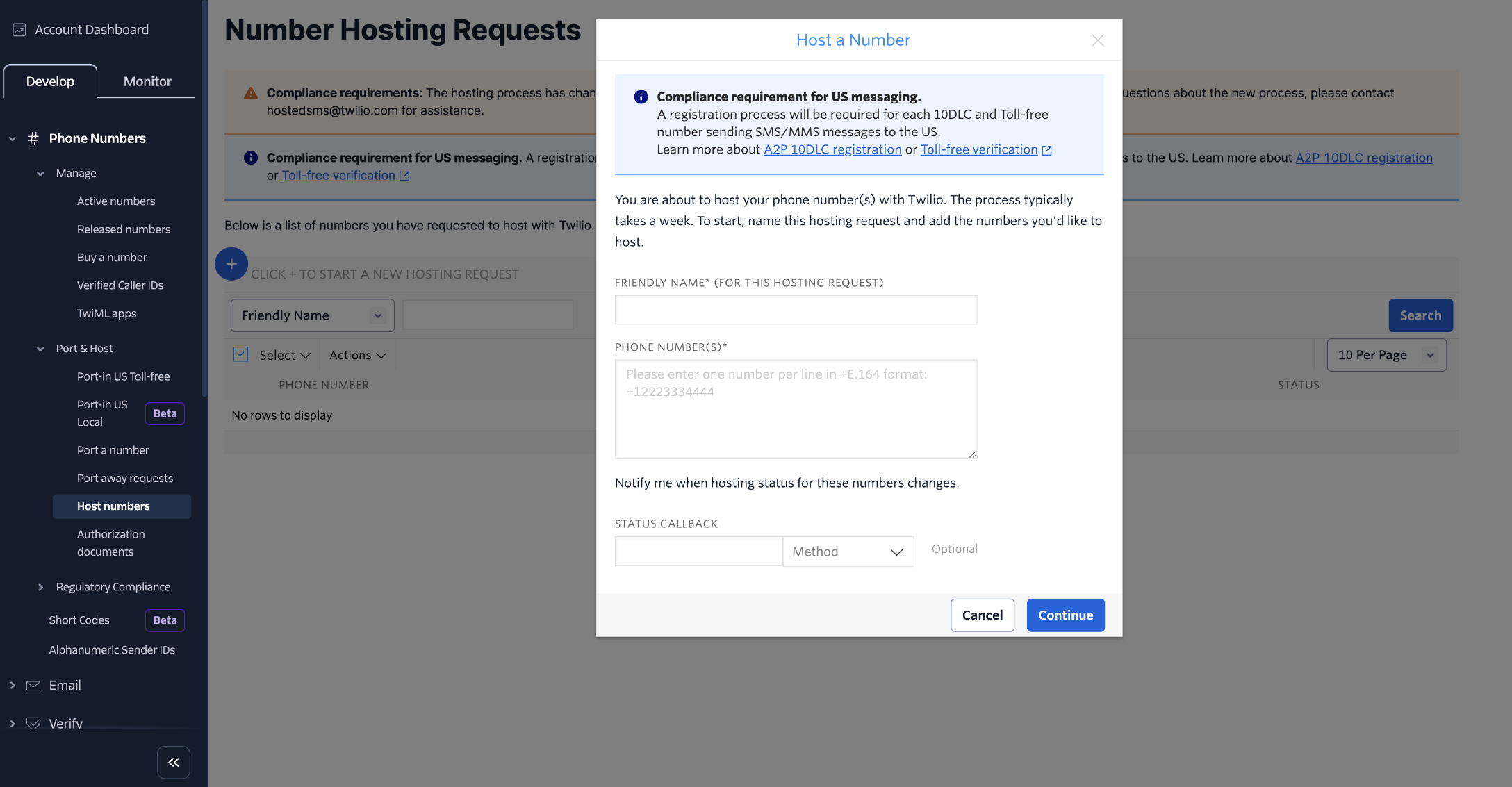
Hosted messaging requests require number verification, and applicable 10DLC and toll-free numbers must also meet messaging-registration requirements.
How to Set Up Number Hosting
A complete request requires the correct destination Location ID, eligible phone numbers, and action from the authorized number owner. Completing each verification step promptly helps prevent the request from remaining pending.
Step 1: Confirm the Phone Number Is Eligible
Confirm that the number is a supported US or Canadian landline or toll-free number, is not a mobile number, and is not already using an incompatible messaging configuration.
Step 2: Find the Location ID
The Location ID identifies the sub-account where Hosted Messaging should be enabled. You can locate it in the sub-account URL while logged into the platform.
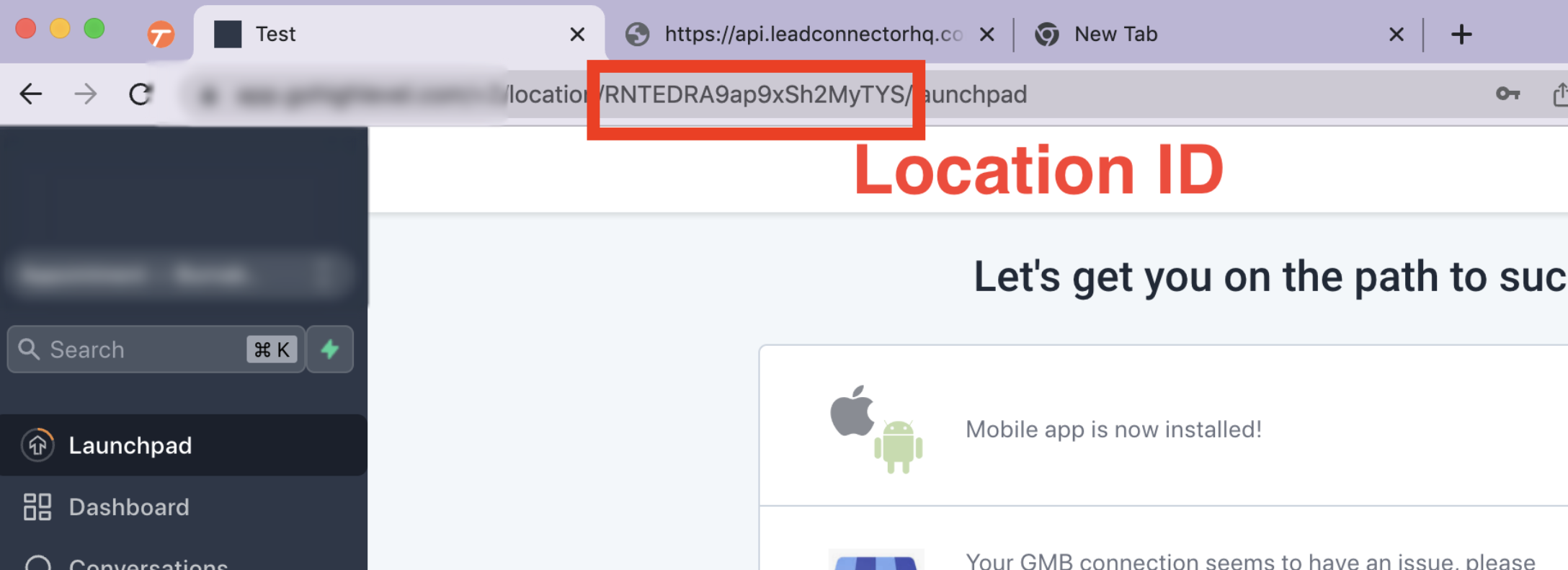
The Location ID appears in the sub-account URL and uniquely identifies the destination sub-account.
Step 3: Prepare the Phone Number List
Provide each number you want hosted in E.164 format. For example: +15551234567. If requesting multiple eligible numbers, clearly list each number so Support can associate them with the correct Location ID.
Step 4: Contact Support
Contact Support and provide:
- Destination Location ID
- Phone number(s) to host
- Any requested ownership or carrier details
Step 5: Complete Ownership Verification and the LOA
The authorized number owner must complete ownership verification and sign the Letter of Authorization. Carrier confirmation may also be required.
Step 6: Wait for Approval and Activate Messaging
After the request passes verification and provider review, hosted SMS/MMS routing is activated. Complete the applicable messaging-registration and validation steps before relying on the number for production messaging.
Messaging Compliance for Hosted Numbers
Number Hosting authorizes the routing of supported messaging traffic, but carrier registration and messaging-policy requirements still apply. Approval to host a number should not be treated as approval to send unrestricted SMS or MMS.
| Requirement | What to Know |
|---|---|
| A2P 10DLC | Applicable 10-digit local numbers used for US business messaging must be associated with the appropriate approved Brand and Campaign before messaging. |
| Toll-Free Verification | Toll-free numbers used to send SMS/MMS to US and Canadian recipients must be successfully verified before messaging. |
| Consent / Opt-In | Only message contacts who have provided valid consent for the applicable business and messaging use case. |
| Sender Identification | Initial outbound messaging must clearly identify the business sending the message. |
| Opt-Out Handling | Provide required opt-out language and honor opt-out requests such as STOP. |
| Content Rules | Hosted messaging remains subject to messaging policies and carrier restrictions on prohibited or restricted content. |
Do not begin production messaging solely because the hosting request shows approved. Confirm the number's applicable messaging registration is also complete.
What Happens After Hosted Messaging Is Activated?
After activation, voice and messaging continue using separate service paths. A short validation confirms that hosted SMS/MMS works in the correct sub-account while the existing carrier continues handling voice calls normally.
- Confirm hosted messaging is active in the intended sub-account.
- Send an outbound test SMS to a separate phone number.
- Reply to the test SMS and confirm the inbound message appears in Conversations.
- Test MMS when the number and messaging use case support it.
- Verify voice calling remains with the original carrier by testing the existing voice configuration.
- Confirm A2P 10DLC or Toll-Free Verification status when applicable.
- Review workflows and automations that will use the hosted number before enabling production traffic.
Timeline Expectations
Hosted Messaging requires external verification and carrier review, so activation is not immediate. Promptly completing ownership verification and authorization helps prevent avoidable delays.
Many requests complete in approximately one week, but timing can vary based on ownership verification, carrier responsiveness, additional documentation, or further review requirements.
Troubleshooting Number Hosting
Most hosting delays or messaging failures are caused by number eligibility, incomplete authorization, existing SMS service, or missing messaging registration. Identify the issue below before submitting another request.
Mobile numbers are not eligible for this Number Hosting workflow. Use another supported messaging or number-transfer option.
A number with an existing SMS service is not eligible as-is. Contact Support before changing or disabling the existing messaging configuration so the correct path can be confirmed.
Confirm that ownership verification and the Letter of Authorization were completed. Additional carrier confirmation or verification can extend the normal review period.
Confirm applicable A2P 10DLC or Toll-Free Verification requirements are complete. Also review SMS permissions, contact consent, and any messaging error shown in the conversation or automation logs.
Confirm the hosting request is fully activated for the intended Location ID and test again from an unrelated phone number. If activation is complete and inbound messages still do not appear, contact Support with the Location ID and affected number.
Number Hosting is intended to change messaging routing only. If voice calling changes unexpectedly, verify the number's configuration with the original voice carrier and contact Support if the issue began during hosting activation.
Frequently Asked Questions
Need Help?
If a hosting request is delayed, rejected, or approved but messaging is not working as expected, review the checks below before contacting Support. Providing complete number and verification details helps reduce follow-up questions.
- Confirm the phone number is a supported US or Canadian number.
- Confirm the number is not mobile/cellular.
- Confirm the number is not already using an incompatible SMS provider.
- Confirm the correct destination Location ID.
- Confirm ownership verification was completed.
- Confirm the Letter of Authorization was signed.
- Confirm applicable A2P 10DLC or Toll-Free Verification is complete.
- Test both inbound and outbound SMS.
- Confirm voice service still works through the existing carrier.
Include the following information when contacting Support:
- Location ID
- Affected phone number(s)
- Current voice carrier
- Number type: local landline or toll-free
- Hosting request status
- Whether ownership verification was completed
- Whether the LOA was signed
- A2P 10DLC or Toll-Free Verification status when applicable
- Inbound SMS test result
- Outbound SMS test result
- Any error message or screenshot related to the issue