
Toll-free numbers used to send SMS or MMS to recipients in the United States or Canada must complete Toll-Free Verification before messaging is enabled. The verification process confirms the end business, messaging use case, and the method used to obtain recipient consent.
A complete submission should accurately describe the business, messaging purpose, opt-in workflow, and sample message content. Supporting proof must match the opt-in method selected in the verification form.
This guide also includes an in-page opt-in reference so you do not need to rely on a separate article when preparing consent language or verification evidence.
Restricted (Unverified), Pending Verification, and Rejected toll-free numbers cannot send SMS/MMS traffic to US or Canada recipients.
Messages attempted before approval may be blocked and can return messaging errors. Voice calling is not affected by Toll-Free Verification.
Verification does not replace other messaging or identity requirements that may apply to the account or business.
What is Toll-Free Number Verification?
Toll-Free Verification is the carrier compliance process used to confirm the business and messaging use case behind toll-free SMS and MMS traffic. It helps distinguish legitimate business messaging from unwanted or abusive traffic.
Verification applies to toll-free numbers such as 800, 833, 844, 855, 866, 877, and 888 numbers when they are used to message recipients in the United States or Canada.
The submission must reflect the actual end business, messaging purpose, recipient opt-in method, sample message content, and supporting proof of consent.
Key Benefits of Toll-Free Verification
Completing verification allows eligible toll-free numbers to send compliant messaging traffic while reducing avoidable blocking and review issues.
- Messaging Eligibility: Enables approved toll-free numbers to send SMS/MMS to US and Canada recipients.
- Improved Deliverability: Verified traffic is less likely to be blocked solely because the toll-free number is unverified.
- Carrier Compliance: Documents the business, use case, consent method, and messaging purpose expected by carriers.
- Clearer Review Outcomes: Accurate submissions reduce rejection risk caused by mismatched business information or incomplete opt-in evidence.
- In-App Management: Start verification and monitor status directly from the phone-number management area.
Requirements Before You Begin
Preparing accurate business and opt-in information before starting the submission reduces rework and makes it easier for reviewers to confirm that the messaging use case matches the end business.
Have the following ready:
- Legal entity or end-business name
- Public business website or public social-media presence
- Business contact name, email, and phone number
- Physical business address
- Estimated monthly messaging volume
- Messaging use case category
- Detailed use case description
- Representative sample message content
- The actual opt-in method used by customers
- Publicly accessible proof of the opt-in workflow when requested
- Additional business-registration information if the verification workflow requests it
Need opt-in guidance? Use Appendix A — Opt-In Guide in this article before submitting your verification.
How to Verify a Toll-Free Number
Complete the verification from the sub-account that owns the toll-free number. The information submitted should describe the end business that customers interact with—not the software provider or reseller—unless that organization is itself the end sender.
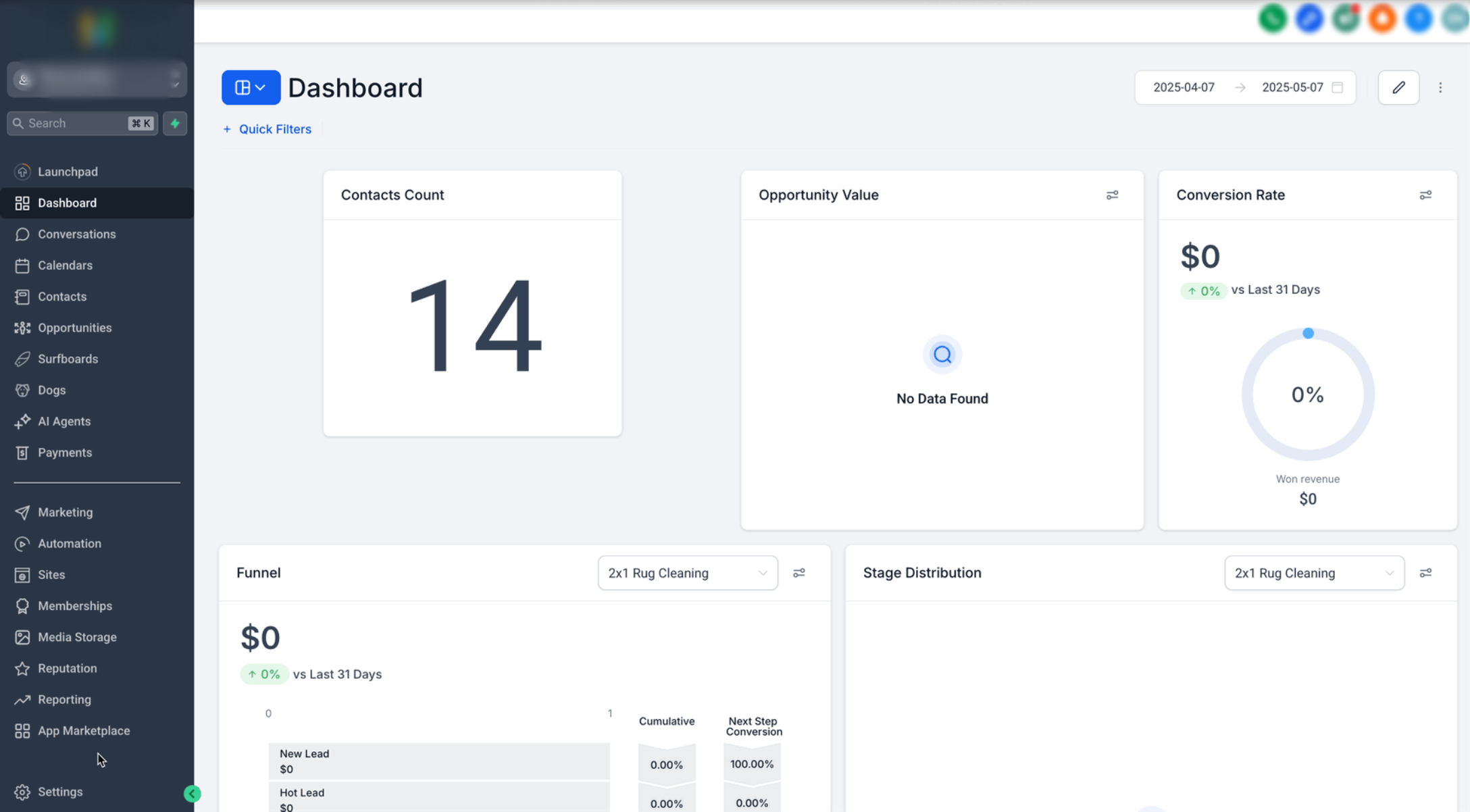
Step 1: Open the Toll-Free Number
- Open the applicable sub-account.
- Go to Settings.
- Open Phone System.
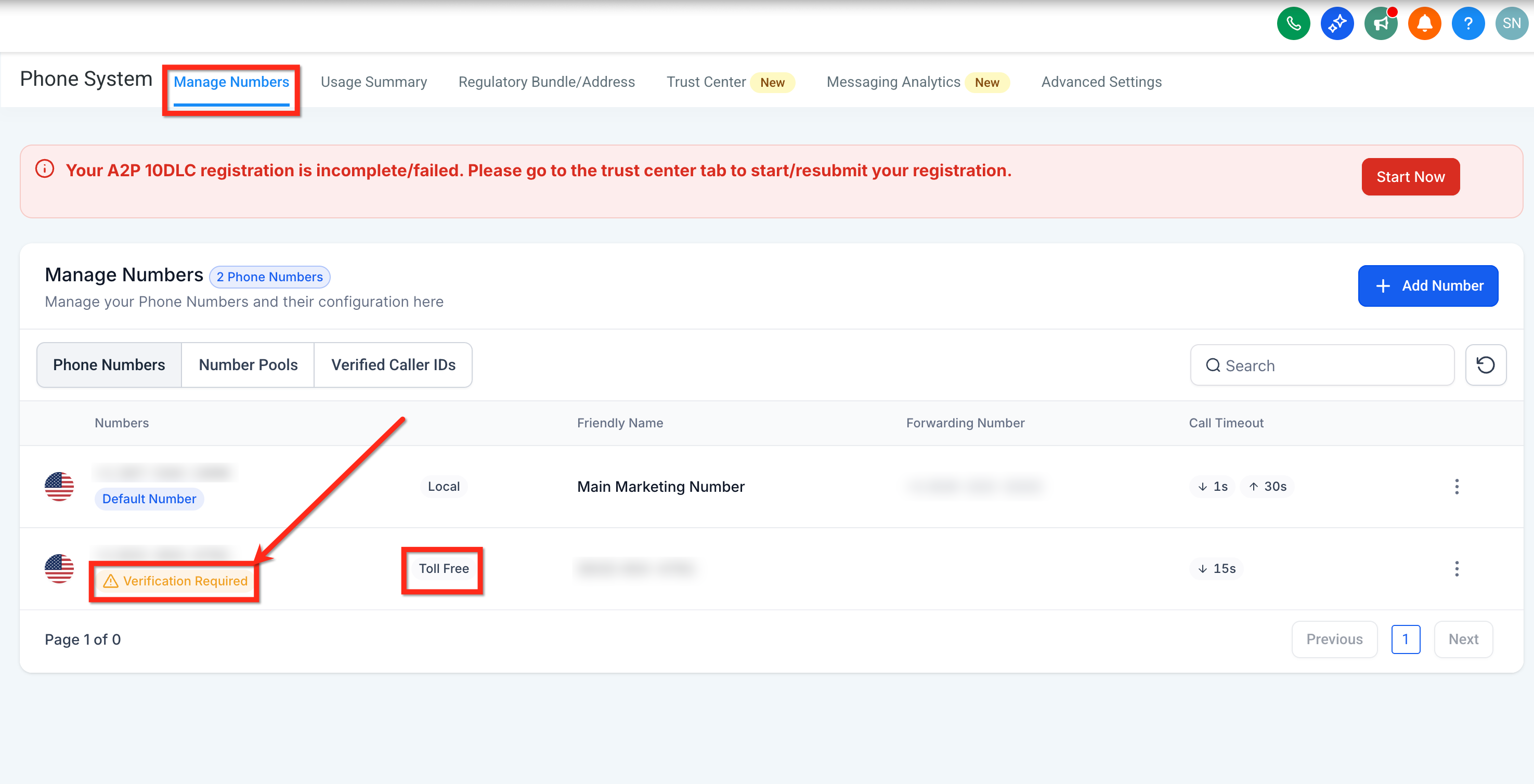
- Select Manage Numbers.
- Locate the toll-free number marked Verification Required and open the verification flow.
Step 2: Add Business and Contact Information
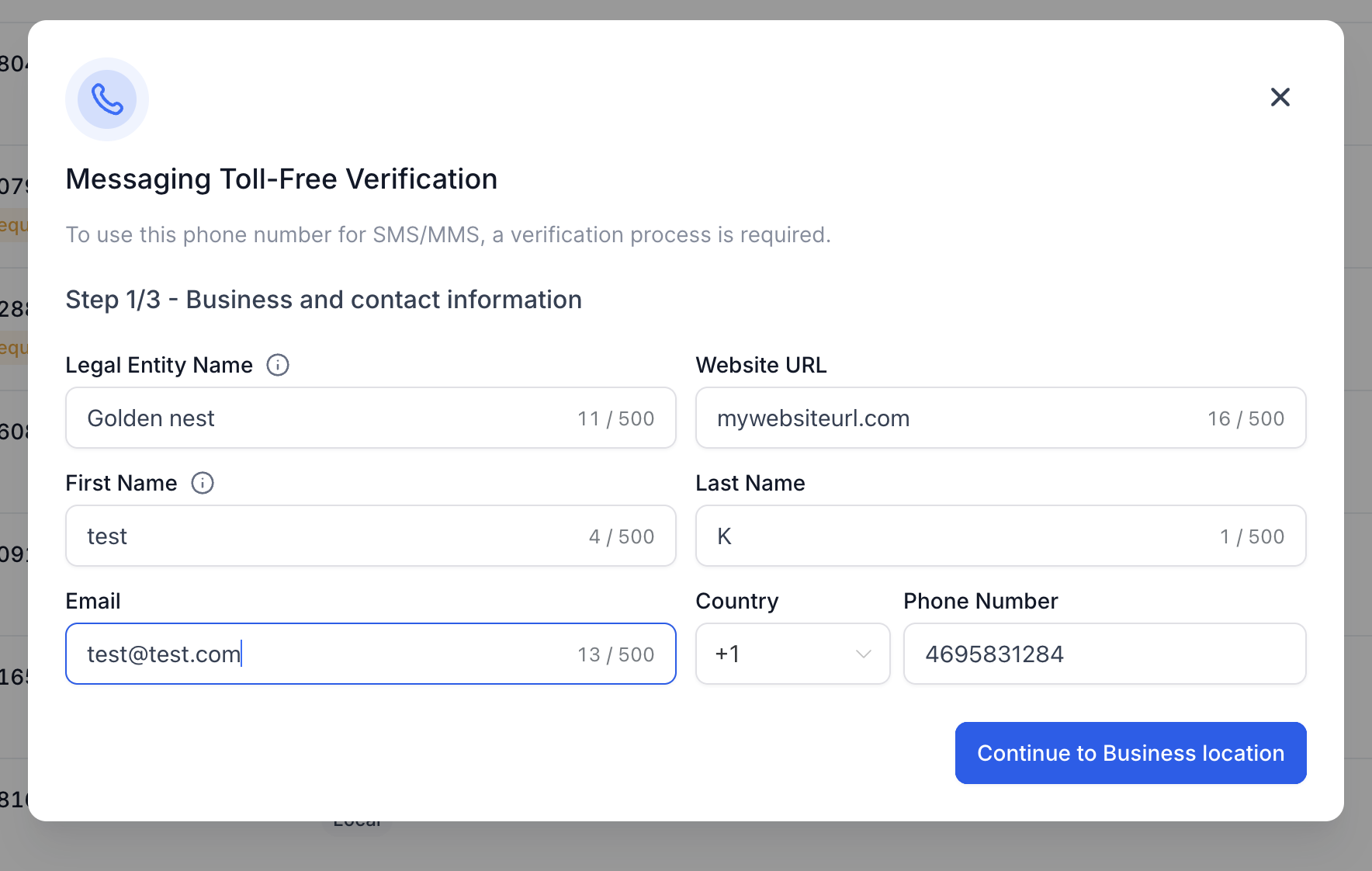
Enter the end business information exactly as it is represented publicly and in official records when applicable.
- Legal Entity Name: Use the end business the customer is engaging with.
- Website URL: Use the end business website or a public social page if there is no formal website.
- First and Last Name: Enter the customer point of contact.
- Email: Enter a valid contact email.
- Phone Number: Enter the contact number with the appropriate country code.
Business registration fields are conditional. A tax ID or registration number is not required in every submission. If additional identity fields appear, complete the requested Legal Entity Type, DBA, Registration Authority, Registration Number, or Registration Country accurately.
Step 3: Add the Business Location
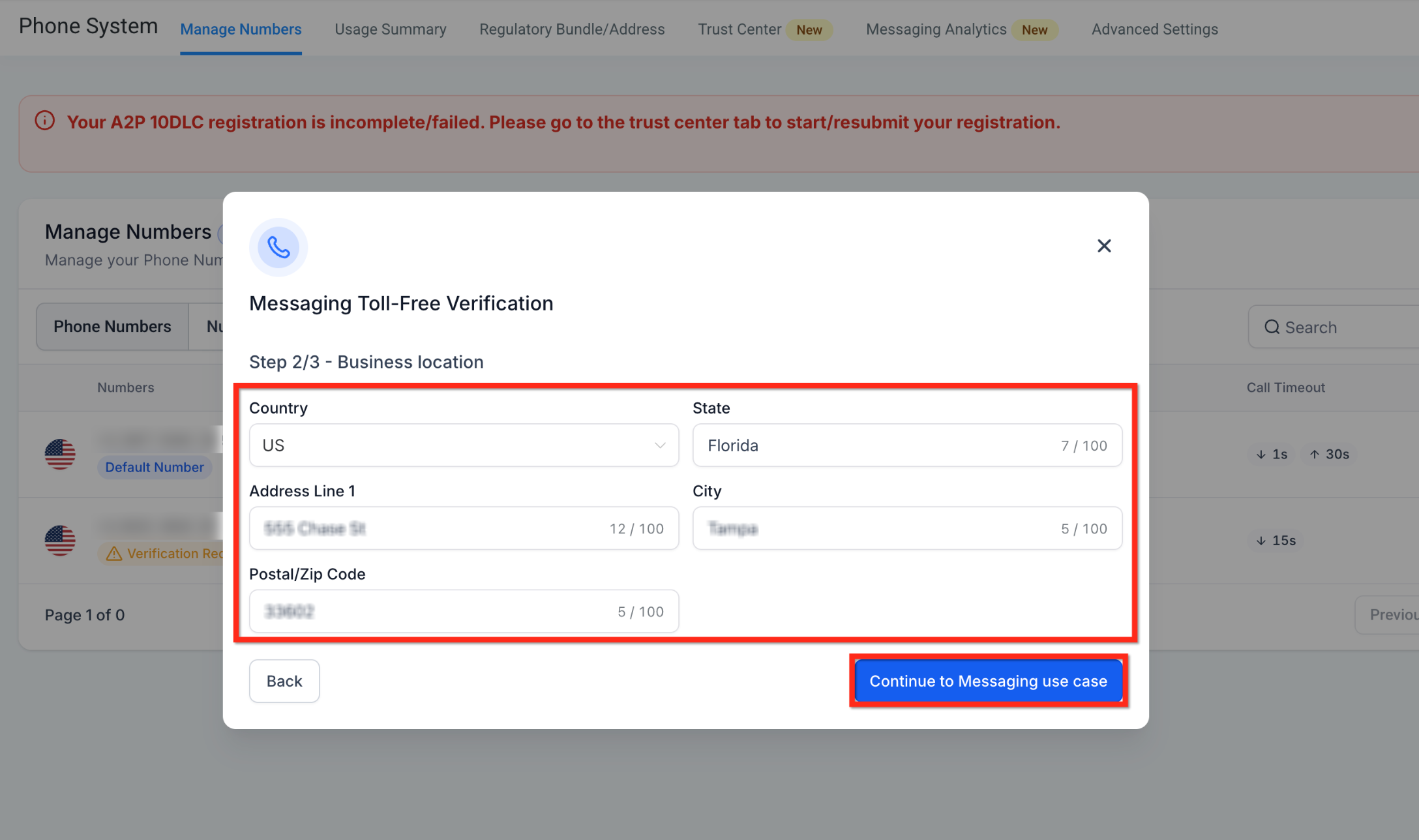
The location should represent the end business associated with the messaging use case.
- Select the business Country.
- Enter the State, province, or region.
- Enter Address Line 1.
- Enter the City.
- Enter the Postal or ZIP code.
- Click Continue to Messaging use case.
Step 4: Complete the Messaging Use Case
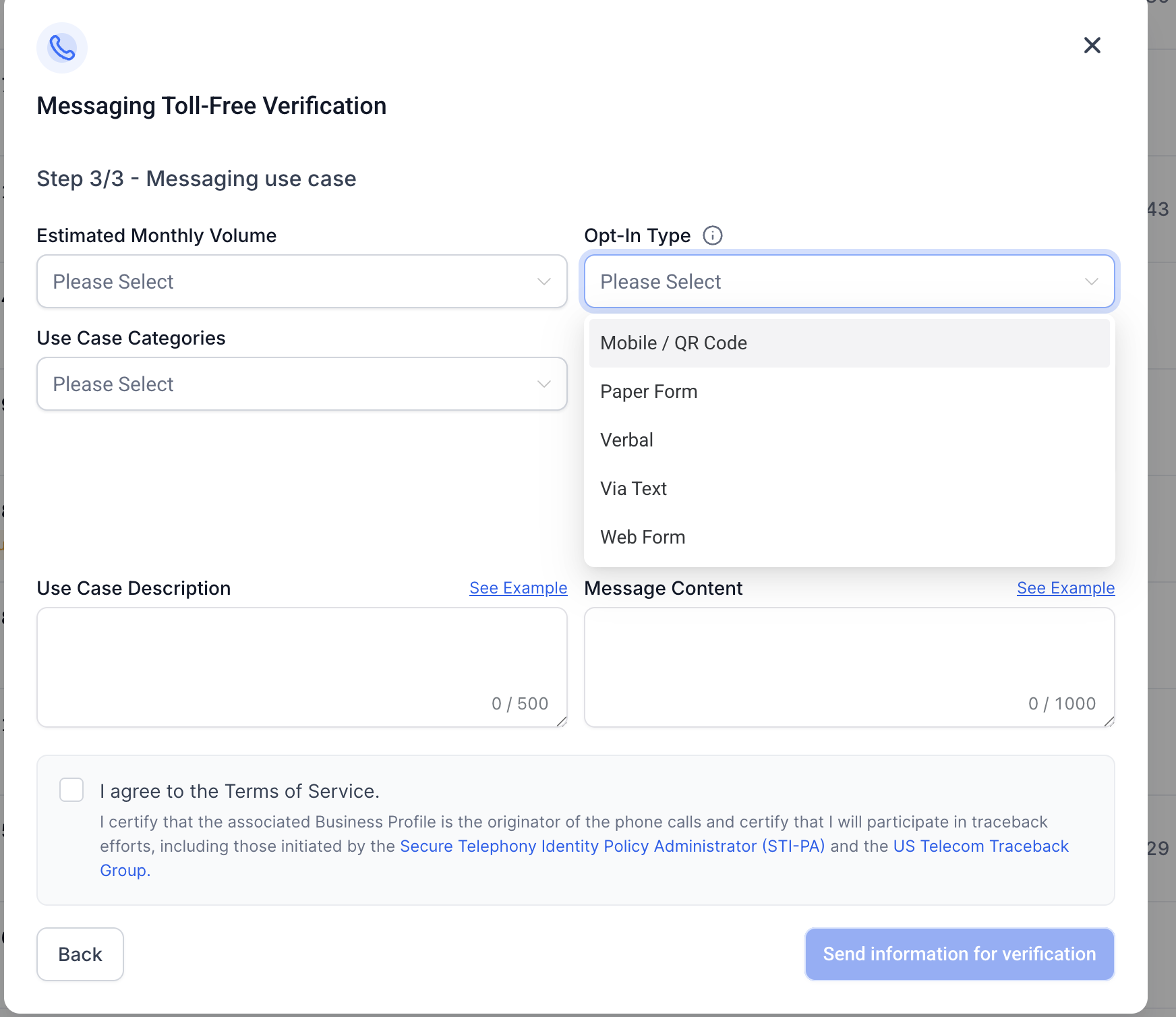
The messaging use case must match the way customers actually opt in and the messages they will receive. Reviewers compare the selected category, opt-in method, evidence, description, and sample message for consistency.
- Select the Estimated Monthly Volume.
- Select the applicable Use Case Categories.
- Choose the actual Opt-In Type, such as Mobile / QR Code, Paper Form, Verbal, Via Text, or Web Form.
- Enter a detailed Use Case Description.
- Add representative Message Content.
- Add a publicly accessible Opt-In Workflow Image URL when requested.
- Review the Terms of Service acknowledgment.
- Click Send information for verification.
Appendix A — Opt-In Guide
Toll-Free Verification requires a clear explanation of how recipients consent to receive messages. The selected opt-in method, supporting evidence, and use case must all describe the same real-world customer experience.
Core principle: Consent should be specific, informed, and connected to the business and message type. Do not submit an opt-in method that is different from how customers actually provide consent.
Minimum Opt-In Elements
Where applicable, the customer-facing consent disclosure should clearly identify:
- The business or program sending the messages
- The type or purpose of the messages
- Message frequency or a statement that frequency varies
- That message and data rates may apply
- How the recipient can request help
- How the recipient can opt out
- A Privacy Policy link
- Terms of Service or Terms and Conditions when applicable
Example Consent Language
“By providing my phone number, I agree to receive text messages from [Business Name] about [message purpose]. Message frequency varies. Message and data rates may apply. Reply HELP for help and STOP to unsubscribe.”
Adapt the wording to the actual program. The consent text submitted for verification should accurately reflect what the customer sees or hears during opt-in.
Web Form Opt-In
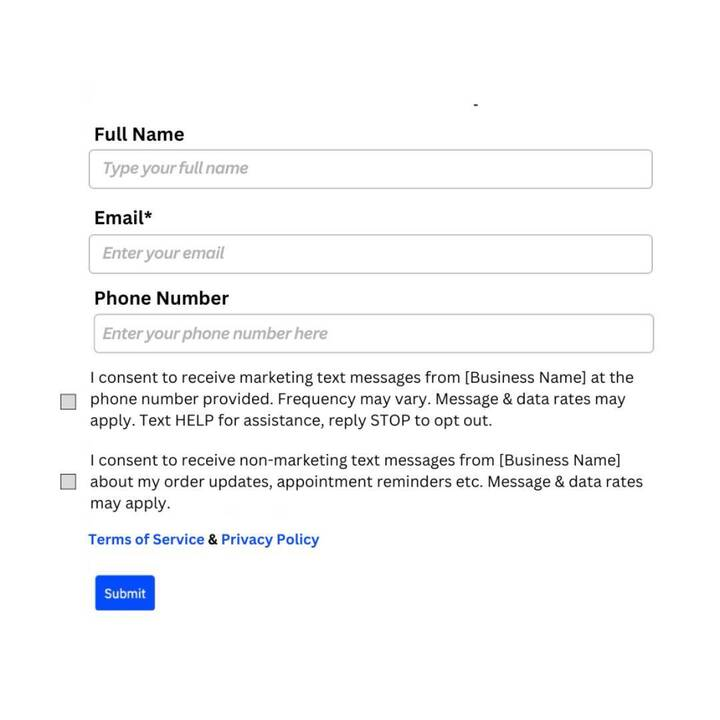
A web form can collect a customer's phone number and separate permission to receive messaging.
- The SMS consent checkbox should not be pre-selected.
- Consent should not be bundled into unrelated terms.
- The form should identify the business and messaging purpose.
- Include applicable frequency, rate, HELP, and STOP disclosures.
- Make the Privacy Policy and Terms accessible from the form or page.
- Use separate marketing and non-marketing consent where your messaging program requires distinct consent.
Verbal Opt-In
Verbal consent may be collected during a live call or an IVR flow. The customer should be clearly told what messages they are agreeing to receive and how to opt out.
Example: “We can send you text reminders from [Business Name] about your appointments. Message frequency varies. Message and data rates may apply. Reply HELP for help and STOP to unsubscribe. Would you like to receive these messages?”
Paper Form Opt-In
A physical form may collect the recipient's number and consent. For verification, provide a publicly accessible image or scan that clearly shows the consent language and how the customer agrees.
Via Text Opt-In
When customers initiate consent through text messaging, provide the keyword, advertisement, sign, or other campaign material that tells the customer how to subscribe. The evidence should show the business, the call to action, and applicable consent disclosures.
Mobile / QR Code Opt-In
A QR code can direct customers to a web form or pre-filled messaging flow. The destination must still provide a valid consent experience.
If the QR code opens a web form, the web-form consent requirements apply to that destination.
Opt-In Evidence Requirements
When the verification form requests an Opt-In Workflow Image URL, provide evidence that is:
- Publicly accessible without a login
- Clearly associated with the submitted business
- Consistent with the Opt-In Type selected in the form
- Clear enough for the reviewer to read the actual consent language
- Representative of the live customer experience
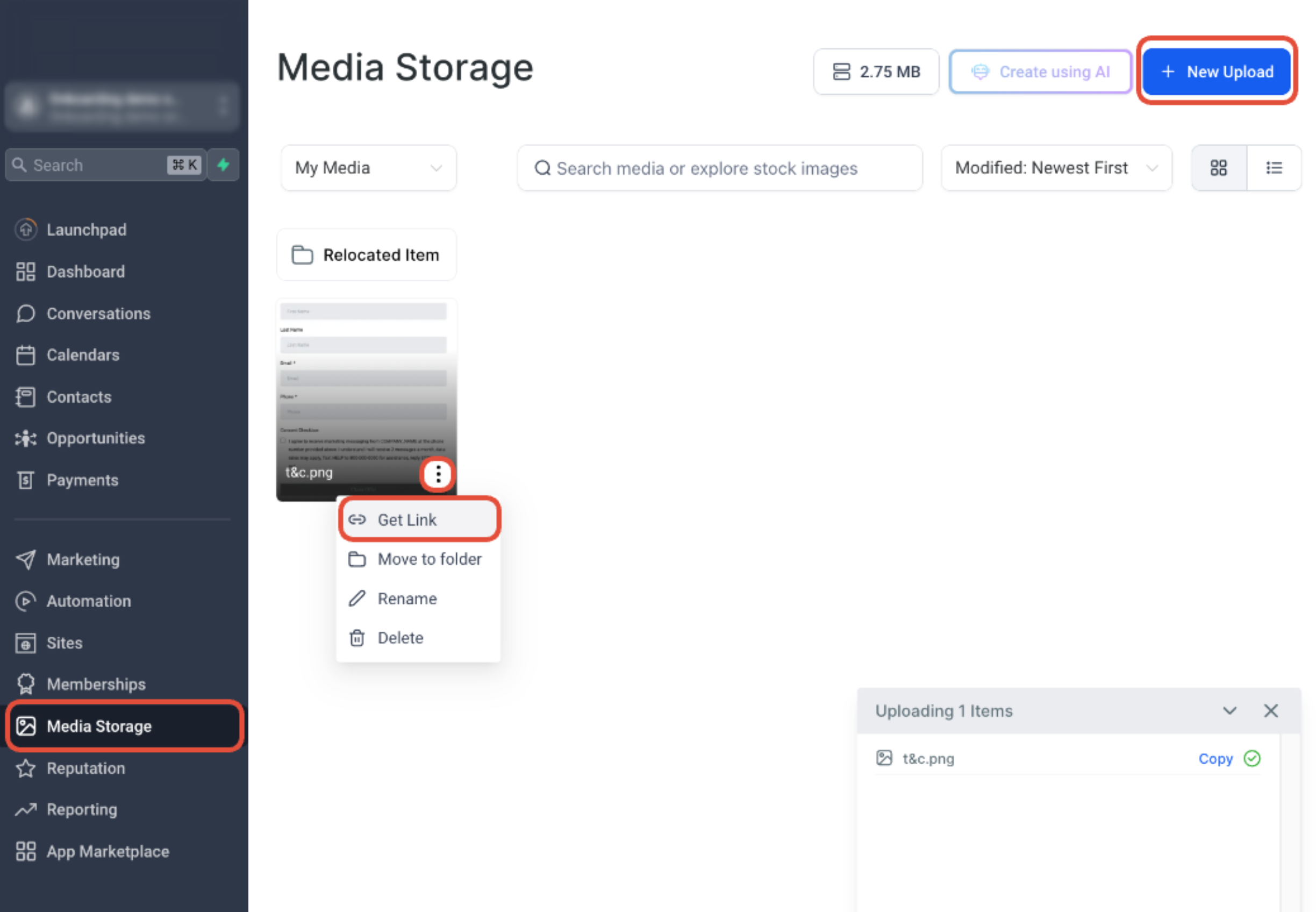
If the live opt-in page is behind a login or is not publicly available, upload a screenshot to a publicly accessible location and use that URL in the verification flow.
Use Case Description
Avoid vague descriptions such as “Marketing.” Explain:
- What messages are sent
- Who receives them
- How those recipients opted in
- Which channel or workflow is used to collect consent
Better example: “This toll-free number is used to send appointment reminders and service updates to customers of [Business Name] who opted in through our website booking form.”
Weak example: “Marketing.”
Sample Message Content
Sample messages should match the use case and generally identify the business and the purpose of the message. Include opt-out language when applicable.
Example: “Hi Jamie, this is [Business Name]. Your appointment is scheduled for Friday at 10:00 AM. Reply STOP to opt out.”
Consent Recordkeeping
Maintain records that can demonstrate how and when consent was captured. Depending on the opt-in method, useful records can include:
- Phone number
- Date and time of opt-in
- Opt-in method
- The exact consent language shown or read to the customer
- Form submission or workflow record
- Source page or campaign
- IP address or similar metadata when available and relevant
Monitor Verification Status
After submission, monitor the toll-free number from the phone-number management area. Review times can vary based on submission quality, business information, use case, and carrier review volume, so do not rely on a guaranteed approval timeline.
| Verification Status | Messaging | What It Means |
|---|---|---|
| Restricted (Unverified) | Blocked | The number has not completed an approved verification. |
| Pending Verification | Blocked | The submission is under review. SMS/MMS remains unavailable until approval. |
| Verified (Approved) | Allowed | The toll-free number is approved for eligible messaging traffic, subject to applicable carrier policies. |
| Rejected | Blocked | The submission was not approved. Review the rejection reason and correct or appeal the submission when available. |
Troubleshooting Toll-Free Verification
Most verification problems can be traced to mismatched business information, incomplete opt-in evidence, vague use cases, inaccessible proof URLs, or sample messages that do not match the submitted campaign.
Confirm that the number is a toll-free number in the correct sub-account and that your user permissions allow access to phone-number settings.
Use a complete, publicly accessible HTTPS URL. Verify that the link opens without a login and directly displays the opt-in evidence or a page containing it.
Compare the rejection reason against the business name, website, use case, opt-in type, consent proof, and sample messages. Correct the mismatched item before resubmitting or requesting an appeal.
If the toll-free number sends promotional or marketing content, the selected use case and opt-in experience should accurately reflect that activity. A mismatch can lead to rejection.
Confirm the number shows Verified (Approved), then review the message error, recipient, content, opt-out state, and other messaging-compliance requirements. Toll-Free Verification approval does not override unrelated carrier filtering or account restrictions.
Frequently Asked Questions
Need Help?
Before Contacting Support
- Confirm the affected phone number is toll-free.
- Check the current verification status.
- Review the business name and website for consistency.
- Confirm the selected Opt-In Type matches the real consent workflow.
- Open the proof URL in a private/incognito browser to confirm it is publicly accessible.
- Compare the use case description with the actual messages being sent.
- Review any rejection message before resubmitting.
Still Need Help?
When contacting Support, include:
- The affected toll-free number
- The Location ID
- Current verification status
- Business or legal entity name
- Selected use case and Opt-In Type
- Rejection reason, if applicable
- The public opt-in evidence URL
- Screenshots of the issue or error