
The platform applies inbound call rate limits to help protect voice infrastructure from abusive, automated, or unusually high call patterns while keeping legitimate calls available.
The applicable threshold depends on whether a phone number is connected to an IVR, connected to Voice AI, or using standard inbound call routing.
These limits are measured using documented call-rate thresholds rather than a universal concurrent-call limit, making it important to distinguish call volume from the number of calls that happen to arrive at the same time.
Inbound and outbound Voice AI limits are different. The thresholds in this article apply to inbound phone calls. Do not use outbound Voice AI calling limits or Voice AI Chat Widget concurrency limits when evaluating phone-number-based inbound Voice AI traffic.
What is Inbound Call Rate Limiting?
Inbound call rate limiting controls how frequently calls can arrive from or be directed to specific phone numbers before the traffic is identified as potentially abusive or excessive. The thresholds vary based on the type of inbound call handling configured for the number.
A rate limit is not the same thing as a concurrency limit. Rate limits measure call volume over a period of time, while concurrency describes how many calls are active at the same moment.
Key Benefits of Understanding Inbound Call Rate Limits
Knowing which threshold applies to each phone number helps you plan call routing, prepare for high-volume events, and distinguish legitimate simultaneous traffic from patterns that may trigger abuse protections.
- Traffic Planning: Understand how much inbound traffic different routing types can accept before a documented rate threshold is exceeded.
- Voice AI Clarity: Separate phone-based Voice AI rate limits from unrelated browser-widget or outbound Voice AI limits.
- Abuse Protection: Reduce the risk that repeated automated or spam calls trigger account-level safeguards.
- Better Routing: Choose IVR, Voice AI, or standard live-answer routing based on your expected call pattern.
- Faster Recovery: Know when a blocked call is an individual violation and when Support assistance is required.
How Inbound Call Rate Limits Are Measured
Inbound protections evaluate call volume based on the originating caller number and the destination phone number. Understanding the difference helps identify whether traffic is concentrated from one caller or concentrated on one business number.
| Measurement | What It Represents | Example |
|---|---|---|
| From a number | Calls originating from the same caller phone number. | One external number repeatedly calling your business numbers. |
| To a number | Calls arriving at the same platform-managed phone number. | Many different callers contacting the same business line. |
| Violation cap | The number of rate-limit violations recorded within an hour. | More than five violations can trigger an account-wide inbound call block. |
Threshold wording matters: A limit written as >200 calls per minute means the rate must exceed 200 calls per minute before that documented threshold is violated.
Concurrent Inbound Calls and Voice AI
Simultaneous inbound calls are often confused with rate limiting. For phone-number-based Voice AI, current platform documentation provides an inbound call-rate threshold but does not define a separate per-number, per-sub-account, or per-agent concurrent-session ceiling for inbound phone calls.
Ten calls arriving during the same minute are below the documented >200 calls-per-minute threshold for a Voice AI-connected number.
However, the documented rate threshold should not be interpreted as a guarantee of unlimited simultaneous Voice AI sessions. Correct number assignment, routing mode, and Voice AI working hours must still allow the agent to answer.
| Voice Experience | Published Limit | Applies Here? |
|---|---|---|
| Phone-number-based Voice AI | Inbound rate threshold of >200 calls/minute from or to a number. | Yes |
| Voice AI Chat Widget | 20 concurrent browser-based Voice AI calls per sub-account. | No. This is a separate browser-based experience. |
| Outbound Voice AI | Uses separate outbound call-rate and daily limits. | No. Outbound rules do not define inbound capacity. |
Inbound Call Rate Limit Reference
The routing method assigned to the phone number determines which documented threshold applies. IVR-connected numbers are excluded from these specific inbound rate-limit rules, while Voice AI and regular numbers use different call-per-minute thresholds.
| Number Type | From One Number | To One Number | When Exceeded |
|---|---|---|---|
| IVR-Connected | Not subject to these inbound rate-limit rules | Not subject to these inbound rate-limit rules | These specific rate-limit violations do not apply. |
| Voice AI-Connected | >200 calls/minute | >200 calls/minute | The triggering call is blocked and one violation is recorded. |
| Regular Number | >10 calls/minute | >15 calls/minute | The triggering call is blocked and one violation is recorded. |
Regular number refers to a standard inbound number that is not being handled through IVR or Voice AI for the applicable call path.
What Happens When a Limit Is Exceeded?
A violation is recorded when a Voice AI or regular-number call exceeds the applicable rate threshold. A single violation affects the triggering call, while repeated violations can escalate into an account-wide inbound calling restriction.
When the applicable calls-per-minute threshold is exceeded, the current triggering call is blocked and one violation is recorded.
All inbound calls for the affected account can be blocked. Contact Support for assistance reviewing the traffic and restoring inbound calling.
How to Set Up Routing for High Inbound Call Volume
Proper routing ensures calls reach the intended destination before you evaluate whether call volume itself is the issue. Configure the number based on whether callers should reach Voice AI immediately, try human users first, or enter an IVR workflow.
Determine whether the number should use IVR, Voice AI, or normal team-member/forwarding routing. The applicable inbound rate threshold depends on this call path.
- Go to AI Agents → Voice AI.
- Open the applicable Voice AI agent.
- Open the Deploy tab.
- Assign the required phone number or number pool.
- Select Answer calls directly when Voice AI should answer immediately, or Use as backup when humans should have the first opportunity to answer.
- Review the agent's Working Hours so it is available when inbound calls are expected.
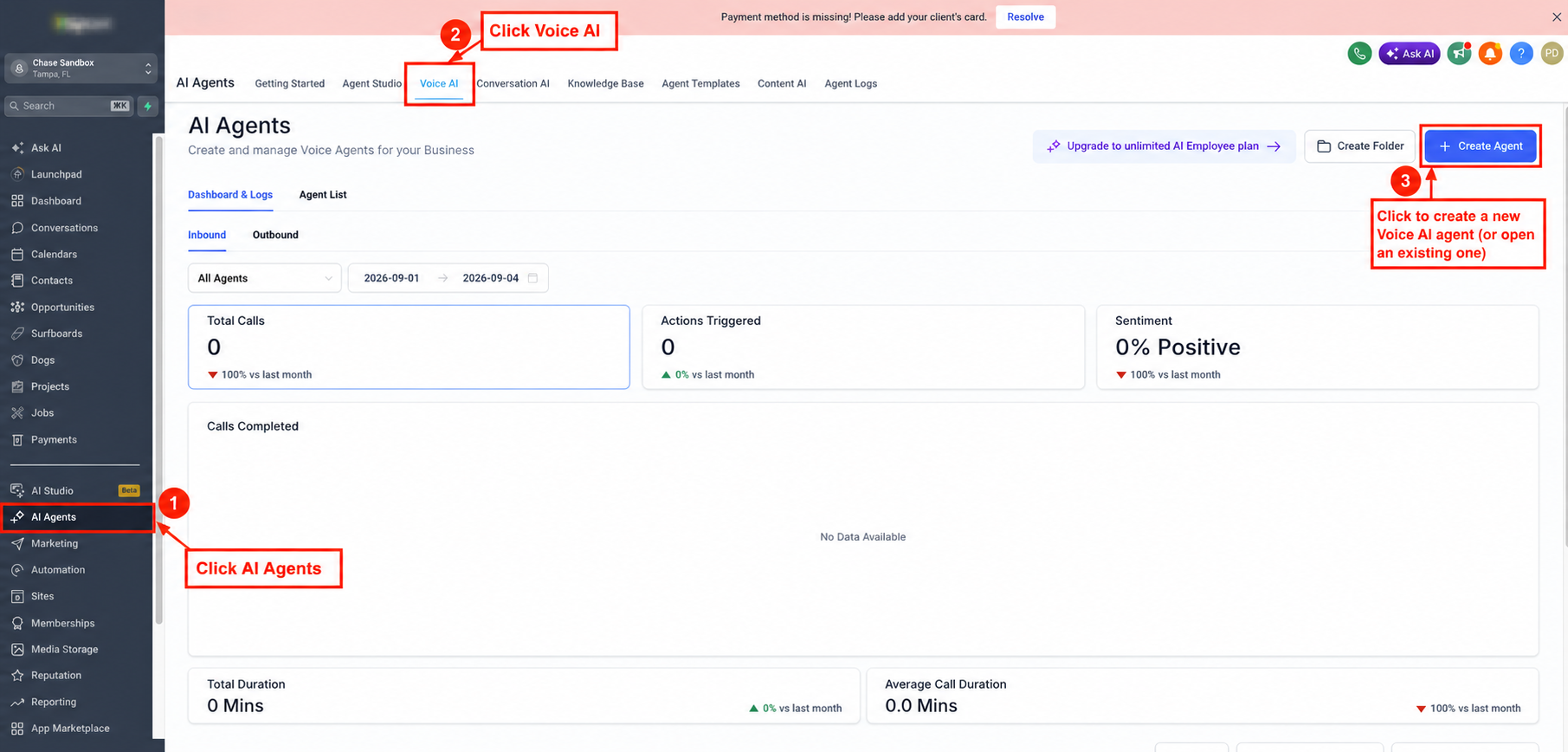
Screenshot: Navigate to AI Agents → Voice AI, then open or create the applicable Voice AI agent.
Rate-limit capacity and human-answer capacity are different. If calls are routed to team members, make sure the correct web app, mobile app, phone, or VoIP deskphone devices are enabled.
The platform can also ring up to six additional team members through the Ring More Team Members option. The first configured destination to answer takes the call.
If callers should navigate a menu before reaching a person or department, build the IVR in Automation → Workflows and assign it to the phone number's Call Forwarding configuration. IVR-connected numbers are not subject to the specific inbound rate-limit thresholds described in this article.
Place normal test calls to confirm the correct destination answers. If you expect a campaign, broadcast, event, or other traffic pattern that may approach the documented thresholds, contact Support before launch to review the expected inbound volume.
Best Practices for High Inbound Call Volume
High-volume inbound calling works best when routing, staffing, AI availability, and spam protections are planned together. Rate limits are only one part of the complete inbound call path.
- Use the Correct Routing Type: Choose IVR, Voice AI, or regular call routing based on the actual caller experience you need.
- Plan for Traffic Concentration: A large number of calls to the same regular number can reach its destination threshold much faster than Voice AI-connected traffic.
- Watch Repeated Callers: The originating-number threshold can be triggered even when calls are distributed across multiple destination numbers.
- Protect Voice AI From Spam: Use available Voice AI spam-detection and blocking controls to reduce repeated unwanted calls.
- Do Not Mix Inbound and Outbound Limits: Outbound Voice AI uses a separate set of rate and daily limits.
- Escalate Planned Traffic Spikes: Contact Support when expected traffic may approach the documented thresholds.
Frequently Asked Questions
Need Help?
- Confirm whether the affected number uses IVR, Voice AI, or regular inbound routing.
- Record the approximate number of calls received and the time window in which they arrived.
- Note whether calls originated from one caller or many different callers.
- Confirm the Voice AI agent's phone-number assignment, routing mode, and working hours.
- Test the number with a normal inbound call after the traffic spike has ended.
- Gather the affected phone number, sub-account details, timestamps, and any relevant call logs or screenshots.
Contact Support if inbound calling remains blocked, repeated rate-limit violations occur, or you expect legitimate traffic that may approach the documented thresholds. Providing the information above can help speed up investigation and recovery.