
Unpublishing a Managed Agent lets you temporarily take its automated triggers out of production without losing the work you’ve already configured. Your agent’s triggers, apps, knowledge, and instructions remain in place while you continue editing and testing the agent. When you’re ready, republish the agent to reactivate its production triggers using your latest configuration.
TABLE OF CONTENTS
- What is Unpublishing a Managed Agent?
- Key Benefits of Unpublishing a Managed Agent
- How to Unpublish a Managed Agent
- Frequently Asked Questions
What is Unpublishing a Managed Agent?
Unpublishing a Managed Agent temporarily stops its production activity without deleting the agent or removing the configuration you’ve already built. Its production triggers stop running, and any armed scheduled runs are cleared so the agent stays inactive in production.
Your configuration remains intact, including triggers, apps, knowledge, and instructions. You can continue editing the agent in the builder, test your draft, and chat with the agent while it is unpublished.
If an event was already in progress when the agent was unpublished, it will appear as Skipped in Activity history with a reason. When you are ready, you can publish the agent again and return it to production with your latest saved configuration!
Important: Unpublishing does not delete or disable the Managed Agent’s configuration. It pauses its production triggers while preserving the setup so you can continue working on the agent and publish it again when ready.
Key Benefits of Unpublishing a Managed Agent
- Pause without losing your configuration: Stop production triggers while keeping the agent's triggers, apps, knowledge, and instructions intact.
- Continue editing while unpublished: Refine the agent in the builder without reactivating its production triggers.
- Test changes before going live: Use the test panel while the agent is unpublished to validate changes before publishing.
- Prevent scheduled activity: Armed scheduled runs are cleared when the agent is unpublished so the agent remains inactive in production.
- Return to production easily: Republish the agent to activate its configured triggers using the latest configuration.
How to Unpublish a Managed Agent
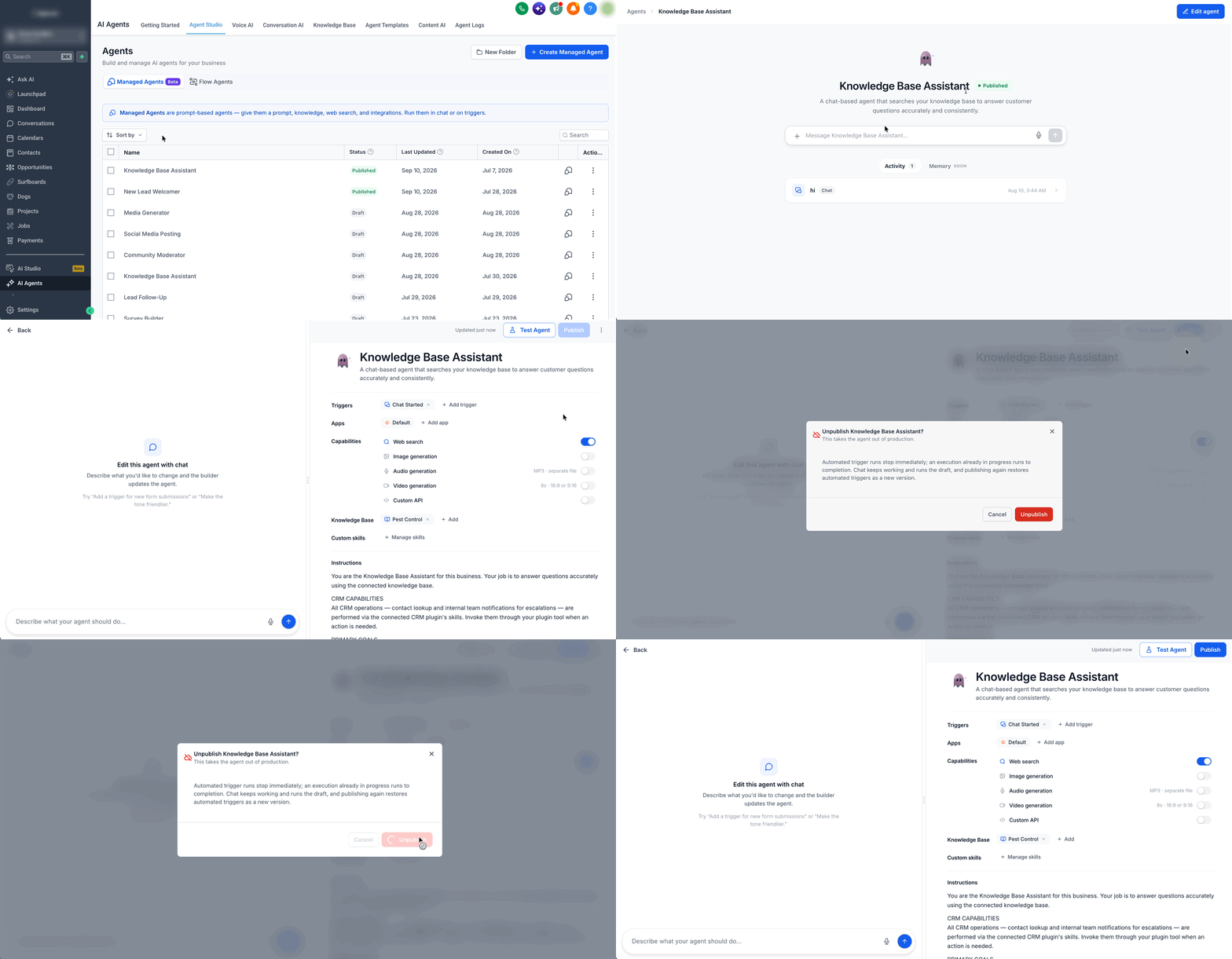
- Navigate to AI Agents > Agent Studio.
- Open the published Managed Agent you want to take out of production.
- Click Edit Agent icon next to publish in the upper-right corner of the builder.
- Click the 3 dot icon next to publish in the upper-right corner of the builder and select the Unpublish from the dropdown.
Once your agent is unpublished, you can continue editing or testing the agent in the builder as needed. When you are ready to return the agent to production, click Publish. The latest saved configuration is published, and the agent’s configured production triggers become active again.
Frequently Asked Questions
Q: Does unpublishing delete my Managed Agent?
No. The agent and its configuration remain available. Unpublishing stops its configured production triggers rather than deleting the agent.
Q: Can I test an unpublished Managed Agent?
Yes. The test panel remains available so you can validate your draft before publishing it again.
Q: Can I chat with a Managed Agent while it is unpublished?
Yes. You can continue chatting with the Managed Agent while it is unpublished. Unpublishing is intended to stop its configured production triggers rather than prevent direct interaction with the agent.