
Multi-tier commissions let you reward affiliates for direct sales and sales generated through their sub-affiliate network. You can configure different commission rates across multiple tiers to support a layered affiliate structure. The system supports up to seven tiers in an affiliate campaign. This guide explains how multi-tier commissions work and how to configure them.
Table of Contents
What Are Multi-Tier Commissions?
Multi-tier commissions allow affiliates to earn commissions from their own sales and, where applicable, sales generated by affiliates they referred. Each level in the affiliate relationship represents a commission tier. A campaign can include up to seven tiers, with a separate commission rate configured for each tier.
Key Benefits of Multi-Tier Commissions
Multi-tier commissions provide more flexibility when rewarding affiliates and help support affiliate programs where participants refer additional affiliates.
Flexible commission structures: Configure up to seven commission tiers within an affiliate campaign.
Tier-specific rewards: Set different commission rates for affiliates at different levels of the referral structure.
Product-level flexibility: Configure tier commissions using default commission rates or product-specific commission settings.
Referral network incentives: Reward qualifying affiliates when sales occur through their sub-affiliate relationships.
Optional customer enrollment: Campaign settings can automatically enroll new customers as sub-affiliates when that option is enabled.
Prerequisites and Limitations
Understanding the campaign requirements before configuring commissions helps ensure the correct settings are available during setup.
Create a new affiliate campaign before configuring multi-tier commissions.
Multi-tier commissions support a maximum of seven tiers.
Commission distribution depends on the affiliates present in the referral chain. If fewer affiliate levels exist than the number of configured tiers, only the applicable affiliates in the chain receive commissions.
Available commission settings can be configured as default rates or customized for specific products.
How Multi-Tier Commissions Work
Each affiliate in a referral chain can correspond to a commission tier. The affiliate responsible for the sale receives the first-tier commission, while qualifying referring affiliates can receive commissions from subsequent tiers.
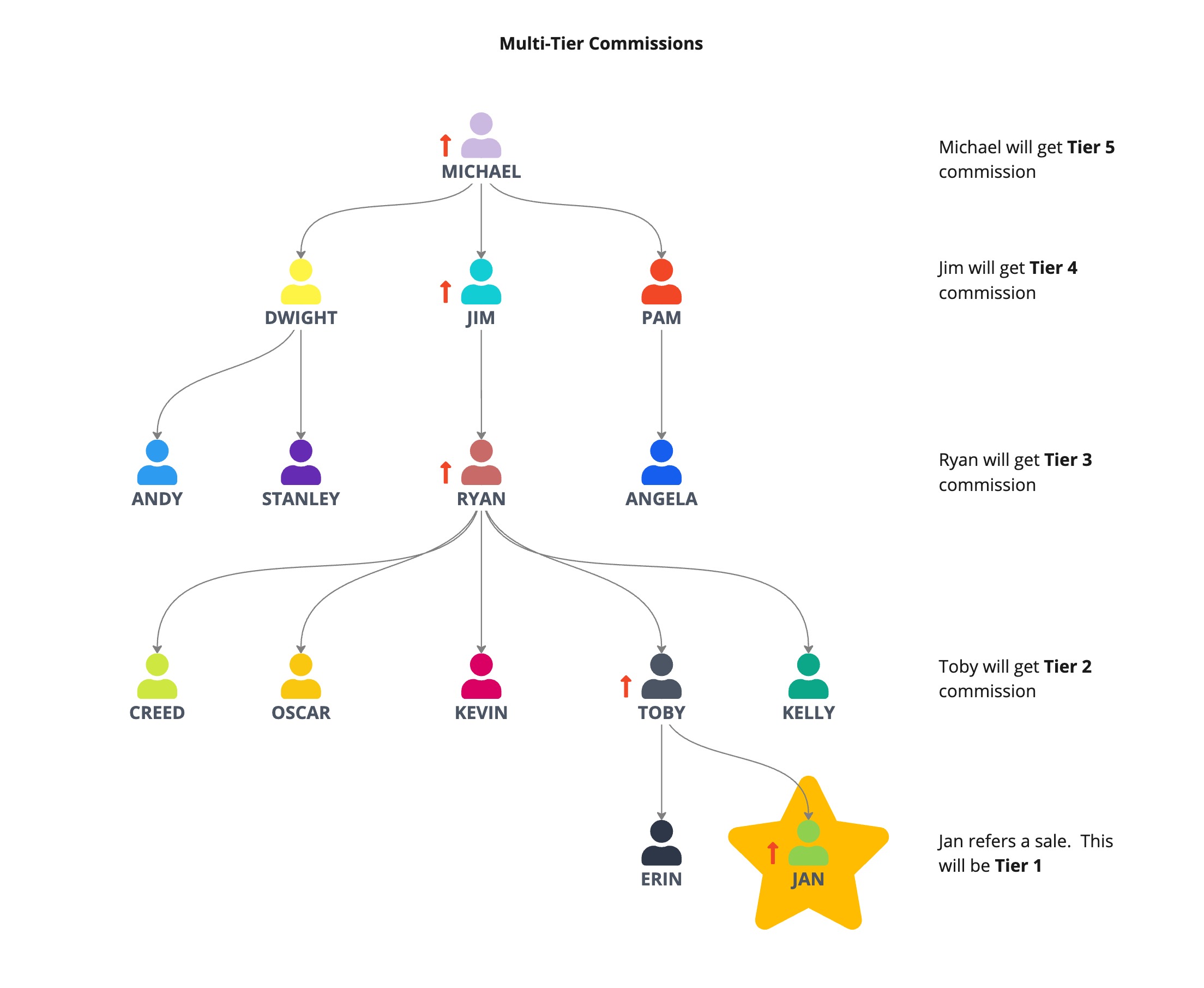
For example, consider this five-tier commission structure:
Tier 1: 20%
Tier 2: 10%
Tier 3: 5%
Tier 4: 3%
Tier 5: 2%
If Jan generates a $100 sale:
Jan, the Tier 1 affiliate, earns $20.
Toby, Jan's referring affiliate at Tier 2, earns $10.
Ryan, the Tier 3 affiliate, earns $5.
Jim, the Tier 4 affiliate, earns $3.
Michael, the Tier 5 affiliate, earns $2.
The total commission distributed for the $100 sale is $40.
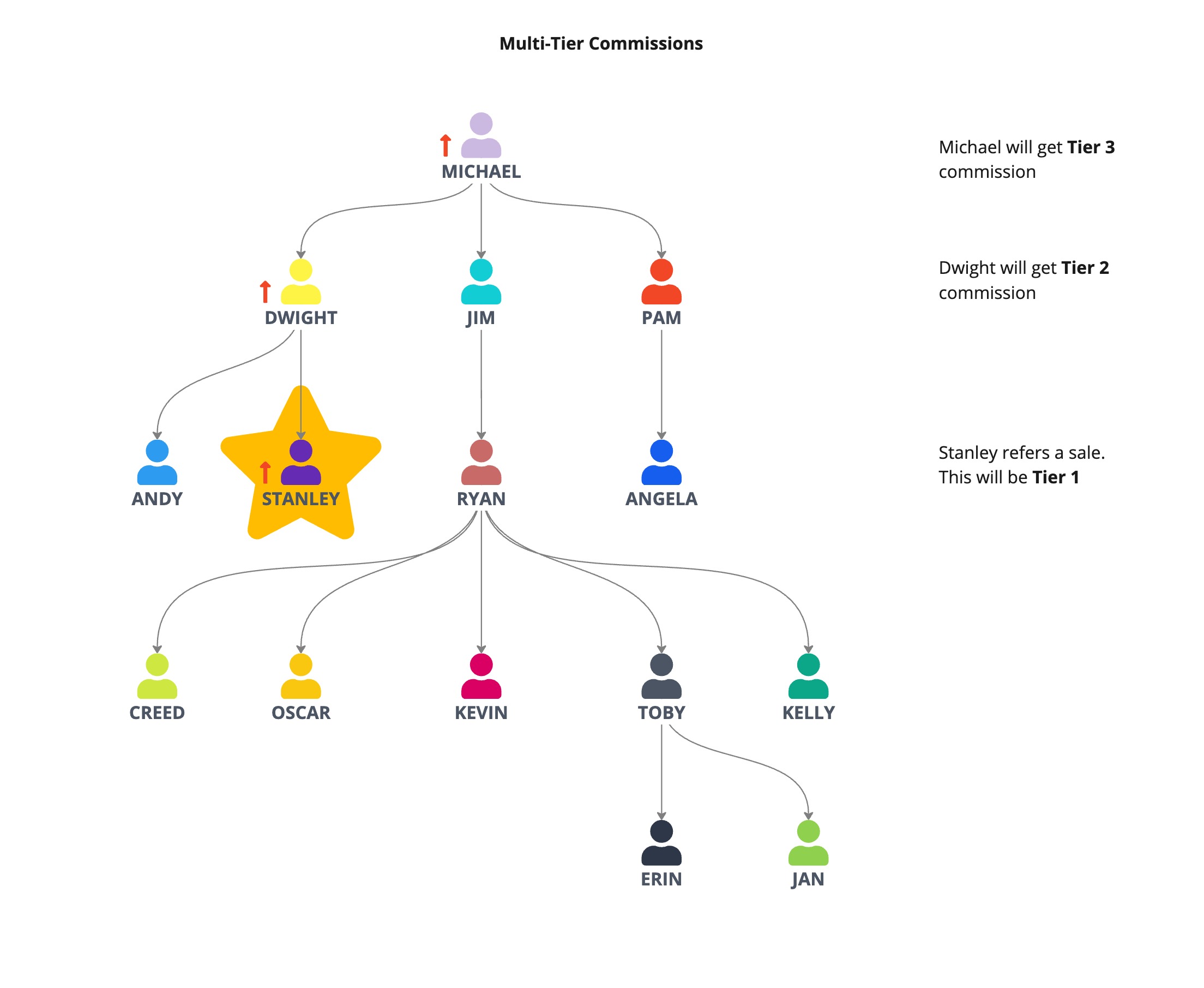
If the affiliate chain contains fewer levels than the campaign's configured tiers, commissions apply only to the available levels.
For example, using the same commission structure, if Stanley generates a $100 sale and the referral chain contains only three applicable affiliates:
Stanley receives the Tier 1 commission of $20.
Dwight receives the Tier 2 commission of $10.
Michael receives the Tier 3 commission of $5.
The total commission distributed is $35.
How To Set Up Multi-Tier Commissions
Configure multi-tier commissions while creating an affiliate campaign so each participating tier receives the appropriate commission rate.
Select Marketing from the left navigation menu.
Select Affiliate Manager.
Select Campaigns.
Click + Add to create a new affiliate campaign.
Configure the campaign source and other required campaign settings.
Set the campaign's default commission and any applicable product-specific commissions.
Open Advanced Commissions.
Enable Multi-Tier Commissions.
Select the number of commission tiers you want to use. You can configure up to seven tiers.
Set the commission for each tier using the applicable default or product-specific commission settings.
Review any additional campaign settings, including Auto-Enroll New Customers as Sub-Affiliates if you want to use that option.
Review the campaign configuration.
Click Publish to activate the campaign.
Frequently Asked Questions
Q: How many commission tiers can I configure?
A: You can configure up to seven tiers in a multi-tier affiliate campaign.
Q: Can each commission tier have a different rate?
A: Yes. Each tier can have its own commission rate.
Q: Can I configure commissions for individual products?
A: Yes. Tier commissions can use default commission rates or product-specific commission settings.
Q: What happens if my campaign has more tiers than the affiliate referral chain?
A: Only the applicable affiliates present in the referral chain receive commissions. Unused tiers do not add additional recipients.
Q: Can new customers become sub-affiliates automatically?
A: Yes. Campaign settings include an option to auto-enroll new customers as sub-affiliates.