
Content AI feedback lets you rate generated text and images while you work, so you can quickly indicate whether an output was useful or missed the mark. The updated feedback experience supports both thumbs-up and thumbs-down ratings with optional follow-up details. Your submitted rating stays connected to the specific generation, so you can return later and review the feedback you provided.
TABLE OF CONTENTS
- What is Thumbs Up/Down Feedback for Content AI?
- Where Is Feedback Available?
- How to Provide Feedback on AI-Generated Content
- Frequently Asked Questions
What is Thumbs Up/Down Feedback for Content AI?
Thumbs Up/Down Feedback for Content AI lets you rate AI-generated text and images directly from supported Content AI experiences. You can select thumbs up when an output works well or thumbs down when it does not, then provide optional follow-up feedback about the result.
The updated experience keeps feedback connected to the exact prompt and generated text or image you rated. After you submit a rating, it remains associated with that generation and can be reopened later to review what you submitted.
Where Is Feedback Available?
Feedback is currently supported in the following tools. This ensures that no matter where you’re creating or editing AI content, you can provide valuable input to enhance its quality.
Social Planner: AI-generated post content (text and images) can be rated.
Blogs: AI-generated blog content can be rated.
Email Builder: AI-generated email content can be rated.
Funnels & Websites: AI-generated website or funnel copy can be rated.
Quick Actions (Fix Grammar, Rewrite, etc.): AI edits performed via Quick Actions can be rated.
How to Provide Feedback on AI-Generated Content
You can rate AI-generated content quickly and easily. Here’s how it works:
- From a supported Content AI experience, generate or open the text or image you want to review.
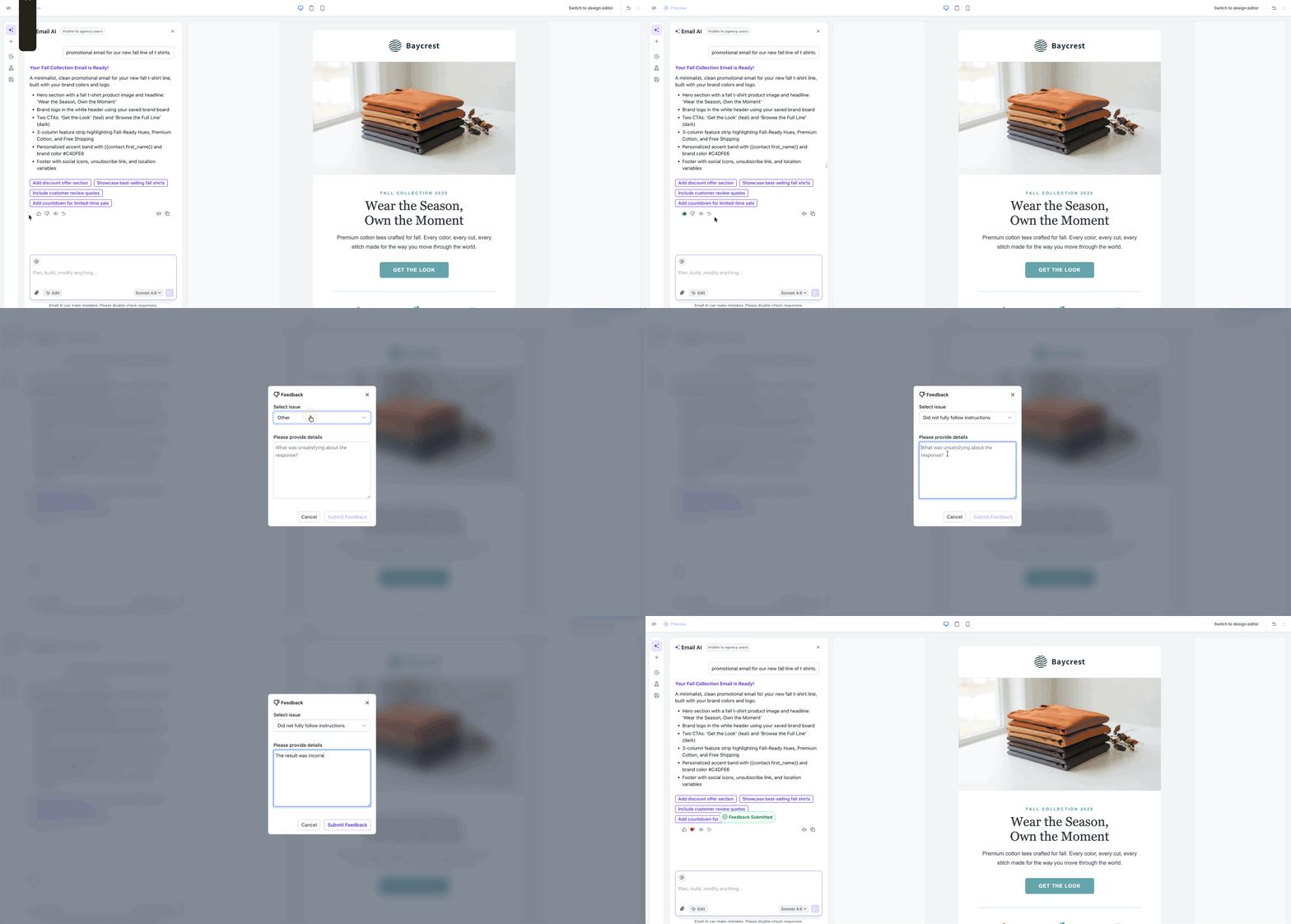
- Locate the thumbs up and thumbs down controls on the generated result.
- Select thumbs up when the output was useful.
- Select thumbs down when the output did not meet your needs.
- In the feedback modal, describe your issue in a note and optionally select the reason you are leaving feedback. Then submit your response.
Frequently Asked Questions
Q: Does my feedback directly improve the AI content I receive?
Your feedback helps improve AI performance across the platform. While individual feedback doesn’t immediately change your personal AI results, it helps tune the system for all users.
Q: Can I skip providing a reason when giving thumbs down?
Yes, providing a reason is optional, but it’s highly valuable and encouraged.
Q: Is the feedback anonymous?
Yes, feedback is used in aggregate to improve AI quality and is not tied to your specific content.
Q: Can I edit my feedback after submitting it?
At this time, feedback cannot be edited once submitted. However, you can rate subsequent outputs.
Q: Will more tools support Thumbs Up/Down Feedback for Content AI in the future?
Yes! The team plans to expand this feedback mechanism into additional AI-driven features as they roll out.