
You can place outbound calls from the mobile app using an existing personal or business phone number that has been verified. This lets you use a familiar number as your caller ID when contacting leads and customers.
TABLE OF CONTENTS
- What Is Calling With an Existing Verified Number?
- Why Use an Existing Verified Number?
- Before You Begin
- How to Make a Call Using Your Verified Number
- Countries With Verified Caller ID Restrictions
- Frequently Asked Questions
What Is Calling With an Existing Verified Number?
An existing verified number is a phone number you already own and have verified for use as an outbound caller ID.
After verification, the number appears as an available calling option in the mobile dialer. When you select it, the recipient sees your verified number as the caller ID for the outbound call.
Why Use an Existing Verified Number?
Using an existing verified number lets you:
Make outbound calls using a phone number you already own.
Maintain a consistent caller ID when contacting leads and customers.
Select your verified number directly from the mobile dialer.
Start making outbound calls without first setting up a dedicated phone number.
Before You Begin
Make sure:
The phone number you want to use has been verified.
You have access to the mobile app.
The verified number appears as an available caller ID in the dialer.
How to Make a Call Using Your Verified Number
Open the mobile app.
Navigate to the Call Dialer.
Tap the caller ID dropdown.
On the Select call from screen, locate your existing phone number.
Select the number marked with the Verified badge.
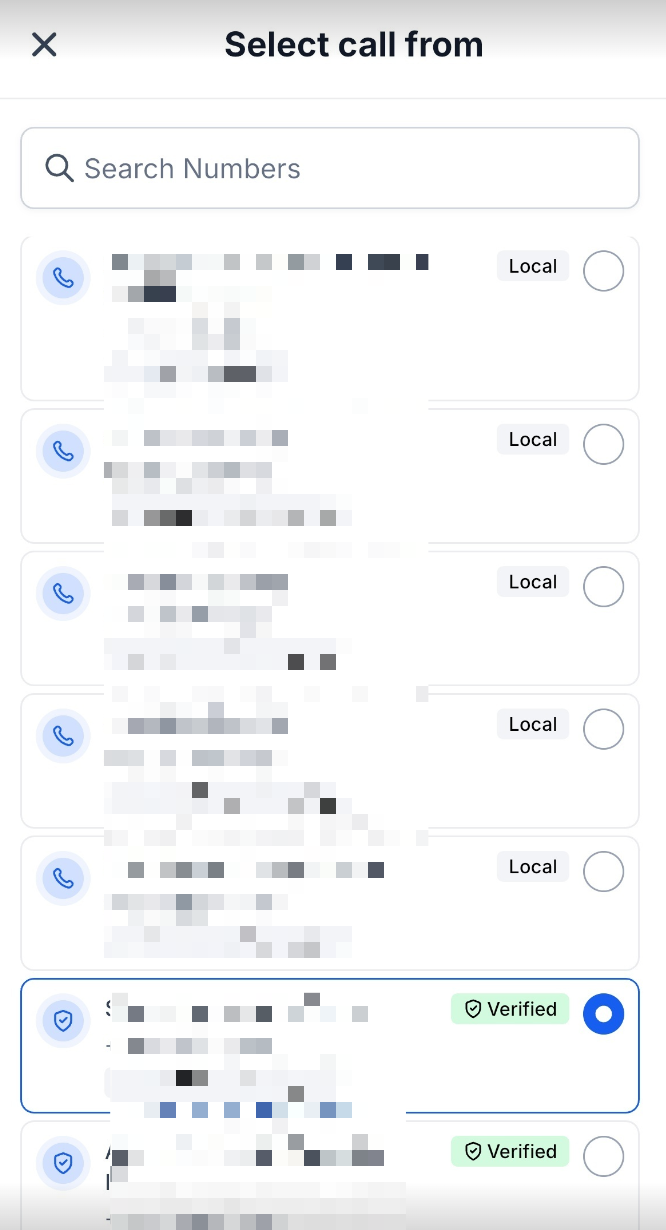
Enter the phone number you want to call or select a contact.
Place the call.
The selected verified number is used as the caller ID for the outbound call.
Important Notes
A verified number is used for outbound caller ID.
Using a verified number for outbound calls does not port or transfer ownership of the number.
Incoming calls to the verified number continue to follow the existing configuration for that number.
Availability and call completion can depend on local carrier and regulatory requirements.
Countries With Verified Caller ID Restrictions
Verified Caller ID may not be supported for domestic calls in certain countries because of local regulations or carrier restrictions.
Examples include:
India
Malaysia
Finland
Thailand
Taiwan
Greece
Calls placed with a Verified Caller ID in affected countries may be blocked or may not complete reliably. Where supported, use an appropriate local or international phone number to help ensure call delivery.
Frequently Asked Questions
Can I use a phone number I already own for outbound calls?
Yes. After the number is successfully verified, you can select it from the mobile dialer and use it as your outbound caller ID.
Where do I select my verified number?
Open the Call Dialer, tap the caller ID dropdown, and select your number from the Select call from screen. Verified numbers display a Verified badge.
Does using a verified number transfer the number into the phone system?
No. Verifying a number for outbound caller ID is different from porting the number.
Can I receive incoming calls through the mobile app using my verified number?
Verifying an existing number for caller ID does not move inbound calling for that number into the app. Incoming calls continue to follow the existing setup for the number.
Can I use a verified number for SMS?
This feature specifically supports using the verified number as the caller ID for outbound voice calls. It does not establish SMS support for that number.