
External Authentication in Marketplace apps lets developers connect their applications to third-party services using OAuth v2, API Keys, or Basic Auth. The expanded framework introduces multiple account connections, customizable install-time fields, independent User Info settings, and JavaScript Code Mode for advanced authentication requests. These capabilities help developers integrate with more providers while reducing the need for custom authentication infrastructure.
TABLE OF CONTENTS
- What Is External Authentication for Marketplace Apps?
- Key Benefits of External Authentication
- Multi-Account Support for Basic Auth
- User Info and Multi-Auth Settings
- Configurable Install-Time Fields
- How to Set Up External Authentication for Marketplace Apps
- Frequently Asked Questions
What Is External Authentication for Marketplace Apps?
External Authentication is the framework that allows Marketplace apps to securely connect with third-party services during app installation. Developers can configure how users authenticate, how account information is identified, and how credentials are managed for supported workflows, triggers, and actions.
The framework supports the following authentication methods:
OAuth v2: Authenticates users through an external provider's authorization flow and manages access tokens.
API Key: Authenticates users with API credentials issued by an external service.
Basic Auth: Authenticates users using credentials such as a username and password.
The expanded framework provides additional flexibility for services with nonstandard authentication requirements, including providers that use account-specific URLs or require additional user input during installation.
Key Benefits of External Authentication
The expanded authentication framework simplifies third-party integrations while giving developers more control over account connections and authentication behavior. These improvements help support a wider range of services without requiring developers to build and maintain separate authentication systems.
Multiple Account Connections: Allow users to connect multiple external accounts to a single Marketplace app installation using supported OAuth or Basic Auth configurations.
Improved Account Identification: Retrieve account names and email addresses to make connected accounts easier to recognize and manage.
Flexible Authentication Settings: Configure User Info independently from Multi-Auth based on the app's requirements.
Dynamic Install-Time Fields: Collect provider-specific information, such as a store URL or tenant identifier, during installation.
Custom Authentication Logic: Use JavaScript Code Mode to configure authentication requests for providers with nonstandard requirements.
Simplified Credential Management: Use the built-in authentication framework to manage supported credentials and token refresh operations.
Enhanced Troubleshooting: Inspect authentication responses, user information, execution logs, and HTTP details using the built-in testing tools.
Multi-Account Support for Basic Auth
Multi-Account Support allows Basic Auth Marketplace apps to maintain multiple credential sets within a single installation. This is useful when users manage multiple accounts with the same third-party provider and need to connect each account without installing the app repeatedly.
Previously, Multi-OAuth Support introduced multiple connections for OAuth-based apps. The expanded framework extends this capability to API Key / Basic Auth apps.
How Multiple Basic Auth Connections Work
Each connection represents a separate set of credentials associated with an external account. To distinguish connections, the authentication framework can retrieve identifying information from the external service and map it to supported account fields.
The supported account information mappings include:
| Field | Purpose |
|---|---|
| Account ID Path | Identifies the external account using its unique ID. |
| Account Name Path | Retrieves a recognizable name for the connection. |
| Account Email Path | Retrieves the email address associated with the account. |
Developers can retrieve this information in two ways:
Account Info Request: Configure an optional request to a provider endpoint that returns account details.
Authentication Response: Reuse account information returned directly by the authentication endpoint.
Example: Account Information Response
A third-party API might return the following account information:
{
  "account": {
    "id": "account_123",
    "name": "Example Store",
    "email": "admin@example.com"
  }
}
For this example, the mapping paths would be:
Account ID Path:
account.idAccount Name Path:
account.nameAccount Email Path:
account.email
Note: This is an illustrative response. The actual field paths depend on the third-party provider's response structure.
Properly mapping account information helps display identifiable connections when users connect multiple accounts.
User Info and Multi-Auth Settings
User Info and Multi-Auth are independent configuration options, allowing developers to retrieve account details without requiring multiple account connections. This distinction is useful for apps that only need one external connection but still benefit from showing a recognizable account name or email address.
Multi-Auth
Multi-Auth enables applications to maintain multiple external account connections within a single installation. When combined with User Info, each connection can be identified using account information retrieved from the provider.
Understanding the Configuration Options
| Configuration | Expected Behavior |
|---|---|
| User Info enabled, Multi-Auth disabled | Retrieves account information for a single connection. |
| User Info enabled, Multi-Auth enabled | Retrieves identifying information for supported multiple connections. |
| User Info disabled, Multi-Auth enabled | Supports multiple connections; account identification depends on the configured authentication response and mapping requirements. |
| Both disabled | Uses the app's standard authentication configuration without the optional capabilities. |
Important: Once User Info Endpoint or Multi-Auth is enabled in a published app version, that setting cannot be disabled in subsequent versions. Developers should review both settings carefully before publishing a new version.
Configurable Install-Time Fields
Install-Time Fields let developers collect additional information from users during the external authentication process. These values can be used to personalize authentication requests for services that require account-specific URLs, store identifiers, or other installation-dependent parameters.
Each install-time field supports the following properties:
| Property | Description |
|---|---|
| Label | User-facing name displayed during installation. |
| Key | Identifier used to reference the field value. |
| Type | Input type used to collect the value. |
| Required | Determines whether the user must provide a value. |
| Help Text | Additional instructions to help users enter the correct information. |
| Default | Preconfigured value supplied for the field. |
Code Mode for Custom Authentication Requests
Code Mode allows developers to use JavaScript to customize supported OAuth authentication requests. This provides additional flexibility when a third-party provider requires request parameters, headers, request bodies, or authentication logic that cannot be handled by standard request configuration alone.
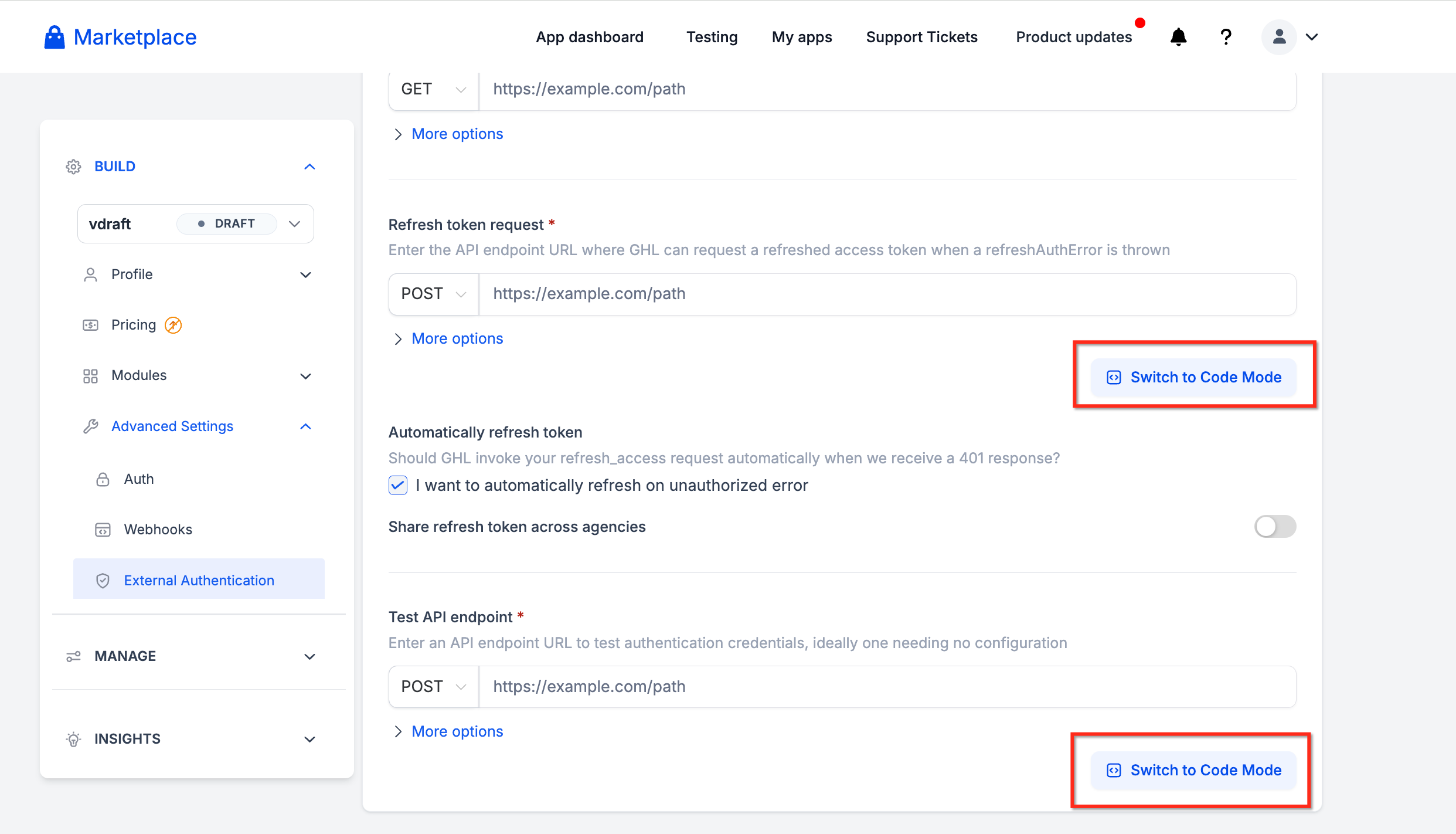
Code Mode is available for the following OAuth requests:
| Request | Purpose |
|---|---|
| Authorization URL | Customize the request used to initiate authorization with the external provider. |
| Access Token | Customize the exchange used to obtain an access token. |
| Refresh Token | Customize requests used to refresh authentication tokens. |
| Test API | Customize requests used to validate authentication. |
| Fetch User Info | Customize requests used to retrieve external account information. |
How to Set Up External Authentication for Marketplace Apps
Proper authentication configuration ensures that users can connect their external accounts and that the app can retrieve the credentials and account information required for its supported features. Developers should configure the authentication method, optional account settings, and request behavior before testing and publishing the app.
Sign in to the Developer Marketplace.
Open the Marketplace app you want to configure, or create a new app.
Open the app's External Authentication configuration.
Configure the required authentication endpoint or request settings.
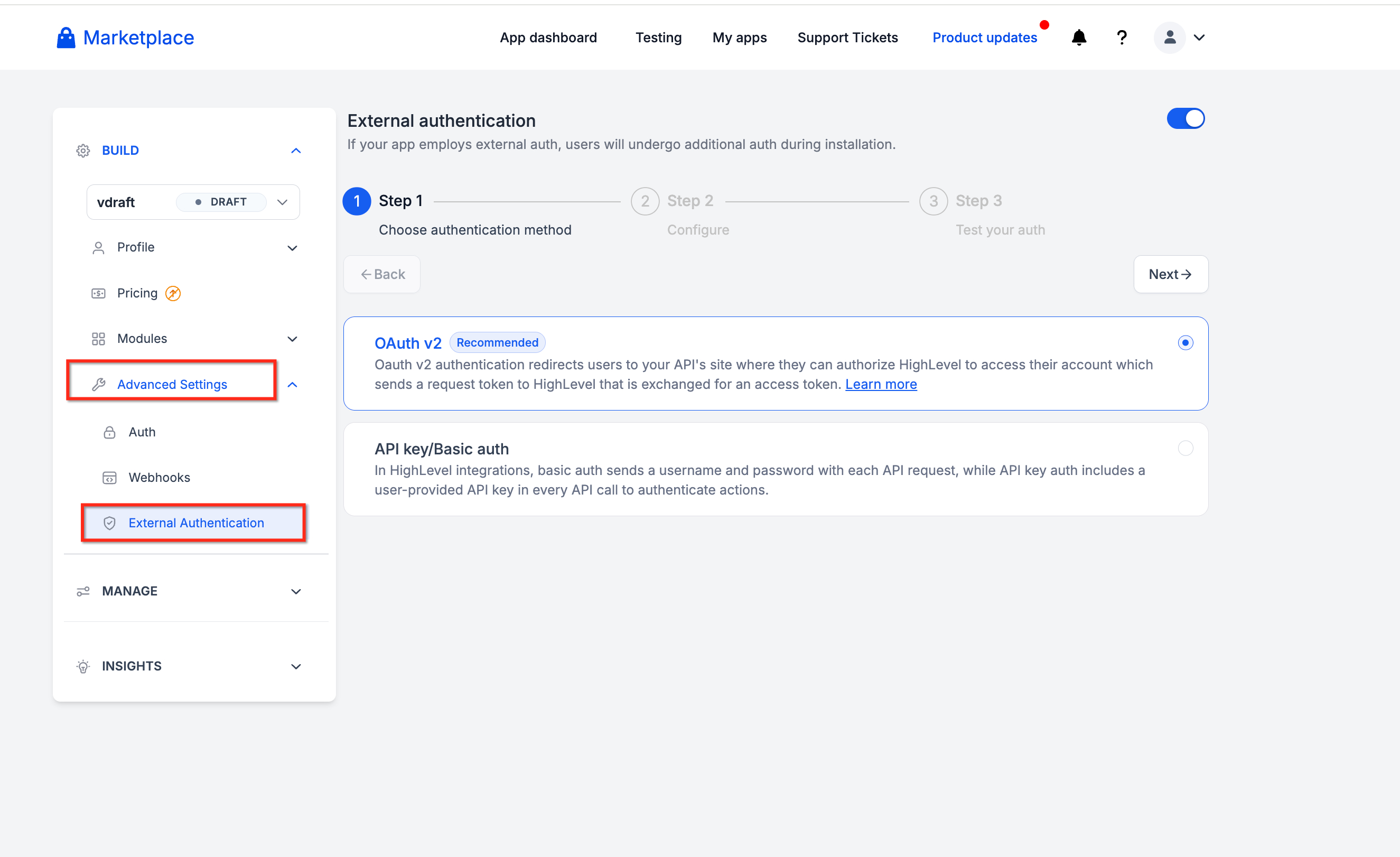
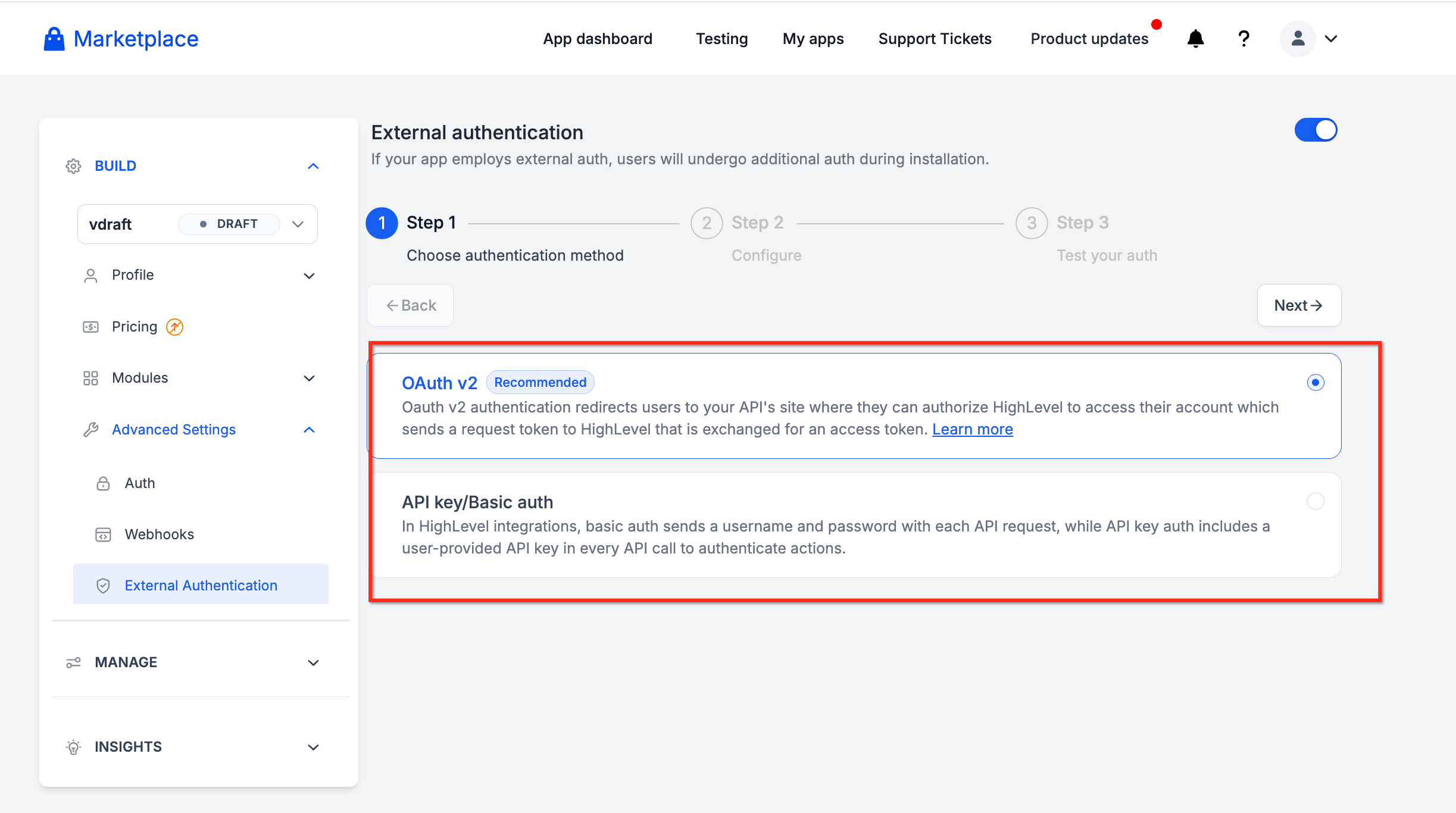
For OAuth v2, configure the applicable Authorization URL and token requests.
For API Key / Basic Auth, configure the credential collection and authentication request as required.
If the provider supports an additional long-lived token exchange, configure the optional Long-Lived Access Token Request.
Locate the User Info setting. Enable User Info if the app should retrieve identifying information for the connected external account.
Configure the User Info Endpoint or applicable account information request.
Map the returned account fields to the corresponding Account ID, Account Name, and Account Email paths.
Test the request to confirm that the expected information is returned.
Enable Multi-Auth if Needed
Locate the Multi-Auth setting.
Enable it if users need multiple external account connections.
For Basic Auth apps, configure the required account identification request or mapping from the authentication response.
Verify that separate credential sets can be distinguished by the returned account information.
Test the configuration using more than one external account.
Multi-Auth is optional for apps that only need a single account connection.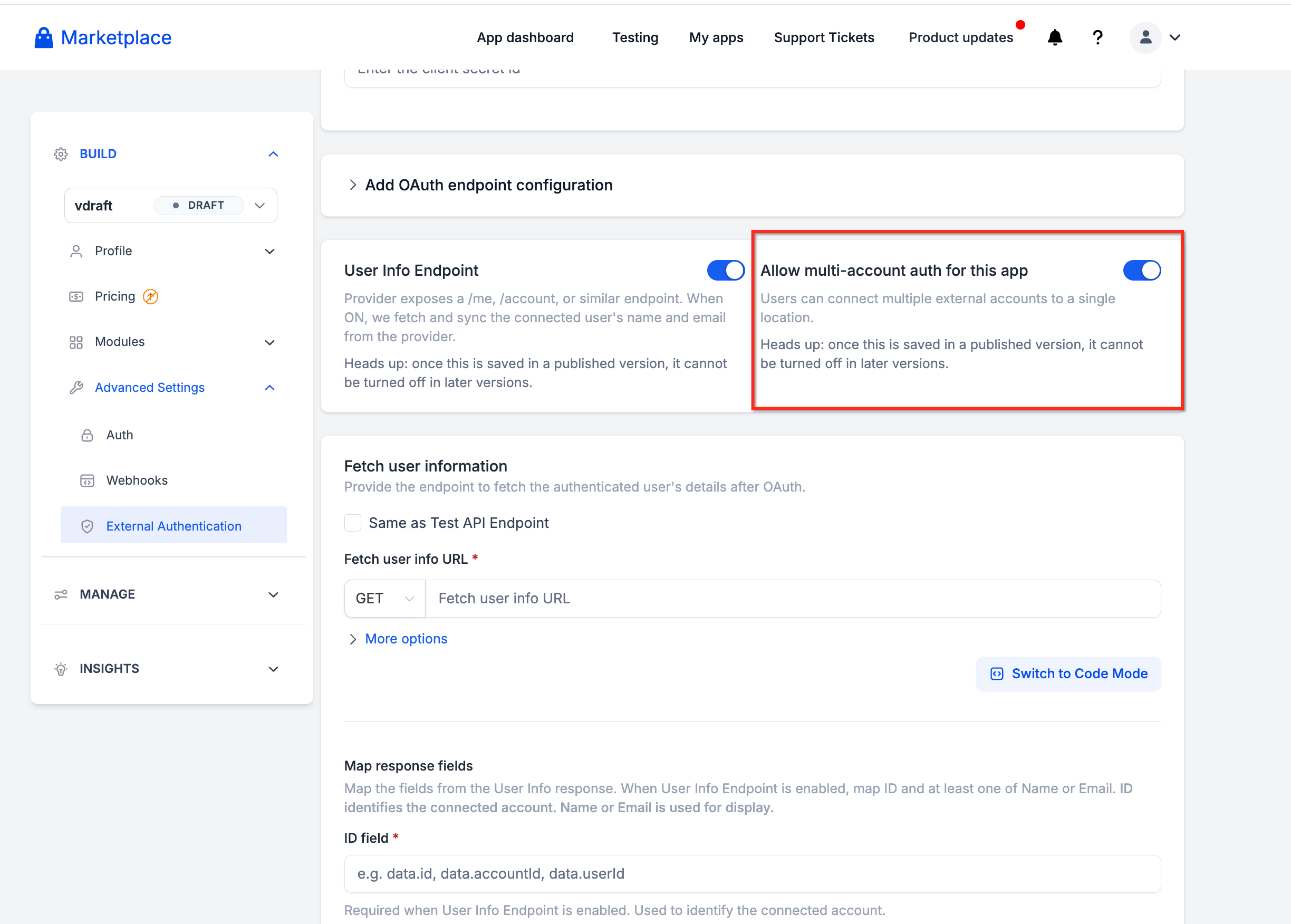
Add Install-Time Fields
Locate the Install-Time Fields configuration.
Add a custom field.
Enter the field's Label and Key.
Select a supported input Type.
Specify whether the field is Required.
Add Help Text and a Default value when appropriate.
Repeat for additional fields, up to the three-field limit.
Reference the configured values in supported request settings or Code Mode.
Only collect information required to complete authentication.
Important Compatibility Considerations
The new Multi-Auth, User Info, and related authentication settings apply to new apps or new app versions.
Existing app installations are not automatically changed by the release.
A published version that enables User Info Endpoint or Multi-Auth cannot disable that setting in subsequent versions.
Frequently Asked Questions
Can I enable User Info without allowing multiple account connections?
Yes. User Info and Multi-Auth are independent settings.
A single-connection app can use User Info to retrieve account names and email addresses without enabling multiple connections.
Can I turn off User Info or Multi-Auth after publishing the app?
No. Once either setting is enabled in a published app version, it cannot be disabled in subsequent versions.
Review these settings before publishing.
Can I configure more than three install-time fields?
No. The expanded framework supports a maximum of three configurable install-time fields per app configuration.
Do I have to use Code Mode for providers that require a unique store URL?
Not necessarily. Install-time field values are available in supported request configurations as well as Code Mode.
Code Mode is useful when the provider requires request customization beyond the standard configuration options.
What should I check if a connected account displays incorrect information?
Check the external provider's account information response and confirm that the configured account field paths match the returned data. Use the User Info and Response testing tabs to investigate mapping issues.
What is the difference between Authentication Code Mode and Workflow Action Custom Code?
Authentication Code Mode customizes supported OAuth authentication requests. Workflow Action Custom Code is used to implement custom logic when a Marketplace workflow action executes. They are separate developer capabilities.