
Manage comments on your social media posts directly from Social Planner! Social Planner supports Comment Management for Facebook, Instagram, LinkedIn, TikTok, Communities, Bluesky, Threads, and YouTube.
This article explains how to use Comment Management, including its supported capabilities and limitations.
TABLE OF CONTENTS
- What is Comment Management?
- Key Benefits of Comment Management
- What You Can Do in Comment Management
- How to Manage Comments Using Social Planner
- Platform Capabilities Overview
- Frequently Asked Questions
What is Comment Management?
Comment Management in Social Planner helps you view and respond to comments on your posts from one dashboard. Instead of switching between social media platforms, you can manage conversations directly where you schedule and plan content.
Note: Currently, only comments on posts published through Social Planner are supported. Comments on posts published directly through Facebook, Instagram, LinkedIn, TikTok, Communities, or other native platforms do not appear here. Support for additional social platforms is in progress.
Key Benefits of Comment Management
One-Stop Inbox: View comments alongside your scheduled posts.
Audience Engagement: View and respond to comments from supported social platforms. Comment availability depends on each platform's synchronization capabilities. YouTube comments sync automatically every 6 hours.
Conversation Context: Manage deeper discussions with threaded (nested) replies.
Time Savings: Respond to comments without leaving Social Planner.
Faster Inbox Cleanup: Mark all unread comments within the selected platform and filtered view as read without reviewing each conversation individually.
What You Can Do in Comment Management
Comment Management helps you respond to comments, organize conversations, and engage with your audience directly from Social Planner.
Replying to Comments
Respond to top-level comments directly from Social Planner. View author names, emojis, and GIFs in comments to maintain conversation context.
Replying directly from Social Planner helps you engage with followers without switching between platforms.
Liking Comments
Like comments to acknowledge interactions with your posts.
On Facebook, likes are recorded on the platform and contribute to post engagement metrics.
Mark All Comments as Read
Use Mark All as Read to mark all unread comments within the selected platform and active filters as read.
This action clears the unread comment count for the current view without removing any comments.
You can continue to view and reply to comments after marking them as read.
Responding to Threaded Comments
Threaded replies help organize conversations with multiple participants.
Click the arrow beside a parent comment to view and respond to nested comments. Your replies appear within the corresponding discussion thread.
The supported number of nested reply levels depends on the social platform.
Smart Filters (Latest vs. Top)
Use the dropdown above the comment inbox to switch between available views:
Latest: Displays the most recent comment activity first.
Top: Displays comments based on relevance or engagement. On Facebook, this follows the platform's most relevant sorting order.
Using Mentions in Comment Replies
Mention Facebook Pages or public profiles by typing @ followed by at least three characters.
A list of matching public pages appears, allowing you to select a mention directly in your reply.
Mention capabilities vary by social platform.
How to Manage Comments Using Social Planner
Step 1: Open Comments in Social Planner
Navigate to Marketing → Social Planner → Comments.
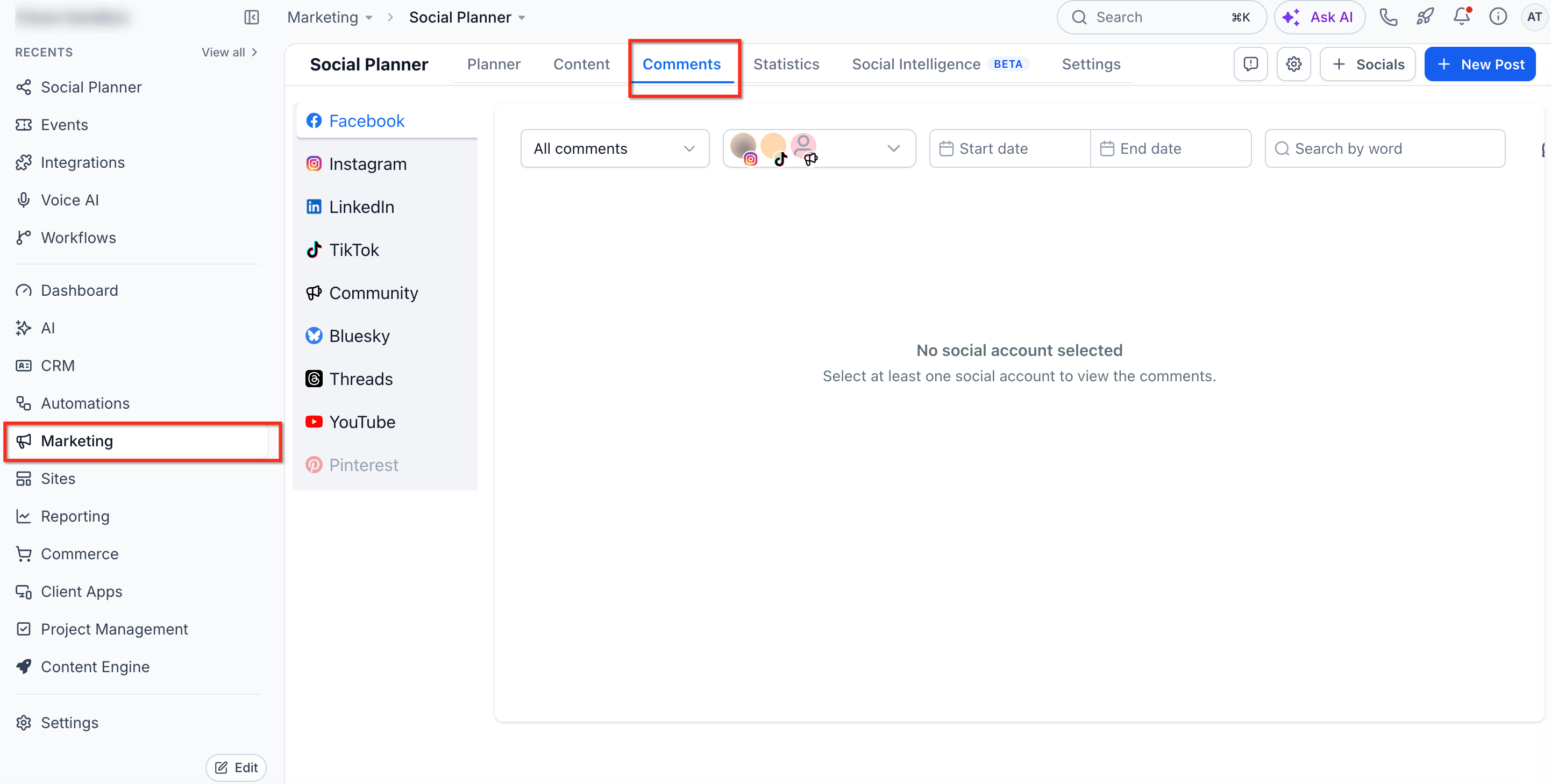
Step 2: View and Engage with Comments
Use the Comments page to view and manage interactions from supported platforms.
You can:
Read comments on posts published through Social Planner.
Reply directly to users.
Like comments on supported platforms.
Add emojis to replies.
Attach images where supported.
Respond to threaded (nested) comments.
Click View More to open an expanded comment view.
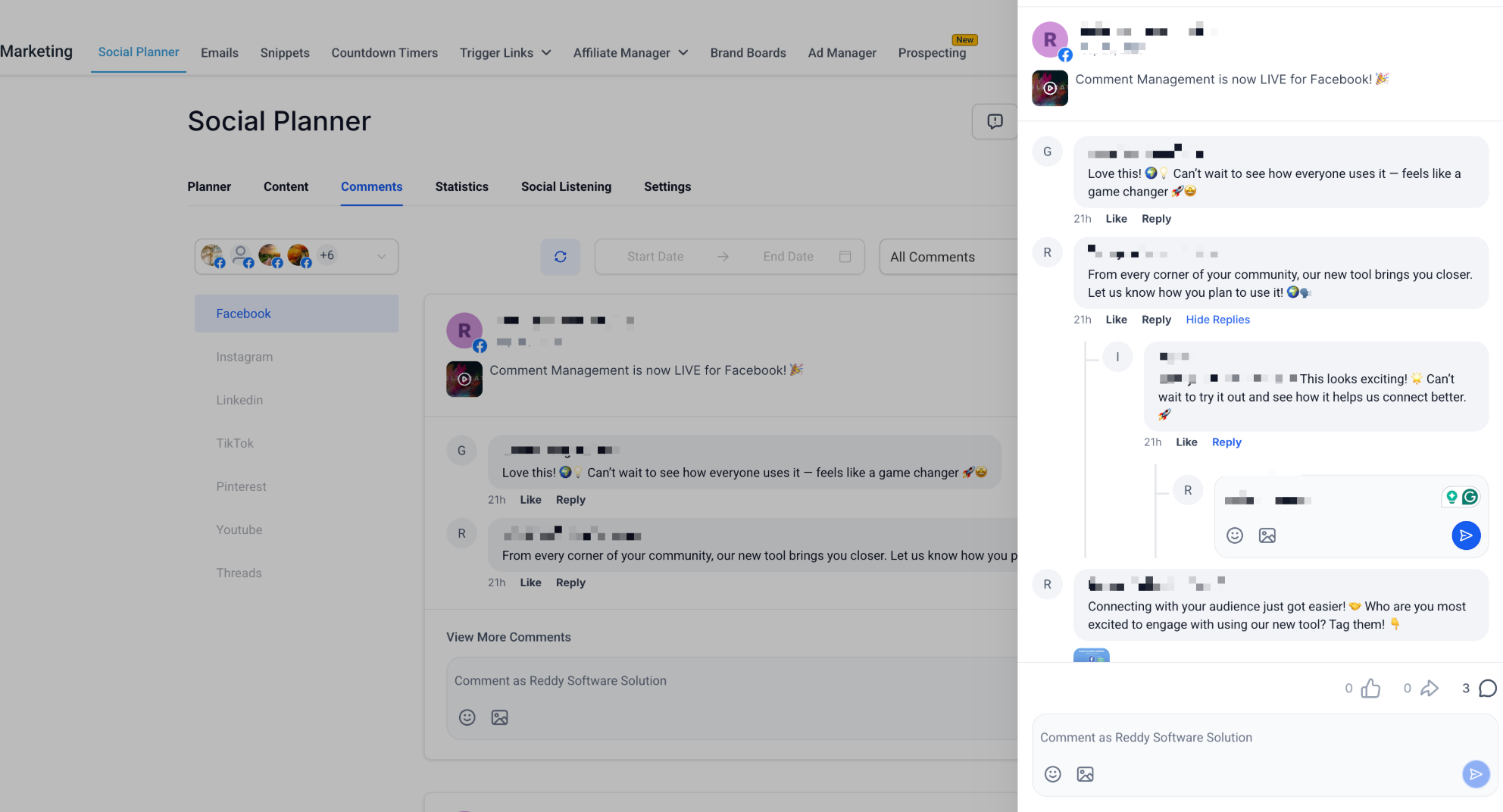
Note: Image attachments are available only on supported platforms. YouTube supports text and emojis but does not support image or video attachments.
Step 3: Filter Between Latest and Top Comments
Use the dropdown filter to choose how comments appear.
Latest: Shows the most recent comments first.
Top: Highlights comments based on engagement or relevance.
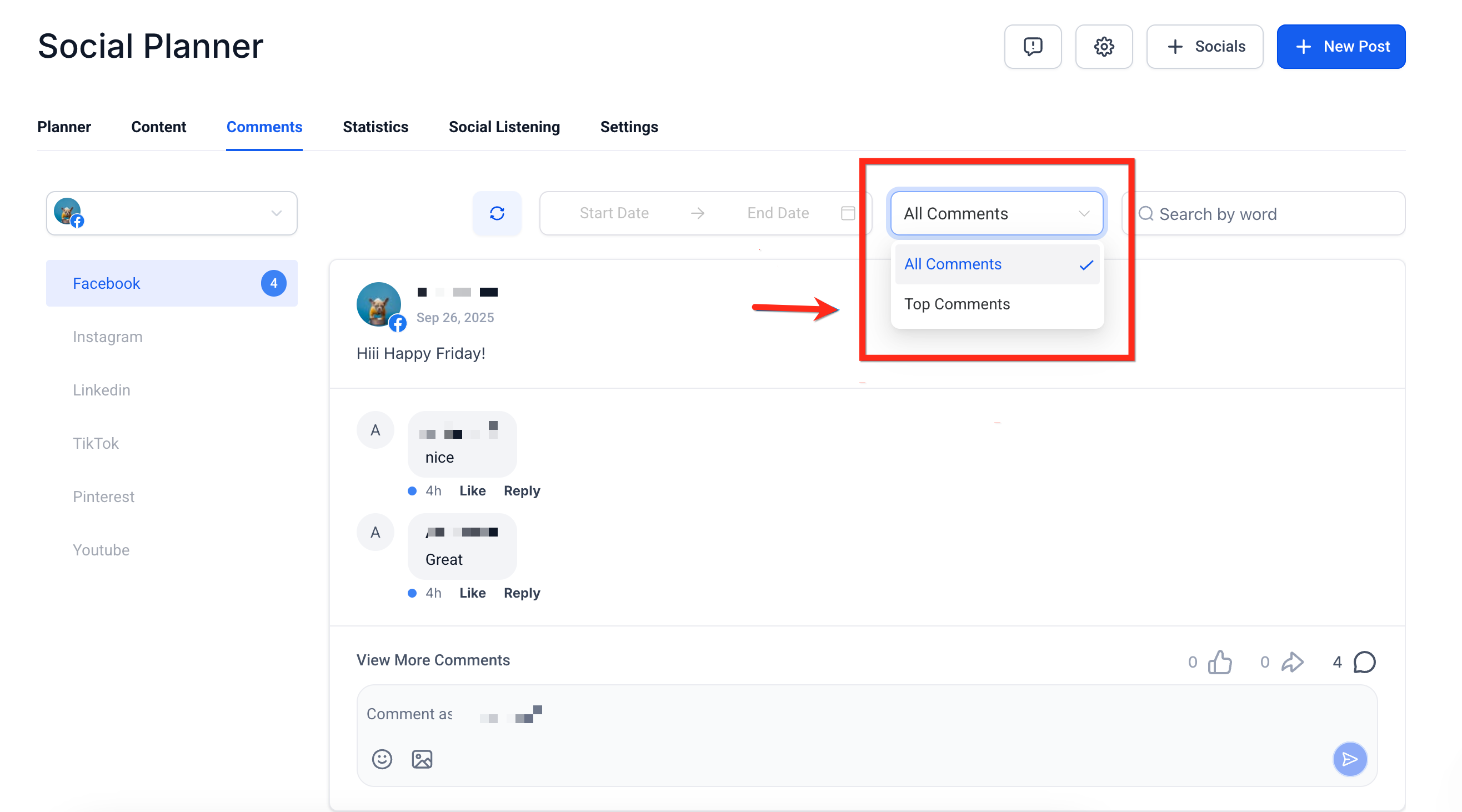
Step 4: Mark All Comments as Read
Select the social platform you want to manage.
Apply the filters for the comments you want to update.
Click Mark All as Read.
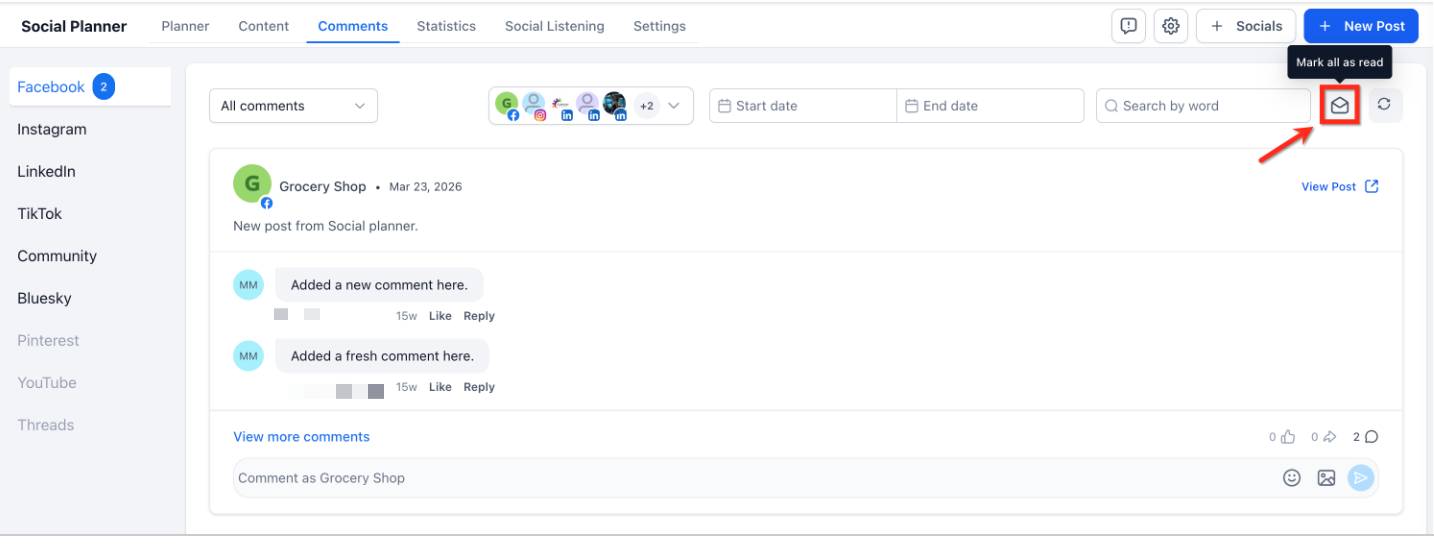
All unread comments within the selected platform and active filters are marked as read.
The unread count for that view clears immediately. Existing comments remain available, and you can continue viewing and replying to them.
Platform Capabilities Overview
Comment Management in Social Planner supports Facebook, Instagram, LinkedIn, TikTok, Communities, Bluesky, Threads, and YouTube.
Each platform supports different comment management capabilities.
Supported Capabilities
View comments on posts published through Social Planner.
Reply using text, emojis, and images up to 10 MB.
Respond to multiple levels of threaded comments.
Like comments.
Mention Facebook Pages or public profiles using @ followed by at least three characters.
Filter comments by Latest or Top.
Add emojis to replies.
Upload images up to 10 MB.
Search comments using at least three characters.
Access supported comment functionality through the API.
View media in comments, including GIFs and thumbnails, without opening them.
Manage comments on posts published through Social Planner.
Limitations
Nested comment counts are not displayed. Only top-level comment counts appear.
Thumbnails, images, videos, and GIFs in comments are not clickable.
Adding GIFs, stickers, or avatars to replies is not supported.
Image uploads larger than 10 MB are not supported due to Facebook API limitations.
Comment searches require at least three characters.
Comments on posts published directly through Facebook do not appear.
Hiding and deleting comments are not supported.
Supported Capabilities
View comments on posts published through Social Planner.
Reply using text, emojis, and images up to 10 MB.
Respond to threaded comments.
Like comments.
Mention users by entering their exact @username.
Filter comments by Latest or Top.
Add emojis to replies.
Upload images up to 10 MB.
Search comments using at least three characters.
View media in comments without opening it.
Manage comments on posts published through Social Planner.
Limitations
Mention search is not supported. You must enter the exact @username due to Instagram API limitations.
Thumbnails, images, videos, and GIFs in comments are not clickable.
Image uploads larger than 10 MB are not supported.
Comment searches require at least three characters.
Hiding and deleting comments are not supported.
API support for Instagram Comment Management is limited, restricting advanced actions.
Comments on posts published directly through Instagram do not appear.
Supported Capabilities
View comments on LinkedIn Page posts published through Social Planner.
Reply using text and emojis.
Respond to one level of threaded comments.
Like comments.
Mention LinkedIn users by searching for their usernames.
Filter comments by Latest or Top.
Search comments using at least three characters.
View comments in the unified inbox.
Manage comments on LinkedIn Page posts published through Social Planner.
Limitations
Only LinkedIn Pages are supported. Personal profiles cannot be connected due to API restrictions.
Threaded replies are limited to one level.
Image uploads in replies are not supported.
Thumbnails, images, GIFs, and videos in comments are not clickable.
Comments on posts published directly through LinkedIn do not appear in Social Planner.
Hiding and deleting comments are not supported.
Comment searches require at least three characters.
Replies must remain within LinkedIn's 3,000-character limit.
TikTok
Supported Capabilities
View comments on posts published through Social Planner.
Reply using text and emojis.
Respond to one level of threaded comments.
View comments in the unified inbox.
Limitations
Comment Management supports only TikTok Business Profiles.
Comments have a maximum length of 150 characters.
Media attachments are not supported in replies.
Threaded replies are limited to one level.
Communities
Supported Capabilities
View comments on community posts directly within Social Planner.
Reply to comments using text.
Respond to one level of threaded comments.
View comments in the unified inbox.
Mention community members using @ in replies.
Receive real-time synchronization with the native platform.
Limitations
Attachments are not supported in replies.
Course mentions and event mentions are not supported.
Comment editing is not available within Social Planner.
Comments have a maximum length of 8,000 characters.
Threaded replies are limited to one level.
Bluesky
Supported Capabilities
View comments on Bluesky posts published through Social Planner.
Reply using text and emojis.
View threaded replies up to three levels deep.
Limitations
Replies are limited to 300 characters.
Only text and emojis are supported. Media attachments are not available.
Profile tagging is not supported.
Replies are visible up to three levels deep. Full threads are stored internally.
Comments are synchronized for only the 15 most recent posts.
Synchronization runs every 6 hours, or four times daily.
Threads
Note: Existing Threads accounts must be reconnected once to grant the permissions required for Comment Management.
Supported Capabilities
View comments on Threads posts published through Social Planner.
Reply using:
Text
Images
Emojis
Location attachments
Respond to one level of threaded comments.
View comments in the unified inbox.
Receive real-time comment updates through webhook synchronization.
Manage Threads conversations alongside Facebook, Instagram, LinkedIn, TikTok, Communities, Bluesky, and YouTube.
Limitations
Only Threads posts published through Social Planner are supported.
Threaded replies are limited to one level.
Comment Management supports connected Threads Business or Professional accounts supported by the Threads API.
Hiding and deleting comments are not supported.
Comment searches require at least three characters.
Replies are subject to Threads character limits and API restrictions.
Available Comment Management features depend on the capabilities supported by the Threads API.
YouTube
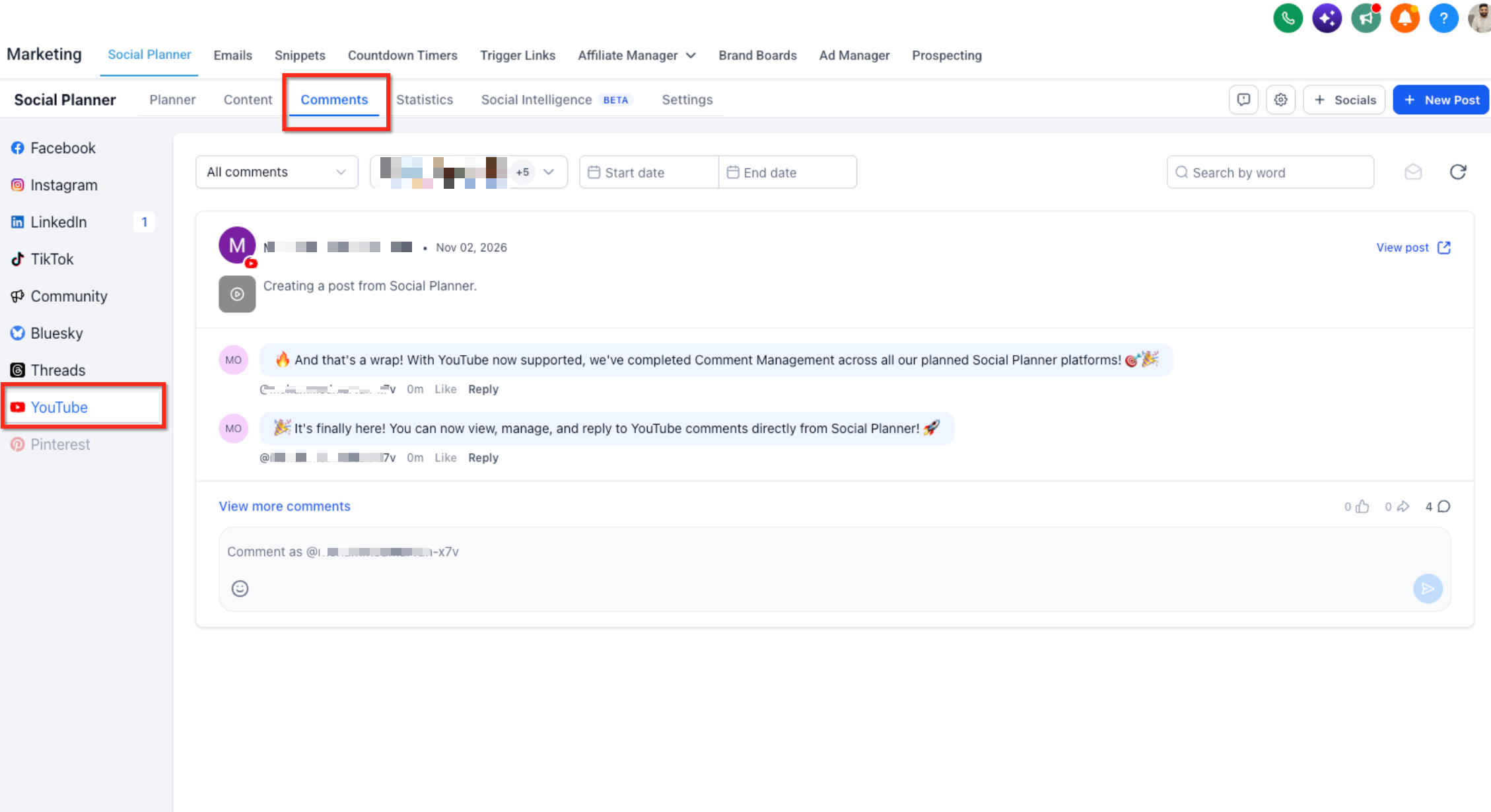
YouTube Comment Management allows you to view and respond to comments on your YouTube videos directly from Social Planner.
You can manage viewer interactions, reply to comments, and follow conversations without switching to YouTube Studio.
What You Can Do
View YouTube Comments: View comments received on videos published through Social Planner.
Reply to Comments: Respond to viewer comments from the Social Planner Comments page.
Emoji Support: Include emojis in your replies.
Threaded Replies: View and respond to comments with support for one level of nested replies.
Automatic Comment Sync: Retrieve comments from YouTube automatically every 6 hours.
Historical Comment Sync: Import existing comments and replies during the initial synchronization for supported videos.
Unified Comment Management: Manage YouTube comments alongside Facebook, Instagram, LinkedIn, TikTok, Communities, Bluesky, and Threads comments.
How YouTube Comment Sync Works
YouTube Comment Management uses periodic polling to retrieve comments because YouTube does not provide a webhook for comment updates.
Synchronization works as follows.
1. Initial Sync (Historical Comments)
When you connect your YouTube account and the initial synchronization runs:
Social Planner retrieves the complete available comment history, including replies, for each eligible video.
Comments are retrieved using pagination, with 100 comments per page.
There is no limit on the number of pages retrieved for an eligible video.
The initial synchronization covers only the 15 most recently published videos for each connected YouTube account.
Important: Although the complete comment history is retrieved for eligible videos, comments from videos older than the 15 most recently published videos are not synchronized, even during the initial synchronization.
2. Automatic Comment Updates
After the initial synchronization:
Social Planner automatically checks YouTube for new comments every 6 hours.
New comments and replies are retrieved during scheduled synchronization cycles.
Comments may not appear immediately after being published on YouTube because synchronization is not real-time.
3. View and Manage Synced Comments
After comments are synchronized, navigate to:
Marketing → Social Planner → Comments → YouTube
Select your connected YouTube account to view comments associated with its eligible videos.
Limitations
Comment Management supports videos published through Social Planner.
Comments on videos published directly through YouTube are not supported.
Only the 15 most recently published videos per connected YouTube account are included in synchronization.
Comments on older videos are not synchronized, including during the initial historical synchronization.
Initial synchronization retrieves 100 comments per page, with no limit on the number of pages for eligible videos.
Automatic comment synchronization runs every 6 hours. Real-time synchronization is not supported.
Only text and emojis are supported in comments and replies.
Image and video attachments are not supported in comments or replies.
Threaded replies are limited to one level.
Comment Management capabilities are subject to YouTube API limitations.
Frequently Asked Questions
Q: Can I see comments from other platforms?
Yes. You can manage comments from Facebook, Instagram, LinkedIn, TikTok, Communities, Bluesky, YouTube, and Threads in Social Planner.
Only comments on posts published through Social Planner appear here.
Q: Will I see comments on posts published directly through a social media platform?
No. Only comments on posts published through Social Planner appear in Comment Management.
Q: Can I delete or hide comments?
No. Deleting and hiding comments are not supported in Comment Management.
Q: Can I reply with images and emojis?
Yes. You can include emojis in supported replies. Image attachments depend on the social platform's capabilities and limitations.