
The Guided Form Bot makes it easy to create AI-powered conversations without writing complex prompts or advanced instructions. Instead of manually building detailed prompt logic, you simply define what information you want the bot to collect and what actions it should perform.
This setup is ideal for lead capture, appointment booking, customer qualification, and support workflows where consistency and speed matter most.
TABLE OF CONTENTS
Introduction
Guided Form Bot provides a simplified setup experience for AI conversations by allowing you to configure objectives instead of building prompts manually.
The bot follows the flow you define, asks questions in sequence, and collects customer information automatically.
This setup is designed to help businesses:
- Launch bots faster
- Reduce setup complexity
- Improve conversation consistency
- Eliminate prompt-writing requirements
- Create reliable information-collection workflows
The guided setup is especially useful for businesses that want fast deployment without learning prompt engineering.
Why Use Guided Form Bot?
Traditional AI bot setup often requires writing detailed prompts and instructions, which can become time-consuming and inconsistent.
Guided Form Bot removes that complexity by allowing you to focus only on the information you want to collect and the actions the bot should perform.
This approach helps you:
- Build bots in minutes
- Create structured conversations
- Collect customer details automatically
- Maintain consistent conversation quality
- Reduce setup errors
Common use cases include:
- Lead qualification
- Appointment booking
- Support intake
- Service requests
- Contact information collection
Create a Guided Form Bot
Open the AI bot management area and begin creating a new bot.
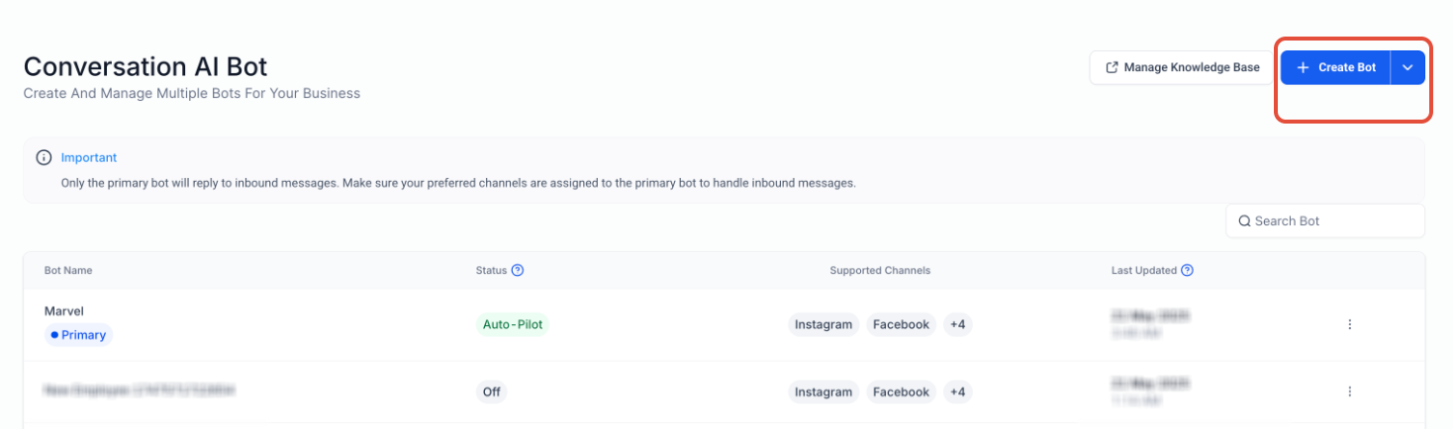
This screen shows where to create a new bot from the Conversation AI dashboard. When opening the Create Bot menu, choose the Guided Form setup option instead of the traditional prompt-based setup.
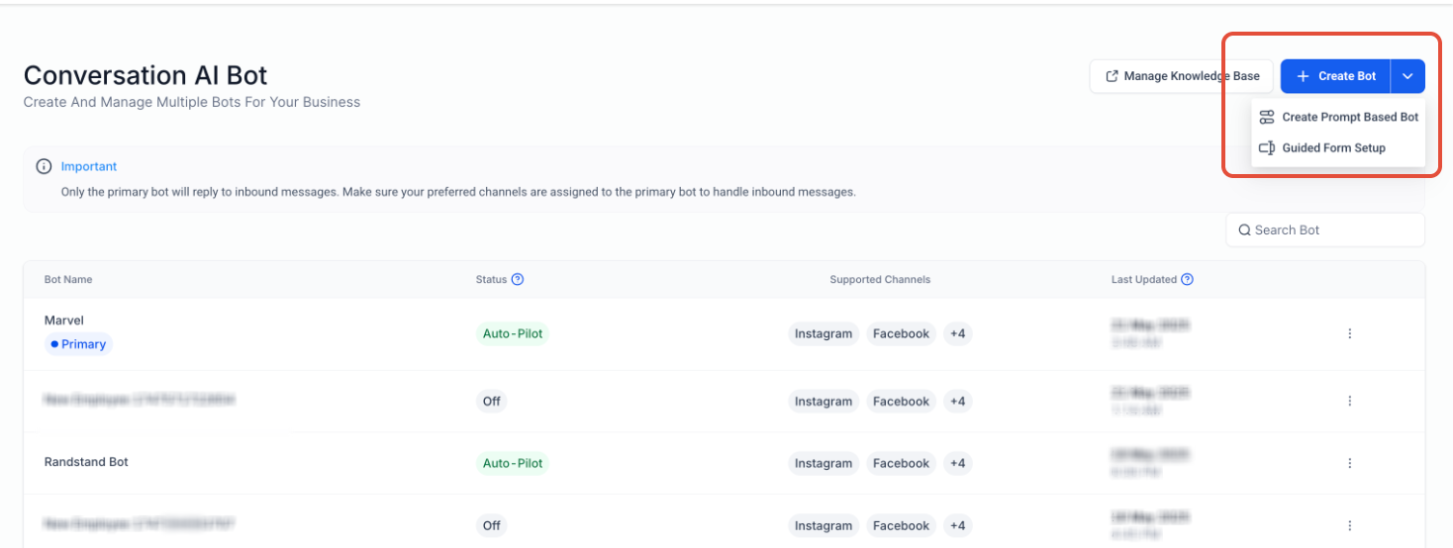
This screen highlights where to choose the Guided Form setup flow when creating a bot.
Configure Basic Bot Settings
After opening the guided setup, configure the core bot settings such as:
- Bot name
- Preferred channels
- Wait time
- Initial greeting message
The initial message is the first response customers receive when the conversation begins and helps establish the tone of the interaction.
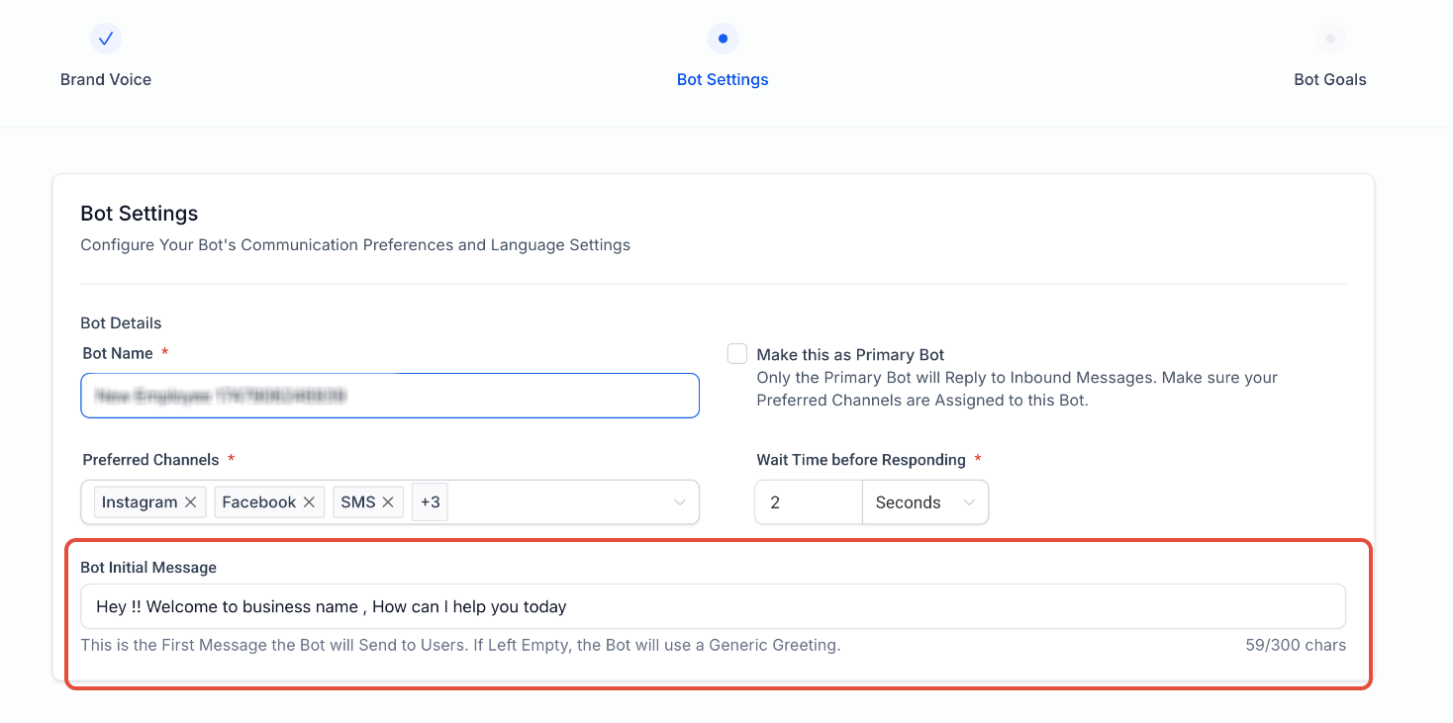
This screen shows where to customize the bot name, communication channels, and initial greeting message.
Define Objectives and Questions
The objectives section controls what the bot should collect from the customer during the conversation.
You can configure the bot to collect:
- Name
- Email
- Phone number
- Address
- Additional custom questions
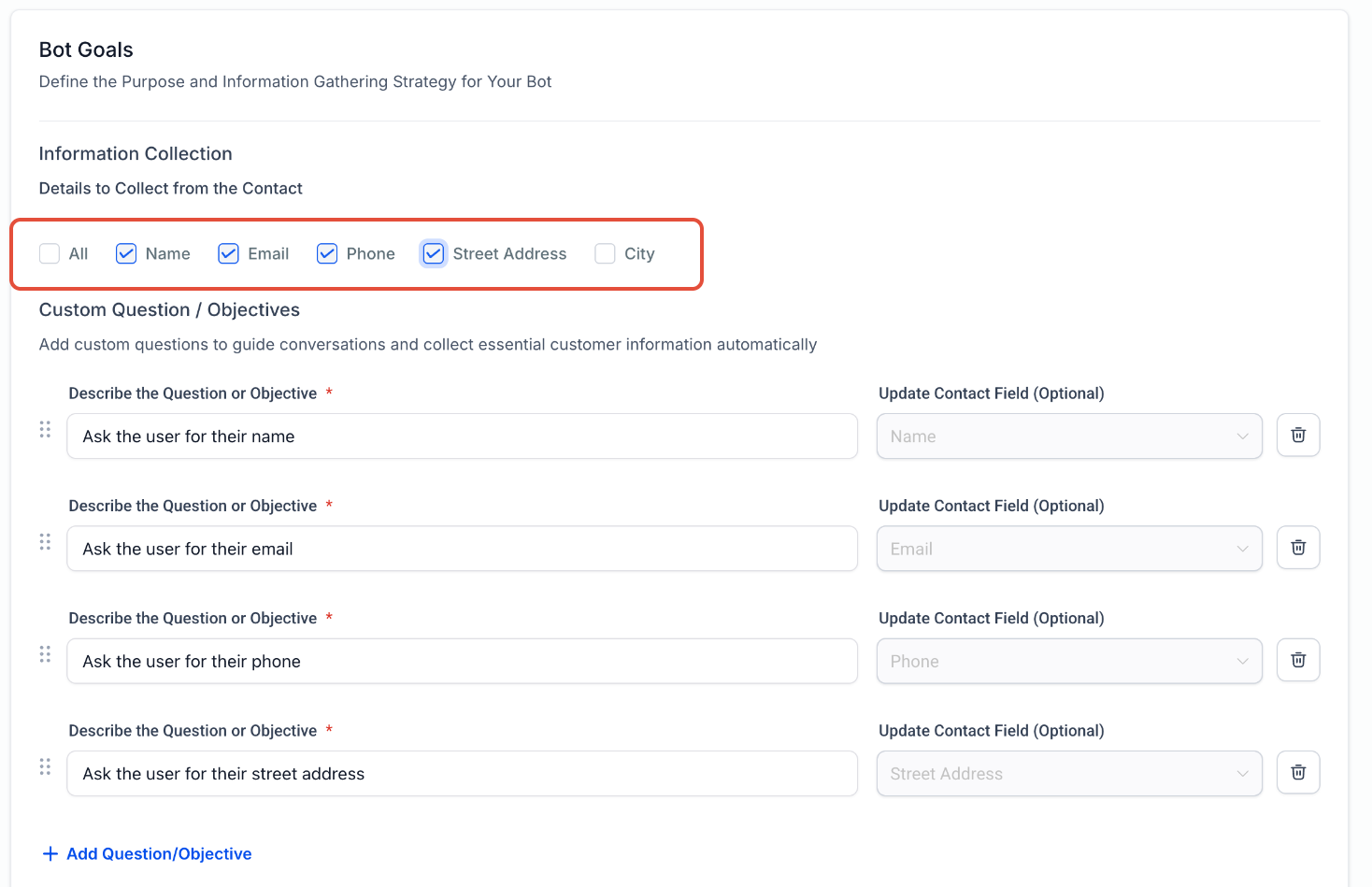
This screen shows where to enable contact information collection and configure custom objectives.
Custom objectives can be written in plain language.
Examples:
- Ask the user for their name
- Ask the user for their email
- Ask the user for their phone number
- What issue are you facing?
The bot follows the objective sequence exactly as configured.
You can also:
- Reorder objectives
- Add additional questions
- Map answers to contact fields
- Skip questions if fields are already populated
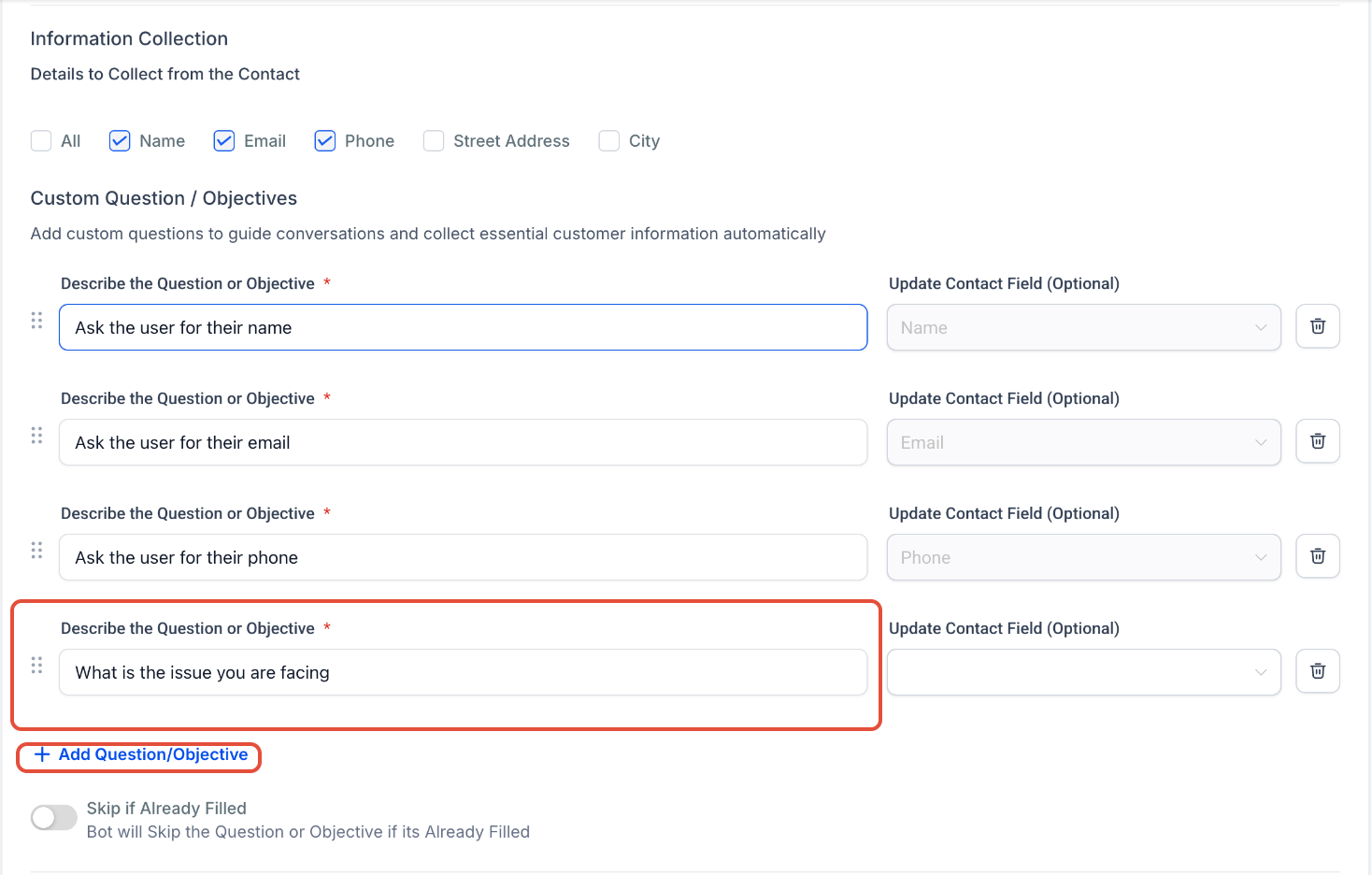
This screen highlights where to add additional questions and customize the information collection flow.
Configure Bot Actions
Once the objectives are configured, choose what the bot should do after collecting information.
Available actions may include:
- Appointment booking
- Workflow triggers
- Contact updates
- Additional automation steps
This allows the bot to automatically continue the customer journey after information is collected.
Final Review and Additional Instructions
After configuring objectives and actions, review the full setup before publishing the bot.
Additional Instructions can be used to provide extra context or fine-tune behavior while still keeping the guided setup simple.
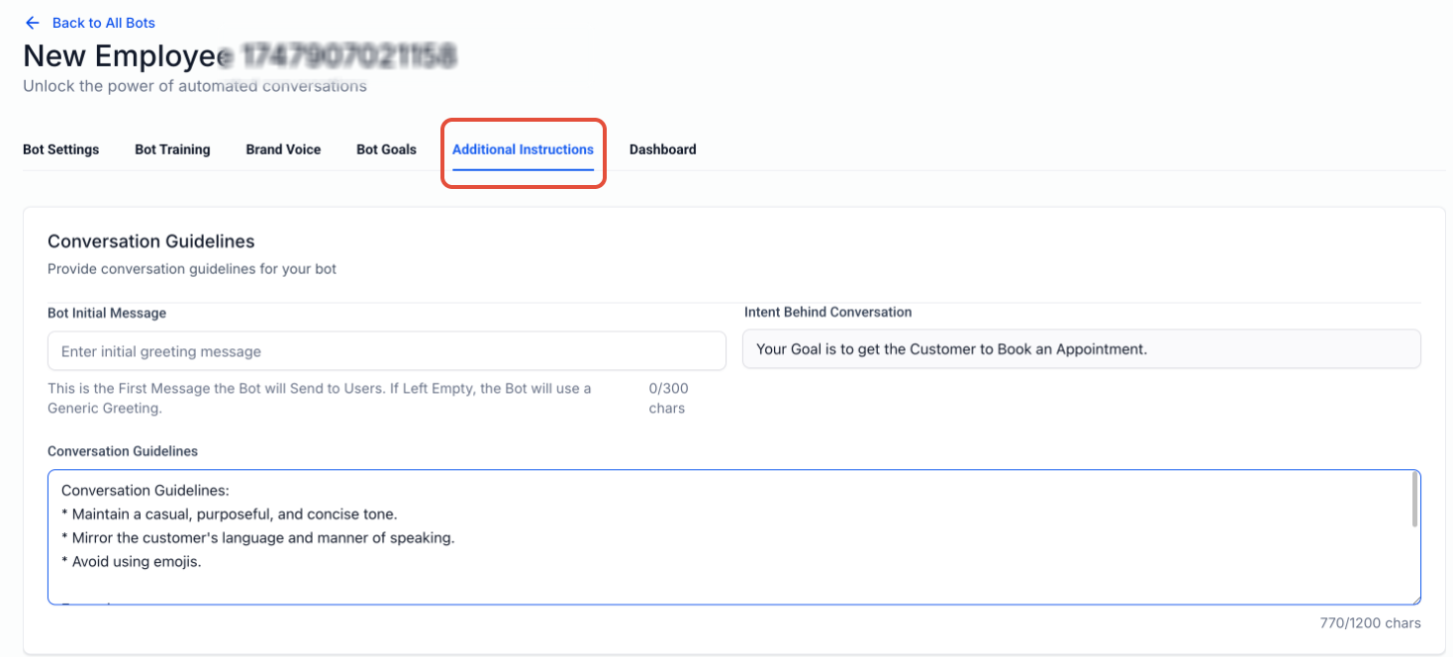
This screen shows where to configure conversation guidelines and provide additional instructions before activating the bot.
Important Notes
- Guided Form Bot is designed for structured conversations
- Objectives are followed in the exact order configured
- Questions can be reordered anytime
- Contact fields can be mapped automatically
- Existing contact information can optionally be skipped
- Additional actions may vary depending on feature availability
Frequently Asked Questions
Q: Do I need to write prompts for Guided Form Bot?
No. Guided Form Bot removes the need for complex prompt writing.
Q: Can I collect contact information automatically?
Yes. The bot can collect information such as name, email, phone number, and additional custom details.
Q: Can I add my own custom questions?
Yes. Additional objectives and questions can be added anytime.
Q: Can I reorder the conversation flow?
Yes. Objectives can be rearranged using the reorder controls.
Q: What happens if a contact field already contains information?
You can enable the Skip If Already Filled option so the bot does not ask again.
Q: Can the bot trigger workflows or appointments?
Yes. Guided Form Bot supports actions such as appointment booking and workflow automation.
Need Help?
If you need assistance configuring Guided Form Bots or optimizing your AI conversation setup, contact support or your system administrator for additional guidance.