
Learn where to find the SLA Performance Dashboard, how each SLA metric is calculated, how user and channel attribution works, which messages are included in reporting, and how to build additional SLA views using Dashboard and Custom Report widgets.
Only Admins can access the SLA Performance Dashboard. Conversation SLAs must be configured for SLA reporting to produce meaningful results. Dashboard data is available starting May 23, 2026, and only completed SLA evaluations are included in the reported SLA metrics.
2. Key Benefits of the SLA Performance Dashboard
3. SLA Metrics Explained
4. User and Channel Performance
5. SLA Reporting Rules and Access
6. How To Use the SLA Performance Dashboard
7. Build Custom SLA Dashboards and Reports
8. Frequently Asked Questions
9. Need Help?
What is the SLA Performance Dashboard?
The SLA Performance Dashboard is a Conversations reporting view that shows how well your team is performing against configured response-time SLAs. Instead of reviewing individual conversations one at a time, Admins can use the dashboard to evaluate overall SLA adherence, response speed, user performance, and channel performance from one location.
The dashboard can help answer questions such as:
- How consistently is the team meeting SLA response targets?
- Which users may need additional coverage or coaching?
- Which communication channels experience the most SLA breaches?
- Are response times improving or declining over the selected period?
Key Benefits of the SLA Performance Dashboard
Centralized SLA reporting gives managers a clearer view of response performance than isolated inbox checks. Reviewing trends by user, channel, and time period can help identify operational problems before they become persistent service issues.
- Centralized Visibility: Review key SLA metrics from one reporting area instead of manually checking individual conversations.
- Faster Issue Detection: Identify when SLA breaches or response times begin trending in the wrong direction.
- User Accountability: Compare SLA performance across assigned users to identify strong performance, coaching opportunities, or workload concerns.
- Channel Insights: Compare communication channels to understand where response delays occur most frequently.
- Better Operational Decisions: Use reporting data to adjust staffing, workflows, coverage, and response processes.
SLA Metrics Explained
Understanding how SLA metrics are calculated is essential when comparing performance across users, channels, or time periods. Active SLA timers are not treated as completed outcomes, so the reporting denominator contains only messages whose SLA evaluation has finished.
| Metric | What It Means |
|---|---|
| SLA Met % | The percentage of completed SLA evaluations where a response was sent before the SLA deadline. Messages with an active SLA are excluded. |
| SLA Breached % | The percentage of completed SLA evaluations where the response-time target was missed. |
| Average Response Time | The average time taken to respond for messages where a reply was sent and the relevant SLA evaluation is complete. |
| SLA Met Messages | The number of messages that received a response within the configured SLA time. |
| SLA Breached Messages | The number of messages where the SLA deadline expired before the required response was sent. |
| SLA Tracked Messages | The total number of messages with a completed SLA outcome. This includes SLA Met and SLA Breached messages but excludes active SLA evaluations. |
Example: If 100 completed SLA evaluations are included and 60 messages were answered before their deadline, the SLA Met percentage is 60%. Messages whose SLA timers are still active are not included in that calculation.
User and Channel Performance
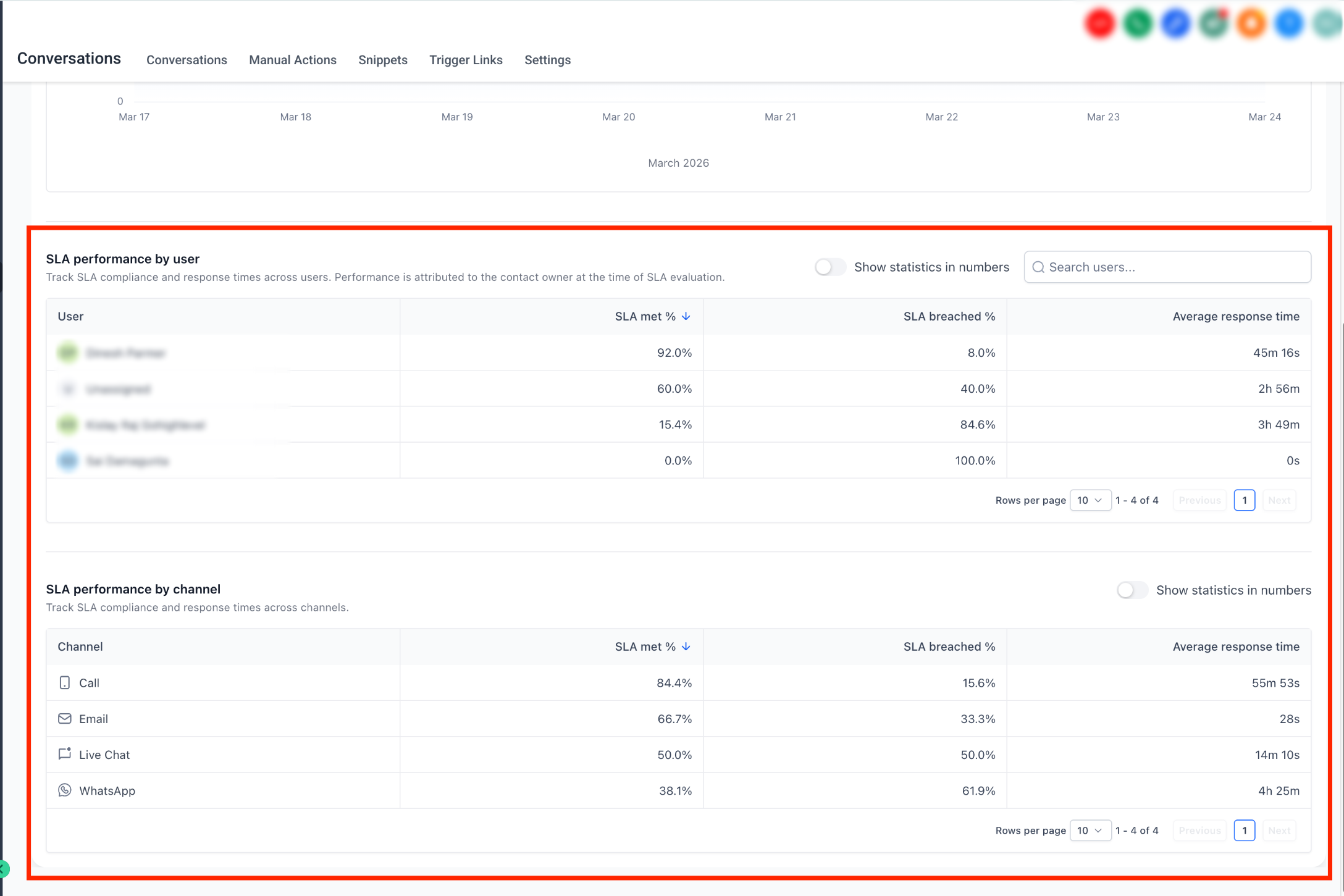
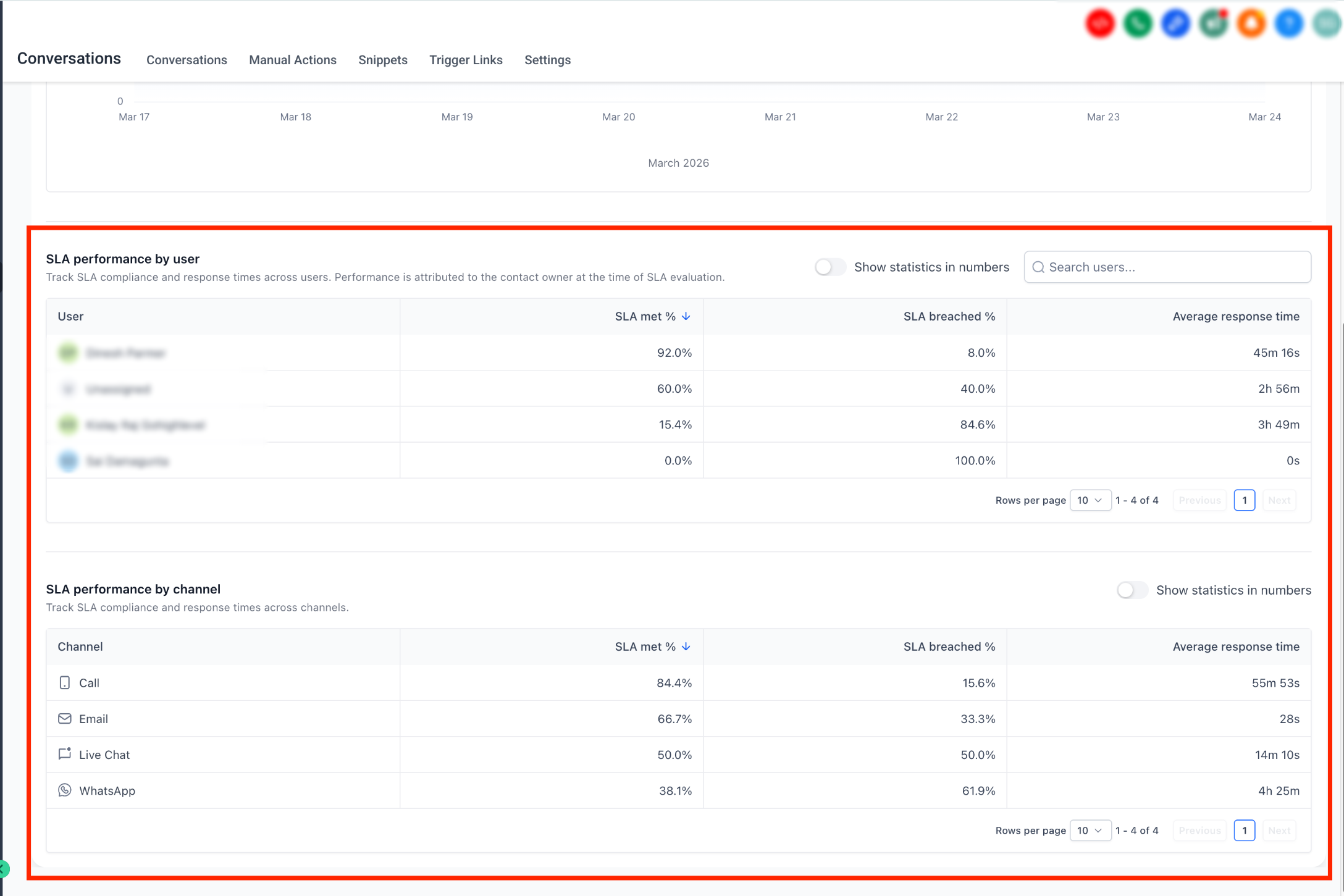
Breaking SLA results down by user and channel helps turn a high-level compliance percentage into actionable information. Managers can identify whether delays are concentrated around particular team members, communication channels, or operating conditions.
User Performance
User-level reporting shows SLA results by assigned user. This can help identify consistent performance, coaching opportunities, workload imbalances, and areas where additional coverage may be required.
Attribution rule: SLA performance is attributed to the user assigned at the time the SLA is evaluated. A later reply or reassignment does not retroactively change that completed SLA attribution.
Channel Performance
Channel-level reporting compares SLA performance across supported communication channels. This helps you identify whether certain channels consistently produce longer response times or higher breach rates and may require different staffing or SLA targets.
SLA Reporting Rules and Access
SLA reports intentionally exclude some conversations and incomplete evaluations. Knowing these rules helps explain why dashboard totals may differ from the total number of conversations or inbound messages seen elsewhere.
- Completed Outcomes Only: Only SLA evaluations that have finished as Met or Breached are included in completed SLA reporting.
- Active SLA Timers: Messages whose SLA evaluation is still active are excluded until the outcome is determined.
- Read Without Reply: Conversations marked as read without a reply are excluded from SLA reporting.
- User Attribution: Performance is attributed to the user assigned when the SLA evaluation occurs.
- Admin Access: Only Admins can access the SLA Performance Dashboard.
- Historical Availability: SLA Performance Dashboard data is available beginning May 23, 2026.
How To Use the SLA Performance Dashboard
Start with overall SLA health, then narrow the analysis to individual users, channels, and time periods. This approach makes it easier to distinguish a broad response-time problem from an issue affecting only part of the team.
Before analyzing performance, confirm that Conversation SLAs are enabled and configured with the response-time targets your team is expected to follow.
Go to Conversations → Analytics → SLA Performance.
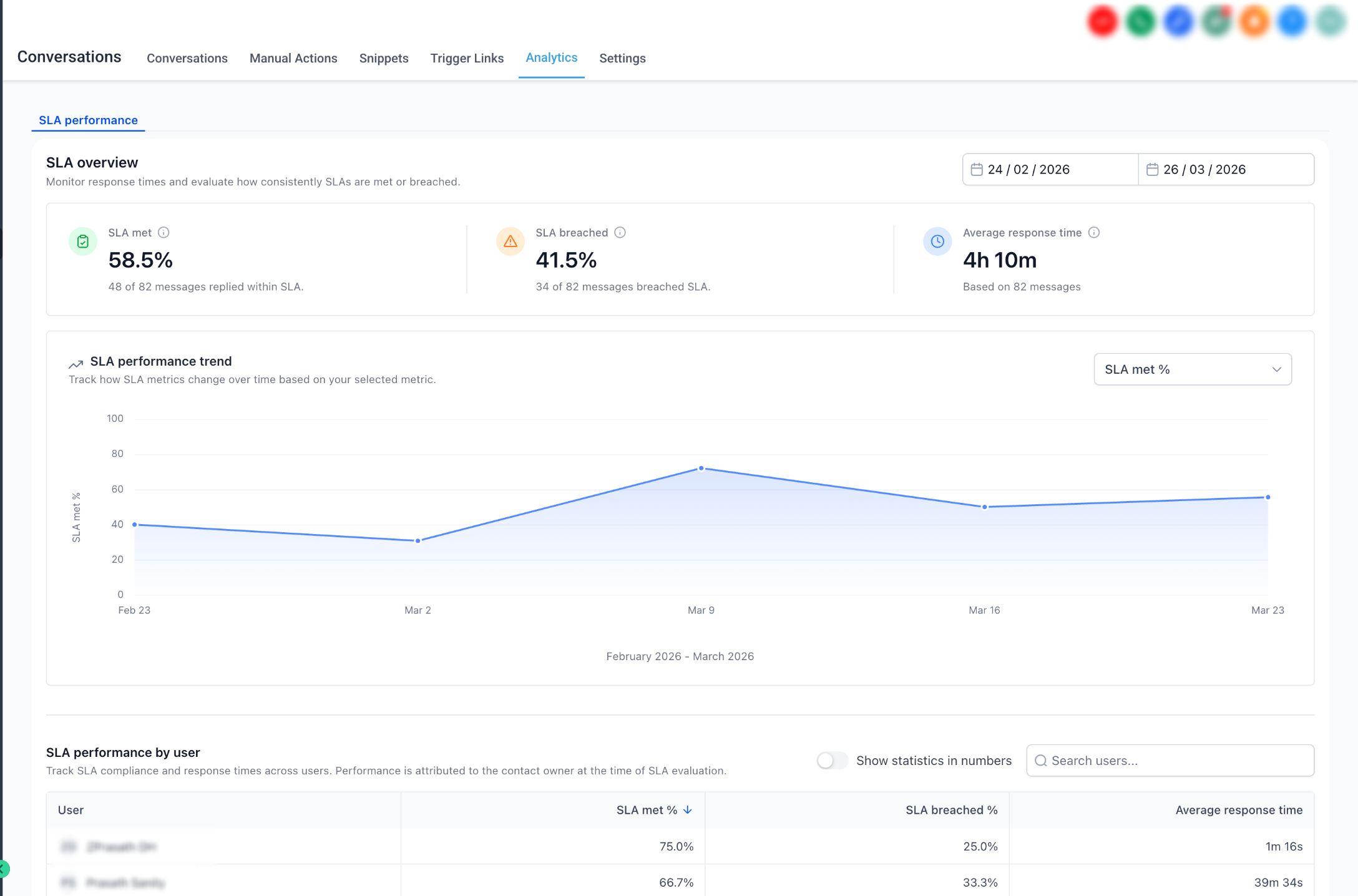
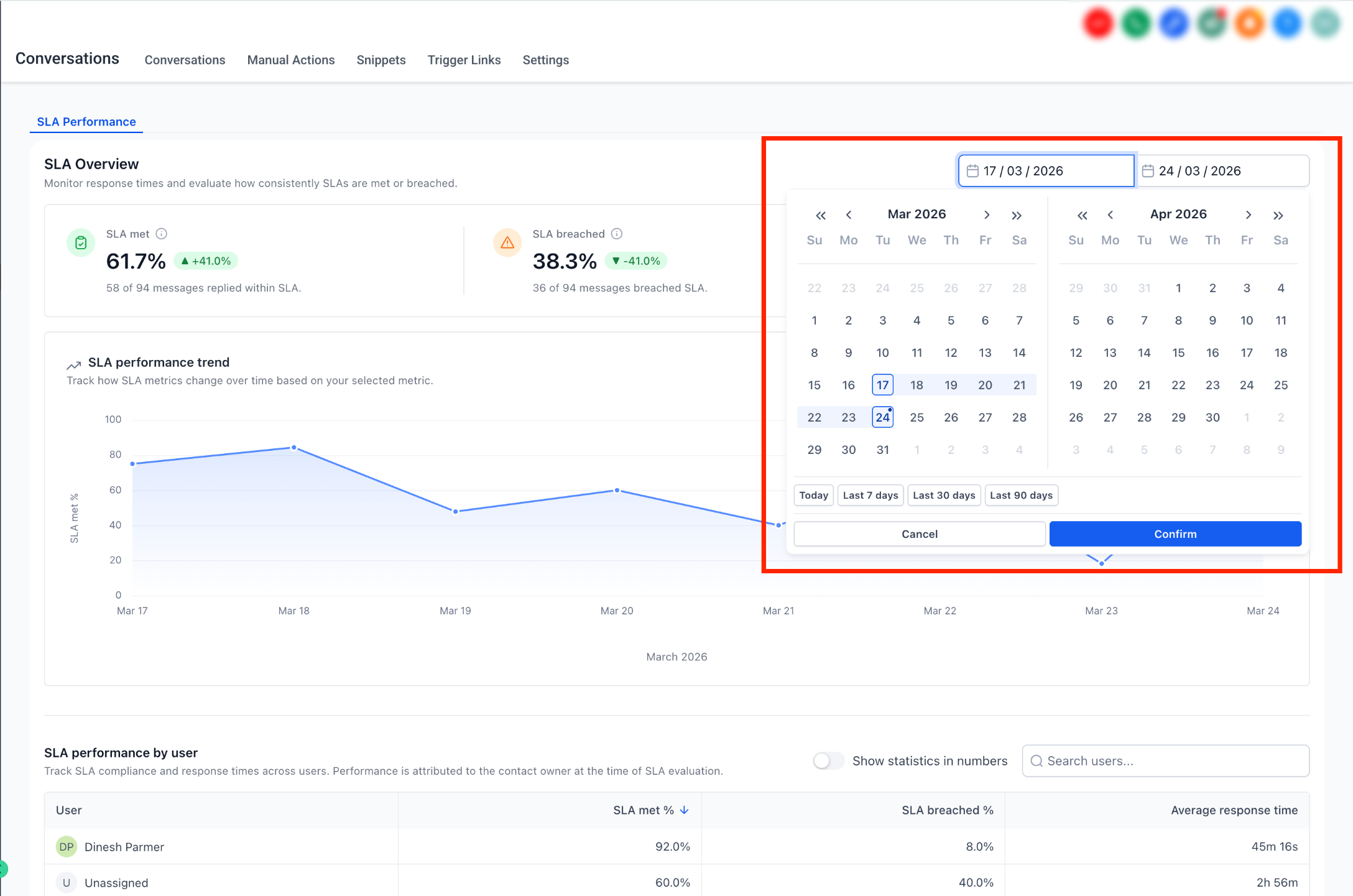
Select the date range that matches the period you want to evaluate. Use a consistent reporting window when comparing performance over time.
Start with SLA Met %, SLA Breached %, and Average Response Time. These metrics provide the clearest high-level view of whether your response process is meeting expectations.
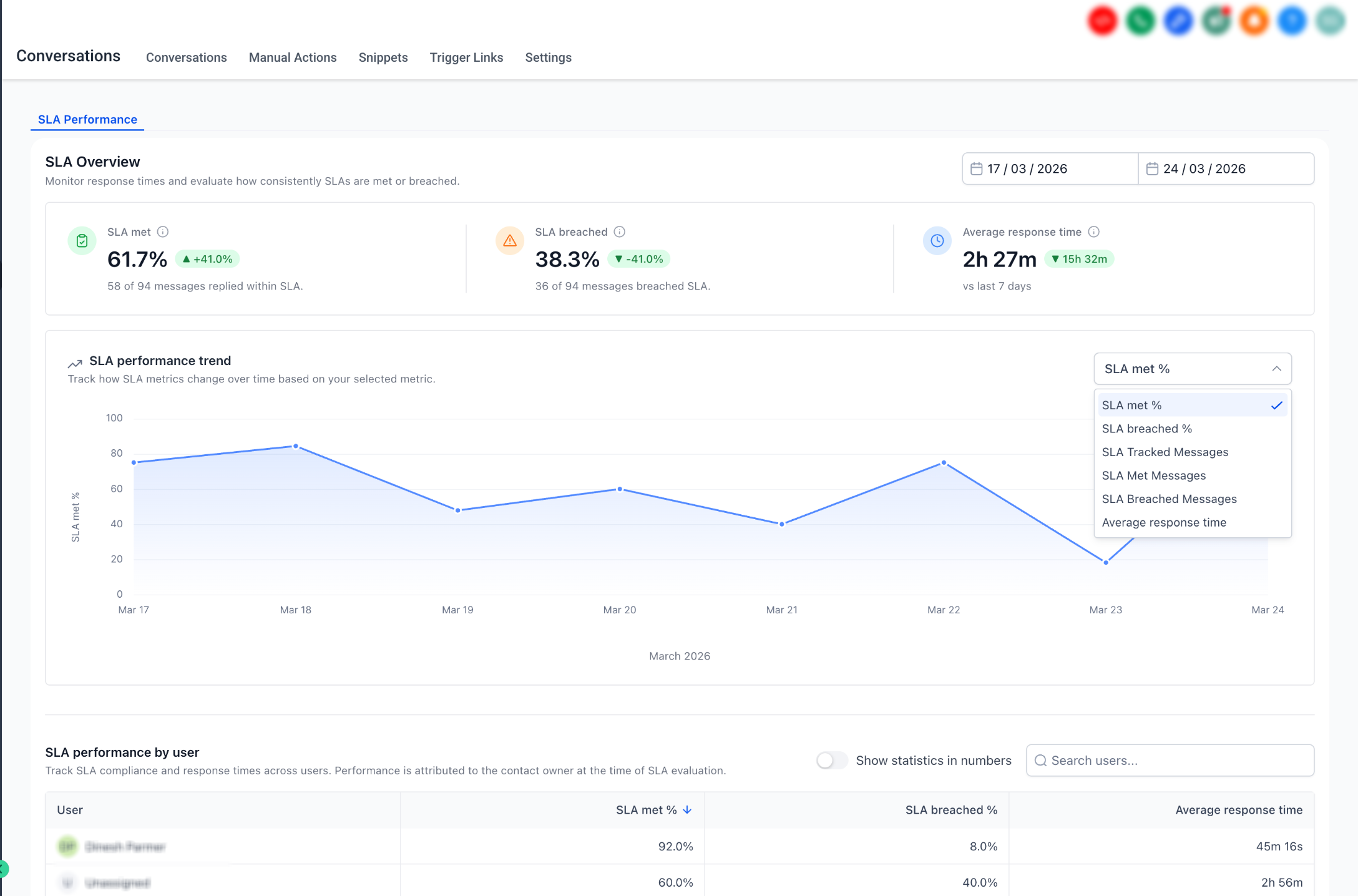
Use the trend controls to compare relevant SLA metrics over time. Trends can help distinguish isolated spikes from sustained changes in team response performance.
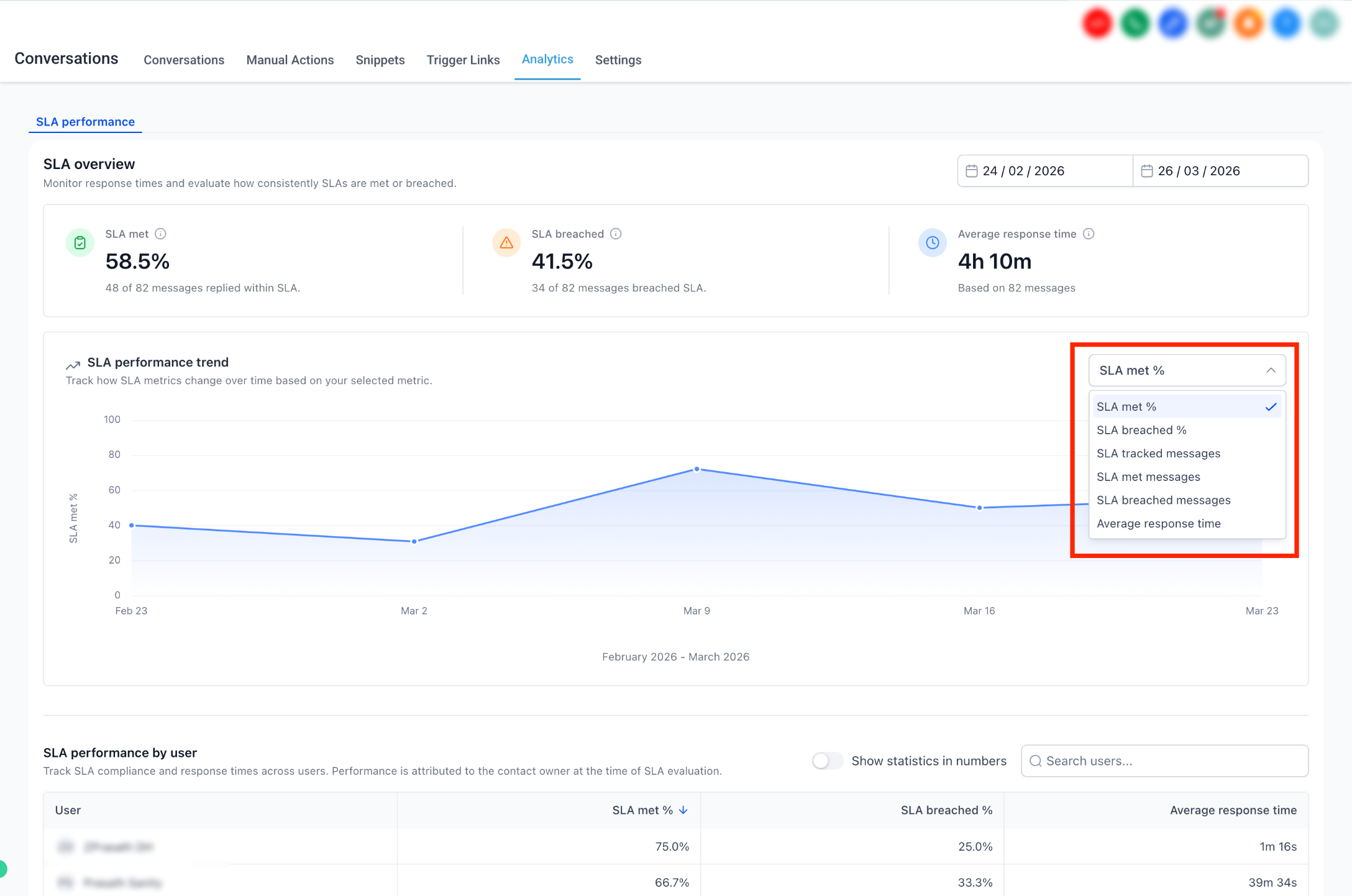
Review the user and channel tables to identify where SLA performance is strongest or weakest. Use the available table sorting controls to focus on the metrics most relevant to your analysis.
Build Custom SLA Dashboards and Reports
The Conversations SLA Performance Dashboard is not the only place SLA data can be analyzed. SLA widgets can also be added to Dashboards and Custom Reports, making it possible to combine SLA health with other operational reporting or schedule reports for stakeholders.
Available SLA Widgets
Available Conversations SLA widgets include:
- SLA Met Trend: Tracks the percentage of SLA targets met over time.
- SLA Breached Trend: Tracks SLA breach percentages over time.
- Average Response Time Trend: Shows how response speed changes across the selected reporting period.
- SLA Performance: Compares SLA outcomes across users or message channels.
Add SLA Widgets to a Dashboard
- Open Dashboards and edit the dashboard where you want to display SLA data.
- Click Add Widget.
- Open the Conversations widget category.
- Choose the SLA widget you want to add.
- Configure its metric, grouping, filters, chart type, and other available display options.
- Save the dashboard changes.
Add SLA Widgets to a Custom Report
- Go to Reporting → Custom Reports.
- Create a report or open an existing one.
- Add a widget or report element.
- Choose the required SLA widget from the Conversations reporting options.
- Configure the metric, grouping, conditions, and display.
- Save the report and schedule delivery if needed.
Widget requirement: Conversation SLAs must be enabled before SLA widgets can populate with SLA data. SLA widgets support a maximum reporting date range of one year.
Frequently Asked Questions
Need Help?
If SLA Performance reporting is unavailable or the results do not match what you expect, use the checks below to narrow down the cause.
- SLA Performance is missing: Confirm you are an Admin and are looking under Conversations → Analytics → SLA Performance.
- No SLA results appear: Confirm Conversation SLAs are enabled and that the selected reporting period contains completed SLA evaluations.
- Totals are lower than expected: Active SLA timers and conversations marked as read without a reply are not included in completed SLA reporting.
- A user's totals seem incorrect: Confirm who was assigned when the SLA evaluation completed. Reporting attribution is based on that user.
- Historical data is missing: Do not expect SLA Performance Dashboard data from before May 23, 2026.
- A channel appears to underperform: Compare its SLA Met %, SLA Breached %, and Average Response Time before adjusting targets or staffing.
- An SLA widget shows no data: Verify SLA is enabled, review the dashboard date range, and check the widget's user and channel conditions.
- A Custom Report differs from the Conversations dashboard: Compare the reporting date range, metric, grouping, and widget conditions before treating the difference as a data issue.
- Issue continues: Collect the selected reporting period, affected user or channel, expected SLA result, actual dashboard values, example conversations, and screenshots of the affected report before contacting support.