
Businesses can redeem customer Gift Cards directly while collecting payments, without requiring the customer to complete a checkout. Gift Cards can be applied when recording payments on Orders and Invoices, using Charge Now, or creating supported subscriptions. Available Gift Card value is applied toward the amount due, with any remaining balance collected using another supported payment method. This article explains where business-initiated Gift Card redemption is available, how payments are applied, important subscription limitations, and how to complete a redemption.
TABLE OF CONTENTS
- What is Gift Card Redemption for Business-Initiated Payments?
- Key Benefits of Gift Card Redemption for Business-Initiated Payments
- Supported Business Payment Flows
- How Gift Card Redemption Is Applied
- Gift Cards and Subscriptions
- Current Limitations for Business-Initiated Gift Card Redemption
- How to Set Up Gift Card Redemption for Business-Initiated Payments
- Frequently Asked Questions
- Related Articles
What is Gift Card Redemption for Business-Initiated Payments?
Business-initiated Gift Card redemption lets your team apply a customer's Gift Card while collecting payment on the customer's behalf. This extends Gift Card redemption beyond customer-facing checkouts and gives businesses a consistent way to accept Gift Cards during supported internal payment workflows.
A valid Gift Card code can be entered during payment collection to check its available balance and apply it to the amount due. To be eligible for redemption, the Gift Card must be active, not expired, and have an available balance. Gift Cards that were previously sold or sent to a customer can be redeemed.
For a broader introduction to creating and managing Gift Cards, see Getting Started with Gift Cards.
Key Benefits of Gift Card Redemption for Business-Initiated Payments
Accepting Gift Cards directly during payment collection gives your team more flexibility when assisting customers and creates a consistent redemption experience across customer-initiated and business-initiated payments.
- More flexible payment collection: Redeem a customer's Gift Card while collecting payment directly instead of requiring the customer to complete a separate checkout.
Automatic balance application: Apply available Gift Card value toward the amount due before collecting any remaining balance.
Support for split payments: Combine a Gift Card with another supported payment method when the Gift Card does not cover the full amount.
Consistent validation: Receive clear validation when a Gift Card is invalid, expired, or has no remaining balance.
Improved payment visibility: See how much was paid using the Gift Card separately from other payment methods.
Automatic balance tracking: Keep the associated Gift Card Order updated with its remaining balance after successful redemption.
Supported Business Payment Flows
Gift Card redemption is available in multiple payment workflows where your team collects a payment on behalf of a customer. Knowing which workflows support redemption helps your team select the correct payment path without sending the customer through a separate checkout.
Gift Cards can currently be redeemed through the following business-initiated payment flows:
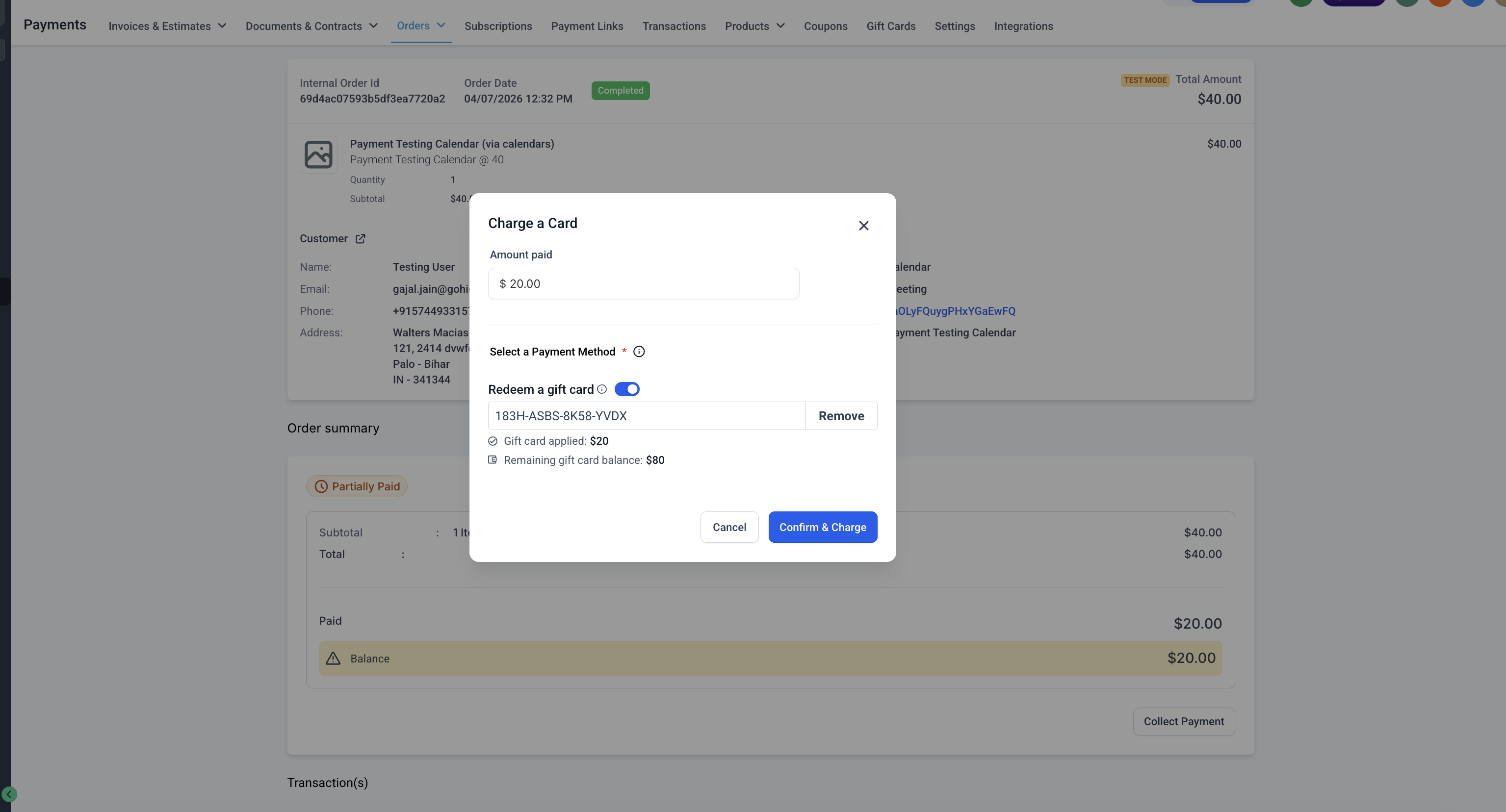
- Payments → Orders → Open Order → Record Payment → Charge a Card
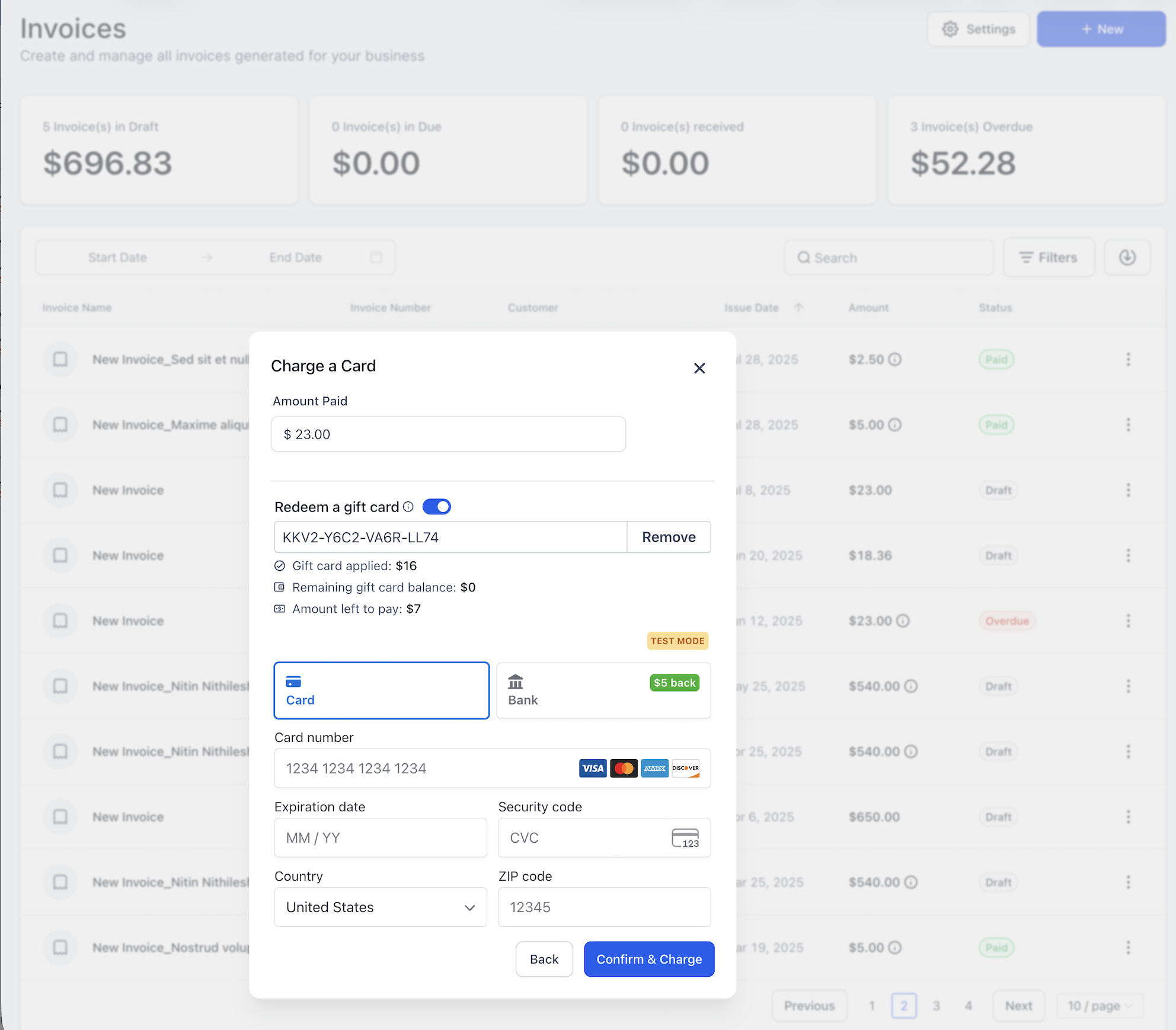
Payments → Invoices → Open Invoice → Record Payment → Charge a Card
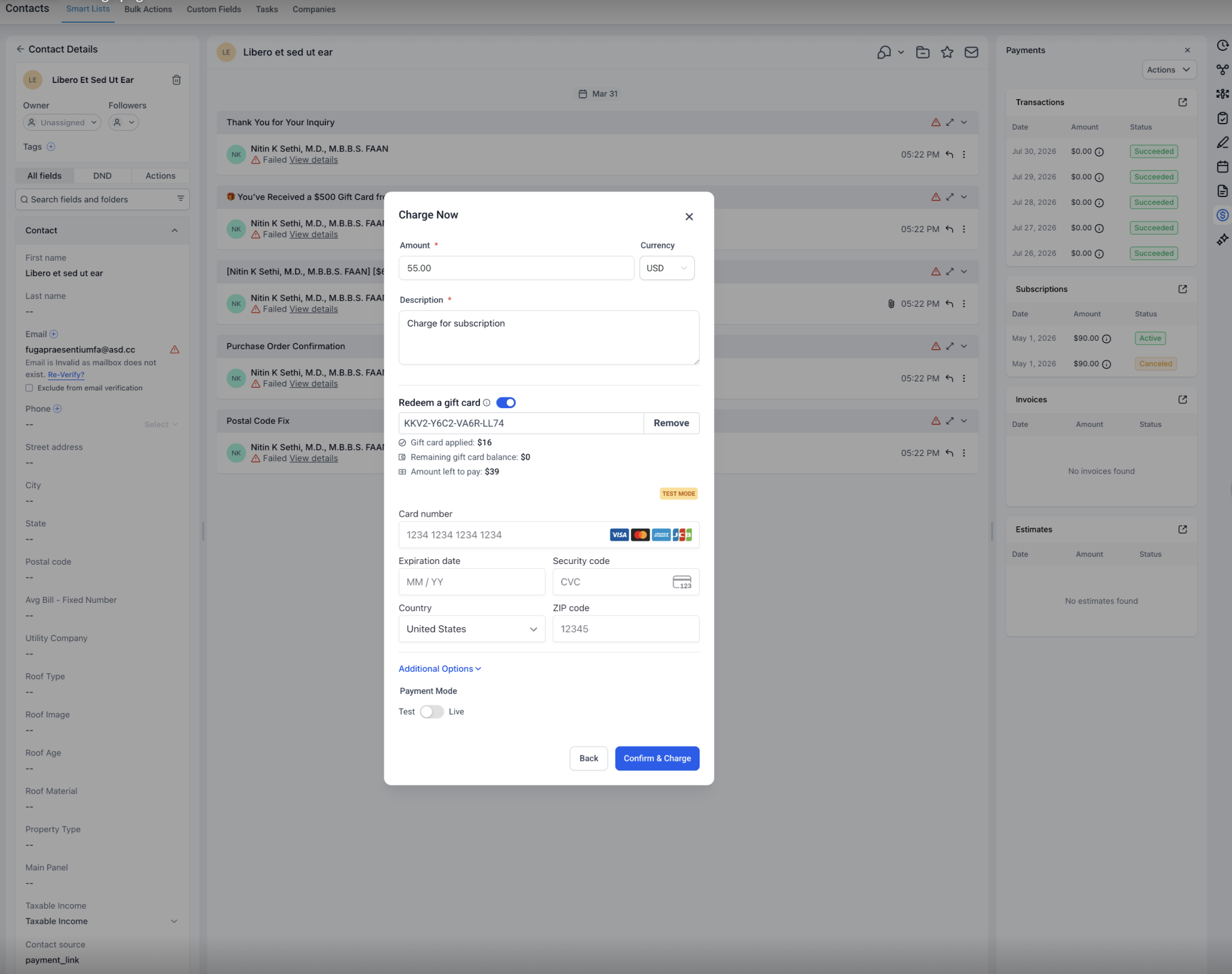
Contacts → Open Contact → Charge Now
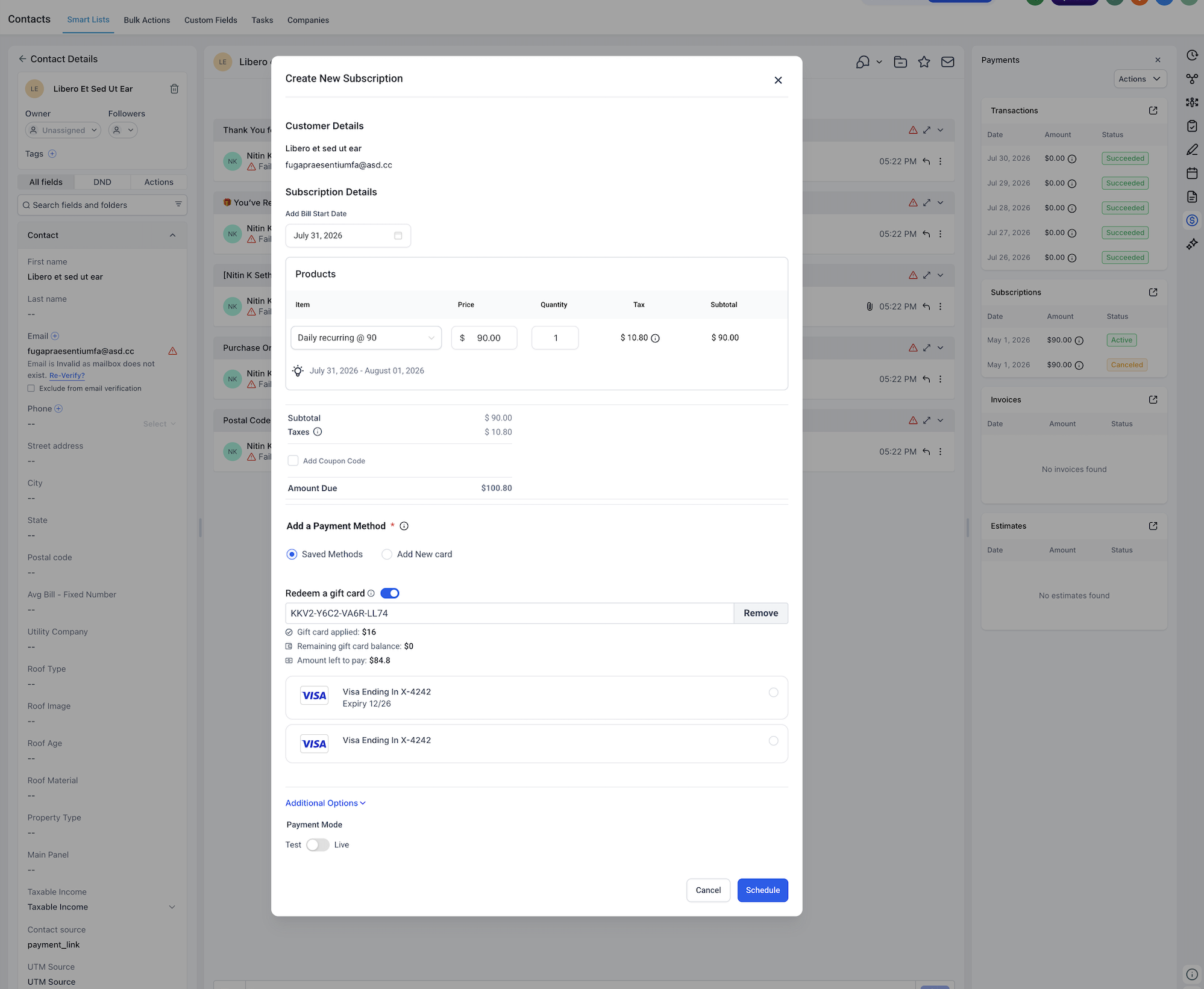
Contacts → Open Contact → Create Subscription
Payments → Subscriptions → Create Subscription
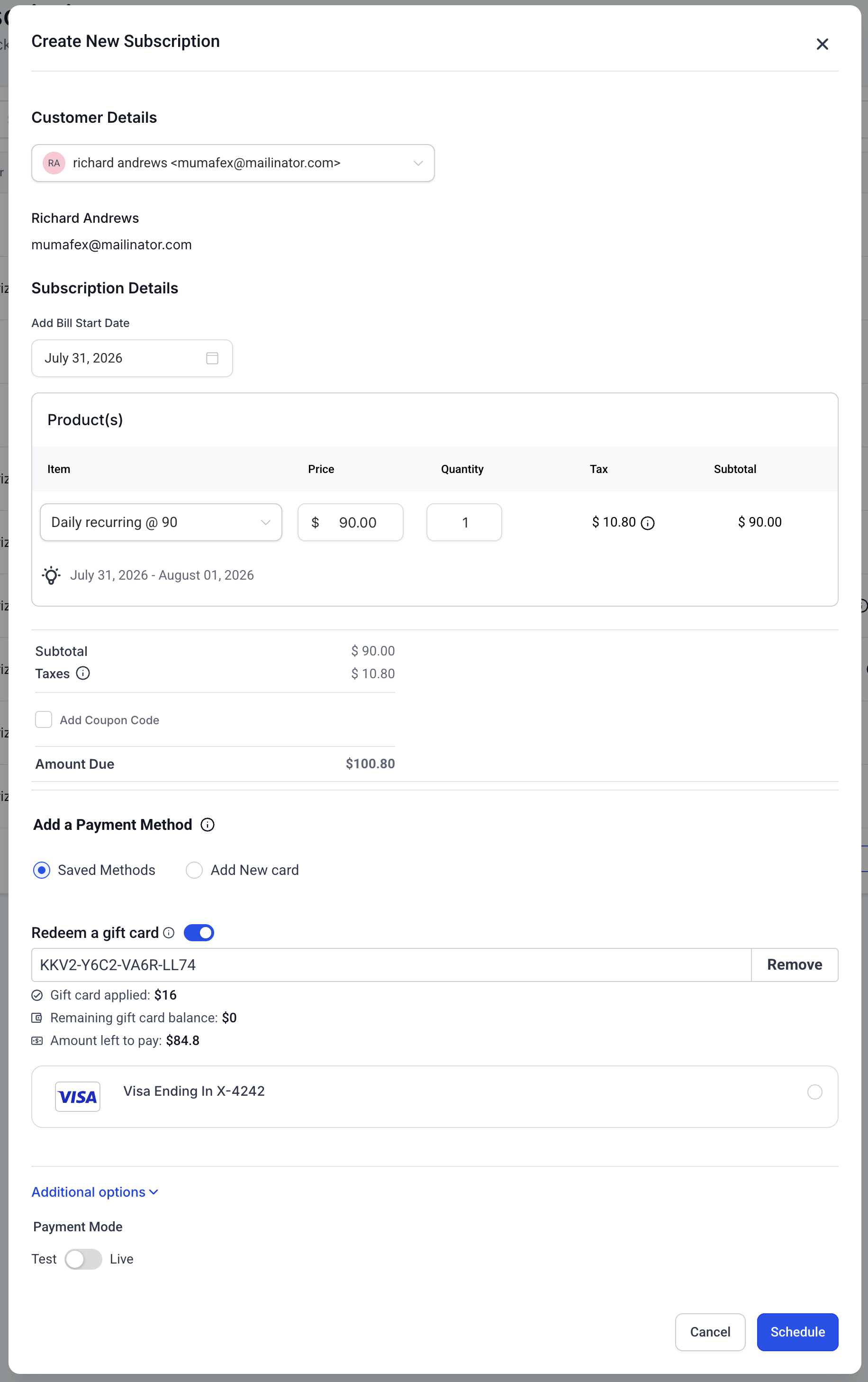
The Gift Card field is available as part of the supported payment experience, allowing you to enter the customer's code and apply the available balance before completing the payment.
How Gift Card Redemption Is Applied
Gift Card balance calculations are handled during the payment process so your team can immediately see how much of the transaction the Gift Card covers. Understanding full and partial redemption behavior helps you explain the final charge to the customer before completing the payment.
When you enter a Gift Card code and click Apply, the Gift Card is validated and the available balance is applied toward the current payment.
- If the Gift Card covers the full amount: The amount due is paid using the Gift Card, and no additional payment method is charged for that payment.
If the Gift Card covers part of the amount: The available Gift Card balance is applied first, and the remaining amount must be collected using another supported payment method.
If the Gift Card cannot be used: An applicable validation message appears for conditions such as an invalid code, expired Gift Card, or zero balance.
For partial payments, you can use a saved card or add a new card.
Example
Payment amount: $200
Gift Card available balance: $150
Gift Card applied: $150
Remaining amount to collect: $50
Remaining Gift Card balance: $0
Gift Cards and Subscriptions
Gift Cards can help reduce the amount collected when a subscription is created, but they do not replace the payment method used for future recurring charges. Understanding this distinction is important for avoiding failed expectations when setting up recurring billing.
Gift Cards can be applied toward the initial payment collected when creating a supported subscription.
Important subscription behaviors include:
- Gift Cards are not currently redeemable for future-dated or scheduled subscriptions.
A Gift Card can be applied to the initial amount collected when an eligible subscription is created.
Future recurring subscription payments are not collected from the Gift Card balance.
Future subscription payments use the payment method attached to the subscription.
A payment method may therefore still be required for the subscription even when the Gift Card covers the full initial amount.
Current Limitations for Business-Initiated Gift Card Redemption
Some Gift Card experiences are available only in specific payment contexts today. Distinguishing business-initiated collection from customer-facing checkout redemption helps prevent confusion when a Gift Card option appears in one workflow but not another.
Business-initiated Gift Card redemption is not currently available while collecting payments through:
- Calendars
POS
Gift Cards can also be used in supported customer-facing Calendar checkout experiences. Therefore, the current Calendar limitation applies specifically to business-initiated Gift Card payment collection, not all Gift Card use associated with Calendars.
How to Set Up Gift Card Redemption for Business-Initiated Payments
A successful redemption depends on having an eligible Gift Card and starting from a supported payment flow. Confirming the Gift Card status and payment details before completing the transaction helps prevent validation errors and ensures any remaining balance can be collected correctly.
- Confirm that an eligible Gift Card exists.
At least one Gift Card Product must have been created.
The Gift Card must have been sold or sent to a customer.
The Gift Card must be active.
The Gift Card must not be expired.
The Gift Card must have an available balance.
Open one of the supported payment flows.
Choose the workflow that matches the payment you are collecting:Payments → Orders → Open Order → Record Payment → Charge a Card
Payments → Invoices → Open Invoice → Record Payment → Charge a Card
Contacts → Open Contact → Charge Now
Contacts → Open Contact → Create Subscription
Payments → Subscriptions → Create Subscription
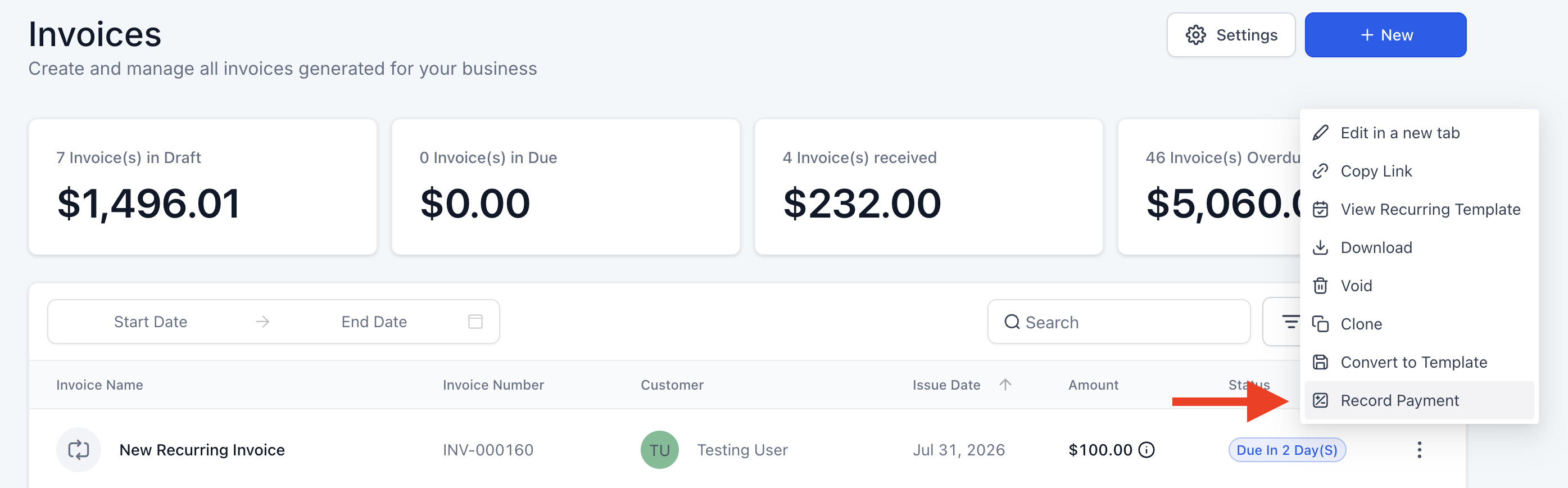
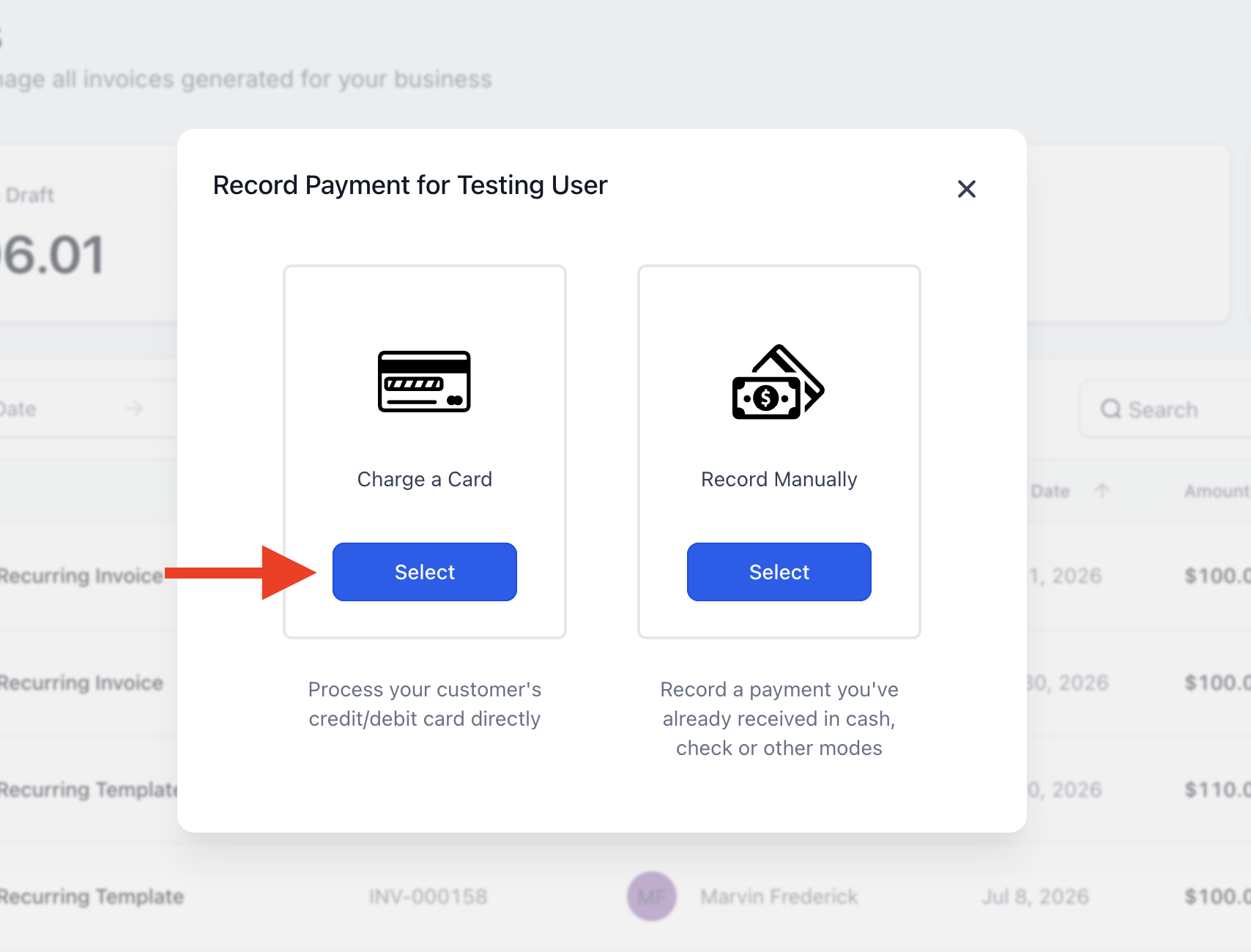
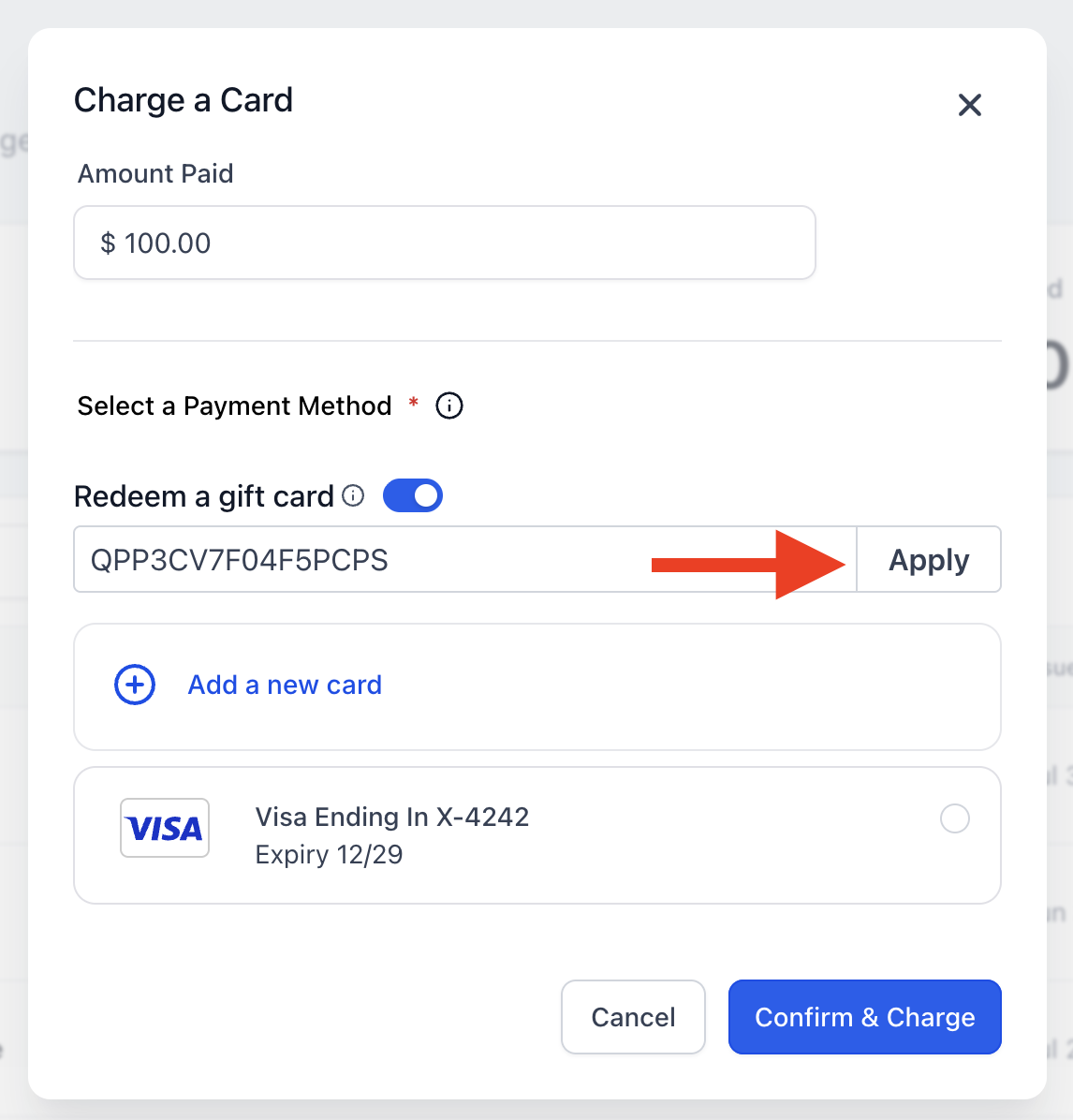
Enter the customer's Gift Card code.
Locate the Gift Card field, enter the customer's Gift Card code, and click Apply.The Gift Card is validated and its applicable available balance appears.
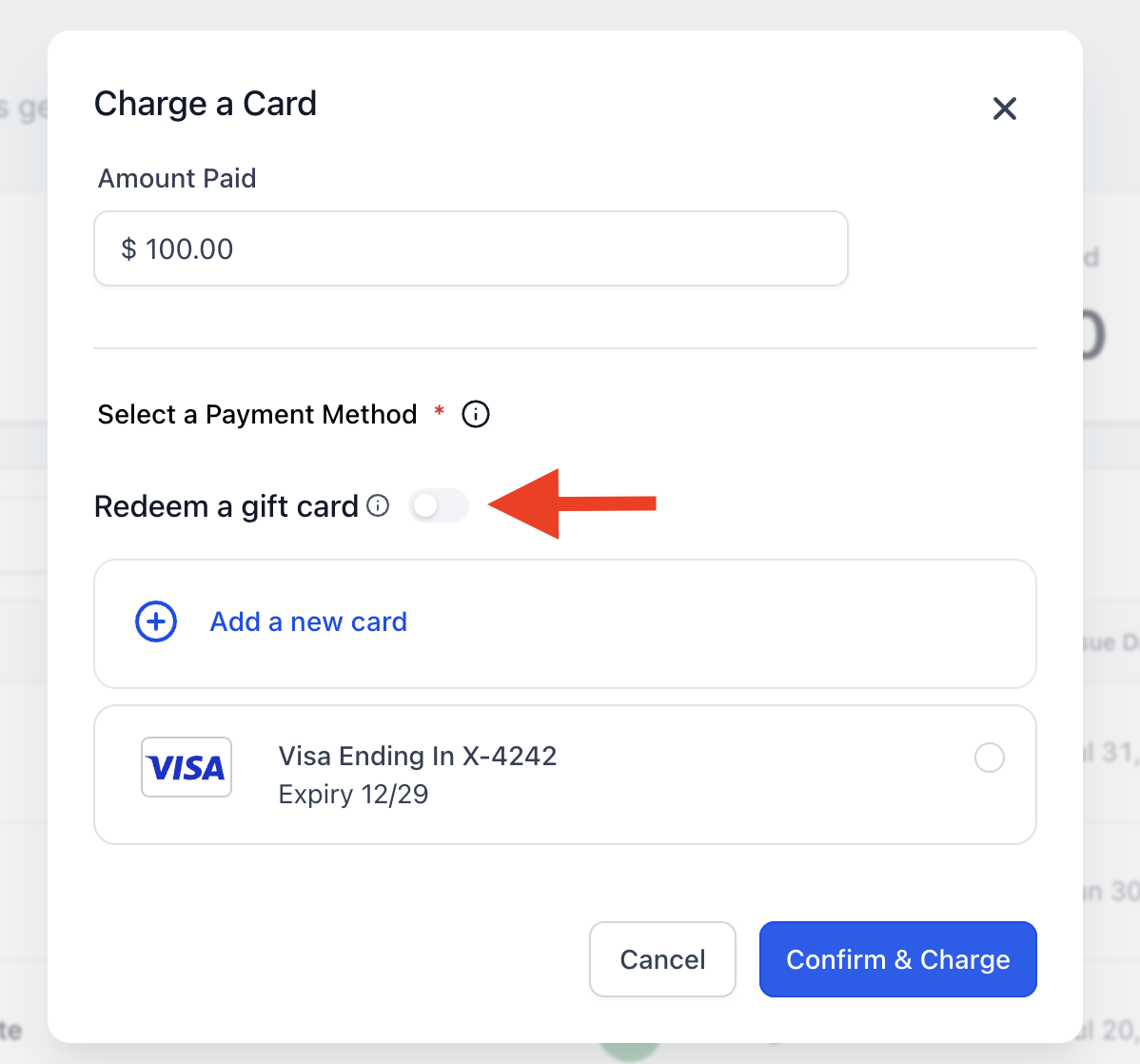
Review the amount applied.
Confirm the Gift Card amount before proceeding.If the Gift Card covers the full amount, no additional payment method is charged for that payment.
If the Gift Card does not cover the full amount, the available Gift Card balance is applied first.
Add or select a payment method when a balance remains.
If there is still an amount due after applying the Gift Card, you can use a saved card or add a new card to collect the remaining balance.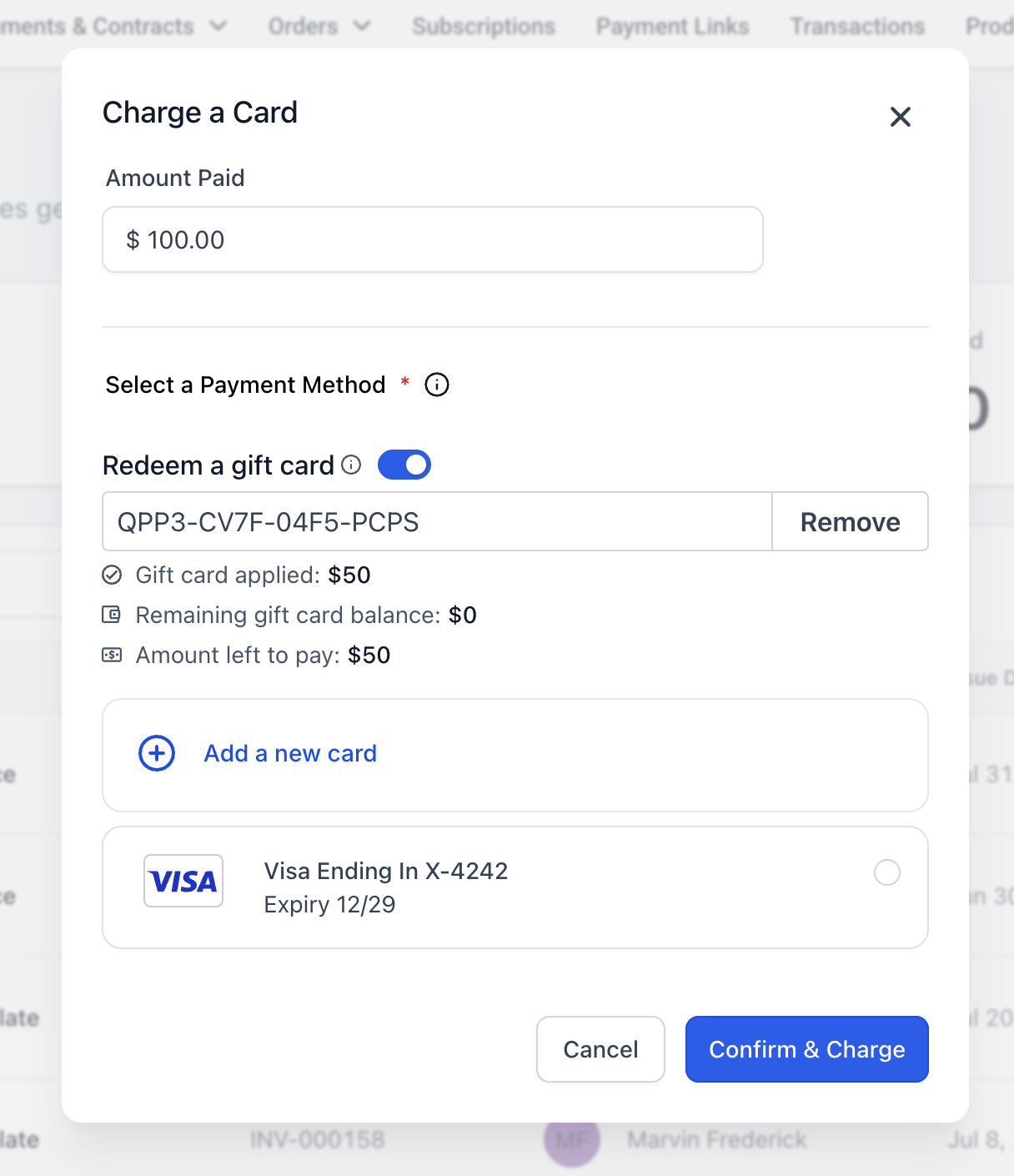
Complete the payment.
Review the final payment summary and submit the payment.Verify the completed redemption.
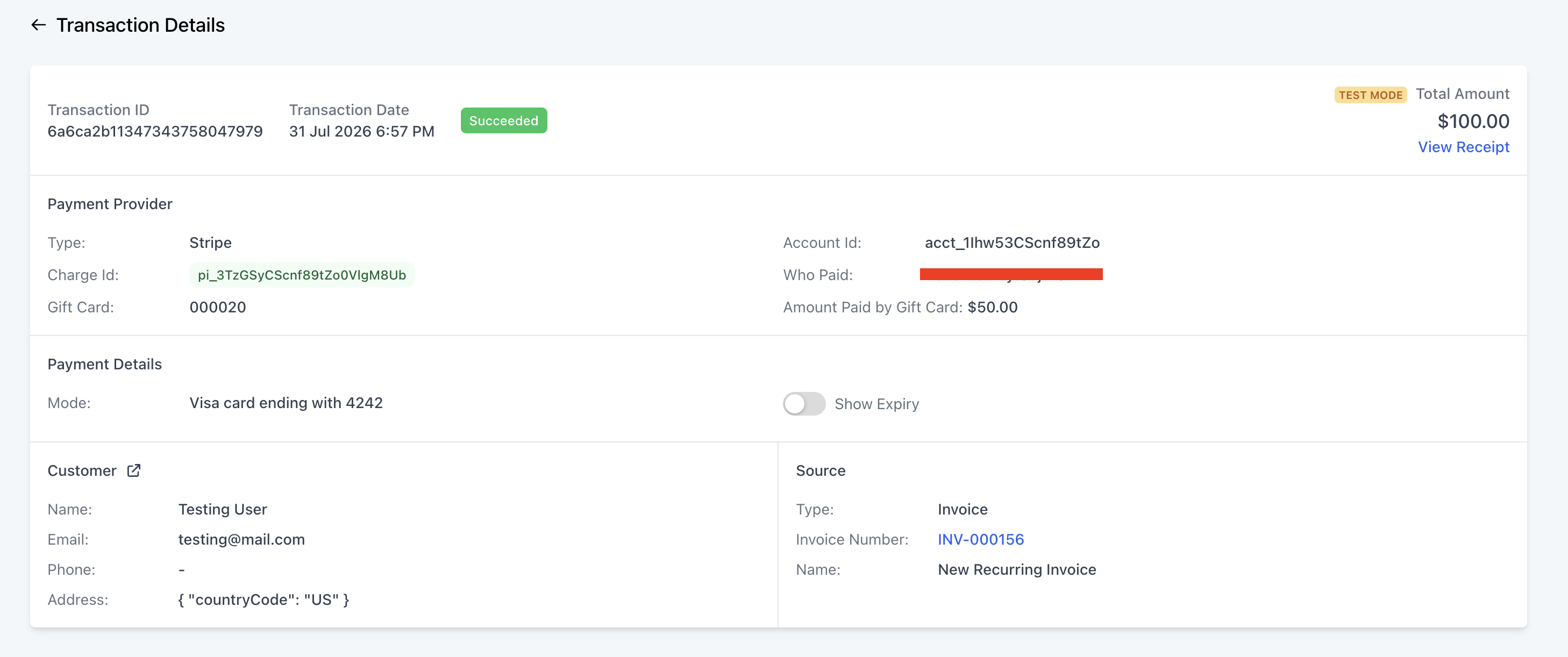
After a successful payment:Open Transaction Details to confirm the Gift Card amount used.
Review the associated Gift Card Order to confirm its updated remaining balance.
Frequently Asked Questions
Q: Can I apply more than one Gift Card to the same payment?
No. You can apply one Gift Card per payment.
Q: Can a Test Mode Gift Card be used for a Live Mode payment?
No. Gift Cards purchased in Test Mode can only be redeemed in Test Mode, while Gift Cards purchased in Live Mode can only be redeemed in Live Mode.
Q: Can I redeem a Gift Card that I sent directly to a customer without collecting payment for it?
Yes. You can redeem a Gift Card that was sent directly to a customer as long as it is active, has not expired, and has an available balance.
Q: What if the customer does not already have a saved card and the Gift Card does not cover the full payment?
You can add a new card to collect the remaining amount.
Q: Is there a dedicated user permission specifically for redeeming Gift Cards?
No dedicated Gift Card redemption permission is currently available. Users still need appropriate access to the payment area where the Gift Card is being redeemed.